
تعارف
This manual provides detailed instructions for the setup, programming, and operation of your RCA 6-Device Universal Remote Control, model RCR6473Z. This remote is designed to consolidate control of up to six different audio/video devices, simplifying your home entertainment experience. Please read these instructions carefully before use to ensure proper functionality and to maximize the remote's capabilities.
پيڪيج مواد
- RCA 6-Device Universal Remote Control (RCR6473Z)
Note: Two AAA batteries are required and are not included in the package.
اهم خاصيتون
- Controls up to 6 devices: TV, Satellite/Cable, Digital-to-Analog Converter (DTC), DVD, DVR, AUX, Audio, or VCR.
- Expanded DVD and DVR capabilities.
- آرام سان سنڀالڻ لاءِ Ergonomic ڊيزائن.
- Multiple programming methods: Automatic, Direct Code Entry, Brand Code Search, and Manual Code Search.
- Device mode indicators for easy identification of the active device.
- Glow keys for improved visibility in low-light conditions.
- Dedicated buttons for Menu, Guide, Info, and Clear functions.
- Full playback controls including Play, Stop, Pause, Record, Reverse, Forward, Skip Back, and Skip Forward.
سيٽ اپ ڪريو
1. بيٽري لڳائڻ
To power your remote control, follow these steps:
- ريموٽ ڪنٽرول جي پٺيءَ تي بيٽري جي دٻي جي احاطي کي ڳولھيو.
- ٽيب تي دٻايو ۽ ڍڪ کي سلائيڊ ڪريو.
- Insert two new AAA alkaline batteries, ensuring the positive (+) and negative (-) terminals align with the markings inside the compartment.
- بيٽري جي ڍڪ کي واپس جاء تي سلائيڊ ڪريو جيستائين اهو محفوظ طور تي ڪلڪ ڪري.
Note: Replace batteries when the remote's performance diminishes or when the indicator light does not illuminate during button presses.
2. پنهنجي ريموٽ کي پروگرام ڪرڻ
The RCA universal remote can be programmed using several methods. It is recommended to try the Automatic Code Search first, then Direct Code Entry, followed by Brand Code Search, and finally Manual Code Search if other methods are unsuccessful. You will need the original remote control for the device you wish to program, or the device itself, to test functionality.
خودڪار ڪوڊ ڳولا
This method scans through codes until it finds one that operates your device.
- Turn on the device you want to control (e.g., TV, DVD player).
- Press and hold the desired device button (e.g., TV, ڊي وي ڊي) on the universal remote until the indicator light illuminates.
- While holding the device button, press and hold the پاور button. Release both buttons. The indicator light should blink once and then stay lit.
- ريموٽ کي ڊوائيس ڏانهن اشارو ڪريو ۽ بار بار دٻايو راند ڪريو بٽڻ (يا پاور button for some devices) until the device turns off. Pause briefly between presses to allow the device to respond.
- هڪ دفعو ڊوائيس بند ٿي وڃي، دٻايو اسٽاپ ڪوڊ محفوظ ڪرڻ لاءِ بٽڻ دٻايو. اشاري جي روشني بند ٿي ويندي.
- Test the remote's functions (e.g., volume, channel, power) to ensure proper operation. If not all functions work, repeat the process to find a better code.
سڌو ڪوڊ داخل
This method requires you to enter a specific code for your device's brand, usually found in a code list provided with the full manual.
- هن ڊوائيس کي کوليو جيڪو توهان ڪنٽرول ڪرڻ چاهيو ٿا.
- Locate the code list for your device's brand and type (e.g., TV, DVD).
- Press and hold the desired device button (e.g., TV, ڊي وي ڊي) on the universal remote until the indicator light illuminates.
- Enter the 4-digit code using the number buttons. As you enter each digit, the indicator light should blink.
- If the code is valid, the indicator light will turn off. If the code is invalid, the light will flash rapidly and remain lit, indicating you should try another code.
- Test the remote's functions. If the device does not respond or not all functions work, try another code from the list.
برانڊ ڪوڊ سرچ
This method searches through codes for a specific brand.
- هن ڊوائيس کي کوليو جيڪو توهان ڪنٽرول ڪرڻ چاهيو ٿا.
- Press and hold the desired device button (e.g., TV, ڊي وي ڊي) on the universal remote until the indicator light illuminates.
- کي دٻايو ۽ رکو برانڊ بٽڻ (جيڪڏهن موجود هجي، يا هڪ ميلاپ جهڙو ڪوڊ جي ڳولا). Release both buttons. The indicator light should blink once and then stay lit.
- ريموٽ کي ڊوائيس ڏانهن اشارو ڪريو ۽ بار بار دٻايو پاور button until the device turns off. Pause briefly between presses.
- هڪ دفعو ڊوائيس بند ٿي وڃي، دٻايو اسٽاپ ڪوڊ محفوظ ڪرڻ لاءِ بٽڻ دٻايو. اشاري جي روشني بند ٿي ويندي.
- Test the remote's functions.
دستي ڪوڊ ڳولها
This method allows you to manually cycle through all available codes.
- هن ڊوائيس کي کوليو جيڪو توهان ڪنٽرول ڪرڻ چاهيو ٿا.
- Press and hold the desired device button (e.g., TV, ڊي وي ڊي) on the universal remote until the indicator light illuminates.
- کي دٻايو ۽ رکو ڪوڊ جي ڳولا button (or a similar button combination). Release both buttons. The indicator light should blink once and then stay lit.
- ريموٽ کي ڊوائيس ڏانهن اشارو ڪريو ۽ بار بار دٻايو پاور button. Each press sends a new code. Pause briefly between presses.
- هڪ دفعو ڊوائيس بند ٿي وڃي، دٻايو اسٽاپ ڪوڊ محفوظ ڪرڻ لاءِ بٽڻ دٻايو. اشاري جي روشني بند ٿي ويندي.
- Test the remote's functions. If not all functions work, repeat the process to find a better code.
توهان جي ريموٽ کي هلائڻ
The RCA 6-Device Universal Remote Control features a logical button layout for intuitive operation. Refer to the image below for a visual guide to the remote's buttons.
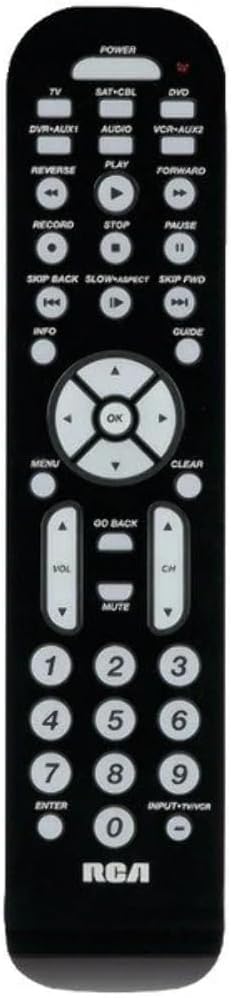
تصوير: سامهون view of the RCA 6-Device Universal Remote Control (RCR6473Z). The remote is black with white buttons. At the top are device selection buttons: TV, SAT-CBL, DVD, DVR-AUX1, AUDIO, VCR-AUX2, and a large POWER button. Below these are playback controls: REVERSE, PLAY, FORWARD, RECORD, STOP, PAUSE, SKIP BACK, SLOW/ASPECT, SKIP FWD. A central navigation pad with OK button is surrounded by arrow keys. Other buttons include MENU, CLEAR, INFO, GUIDE, GO BACK, VOL (volume up/down), CH (channel up/down), MUTE, and a numeric keypad (0-9) with ENTER and INPUT-TV/VCR buttons. The RCA logo is at the bottom.
ڊوائيس جي چونڊ
To control a specific device, press the corresponding device button at the top of the remote. The indicator light will illuminate to confirm the selected device mode.
- ٽي وي: For your television.
- SAT-CBL: For satellite receiver or cable box.
- ڊي وي ڊي: For DVD players.
- DVR-AUX1: For Digital Video Recorders or an auxiliary device.
- آڊيو: For audio receivers or sound systems.
- VCR-AUX2: For VCRs or a second auxiliary device.
بنيادي ڪم
- طاقت: چونڊيل ڊوائيس کي آن يا آف ڪري ٿو.
- جلد ▲/▼: حجم وڌائي يا گھٽائي ٿو.
- سي ايڇ ▲/▼: چينل کي مٿي يا ھيٺ تبديل ڪري ٿو.
- مٽي: آڊيو آئوٽ پُٽ کي خاموش ڪري ٿو.
- عددي ڪي پيڊ (0-9): Used for direct channel entry or code input during programming.
- داخل ٿيڻ: Confirms channel selection or other inputs.
- INPUT-TV/VCR: Switches between video inputs on the selected device.
پلے بیک ڪنٽرول
- هلائڻ Starts playback of media.
- اسٽاپ: پلے بیک کي روڪي ٿو.
- رڪاوٽ پلے بیک کي روڪي ٿو.
- رڪارڊ: Initiates recording (if supported by the device).
- موٽ: ميڊيا کي ريوائنڊ ڪري ٿو.
- اڳتي: فاسٽ فارورڊ ميڊيا.
- پوئتي ڇڏيو: Skips to the previous track/chapter.
- SKIP FWD: Skips to the next track/chapter.
- SLOW/ASPECT: Activates slow motion playback or changes aspect ratio (functionality varies by device).
نيويگيشن ۽ مينيو افعال
- مينيو چونڊيل ڊوائيس جي آن-اسڪرين مينيو تائين رسائي حاصل ڪري ٿو.
- ٺيڪ: مينيو اندر چونڊ جي تصديق ڪري ٿو.
- Arrow Buttons (▲/▼/◀/▶): اسڪرين تي مينيو ۽ اختيارن ذريعي نيويگيٽ ڪري ٿو.
- صاف ڪريو: Clears entries or exits certain menus.
- ڄاڻ: موجوده پروگرام يا ميڊيا بابت معلومات ڏيکاري ٿو.
- ھدايت: Accesses the electronic program guide (EPG).
- واپس وڃو: پوئين مينيو يا اسڪرين ڏانهن واپس اچي ٿو.
سار سنڀال
بيٽري مٽائڻ
When the remote's range decreases or buttons become unresponsive, it's time to replace the batteries. Always replace both AAA batteries at the same time with new ones. Do not mix old and new batteries, or different types of batteries.
صفائي
To clean your remote control, use a soft, dry cloth. Do not use liquid cleaners or abrasive materials, as these can damage the remote's surface or internal components.
مشڪلاتون
- Remote does not operate your device:
- Ensure the remote is in the correct device mode (e.g., TV button pressed for TV).
- Verify that the batteries are fresh and inserted correctly.
- Reprogram the remote using a different code from the code list or try another programming method.
- Ensure there are no obstructions between the remote and the device's infrared sensor.
- ڪجھ بٽڻ ڪم نه ٿا ڪن:
- Not all functions of your original remote may be supported by the universal remote.
- Try reprogramming the remote with a different code for your device, as some codes may offer better functionality.
- اشاري جي روشني روشن نه ٿي ٿئي:
- بيٽري جي انسٽاليشن چيڪ ڪريو ۽ بيٽرين کي تبديل ڪريو جيڪڏھن ضروري ھجي.
وضاحتون
| ماڊل نمبر | RCR6473E (also known as RCR6473Z) |
| برانڊ | آر سي اي |
| سپورٽ ٿيل ڊوائيسز جو وڌ ۾ وڌ تعداد | 6 |
| پيداوار جي ماپ | 2.5 x 6 x 1 انچ (تقريبن) |
| شيءِ جو وزن | 12.8 اونس |
| بيٽرين جي ضرورت آهي | 2 AAA بيٽريون (شامل نه آهن) |
| ٺاهيندڙ | Audiovox Accessories Corporation |
وارنٽي ۽ سپورٽ
قانوني اعلان
Warranty does not cover misuse of the product.
ٺاهيندڙ ڄاڻ
For further assistance or specific product inquiries, please refer to the contact information provided by Audiovox Accessories Corporation, the manufacturer of this RCA product. Additional support resources may be available on the official RCA webسائيٽ.