
تعارف
This manual provides comprehensive instructions for the setup and operation of your RCA RCU704 4-Function Universal Remote Control. This remote is designed to control up to four different audio/video components, simplifying your home entertainment experience.
حفاظت جي ڄاڻ
- پراڻي ۽ نئين بيٽرين کي گڏ نه ڪريو.
- الڪائن، معياري (ڪاربن-زنڪ)، يا ريچارج لائق (نڪل-ڪيڊيميم) بيٽرين کي نه ملايو.
- جيڪڏهن ريموٽ ڊگهي عرصي تائين استعمال نه ٿيندو ته جيئن رسي کي روڪي سگهجي ته بيٽريون هٽايو.
- بيٽرين کي ٻارن جي پهچ کان پري رکو.
پيڪيج مواد
- RCA RCU704 Universal Remote Control
- استعمال ڪندڙ جو دستياب (ھي دستاويز)
پيداوار ختمview
The RCA RCU704 remote control features a straightforward layout for easy operation of your home entertainment devices.
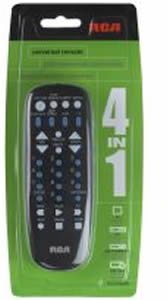
تصوير: سامهون view of the RCA RCU704 universal remote control, showcasinان جي بٽڻ جي ترتيب ۽ ايرگونومڪ ڊيزائن جي ڪري.
Key buttons and their functions include:
- طاقت: چونڊيل جزو کي آن يا آف ڪري ٿو.
- TV, VCR, DVD, AUX: Component selection buttons to switch control to the desired device.
- VOL +/-: حجم جي سطح کي ترتيب ڏئي ٿو.
- CH +/-: چينلز کي مٿي يا هيٺ تبديل ڪري ٿو.
- مٽي: آڊيو آئوٽ پُٽ کي خاموش ڪري ٿو.
- INPUT/VIDEO: Selects the video input source on your TV or other display device.
- نمبر پيڊ (0-9): سڌي چينل داخلا يا مينيو نيويگيشن لاءِ.
سيٽ اپ ڪريو
1. بيٽري لڳائڻ
- Remove the battery compartment cover located on the back of the remote control.
- Insert two fresh AAA batteries, ensuring that the (+) and (-) terminals align correctly with the markings inside the compartment.
- بيٽري جي ڪمري واري ڍڪ کي محفوظ طور تي تبديل ڪريو.
2. ريموٽ کي پروگرام ڪرڻ
There are two primary methods to program your universal remote to control your devices:
طريقو الف: سڌو ڪوڊ داخلا
- Turn on the component (e.g., TV, DVD player) you wish to control.
- کي دٻايو ۽ رکو ڪوڊ جي ڳولا بٽڻ دٻايو جيستائين ريموٽ تي اشاري جي روشني آن نه ٿئي.
- جاري رکڻ دوران ڪوڊ جي ڳولا, press and release the component button (e.g., TV, ڊي وي ڊي) corresponding to the device you want to program. The indicator light will blink once and then remain steadily on.
- Enter the 4-digit code for your brand from the provided code list (refer to the separate code booklet that came with your remote).
- If the code is valid, the indicator light will turn off. If the code is invalid, the light will flash rapidly.
- ريموٽ کي دٻائي ٽيسٽ ڪريو پاور button. If the component turns off, try other functions like ويل +/-. If it works, programming is complete.
- If the component does not respond or functions incorrectly, repeat the process with the next code listed for your brand.
طريقو ب: آٽو ڪوڊ سرچ
- جيڪو جزو توهان ڪنٽرول ڪرڻ چاهيو ٿا ان کي آن ڪريو.
- کي دٻايو ۽ رکو ڪوڊ جي ڳولا بٽڻ دٻايو جيستائين ريموٽ تي اشاري جي روشني آن نه ٿئي.
- جاري رکڻ دوران ڪوڊ جي ڳولا, press and release the component button (e.g., TV, ڊي وي ڊي) you want to program. The indicator light will blink once and then remain steadily on.
- ريموٽ کي جزو ڏانهن اشارو ڪريو ۽ بار بار دٻايو پاور بٽڻ (يا CH+ for TVs) until the component turns off.
- Once the component turns off, immediately press the داخل ڪريو ڪوڊ محفوظ ڪرڻ لاءِ بٽڻ دٻايو. اشاري جي روشني بند ٿي ويندي.
- Test the remote. If it does not work correctly, repeat the auto code search process.
ريموٽ کي هلائڻ
To operate a component after it has been programmed:
- Press the corresponding component button (TV, وي سي آر, ڊي وي ڊي، يا AUX) to select the device you want to control. The indicator light will flash once to confirm selection.
- Point the remote at the component and press the desired function button (e.g., پاور, ويل +/-, چوڌري +/-).
سار سنڀال
- Clean the remote with a soft, dry cloth. Do not use liquid cleaners or abrasive materials.
- Avoid exposing the remote to extreme temperatures, high humidity, or direct sunlight.
- Do not drop the remote or subject it to strong impacts, as this may damage internal components.
مشڪلاتون
| مسئلو | حل |
|---|---|
| ريموٽ توهان جي جزو کي هلائي نٿو سگهي. | Ensure batteries are fresh and installed correctly. Reprogram the remote using a different code for your brand or try the auto code search method. Ensure the remote is pointed directly at the component and there are no obstructions. |
| انڊيڪيٽر لائيٽ آن نٿي ٿئي. | Check battery installation. Replace batteries if necessary. Ensure the battery compartment cover is closed properly. |
| Some buttons work, but others don't. | The programmed code may only partially match your component. Try programming with a different code for your brand or use the auto code search to find a more compatible code. |
| Remote loses programming. | This is typically due to low batteries. Replace batteries with fresh ones and reprogram the remote. |
وضاحتون
- ماڊل: RCU704 (RCARC704)
- افعال: 4 (TV, VCR, DVD, AUX)
- رابطي: انفراريڊ (IR)
- طاقت: 2 x AAA بيٽريون (شامل نه آهن)
- وڌ ۾ وڌ رينج: 10 ميٽر (تقريبن 33 فوٽ)
- بٽڻ جو تعداد: 4 component selection buttons + various function buttons
- وزن: تقريبن 2.4 آونس (بيٽرين کان سواءِ)
وارنٽي ۽ سپورٽ
For detailed warranty information or technical support, please refer to the documentation included with your original purchase or visit the official RCA website. It is recommended to keep your purchase receipt as proof of purchase for warranty claims.
نوٽ: مخصوص وارنٽي شرطون ۽ سپورٽ رابطي جا تفصيل علائقي ۽ پرچون ڪندڙ جي لحاظ کان مختلف ٿي سگهن ٿا.