1. تعارف
The Tripp Lite AVR700U is a 700VA/350W/120V Uninterruptible Power Supply (UPS) system designed to provide reliable battery backup and AC power protection. It safeguards connected electronics against blackouts, brownouts, overvoltages, surges, and line noise. This unit is suitable for protecting home office equipment, media centers, and various commercial components such as computers, routers, printers, HDTVs, and security systems.
The AVR700U features Automatic Voltagجلد کي درست ڪرڻ لاءِ اي ريگيوليشن (AVR)tage fluctuations without using battery power, extending battery life. It also includes surge suppression and EMI/RFI line noise filtering to ensure clean, stable power for your devices.
2. حفاظت جي ڄاڻ
Please read and follow all safety instructions before installing or operating this equipment. Keep this manual for future reference.
- Do not open the UPS housing. There are no user-serviceable parts inside except for the battery.
- Do not connect non-computer-related items like power strips or surge suppressors to the UPS outlets.
- پڪ ڪريو ته يو پي ايس صحيح طرح سان گرائونڊ ٿيل اي سي پاور آئوٽليٽ سان ڳنڍيل آهي.
- Avoid installing the UPS in areas with excessive moisture, heat, or dust.
- Disconnect the UPS from the AC power outlet before performing any maintenance or battery replacement.
3. پيڪيج مواد
تصديق ڪريو ته توھان جي پيڪيج ۾ ھيٺيون شيون شامل آھن:
- AVR700U UPS System
- USB ڪيبل
- ھدايت وارو دستور (ھي دستاويز)
4. مصنوعات جون خاصيتون
- 700VA/350W گنجائش: Provides battery backup for an energy-efficient desktop PC and small monitor for up to 43 minutes.
- خودڪار جلدtagاي ريگيوليشن (AVR): Corrects brownouts as low as 89V and overvoltages as high as 145V back to a nominal 120V without using battery power.
- 8 NEMA 5-15R آئوٽليٽس: Four outlets provide battery backup and surge protection, while the other four offer surge protection only.
- سرج تحفظ: 316 joules of surge suppression protects connected components from harmful power surges.
- Dataline Protection: RJ45 ports protect a standard dial-up/phone connection or 10Mb Ethernet line from data line surges.
- اي ايم آءِ/آر ايف آءِ فلٽرنگ: Filters out disruptive line noise that can cause performance problems and hardware damage.
- USB ڪميونيڪيشن پورٽ: Connects to a computer for unattended file saves and system shutdown using free PowerAlert software.
- User-Replaceable Battery: Features a replaceable internal battery (Tripp Lite RBC51 model) to extend the UPS lifespan.
- ڪمپيڪٽ ڊيزائن: Space-saving ABS housing with keyhole mounting tabs for desktop or wall-mount installation.
5. سيٽ اپ
5.1 شروعاتي جڳهه ۽ ڪنيڪشن
Place the AVR700U in a cool, dry indoor environment, away from direct sunlight, excessive heat, or moisture. Ensure adequate airflow around the unit.
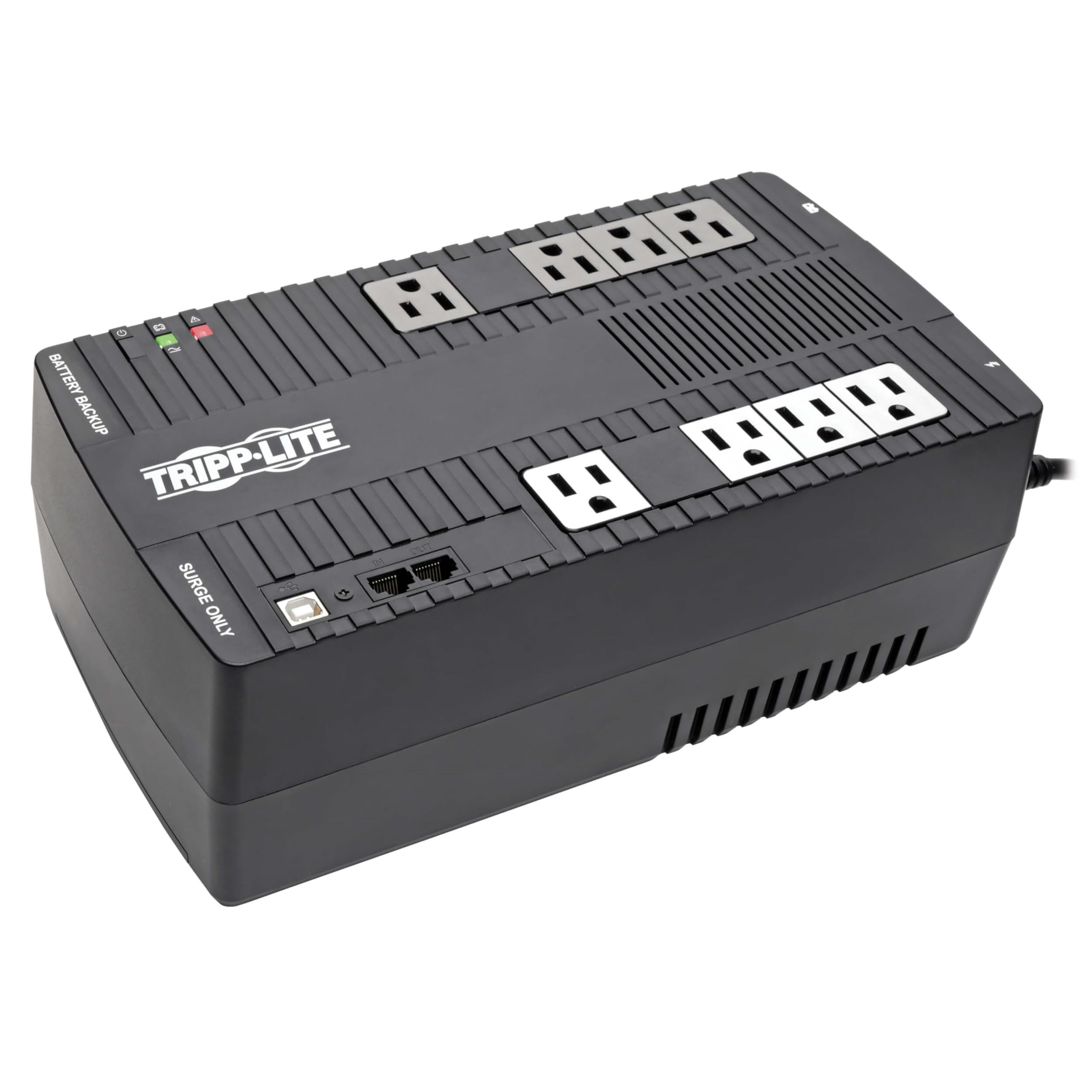
Image: Front and top view of the Tripp Lite AVR700U UPS, showing the layout of outlets and indicators.
Plug the UPS power cord into a grounded 120V AC outlet. Allow the UPS to charge for 24 hours before initial use to ensure maximum runtime capacity.
5.2 ڳنڍڻ جو سامان
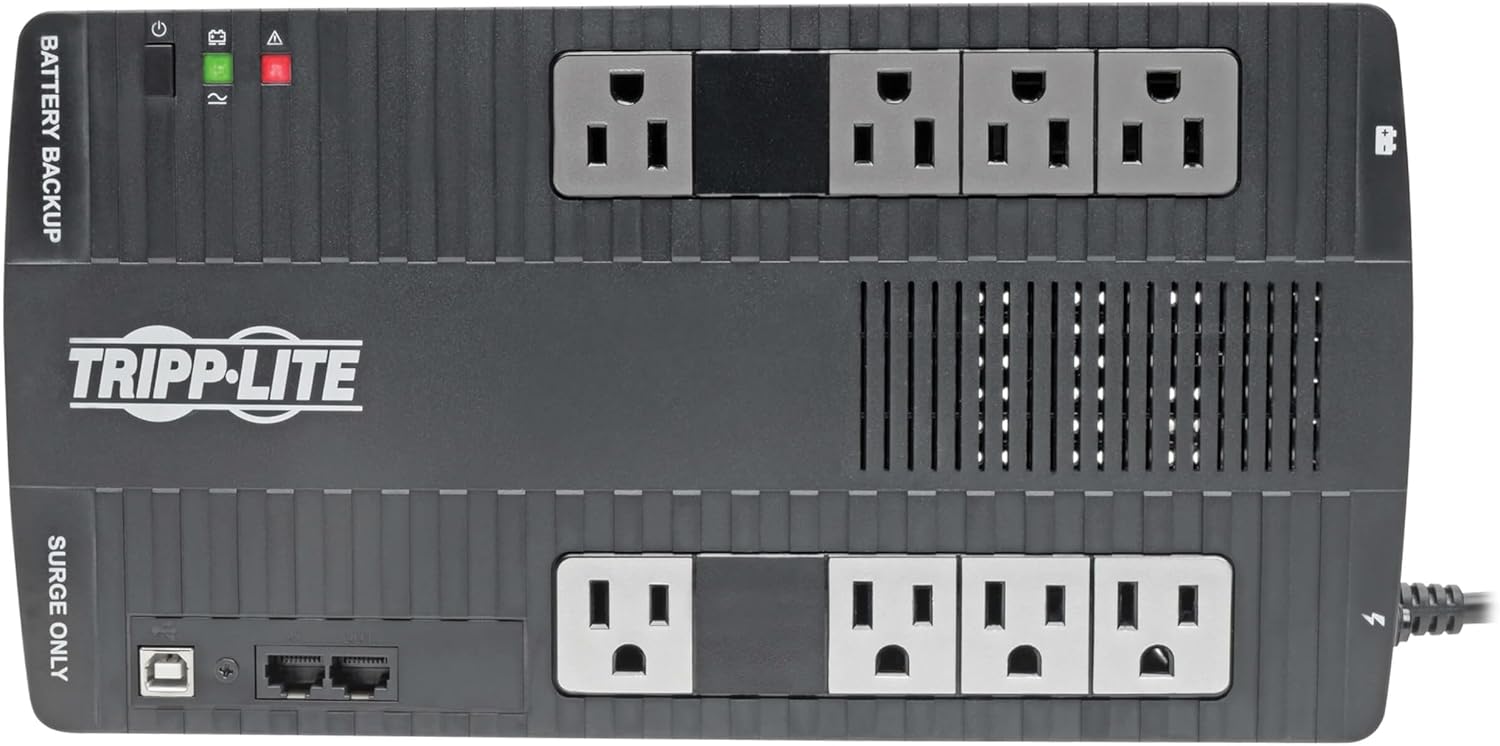
تصوير: مٿي کان هيٺ تائين view of the Tripp Lite AVR700U UPS, clearly showing the 'Battery Backup' and 'Surge Only' outlets, along with the USB and RJ45 ports.
- بيٽري بيڪ اپ ۽ سرج پروٽيڪشن آئوٽليٽ: Connect your critical equipment, such as computers, monitors, and routers, to the four outlets labeled "BATTERY BACKUP." These outlets provide continuous power during outages ۽ سرجز جي خلاف تحفظ.
- سرج ر Onlyو دڪان: Connect non-essential devices like printers, speakers, or desk lamps to the four outlets labeled "SURGE ONLY." These outlets provide surge protection but will not supply power during an outage.
5.3 USB ڪميونيڪيشن پورٽ
Connect the included USB cable from the UPS USB port to a USB port on your computer. Download and install Tripp Lite's free PowerAlert software from the official Tripp Lite website. This software enables safe, unattended file saves and system shutdowns in the event of a prolonged power failure.
5.4 Dataline Protection
To protect a standard dial-up/phone connection or 10Mb Ethernet line from surges, connect your incoming line to the "IN" RJ45 port on the UPS and then connect a cable from the "OUT" RJ45 port to your device (e.g., modem, network card).
5.5 وال ماؤنٽ جي انسٽاليشن

تصوير: هيٺيون view of the Tripp Lite AVR700U UPS, showing the keyhole mounting tabs for wall installation.
The UPS features keyhole mounting tabs on the rear for optional wall-mount installation. Ensure the mounting surface is sturdy enough to support the weight of the UPS and connected equipment.
6. آپريشن
6.1 پاور آن/آف
To turn the UPS on, press and hold the power button until the unit beeps. To turn it off, press and hold the power button again until the unit beeps and the indicators turn off.
6.2 LED Indicators and Alarms
The front panel features LED indicators that provide status information:
- Green LED (Line Mode): Indicates the UPS is operating on utility power and providing conditioned AC power to connected devices.
- Yellow LED (Battery Mode): Illuminates when the UPS is operating on battery power during a blackout or severe voltage ctيرار.
- Red LED (Fault/Overload/Replace Battery): Indicates a fault condition, an overload, or that the battery needs replacement. Refer to the troubleshooting section for details.
The UPS remains silent during normal line and battery backup modes. Alarms sound only for low battery, battery replacement, overload, or fault conditions.
6.3 خودڪار Voltagاي ريگيوليشن (AVR)
The AVR feature automatically corrects incoming utility voltagاي اتار چڙهاؤ (براؤن آئوٽ ۽ اوور وول)tages) to a safe 120V output without switching to battery power. This protects your equipment from incremental hardware damage and ensures stable operation.
6.4 بيٽري بيڪ اپ فنڪشن
طاقت جي دورانtage, the UPS automatically switches to battery power, providing continuous power to devices connected to the "BATTERY BACKUP" outlets. This allows you time to save work and safely shut down your systems.
6.5 پاور الرٽ سافٽ ويئر
When connected via USB and with PowerAlert software installed, your computer can communicate with the UPS. This enables automatic, graceful shutdowns of your operating system and applications during extended power outages, preventing data loss.
6.6 پيداوار ختمview وڊيو
وڊيو: هڪ جنرل اوورview of the Tripp Lite UPS system, demonstrating its features and basic setup.
7. سار سنڀال
7.1 بيٽري مٽائڻ
The internal battery is user-replaceable. When the Red LED indicates a battery issue, or if the battery runtime significantly decreases, it may be time to replace the battery. Use Tripp Lite's RBC51 replacement battery model.

تصوير: پاسي view of the Tripp Lite AVR700U UPS, showing the circuit breaker reset button and grounding screw.
عمل:
- Turn off the UPS and disconnect it from the AC power outlet.
- Disconnect all connected equipment from the UPS.
- Locate the battery compartment access panel (usually on the bottom or side).
- Remove the screws or clips securing the panel and carefully slide out the old battery.
- Disconnect the battery wires, noting their polarity.
- Connect the new RBC51 battery, ensuring correct polarity.
- Slide the new battery into the compartment and secure the access panel.
- Reconnect the UPS to AC power and allow it to charge for 24 hours.
Properly dispose of the old battery according to local regulations.
7.2 صفائي
يو پي ايس جي ٻاهرين حصي کي نرم، سڪل ڪپڙي سان صاف ڪريو. مائع يا ايروسول ڪلينر استعمال نه ڪريو. پڪ ڪريو ته وينٽيليشن جا سوراخ مٽي ۽ ملبي کان پاڪ آهن.
8. مسئلا حل ڪرڻ
If the UPS is not operating correctly, refer to the following common issues and solutions:
| مسئلو | ممڪن سبب | حل |
|---|---|---|
| يو پي ايس آن نٿو ٿئي. | Not connected to AC power; Battery discharged; Power button not held long enough. | Ensure UPS is plugged into a live AC outlet. Allow 24 hours for initial charge. Press and hold power button until beep. |
| UPS beeps continuously or Red LED is on. | Overload; Battery fault/needs replacement. | Disconnect non-essential equipment to reduce load. If alarm persists, replace battery (RBC51). |
| مختصر بيٽري رن ٽائيم. | Battery not fully charged; Battery nearing end of life; Excessive load. | Allow 24 hours for battery to charge. Reduce connected load. Replace battery if old. |
| Connected equipment loses power during outage. | Equipment connected to "SURGE ONLY" outlets; UPS battery discharged. | Ensure critical equipment is connected to "BATTERY BACKUP" outlets. Allow battery to charge. |
| Data line protection not working for Ethernet. | Incompatible Ethernet speed (only supports 10Mb). | The RJ45 ports are designed for 10BaseT Ethernet or telephone lines. Higher speed Ethernet (100BaseT, Gigabit) is not supported through these ports. |
If problems persist after attempting these solutions, contact Tripp Lite technical support.
9. وضاحتون
| خاصيت | تفصيل |
|---|---|
| ماڊل نمبر | AVR700U |
| گنجائش (VA/Watts) | 700VA / 350W |
| انٽ واليمtage | 120V AC |
| اوٽ وولٽtage | 120V AC |
| خودڪار جلدtagاي ريگيوليشن (AVR) | Corrects 89V-145V to 120V |
| آئوٽليٽ | 8 x NEMA 5-15R (4 Battery Backup & Surge, 4 Surge Only) |
| سرڪشي دressionاءُ | 316 جولس |
| ڊيٽا لائن تحفظ | RJ45 (10Mb Ethernet / Phone) |
| بيٽري جو قسم | Sealed Lead Acid (User-replaceable RBC51) |
| Typical Backup Time (Half Load) | 43 minutes (for energy-efficient desktop PC with small LCD) |
| طول و عرض (H x W x D) | 8.75 x 13.5 x 4.75 انچ (22.23 x 34.29 x 12.07 سينٽي) |
| وزن | 12 پائونڊ (5.44 ڪلوگرام) |
| رنگ | ڪارو |
10. وارنٽي ۽ سپورٽ
10.1 پروڊڪٽ وارنٽي
This Tripp Lite AVR700U UPS system is covered by a 3-Year Manufacturer's Warranty. Additionally, it includes a $100,000 Ultimate Lifetime Connected Equipment Insurance, providing protection for equipment properly connected to the UPS.
For detailed warranty terms and conditions, please refer to the warranty documentation included with your product or visit the official Tripp Lite webسائيٽ.
10.2 ٽيڪنيڪل سپورٽ
Tripp Lite offers expert technical support via phone, web, and email. If you encounter any issues or have questions regarding the installation, operation, or maintenance of your AVR700U UPS, please contact their support team for assistance.
For the most current contact information, please visit the Tripp Lite official webسائيٽ.


