
تعارف
The Philips AJ5000/12 is a digital tuning clock radio designed to provide timekeeping, alarm functions, and FM radio reception. It features a clear digital display, dual alarm settings, and mood-lighting capabilities to enhance your waking experience. This manual provides detailed instructions for setting up and operating your device.
پيداوار ختمview
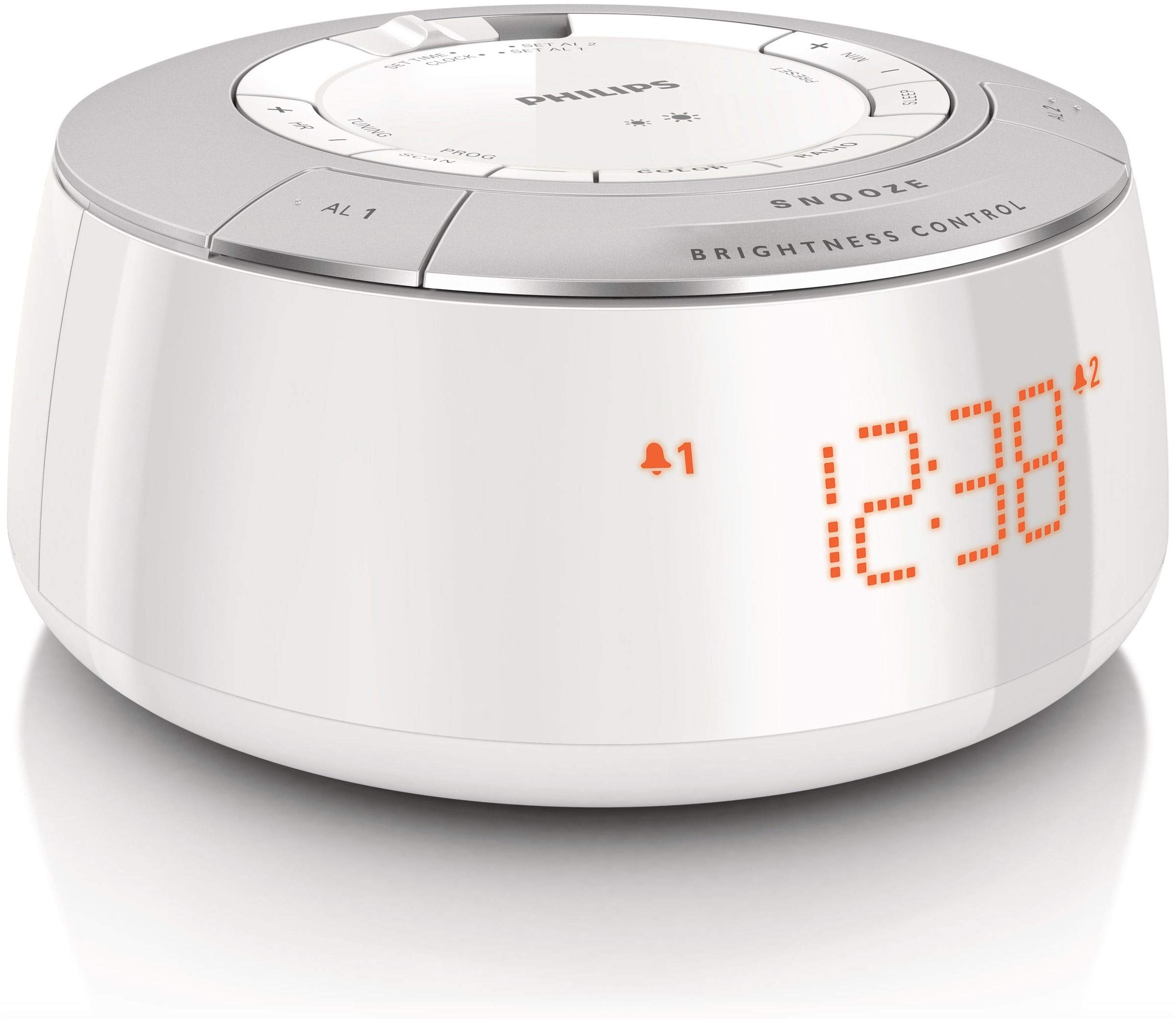
شڪل 1: سامهون view of the Philips AJ5000/12 Digital Tuning Clock Radio, displaying the time and alarm indicators.
The Philips AJ5000/12 combines a clock, alarm, and FM radio into a compact unit. Key features include:
- Digital FM radio tuner for clear reception.
- Dual alarm function for separate wake-up times.
- Snooze feature for additional sleep time.
- ترتيب ڏيڻ واري ڊسپلي جي روشني.
سيٽ اپ ڪريو
1. پاور ڪنيڪشن
Connect the power adapter to the DC input jack on the back of the clock radio and then plug the adapter into a wall outlet. The unit will power on and the display will illuminate.
2. Battery Installation (Backup)
او يو دوران بيڪ اپ پاور لاءِtages, install 2 Lithium Ion batteries (not included) into the battery compartment located on the bottom of the unit. Ensure correct polarity (+/-) as indicated inside the compartment. These batteries maintain time and alarm settings during a power interruption but do not power the main functions of the device.
3. اينٽينا سيٽ اپ
Extend the FM antenna wire fully for optimal radio reception. Adjust its position to improve signal clarity if needed.
آپريٽنگ هدايتون
1. وقت مقرر ڪرڻ
- Press and hold the 'TIME SET' button until the hour digits flash.
- Use the 'HOUR' and 'MINUTE' buttons to adjust the time.
- Press 'TIME SET' again to confirm the setting.
2. الارم لڳائڻ (الارم 1 ۽ الارم 2)
ڪلاڪ ريڊيو ۾ ٻه آزاد الارم آهن.
- Press and hold the 'ALARM 1' or 'ALARM 2' button until the alarm time digits flash.
- گهربل الارم وقت مقرر ڪرڻ لاءِ 'ڪلاڪ' ۽ 'منٽ' بٽڻ استعمال ڪريو.
- Press the 'ALARM 1' or 'ALARM 2' button again to select the alarm source (Buzzer or FM Radio). The corresponding alarm icon will appear on the display.
- To deactivate an alarm, press the 'ALARM 1' or 'ALARM 2' button repeatedly until the alarm icon disappears.
3. اسنوز فنڪشن
When an alarm sounds, press the 'SNOOZE' button (located on top) to temporarily silence the alarm. The alarm will sound again after approximately 9 minutes.
4. ايف ايم ريڊيو آپريشن
- Press the 'RADIO ON/OFF' button to turn on the FM radio.
- Press the 'TUNE +' or 'TUNE -' buttons to manually tune to a desired frequency.
- To auto-scan for stations, press and hold 'TUNE +' or 'TUNE -' until the frequency starts scanning.
- To preset a station, tune to the desired station, then press and hold a 'PRESET' button (e.g., P1, P2) until the preset number flashes. Release the button to save.
5. Display Brightness Control
Use the 'BRIGHTNESS CONTROL' button (located on top) to adjust the intensity of the digital display. Press repeatedly to cycle through different brightness levels.
سار سنڀال
صفائي
Wipe the unit with a soft, dry cloth. Do not use abrasive cleaners, solvents, or strong detergents, as these may damage the plastic enclosure. Ensure the unit is unplugged before cleaning.
بيٽري مٽائڻ
If the backup batteries are depleted, replace them with new Lithium Ion batteries to ensure time and alarm settings are retained during power outages. Dispose of old batteries responsibly.
مشڪلاتون
| مسئلو | ممڪن سبب | حل |
|---|---|---|
| بجلي ناهي / ڊسپلي بند آهي | پاور اڊاپٽر ڳنڍيل نه آهي يا آئوٽ ليٽ خراب آهي. | پاور ڪنيڪشن چيڪ ڪريو ۽ ٻيو آئوٽ ليٽ آزمايو. |
| خراب ايف ايم ريڊيو استقبال | اينٽينا نه وڌايو ويو آهي ۽ نه مداخلت. | Extend and reposition the FM antenna. Move unit away from other electronic devices. |
| الارم نه ٿو لڳي | الارم چالو نه ٿيو آهي يا آواز تمام گهٽ آهي. | Ensure alarm icon is displayed. Increase radio volume if alarm source is radio. |
| پاور آئوٽ ٿيڻ کان پوءِ وقت/الارم سيٽنگون گم ٿي ويون.tage | بيڪ اپ بيٽريون ختم ٿي ويون آهن يا انسٽال ٿيل نه آهن. | Install or replace backup batteries. |
وضاحتون
- برانڊ: فلپس
- ماڊل نمبر: AJ5000/12
- طاقت جو ذريعو: AC Power (with 2 Lithium Ion batteries for backup)
- شيء جو وزن: 0.6 ڪلوگرام
- ڊسپلي جو قسم: ڊجيٽل
- بند ٿيل مواد: پلاسٽڪ
- خاص خاصيتون: الارم، ريڊيو
وارنٽي ۽ سپورٽ
وارنٽي جي معلومات ۽ ڪسٽمر سپورٽ لاءِ، مھرباني ڪري پنھنجي پراڊڪٽ سان شامل وارنٽي ڪارڊ ڏسو يا سرڪاري فلپس سپورٽ جو دورو ڪريو. webسائيٽ. ڪنهن به وارنٽي دعوائن لاءِ خريداري جي ثبوت طور پنهنجي خريداري جي رسيد رکو.