
انفوڪس IN126
InFocus IN126 DLP پروجيڪٽر يوزر مينوئل
Model: IN126 | Brand: InFocus
1. پراڊڪٽ ختمview
The InFocus IN126 is a DLP projector designed for various projection needs, offering high brightness and a clear image. This manual provides essential information for the proper setup, operation, and maintenance of your projector.
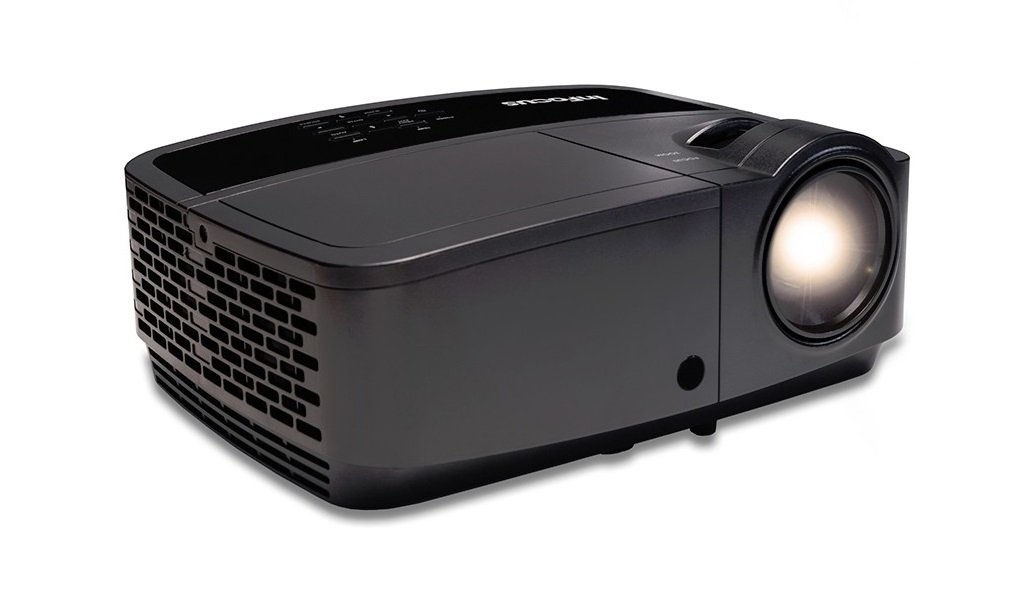
تصوير 1.1: سامهون view of the InFocus IN126 DLP Projector.
اهم خاصيتون:
- High brightness of up to 3200 lumens for clear images in various lighting conditions.
- High 3000:1 contrast ratio for sharp detail.
- Compact and portable design, weighing approximately 4.8 lbs. (2.17 kg).
- 3D-Ready capability for immersive viewتجربو ڪرڻ.
- HDMI connectivity for versatile input options.
2. سيٽ اپ ۽ تنصيب
2.1 کولڻ
Carefully remove the projector and all accessories from the packaging. Verify that all components are present according to the packing list.
2.2 پروجيڪٽر جي جاءِ
Place the projector on a stable, flat surface or mount it securely. Ensure adequate ventilation around the projector to prevent overheating. Position the projector at an appropriate distance from the screen to achieve the desired image size.
2.3 ڳنڍڻ وارا آلات
Connect your video source (e.g., laptop, gaming console) to the projector using an HDMI cable. Ensure the cable is securely plugged into both the source device and the projector's HDMI input port.

Image 2.1: An InFocus projector set up for a business presentation, demonstrating typical usage.
2.4 پاور آن/آف
- پاور آن ڪرڻ: Connect the power cord to the projector and a power outlet. Press the power button on the projector or remote control. The power indicator light will illuminate.
- پاور آف ڪرڻ: پاور بٽڻ کي ٻه ڀيرا دٻايو. پروجيڪٽر مڪمل طور تي بند ٿيڻ کان اڳ کولنگ چڪر ۾ داخل ٿيندو. کولنگ چڪر دوران پروجيڪٽر کي ان پلگ نه ڪريو.
2.5 تصويري ترتيب
- فوڪس: لينس تي فوڪس رنگ کي گھمايو جيستائين تصوير تيز ۽ صاف نه ٿئي.
- ڪيسٽون جي اصلاح: Use the keystone adjustment feature (usually found in the projector's menu or via dedicated buttons) to correct trapezoidal image distortion if the projector is not perfectly perpendicular to the screen.
3. پروجيڪٽر هلائڻ
3.1 ان پٽ سورس جي چونڊ
Press the 'Source' or 'Input' button on the remote control or projector control panel to cycle through available input sources (e.g., HDMI, VGA). Select the input corresponding to your connected device.
3.2 مينيو نيويگيشن
Use the arrow buttons on the remote or control panel to navigate the on-screen display (OSD) menu. Press 'Enter' or 'OK' to confirm selections and 'Menu' or 'Exit' to go back or close the menu.
3.3 تصوير جي ترتيب
او ايس ڊي مينيو اندر، توهان مختلف تصويري سيٽنگون ترتيب ڏئي سگهو ٿا:
- روشني: تصوير جي مجموعي روشني يا اونداهي کي ترتيب ڏئي ٿو.
- تضاد: تصوير جي هلڪي ۽ اونداهي حصن جي وچ ۾ فرق کي ڪنٽرول ڪري ٿو.
- رنگ: رنگن جي شدت کي ترتيب ڏئي ٿو.
- تناسب تناسب: Selects the display format (e.g., 4:3, 16:9).
3.4 آڊيو سيٽنگون
If your projector has built-in speakers or is connected to an external audio system, you can adjust the volume and other audio settings through the OSD menu.
3.5 3D آپريشن
The IN126 projector is 3D-Ready. To view 3D content, you will need compatible 3D glasses, a 3D-enabled source device, and 3D content. Refer to your 3D glasses and source device manuals for specific instructions on enabling 3D mode.
4. سار سنڀال
4.1 لينس صاف ڪرڻ
Use a soft, lint-free cloth specifically designed for optical lenses to gently wipe the projector lens. Avoid using abrasive cleaners or excessive force, which can scratch the lens.
4.2 Cleaning the Projector Casing
Wipe the projector's exterior casing نرم سان، damp ڪپڙو. سخت ڪيميائي يا محلول استعمال نه ڪريو.
4.3 ايئر فلٽر جي سار سنڀال
Regularly check and clean the air filter to ensure proper airflow and prevent overheating. Refer to the full product manual for instructions on locating and cleaning or replacing the air filter.
4.4 ايلamp بدلائڻ
پروجيڪٽر ايلamp has an estimated operating life of up to 20,000 hours. When the lamp reaches the end of its life, a warning message may appear, or the image brightness may significantly decrease. Refer to the full product manual for detailed instructions on safe lamp replacement. Always use genuine InFocus replacement lamps.
5. مسئلا حل ڪرڻ
This section addresses common issues you might encounter with your InFocus IN126 projector.
5.1 اسڪرين تي ڪا به تصوير ناهي
- پڪ ڪريو ته پروجيڪٽر آن آهي ۽ پاور انڊيڪيٽر لائيٽ مضبوط آهي.
- Check all cable connections (HDMI, power) are secure.
- تصديق ڪريو ته پروجيڪٽر تي صحيح ان پٽ سورس چونڊيو ويو آهي.
- Confirm the source device (laptop, etc.) is powered on and outputting a signal.
5.2 Image is Distorted or Blurry
- لينس تي فوڪس رنگ کي ترتيب ڏيو.
- Use keystone correction to fix trapezoidal distortion.
- Ensure the projector is placed on a stable surface and is not vibrating.
- Check the resolution settings of your source device; ensure it is compatible with the projector's native resolution (1280 x 720).
5.3 آواز ڪونهي
- پروجيڪٽر ۽ سورس ڊيوائس ٻنهي تي حجم وڌايو.
- جيڪڏهن ٻاهرين اسپيڪر استعمال ڪري رهيا آهيو، پڪ ڪريو ته اهي صحيح طرح سان ڳنڍيل آهن ۽ پاور آن آهن.
- Check audio settings in the projector's OSD menu.
5.4 پروجيڪٽر جو اوور هيٽنگ
- Ensure there is sufficient space around the projector for ventilation.
- Clean the air filter to remove any dust buildup.
- وائنٽيليشن جي سوراخ کي بلاڪ نه ڪريو.
6. وضاحتون
The following table outlines the key technical specifications for the InFocus IN126 DLP Projector:
| خاصيت | تفصيل |
|---|---|
| برانڊ | InFocus |
| ماڊل نالو | IN126 DLP |
| ڊسپلي جو قسم | ڊي ايل پي |
| اصلي قرارداد | 1280 x 720 |
| وڌ ۾ وڌ ڊسپلي ريزوليوشن | 1920 x 1080 |
| روشني | 3200 lumens (ANSI) |
| مقابلي جي نسبت | 3000:1 |
| روشني جو ذريعو آپريٽنگ زندگي | 20000 ڪلاڪ |
| Lamp واتtage | 230 واٽ |
| رابطي ٽيڪنالاجي | HDMI |
| خاص خصوصيت | 3D-تيار |
| فارم فيڪٽر | پورٽبل |
| چڙهڻ جو قسم | ٽيبل ٽاپ جبل |
| شيءِ جو وزن | 4.85 پائونڊ (2.2 ڪلوگرام) |
| خارجي جاچ جي سرٽيفڪيشن | UL, c-UL, FCC, CE |
7. وارنٽي ڄاڻ
The InFocus IN126 DLP Projector comes with a limited manufacturer's warranty. For specific details regarding warranty coverage, duration, and terms, please refer to the warranty card included with your product or visit the official InFocus webسائيٽ. وارنٽي دعوائن لاءِ خريداري جو ثبوت رکو.
8. ڪسٽمر سپورٽ
For further assistance, technical support, or to inquire about replacement parts, please visit the official InFocus support website or contact their customer service department. Contact information can typically be found on the InFocus website or in the documentation included with your projector.
Ask a question about this manual
Ask about setup, troubleshooting, compatibility, parts, safety, or missing instructions. Manuals+ will review the question and use this page’s manual context to help answer it.