
1. تعارف
خريد ڪرڻ لاءِ مهربانيasing the Gemini PS3-USB 3 Channel 10-Inch Mixer. This manual provides essential information for the proper setup, operation, and maintenance of your mixer. Please read this manual thoroughly before use to ensure optimal performance and to prevent damage.
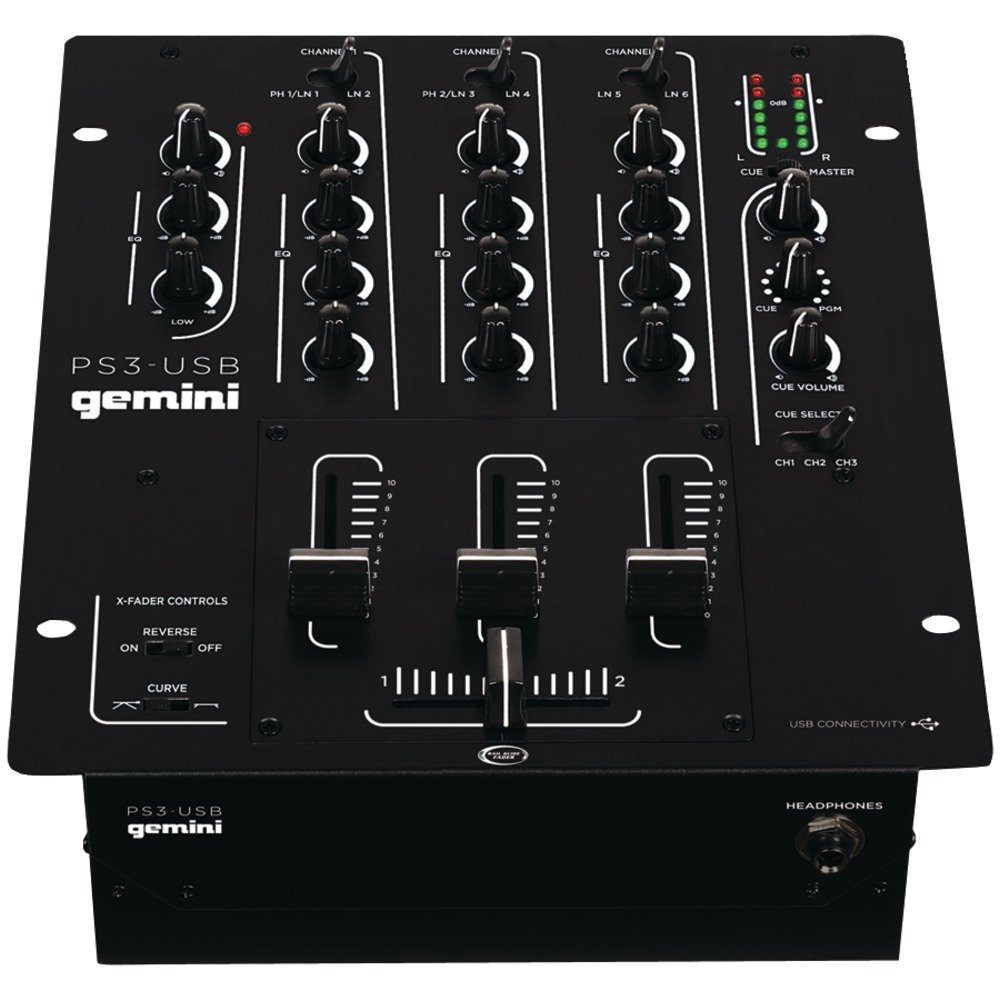
شڪل 1: سامهون view of the Gemini PS3-USB Mixer, showing controls and inputs.
2. حفاظتي هدايتون
- طاقت جو ذريعو: يونٽ کي صرف مخصوص پاور سپلائي سان ڳنڍيو.
- وينٽيليشن: مناسب وينٽيليشن کي يقيني بڻايو. وينٽيليشن جي سوراخن کي بند نه ڪريو.
- پاڻي ۽ نمي: يونٽ کي مينهن يا نمي جي سامهون نه رکو. يونٽ تي مائع سان ڀريل شيون نه رکو.
- گرمي: يونٽ کي گرمي جي ذريعن جهڙوڪ ريڊيئيٽر، گرمي رجسٽر، اسٽو، يا ٻين سامان کان پري رکو (بشمول ampلائفائرز) جيڪي گرمي پيدا ڪن ٿا.
- صفائي: صرف سڪل ڪپڙي سان صاف ڪريو.
- خدمت ڪرڻ: سڀني خدمتن کي قابل سروس اهلڪارن جي حوالي ڪريو. هن پراڊڪٽ کي پاڻ سروس ڪرڻ جي ڪوشش نه ڪريو.
3. سيٽ اپ
3.1 کولڻ
Carefully unpack the mixer and check for any signs of damage. Retain the packaging materials for future transport or storage.
3.2 ڳنڍڻ واري طاقت
Connect the provided power adapter to the mixer's power input and then to a suitable electrical outlet.
3.3 آڊيو ڪنيڪشن
The PS3-USB features 5-line, 3-channel inputs with 2 convertible Phono/Line RCA inputs.
- Phono/Line Inputs: Connect turntables or line-level devices (CD players, media players) to the RCA inputs. Use the Phono/Line switch to select the appropriate input type for each channel.
- ماسٽر آئوٽ: Connect the Master RCA outputs to your ampلائفائر يا طاقتور اسپيڪر.
- رڪارڊ آئوٽ: Connect the Record RCA outputs to a recording device if you wish to record your mix.
- هيڊفون: Plug your 1/4" (6.3mm) headphones into the front panel headphone connector.
3.4 USB ڪنيڪشن
Connect the mixer to your Mac or PC using a standard USB cable. This allows for simultaneous playback and recording through your computer's media player software.
4. آپريٽنگ هدايتون
4.1 ڪنٽرول ۽ ڪم ختمview
Familiarize yourself with the mixer's layout:
- Channel Gain Control: هر چينل لاءِ ان پٽ ليول کي ترتيب ڏئي ٿو.
- 3-Band Rotary EQ: Provides control over High, Mid, and Low frequencies for each channel.
- چينل جي فيڊرز Control the volume of each individual channel.
- ڪراس فيڊر A user-replaceable Rail Glide crossfader with curve and reverse controls for blending between channels.
- ماسٽر حجم: ميڪر جي مجموعي آئوٽ ليول کي ڪنٽرول ڪري ٿو.
- VU ميٽر: Visual indicators for master or cue levels.
- Cue Section: Includes rotary cue volume, CUE/PGM controls, and a split cue switch for headphone monitoring.
- مائڪروفون سيڪشن: Features a rotary microphone volume control and a 2-band EQ for microphone input.
4.2 بنيادي ملاوٽ
- Connect your audio sources to the appropriate Phono/Line inputs.
- Set the Phono/Line switch for each channel to match your source.
- Adjust the Gain control for each active channel to achieve a healthy input level without clipping (distortion).
- Use the channel faders to bring up the volume of your desired audio sources.
- Utilize the 3-band EQ to shape the sound of each channel.
- Use the crossfader to smoothly transition between channels.
- Monitor your mix using headphones via the Cue section and adjust the Master Volume for the main output.
4.3 USB پلے بیک ۽ رڪارڊنگ
Once connected via USB, your computer should recognize the PS3-USB as an audio device.
- پلے بیک: Select the PS3-USB as the output device in your computer's sound settings or media player software to route audio through the mixer.
- رڪارڊنگ: Select the PS3-USB as the input device in your recording software. The mixer's master output will be sent to your computer for recording.
5. سار سنڀال
- صفائي: مکسر جي ٻاهرين حصي کي صاف ڪرڻ لاءِ نرم، سڪل ڪپڙو استعمال ڪريو. مائع صاف ڪندڙ يا سالوينٽس استعمال نه ڪريو.
- Crossfader Replacement: The Rail Glide crossfader is user-replaceable. Refer to the Gemini website or authorized service centers for replacement parts and instructions if needed.
- اسٽوريج: When not in use for extended periods, store the mixer in a cool, dry place, preferably in its original packaging.
6. مسئلا حل ڪرڻ
| مسئلو | ممڪن سبب | حل |
|---|---|---|
| No sound output from master. | Master volume too low; incorrect input selection; amplifier/speaker issues. | Increase Master Volume. Check Phono/Line switches. Verify amplifier/speaker connections and power. |
| No sound from a specific channel. | Channel fader down; Gain too low; incorrect Phono/Line selection; source device off/muted. | Raise channel fader. Adjust Gain. Correct Phono/Line switch. Check source device. |
| تحريف ٿيل آڊيو. | Input Gain too high; Master Volume too high; faulty cable. | Reduce channel Gain. Reduce Master Volume. Replace cables. |
| USB recording/playback not working. | Incorrect USB connection; computer audio settings incorrect; driver issues. | Ensure USB cable is securely connected. Select PS3-USB as audio device in computer settings. Restart computer. |
7. وضاحتون
- ماڊل: PS3USB
- چينل: 3
- داخلائون: 5-Line, 2 Convertible Phono/Line RCA, USB
- آئوٽ پُٽ: Master RCA, Record RCA, 1/4" (6.3mm) Headphone
- EQ 3-Band Rotary EQ per channel, 2-Band EQ for Microphone
- ڪراس فيڊر User-replaceable Rail Glide with Curve and Reverse controls
- رابطي: USB for Mac/PC Playback & Recording
- Dimensions (Approximate Shipping): 12.00in x 10.00in x 3.25in
- Weight (Approximate Shipping): 6.2 پائونڊ (2.8 ڪلوگرام)
- UPC: 747705208149
8. وارنٽي ۽ سپورٽ
This Gemini product is covered by a 90 ڏينهن وارنٽي خريداري جي تاريخ کان. هي وارنٽي عام استعمال هيٺ پيداوار جي خرابين ۽ ڪاريگري کي ڍڪيندي آهي. اهو غلط استعمال، حادثي، ترميم، يا غير مجاز مرمت جي ڪري ٿيندڙ نقصان کي ڍڪي نه ٿو.
For technical support, service inquiries, or warranty claims, please contact your authorized Gemini dealer or visit the official Gemini webرابطي جي معلومات لاء سائيٽ.
مھرباني ڪري وارنٽي جي تصديق لاءِ خريداري جو ثبوت رکو.