
تعارف
خريد ڪرڻ لاءِ مهربانيasing the RCA 32LB45RQ 32-Inch Full 1080p 60Hz LCD HDTV. This manual provides essential information for the safe and efficient operation of your television. Please read it thoroughly before using the product and retain it for future reference.
حفاظت جي ڄاڻ
نقصان کان بچڻ ۽ محفوظ آپريشن کي يقيني بڻائڻ لاءِ هيٺ ڏنل حفاظتي احتياطن تي عمل ڪريو:
- طاقت جو ذريعو: ٽي وي کي صرف مخصوص پاور سپلائي سان ڳنڍيو.
- وينٽيليشن: ٽي وي جي چوڌاري مناسب هوا جي وهڪري کي يقيني بڻايو. هوا جي وهڪري جي سوراخن کي بند نه ڪريو.
- مائع: Keep the TV away from water and moisture. Do not place liquid-filled objects on the TV.
- صفائي: صفائي ڪرڻ کان اڳ ٽي وي کي ان پلگ ڪريو. نرم، سڪل ڪپڙو استعمال ڪريو. مائع صاف ڪندڙن کان پاسو ڪريو.
- لڳائڻ: ٽي وي کي هڪ مستحڪم، هموار مٿاڇري تي رکو يا ان کي ڀت سان محفوظ طور تي لڳايو.
- خدمت ڪرڻ: ٽي وي جي پاڻ سروس ڪرڻ جي ڪوشش نه ڪريو. سڀني سروسنگ کي قابل اهلڪارن جي حوالي ڪريو.
دٻي ۾ ڇا آهي
پڪ ڪريو ته سڀئي جزا موجود آهن:
- RCA 32LB45RQ 32-Inch LCD HDTV
- بيٺو
- ريموٽ ڪنٽرول
- 2 AA بيٽريون
- پاور ڪنڊ
- استعمال ڪندڙ جو دستياب (ھي دستاويز)
سيٽ اپ ڪريو
اسٽينڊ کي ڳنڍڻ
To attach the included stand, carefully place the TV screen-down on a soft, clean surface to prevent scratches. Align the stand with the mounting holes on the bottom of the TV and secure it using the provided screws. Ensure the stand is firmly attached before placing the TV upright.

سامهون view of the RCA 32LB45RQ HDTV with its stand attached.
ڀت تي چڙهڻ
The RCA 32LB45RQ is wall mountable. A VESA-compatible wall mount kit (sold separately) is required. Refer to the wall mount kit's instructions for proper installation. Ensure the wall can support the weight of the TV and the mount.
ڳنڍيندڙ پردي
Your TV offers various input ports for connecting external devices:
- HDMI: Connect Blu-ray players, game consoles, cable/satellite boxes, and other HD devices. The TV has 3 HDMI ports.
- USB: Connect USB storage devices for media playback. The TV has 1 USB port.
- جزو (YPbPr): Connect older video devices using component video and stereo audio cables. The TV has 1 component input.
- VGA: Connect a computer. The TV has 1 VGA input.
- اينٽينا / ڪيبل: اوور دي ايئر براڊڪاسٽ يا ڪيبل ٽي وي ڪنيڪشن لاءِ اينٽينا ڳنڍيو.

ريڙهه view of the RCA 32LB45RQ HDTV, highlighting the various input ports for external devices.
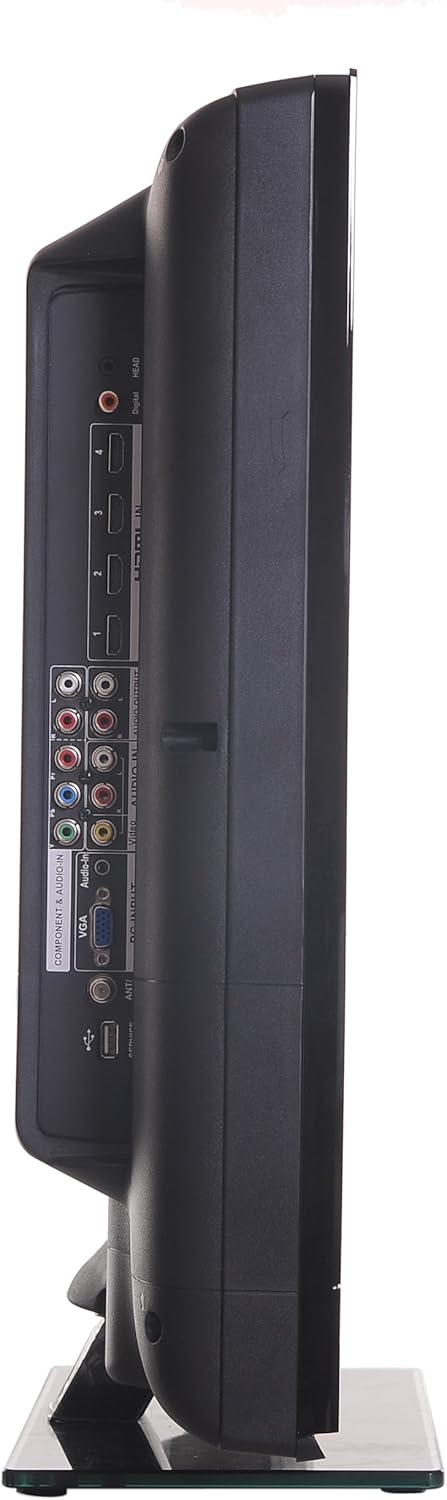
پاسي view of the RCA 32LB45RQ HDTV, showing additional input ports for convenient access.
پاورنگ آن ۽ شروعاتي سيٽ اپ
After connecting all desired devices and the power cord, press the power button on the TV or remote control. Follow the on-screen prompts for initial setup, including language selection, time zone, and channel scanning for over-the-air or cable channels.
آپريٽنگ
ريموٽ ڪنٽرول ختمview
The included remote control allows you to access all TV functions. Insert the two AA batteries (included) into the remote control, observing polarity.
بنيادي ڪم
- طاقت: ٽي وي کي کولڻ يا بند ڪرڻ جي لاءِ دٻايو.
- حجم مٿي / ھيٺ: آڊيو سطح کي ترتيب ڏيو.
- چينل مٿي / هيٺ: ٽي وي چينل تبديل ڪريو.
- خاموش: Silence the TV audio.
- ان پٽ: Cycle through available input sources (HDMI 1, HDMI 2, Component, VGA, TV).
مينيو نيويگيشن
Press the 'Menu' button on your remote to access the TV's settings. Use the arrow keys to navigate and 'OK' or 'Enter' to select options.
- تصويري سيٽنگون: Adjust brightness, contrast, color, tint, sharpness, and select picture modes (e.g., Standard, Dynamic, Movie).
- آواز سيٽنگون: باس، ٽريبل، بيلنس کي ترتيب ڏيو، ۽ آواز جا طريقا چونڊيو (مثال طور، معياري، موسيقي، فلم).
- Settings/Setup: Access general TV settings such as language, time, parental controls (V-Chip), and software updates.
انٽرنيٽ خدمتون
The TV supports a built-in browser for basic internet access. Use the remote control to navigate web صفحا.
سار سنڀال
اسڪرين جي صفائي
نرم، لِنٽ کان پاڪ ڪپڙي سان اسڪرين کي نرميءَ سان صاف ڪريو. ضدي نشانن لاءِ، ٿورو ڊيampen the cloth with water or a specialized screen cleaner (ensure it is safe for LCD screens) and wipe gently. Do not spray liquid directly onto the screen.
عام سنڀال
- ٽي وي کي سڌي سج جي روشني يا انتهائي گرمي پد جي سامهون آڻڻ کان پاسو ڪريو.
- ٽي وي جي مٿان ڳري شيون نه رکو.
- بجلي جي طوفانن دوران يا جڏهن اهو ڊگهي عرصي تائين استعمال ۾ نه هوندو ته ٽي وي کي ان پلگ ڪريو.
مشڪلاتون
If you encounter issues with your TV, refer to the following table for common problems and solutions:
| مسئلو | ممڪن سبب / حل |
|---|---|
| طاقت نه آهي | Ensure the power cord is securely plugged into the TV and a working electrical outlet. Check the power indicator light. |
| تصوير ناهي، پر آواز موجود آهي. | Check the input source selection. Ensure the connected device is powered on and sending a signal. |
| آواز ڪونهي، پر تصوير موجود آهي. | Check the volume level and ensure the TV is not muted. Verify audio cable connections for external devices. |
| خراب تصوير معيار | Adjust picture settings (brightness, contrast, sharpness). Check antenna or cable connections. Ensure the input source is providing a high-quality signal. |
| ريموٽ ڪنٽرول ڪم نه ڪري رهيو آهي | بيٽريون چيڪ ڪريو ۽ تبديل ڪريو. پڪ ڪريو ته ريموٽ ۽ ٽي وي جي IR سينسر جي وچ ۾ ڪا به رڪاوٽ نه آهي. |
وضاحتون
Detailed technical specifications for the RCA 32LB45RQ HDTV:
| خاصيت | تفصيل |
|---|---|
| ماڊل نالو | 32LB45RQ |
| اسڪرين جي ماپ | 32 انچ |
| ڊسپلي ٽيڪنالاجي | ايل سي ڊي |
| قرارداد | 1080 ص (1920 X 1080) |
| ريفريش جي شرح | 60Hz |
| اسپيڪٽ ريشو | 16:9 |
| مقابلي جي نسبت | 5000:1 |
| جوابي وقت | 8 ملي سيڪنڊ |
| ٽونر جو قسم | ATSC، NTSC |
| ڪل HDMI بندرگاهن | 3 |
| ڪل USB بندرگاهن | 1 |
| Component Inputs | 1 |
| وي جي اي ان پٽ | 1 |
| رابطي ٽيڪنالاجي | HDMI، USB |
| سپورٽ انٽرنيٽ سروسز | برائوزر |
| چڙهڻ جو قسم | ڀت جبل |
| رنگ | ڪارو |
| شيءِ جو وزن | 17.4 پائونڊ |
| شامل اجزاء | اسٽينڊ، ٽي وي |
| Parental Control Technology | وي- چپ |
| ماڊل سال | 2017 |

Energy Guide label for the RCA 32LB45RQ HDTV, showing estimated yearly energy cost.
وارنٽي ۽ سپورٽ
وارنٽي ڄاڻ
This RCA 32LB45RQ HDTV comes with a Limited 1 year parts and labor warranty. Please retain your proof of purchase for warranty claims. For specific terms and conditions, refer to the warranty card included with your product or contact RCA customer support.
ڪسٽمر سپورٽ
For technical assistance, troubleshooting beyond this manual, or warranty service, please contact RCA customer support. Contact information can typically be found on the RCA official webسائيٽ تي يا پراڊڪٽ پيڪنگنگ تي.