
RCA RTS736W
RCA RTS736W 30 انچ اسٽريمنگ سائونڊ بار يوزر مينوئل
Model: RTS736W
تعارف
This user manual provides comprehensive instructions for the installation, operation, and maintenance of your RCA RTS736W 30-Inch Streaming Soundbar. Please read this manual thoroughly before using the product to ensure proper functionality and to prevent damage.
The RCA RTS736W is designed to enhance your home audio experience with its 3.0 channel sound and integrated Wi-Fi for streaming online content.
اهم خاصيتون
- Wi-Fi Built-In for streaming video content to a TV.
- 3.0 Channel Left/Center/Right audio configuration.
- HDMI 1080p Output for high-definition connectivity.
- Includes 1 Rear Analog Audio-in Jack and 1 Side Line-in Jack for various audio sources.
- Flexible placement options: includes table or wall mounting brackets.
پيڪيج مواد
پڪ ڪريو ته سڀئي شيون پيڪيج ۾ موجود آهن:
- RCA RTS736W 30-Inch Streaming Soundbar
- ريموٽ ڪنٽرول
- پاور اڊاپٽر
- Table or Wall Mounting Brackets
- استعمال ڪندڙ جو دستياب (ھي دستاويز)
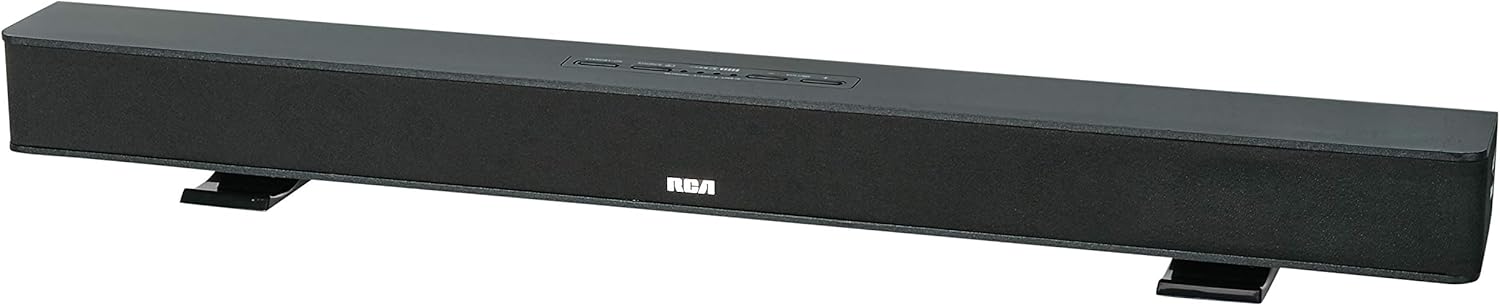
Image: The RCA RTS736W 30-Inch Streaming Soundbar, shown with its sleek black design and integrated controls.
سيٽ اپ ڪريو
1. جڳهه جا آپشن
The soundbar offers flexible placement:
- ٽيبل ٽاپ جي جڳھ: Place the soundbar on a flat, stable surface in front of your television. Ensure there is adequate ventilation around the unit.
- ڀت لڳائڻ: Use the included wall mounting brackets to secure the soundbar to a wall. Refer to the separate wall mounting template (if provided) for detailed instructions. Ensure the wall can support the weight of the soundbar.

Image: The RCA RTS736W soundbar positioned on a TV stand, demonstrating a typical home theater setup with various streaming service icons displayed on the television screen.
2. پاور سان ڳنڍڻ
- Connect the power adapter to the DC IN 13.5V port on the back of the soundbar.
- پاور اڊاپٽر جي ٻئي پڇاڙي کي وال آئوٽليٽ ۾ لڳايو.
3. آڊيو ڪنيڪشن
Choose one of the following methods to connect the soundbar to your audio source:
- HDMI ٻاھر Connect an HDMI cable from the HDMI OUT port on the soundbar to an HDMI input on your television. This connection supports 1080p video output from the soundbar's streaming functions.
- Analog Audio-in (AUX 1 / AUX 2): Use RCA audio cables to connect your TV or other audio devices to the AUX 1 or AUX 2 input jacks on the back of the soundbar. Match the red and white connectors.
- Side Line-in Jack: For portable devices like smartphones or tablets, connect a 3.5mm audio cable from your device's headphone jack to the Line-in jack located on the side of the soundbar.

تصوير: هڪ ويجهو تصوير view of the rear panel of the RCA RTS736W soundbar, highlighting the AUX 1, AUX 2, DC IN 13.5V, HDMI OUT, and VIDEO OUT ports for various connections.
4. نيٽ ورڪ ڪنيڪشن (وائي فائي)
To utilize the streaming features, connect the soundbar to your home Wi-Fi network. This process is typically guided by on-screen prompts when the soundbar is first powered on and connected to a TV via HDMI.
- Ensure your TV is connected to the soundbar via HDMI and powered on.
- Follow the on-screen instructions to select your Wi-Fi network and enter the password.
آپريٽنگ هدايتون
1. پاور آن/آف
کي دٻايو طاقت يونٽ کي آن يا آف ڪرڻ لاءِ سائونڊ بار يا ريموٽ ڪنٽرول تي بٽڻ.
2. انٽ چونڊ
کي دٻايو ان پٽ button on the remote control or the soundbar to cycle through available audio sources: HDMI, AUX 1, AUX 2, Line-in, and Wi-Fi streaming.
3. حجم ڪنٽرول
استعمال ڪريو جلد + ۽ جلد جو buttons on the remote control or the soundbar to adjust the audio level.
کي دٻايو گونگا آڊيو کي عارضي طور تي خاموش ڪرڻ لاءِ بٽڻ.
4. اسٽريمنگ مواد
Once connected to Wi-Fi and your TV via HDMI, you can access various streaming applications. Navigate using the directional buttons and OK ريموٽ ڪنٽرول تي بٽڻ.
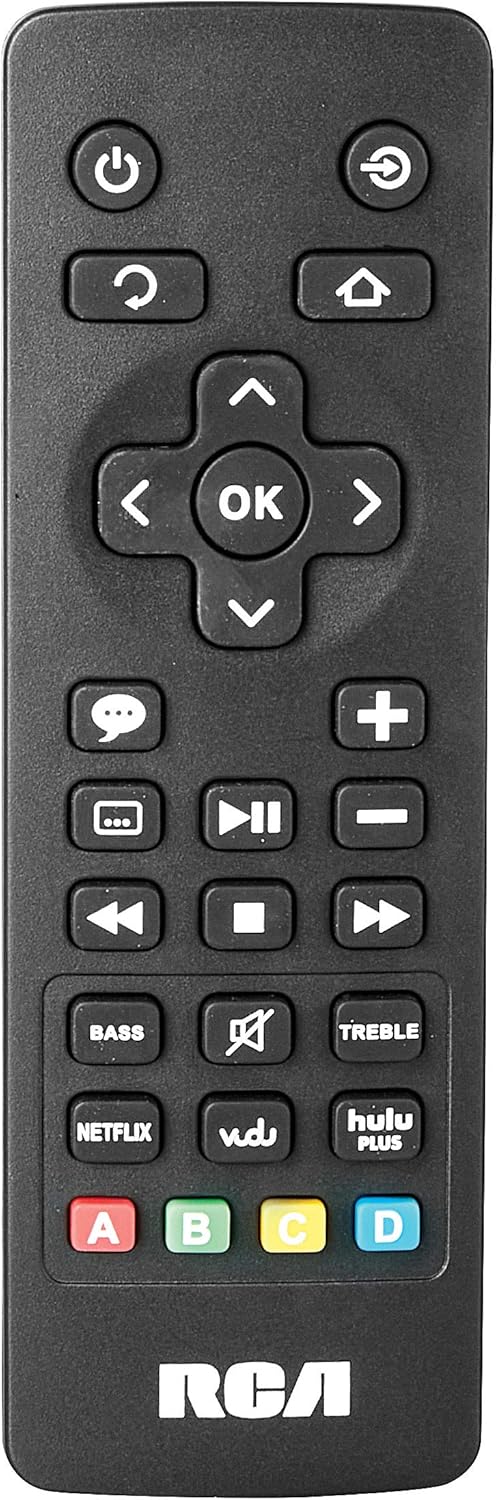
Image: The remote control for the RCA RTS736W soundbar, featuring dedicated buttons for power, volume, input selection, navigation, and direct access to streaming services like Netflix, Vudu, and Hulu Plus.
Dedicated buttons for services like Netflix, Vudu, and Hulu Plus may be available on the remote for direct access.
5. آڊيو ايڊجسٽمينٽ
استعمال ڪريو پرش ۽ ٽربل buttons on the remote control to fine-tune the audio output to your preference.
سار سنڀال
- صفائي: Disconnect the soundbar from the power outlet before cleaning. Use a soft, dry cloth to wipe the exterior surfaces. Do not use liquid cleaners or abrasive materials.
- وينٽيليشن: پڪ ڪريو ته سائونڊ بار تي وينٽيليشن جا سوراخ بند نه آهن. مناسب هوا جي وهڪري کي وڌيڪ گرم ٿيڻ کان روڪي ٿو.
- اسٽوريج: جيڪڏهن سائونڊ بار کي گهڻي عرصي تائين ذخيرو ڪري رهيا آهيو، ته ان کي بجلي کان ڌار ڪريو ۽ ان کي سڌي سج جي روشني ۽ انتهائي گرمي پد کان پري ٿڌي، سڪل جاءِ تي محفوظ ڪريو.
مشڪلاتون
ڪابه طاقت
- Check if the power adapter is securely connected to the soundbar and a working wall outlet.
- پڪ ڪريو ته پاور آئوٽليٽ فعال آهي ٻئي ڊوائيس سان ان جي جانچ ڪندي.
ڪو آواز
- تصديق ڪريو ته سائونڊ بار تي صحيح ان پٽ سورس چونڊيو ويو آهي.
- Check all audio cable connections between the soundbar and your audio source (TV, etc.).
- Ensure the volume on both the soundbar and the connected audio source is turned up and not muted.
- If using HDMI, confirm that your TV's audio output settings are configured to send audio to the soundbar.
Streaming Issues (Buffering, Freezing)
- Check your Wi-Fi network connection. Ensure the signal strength is adequate.
- پنهنجي گهر جي روٽر ۽ موڊيم کي ٻيهر شروع ڪريو.
- Restart the soundbar by unplugging it from the power outlet for a few minutes, then plugging it back in.
- Ensure your internet service is active and performing correctly.
ريموٽ ڪنٽرول ڪم نه ڪري رهيو آهي
- ريموٽ ڪنٽرول ۾ بيٽرين کي تبديل ڪريو.
- پڪ ڪريو ته ريموٽ ڪنٽرول ۽ سائونڊ بار جي سينسر جي وچ ۾ ڪا به رڪاوٽ نه آهي.
- ريموٽ کي سڌو سنئون سائونڊ بار ڏانھن اشارو ڪريو.
وضاحتون
| ماڊل نمبر | RTS736W |
| اسپيڪر جو قسم | سائونڊ بار |
| چينل | 3.0 (Left/Center/Right) |
| رابطي | HDMI, RCA, Wi-Fi |
| وائرليس ٽيڪنالاجي | وائي فائي |
| HDMI آئوٽ | 1080 ص |
| آڊيو انپٽ | 2x Analog Audio-in (RCA), 1x Side Line-in (3.5mm) |
| اسپيڪر سائيز | 30 انچ |
| وڌ ۾ وڌ آئوٽ پاور | 150 واٽ |
| رڪاوٽ | 8 اومس |
| طاقت جو ذريعو | تار ٿيل برقي |
| پيداوار جي ماپ (L x W x H) | 33.5 x 6.5 x 5.5 انچ |
| شيءِ جو وزن | 5.55 پائونڊ |
| ٺاهيندڙ | Alco Electronics Ltd. |
وارنٽي ڄاڻ
Specific warranty details for the RCA RTS736W Soundbar are typically provided with the product packaging or can be found on the official RCA webسائيٽ. مھرباني ڪري وارنٽي دعوائن لاءِ خريداري جو ثبوت رکو.
For warranty service, contact RCA customer support with your model number and purchase date.
ڪسٽمر سپورٽ
For further assistance, technical support, or service inquiries, please refer to the contact information provided in your product's original documentation or visit the official RCA support webسائيٽ.
آن لائين وسيلا: Visit the RCA Store on Amazon