
تعارف
This manual provides essential instructions for the setup, operation, maintenance, and troubleshooting of your Mobility Lab ML301884 Wired Optical Mouse. Please read this manual thoroughly to ensure proper use and to maximize the lifespan of your device.
پيداوار ختمview
The Mobility Lab ML301884 is a lightweight, wired optical mouse designed for reliable performance with both Mac and PC systems. It features a 1000 DPI optical sensor for precise tracking.
اجزاء
- کاٻي ڪلڪ بٽڻ: Primary button for selection and interaction.
- ساڄي ڪلڪ بٽڻ: Secondary button for context menus and additional functions.
- اسڪرول ويل: دستاويزن ذريعي عمودي اسڪرولنگ لاءِ ۽ web صفحا. وچين ڪلڪ بٽڻ طور پڻ ڪم ڪري ٿو.
- USB ڪيبل: Connects the mouse to your computer.
- آپٽيڪل سينسر: Located on the underside of the mouse, detects movement.
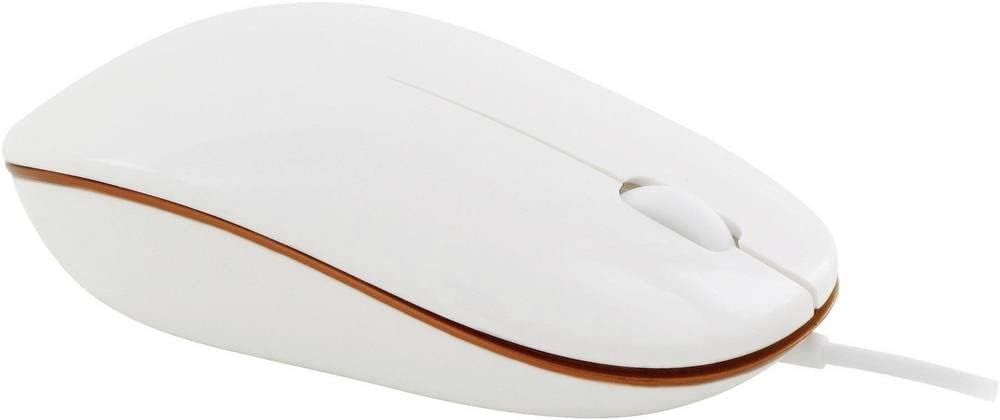
شڪل 1: مٿي کان هيٺ view of the Mobility Lab ML301884 Wired Optical Mouse, showing the left and right click buttons and the scroll wheel.

Figure 2: Diagram illustrating the dimensions of the Mobility Lab ML301884 Wired Optical Mouse, with a length of 102mm (4.01 inches), width of 57mm (2.24 inches), and height of 29.5mm (1.16 inches).
سيٽ اپ ڪريو
- USB ڪيبل ڳنڍيو: Locate an available USB port on your computer (desktop or laptop). Insert the USB connector of the Mobility Lab ML301884 mouse firmly into the USB port.
- خودڪار ڊرائيور جي انسٽاليشن: Your operating system (Windows or macOS) will typically detect the new hardware and install the necessary drivers automatically. This process usually takes a few seconds. No additional software installation is required.
- ڪارڪردگي جي تصديق ڪريو: Once the drivers are installed, move the mouse and observe if the cursor on your screen responds. Test the left and right click buttons, and the scroll wheel.
The mouse is designed for plug-and-play operation and should be ready for use immediately after connection.
آپريٽنگ هدايتون
The Mobility Lab ML301884 mouse provides standard functionality for navigation and interaction with your computer.
- Moving the Cursor: Place the mouse on a flat, opaque surface. Move the mouse to control the cursor on your screen. The optical sensor provides accurate tracking.
- کاٻي ڪلڪ ڪريو: شيون چونڊڻ، لنڪس کولڻ، يا افعال چالو ڪرڻ لاءِ کاٻي بٽڻ کي دٻايو.
- ساڄي ڪلڪ ڪريو: Press the right button to open context-sensitive menus, offering additional options for selected items.
- اسڪرول ويل: Roll the scroll wheel forward or backward to scroll vertically through documents, web pages, or applications. The scroll wheel can also be pressed down for a middle-click function, which often opens links in new tabs or enables auto-scrolling, depending on the application.
سار سنڀال
مناسب سار سنڀال توهان جي مائوس جي ڊگهي عمر ۽ بهترين ڪارڪردگي کي يقيني بڻائي ٿي.
- صفائي:
- صفائي ڪرڻ کان اڳ مائوس کي ڪمپيوٽر کان ڌار ڪريو.
- استعمال ڪريو نرم، lint-آزاد ڪپڙو روشنيءَ سان ڊيampمائوس جي ٻاهرئين حصي کي صاف ڪرڻ لاءِ پاڻي يا هلڪي صفائي واري محلول سان ٻوڙيو وڃي.
- For the optical sensor, use a dry cotton swab to gently remove any dust or debris. Avoid using harsh chemicals or abrasive materials.
- اسٽوريج: Store the mouse in a clean, dry environment when not in use. Avoid extreme temperatures and direct sunlight.
- ڪيبل جي سنڀال: Do not excessively bend or pull the USB cable. Store it neatly to prevent tangling and damage.
مشڪلاتون
If you encounter issues with your Mobility Lab ML301884 mouse, refer to the following common problems and solutions:
| مسئلو | ممڪن سبب | حل |
|---|---|---|
| مائوس جواب نه ڏئي رهيو آهي | USB ڪنيڪشن ڍلو، ناقص USB پورٽ، ڊرائيور جو مسئلو. |
|
| بي ترتيب ڪرسر تحريڪ | Dirty optical sensor, unsuitable surface, software conflict. |
|
| بٽڻ يا اسڪرول ويل ڪم نه ڪري رهيا آهن | Software issue, physical obstruction, hardware malfunction. |
|
وضاحتون
| برانڊ | موبلٽي ليب |
| ماڊل | ايم ايل 301884 |
| انٽرفيس | USB |
| تحريڪ جي سڃاڻپ ٽيڪنالاجي | بصري |
| قرارداد | 1000 ڊي پي آئي |
| مطابقت | Windows, macOS (PC) |
| خاص خاصيتون | هلڪو وزن |
| طول و عرض (L x W x H) | 102 ملي ميٽر x 57 ملي ميٽر x 29.5 ملي ميٽر (تقريبن 4.01 x 2.24 x 1.16 انچ) |
| وزن | 120 جي |
| رنگ | اڇو |
وارنٽي ۽ سپورٽ
ڪاروباري وارنٽي
This Mobility Lab ML301884 Optical Mouse is covered by a 1 سالن جي تجارتي وارنٽي خريداري جي تاريخ کان. هي وارنٽي عام استعمال هيٺ پيداوار جي خرابين ۽ خرابين کي ڍڪيندي آهي. اهو غلط استعمال، حادثن، غير مجاز ترميمن، يا عام لباس ۽ آنسو جي ڪري ٿيندڙ نقصان کي ڍڪيندي ناهي.
مھرباني ڪري وارنٽي دعوائن لاءِ خريد ڪرڻ جو پنھنجو ثبوت رکو.
ڪسٽمر سپورٽ
For technical assistance, warranty inquiries, or further support, please refer to the official Mobility Lab webسائيٽ تي وڃو يا انهن جي ڪسٽمر سروس ڊپارٽمينٽ سان رابطو ڪريو. رابطي جي تفصيل عام طور تي پراڊڪٽ پيڪنگنگ يا ٺاهيندڙ جي webسائيٽ.