
تعارف
This manual provides essential instructions for the safe and efficient operation of your VisionTek Pitbull RockDoc Power Portable MP3 Speaker. Please read this manual thoroughly before using the device and retain it for future reference.
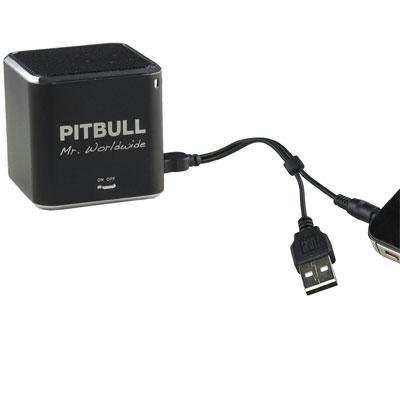
This image displays the compact, black cube-shaped Pitbull RockDoc Power Portable MP3 Speaker. The front face features the 'PITBULL Mr. Worldwide' logo and an 'ON OFF' switch. An integrated cable with a USB connector and a 3.5mm audio jack is shown connected to the speaker, ready for charging or audio input.
پيداوار جون خاصيتون
- پورٽبل ڊيزائن: آسان نقل و حمل لاء ٺهيل ۽ ہلڪو وزن.
- Integrated MP3 Player: Features 4GB of internal memory for direct music playback.
- وائرلیس رابطي Supports Bluetooth for audio streaming from compatible devices.
- Wired Audio Input: Includes a 3.5 mm audio jack for connecting non-Bluetooth devices.
- بيٽري طاقت: Operates on an internal battery for cordless use.
- ٻه طرفي اسپيڪر سسٽم: صاف آڊيو آئوٽ پُٽ فراهم ڪري ٿو.
سيٽ اپ ڪريو
اسپيڪر کي چارج ڏيڻ
- Locate the integrated USB cable attached to the speaker.
- ڪيبل جي USB-A پڇاڙي کي طاقتور USB پورٽ سان ڳنڍيو (مثال طور، ڪمپيوٽر، USB وال اڊاپٽر).
- The speaker's indicator light will illuminate to show charging status. Refer to the device for specific light indications.
- مڪمل چارج ٿيڻ کان پوءِ، USB ڪيبل ڊسڪنيڪٽ ڪريو.
پاور آن / آف
- To power on, slide the 'ON OFF' switch to the 'ON' position.
- To power off, slide the 'ON OFF' switch to the 'OFF' position.
آڊيو ذريعن کي ڳنڍڻ
Your speaker supports three primary methods for audio input:
1. Using Internal 4GB Memory (MP3 Playback)
- To load music onto the internal 4GB memory, connect the speaker to a computer using the USB cable. The speaker should appear as a removable storage device.
- پنھنجي MP3 آڊيو کي ڇڪيو ۽ ڇڏيو. files into the speaker's storage.
- هڪ دفعو files are transferred, safely eject the speaker from your computer.
- The speaker will automatically play files from its internal memory when powered on and no other audio source is connected.
2. بلوٽوٽ ڪنيڪشن
- پڪ ڪريو ته اسپيڪر پاور آهي.
- Activate Bluetooth on your smartphone, tablet, or other compatible device.
- ڳولھيو available Bluetooth devices. The speaker should appear as "Pitbull RockDoc" or similar.
- Select the speaker from the list to pair. A confirmation sound or light indication may occur upon successful pairing.
3. 3.5 mm Audio Jack Connection
- Locate the integrated 3.5 mm audio jack on the speaker's cable.
- Connect this jack to the headphone output or audio-out port of your external audio device (e.g., MP3 player, phone, laptop).
- Ensure the speaker is powered on. Audio will be routed through this connection.
آپريٽنگ هدايتون
بنيادي پلے بیک ڪنٽرول
The speaker features basic controls for media playback. These controls typically include:
- راند/روڪ: Press to start or pause audio playback.
- اڳيون ٽريڪ: Press to skip to the next audio file.
- پويون ٽريڪ: Press to go back to the beginning of the current track or to the previous track.
- حجم ڪنٽرول: Adjust the volume level. (Specific button layout not provided, assume standard controls).
Note: When connected via Bluetooth or 3.5mm audio jack, playback controls on the speaker may control the connected device, or you may need to control playback directly from the source device.
سار سنڀال
صفائي
- اسپيڪر جي ٻاهرئين حصي کي نرم، سڪل، لِنٽ فري ڪپڙي سان صاف ڪريو.
- گھڙڻ وارا صاف ڪندڙ، محلول، يا مضبوط ڪيميڪل استعمال نه ڪريو.
- ڪنهن به سوراخ ۾ نمي حاصل ڪرڻ کان پاسو ڪريو.
ذخيرو
- اسپيڪر کي سڌي سج جي روشني ۽ انتهائي گرمي پد کان پري ٿڌي، سڪل جاءِ تي رکو.
- جيڪڏهن گهڻي عرصي تائين ذخيرو ڪري رهيا آهيو، ته پڪ ڪريو ته بيٽري جزوي طور تي چارج ٿيل آهي (تقريبن 50٪) ته جيئن ان جي عمر وڌندي.
مشڪلاتون
| مسئلو | ممڪن سبب | حل |
|---|---|---|
| طاقت نه آهي | بيٽري ختم ٿي وئي آهي | Charge the speaker using the USB cable. |
| اسپيڪر مان ڪوبه آواز ناهي | Volume too low; Incorrect input source; Device not paired (Bluetooth); Cable not connected (3.5mm) | Increase speaker volume; Ensure correct mode (internal MP3, Bluetooth, or AUX); Re-pair Bluetooth device; Check 3.5mm cable connection. |
| بلوٽوٿ جوڙڻ ناڪام ٿيو | اسپيڪر پيئرنگ موڊ ۾ نه آهي؛ ڊوائيس تمام پري آهي؛ مداخلت | Ensure speaker is discoverable; Move device closer to speaker; Turn off other Bluetooth devices. |
| منتقل نه ٿو ڪري سگھجي files to 4GB memory | Incorrect USB connection; Driver issue; Memory full | Ensure speaker is connected to computer via USB; Try a different USB port/cable; Check available memory space. |
وضاحتون
| خاصيت | تفصيل |
|---|---|
| ماڊل نمبر | 900584 |
| اسپيڪر جو قسم | 1-Way Portable Speaker |
| اندروني ياداشت | 4GB (MP3 پلے بیک لاءِ) |
| رابطي | Bluetooth, 3.5 mm Audio Jack |
| طاقت جو ذريعو | بيٽري سان هلندڙ |
| اسپيڪر وڌ ۾ وڌ آئوٽ پاور | 3 واٽ |
| شيءِ جو وزن | 159 جي |
| پيداوار جي ماپ (LxWxH) | 5 x 5 x 4.9 سينٽي |
| ٺاهيندڙ | VISIONTEK MASS STORAGE |
وارنٽي ڄاڻ
For detailed warranty information regarding your VisionTek Pitbull RockDoc Power Portable MP3 Speaker, please refer to the warranty card included with your purchase or contact the manufacturer directly. Amazon's buying options mention a 'Warranty Policy', indicating manufacturer coverage.
حمايت
If you require technical assistance or have questions not covered in this manual, please contact VisionTek Mass Storage, the manufacturer of this product. Contact details can typically be found on their official webسائيٽ يا پراڊڪٽ پيڪنگنگ.