
1. تعارف
This manual provides detailed instructions for the setup, operation, and maintenance of your Rii Mini i8 2.4GHz Wireless Keyboard with Touchpad. This device combines a full QWERTY keyboard with a multi-touch touchpad, designed for convenient control of various devices such as PCs, Smart TVs, Android TV Boxes, and game consoles.

تصوير: زاويه view of the Rii Mini i8 Wireless Keyboard, showcasing ان جي ڪمپيڪٽ ڊيزائن ۽ اهم ترتيب.
2. پيڪيج مواد
مھرباني ڪري پيڪيج جي مواد کي چيڪ ڪريو ته جيئن پڪ ڪري سگھجي ته سڀئي شيون موجود آھن:
- Rii Mini i8 Wireless Keyboard with Touchpad
- USB Receiver (stored inside the battery compartment)
- USB چارجنگ ڪيبل
- استعمال ڪندڙ جو دستياب (ھي دستاويز)
3. سيٽ اپ
- USB رسيور ڳوليو: Open the battery compartment cover on the back of the keyboard. The USB receiver is stored inside.
- USB رسيور داخل ڪريو: Plug the USB receiver into an available USB port on your device (PC, Smart TV, Android TV Box, etc.).
- ڪي بورڊ تي پاور: Locate the ON/OFF switch on the side of the keyboard and slide it to the "ON" position.
- خودڪار ڪنيڪشن: The keyboard should automatically connect to your device. No additional drivers are typically required.

تصوير: پوئين پاسي view of the Rii Mini i8 keyboard, showing the battery compartment and the USB receiver stored within.

تصوير: پوئين پاسي view of the Rii Mini i8 keyboard with the battery cover open, illustrating the location of the removable USB receiver.
4. آپريٽنگ هدايتون
Once connected, the Rii Mini i8 functions as a standard keyboard and mouse.
- ٽائپنگ: Use the QWERTY keyboard layout for text input.
- مائوس جو ڪم: The central touchpad allows for cursor control.
- ملٽي ميڊيا ڪيز: Dedicated keys for volume control, play/pause, and other media functions are located on the left side.
- فنڪشن ڪيز (Fn): کي دٻايو ۽ رکو Fn key (bottom left) and then press a key with a blue icon to access its secondary function (e.g., Fn + F1 for email).

Image: A user holding the Rii Mini i8 keyboard, demonstrating its use for controlling a television display.
5. Keyboard Layout and Functions
The Rii Mini i8 features a compact QWERTY layout with additional function and multimedia keys.

تصوير: مٿي کان هيٺ تائين view of the Rii Mini i8 Wireless Keyboard, clearly showing the full QWERTY layout, touchpad, and dedicated function keys.
- QWERTY Keys: Standard alphanumeric keys for typing.
- فنڪشن ڪيز (F1-F12): دٻائڻ سان رسائي Fn + corresponding key.
- ملٽي ميڊيا ڪنٽرول ڪيز: Volume up/down, mute, play/pause, next/previous track.
- هدايتي پيڊ: Located on the right side for navigation.
- کاٻي/ساڄي مائوس بٽڻ: Dedicated buttons below the touchpad.
6. ٽچ پيڊ جا ڪم
The integrated touchpad supports multi-touch gestures for intuitive navigation.
- اڪيلو آڱر ٽيپ: کاٻي مائوس جي ڪلڪ طور ڪم.
- ٻن آڱرين سان ٽيپ: Functions as a right mouse click.
- Two Finger Drag (Vertical): Scrolls up or down.
- Single Finger Drag: ڪرسر کي منتقل ڪري ٿو.
7. ڊوائيس کي چارج ڪرڻ
The Rii Mini i8 keyboard is powered by a rechargeable Lithium Metal battery.
- چارجنگ ڪيبل ڳنڍيو: Plug the small end of the included USB charging cable into the mini-USB port on the top edge of the keyboard.
- پاور سورس سان ڳنيو: Plug the standard USB end of the cable into a USB port on your computer, a USB wall adapter, or a power bank.
- چارجنگ اشارو: A charging indicator light (usually red) will illuminate during charging and turn off or change color when fully charged.
- بيٽري جي زندگي: The keyboard is designed for extended use on a single charge.

Image: The included USB charging cable, showing the mini-USB connector for the keyboard and the standard USB connector for a power source.
8. سار سنڀال
- صفائي: Use a soft, dry cloth to clean the surface of the keyboard. For stubborn dirt, a slightly damp ڪپڙو استعمال ڪري سگهجي ٿو، انهي ڳالهه کي يقيني بڻائڻ لاءِ ته ڪو به مائع ڊوائيس ۾ داخل نه ٿئي.
- اسٽوريج: When not in use for extended periods, turn off the keyboard to conserve battery life. Store in a cool, dry place.
- بيٽري جي سنڀال: بيٽري کي بار بار مڪمل طور تي چارج ڪرڻ کان پاسو ڪريو. بيٽري جي صحت کي برقرار رکڻ لاءِ ڊوائيس کي باقاعدي چارج ڪريو.
9. مسئلا حل ڪرڻ
| مسئلو | ممڪن حل |
|---|---|
| ڪي بورڊ جواب نه ڏئي رهيو آهي |
|
| ڪرسر جي حرڪت بي ترتيب يا سست آهي. |
|
| چاٻيون ڪم نه ڪري رهيا آهن |
|
10. وضاحتون
Key technical specifications for the Rii Mini i8 Wireless Keyboard:
- ماڊل: RT-MWK08RF
- رابطي: 2.4GHz وائرليس (USB ڊونگل ذريعي)
- هارڊويئر انٽرفيس: ريڊيو فريڪوئنسي
- آپريٽنگ جلدtage: 3.3 وولٽ
- طاقت جو ذريعو: Battery Powered (Lithium Metal, included)
- پيداوار جي ماپ: 5.79 x 0.75 x 3.86 سينٽي ميٽر (تقريبن 147 x 18 x 97 ملي ميٽر)
- شيء جو وزن: 110 جي
- خاص خاصيتون: وائرليس ، ٽچ پيڊ
- تحريڪ جي سڃاڻپ ٽيڪنالاجي: Optical (for touchpad)
- ڪي بورڊ وضاحت: اندريون
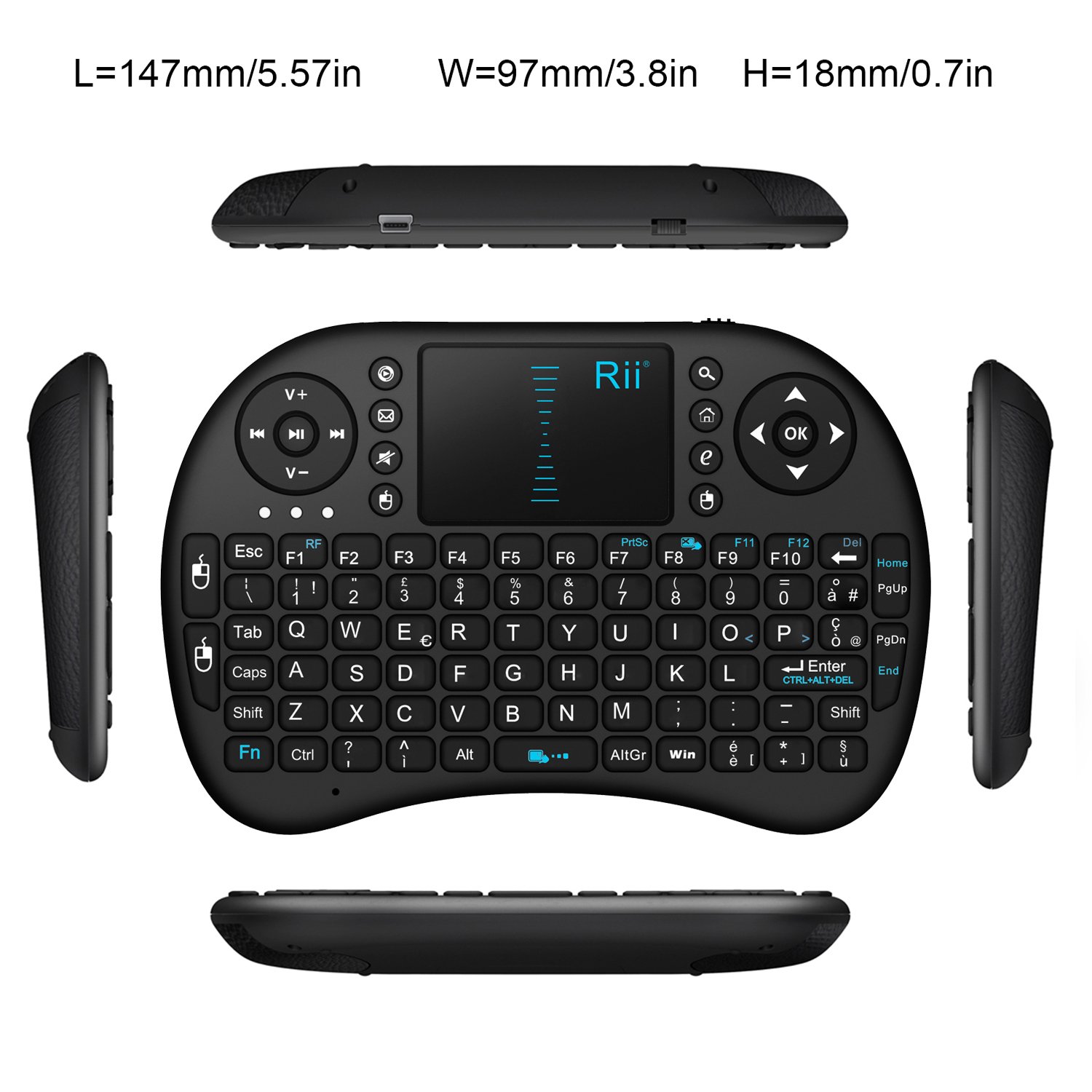
تصوير: مٿي کان هيٺ تائين view of the Rii Mini i8 keyboard with its dimensions (length, width, height) indicated in millimeters and inches.
11. وارنٽي ۽ سپورٽ
وارنٽي جي معلومات ۽ ٽيڪنيڪل سپورٽ لاءِ، مھرباني ڪري ٺاھيندڙ جي سرڪاري ويب سائيٽ ڏانھن رجوع ڪريو webسائيٽ تي وڃو يا پنهنجي پرچون ڪندڙ سان رابطو ڪريو. وارنٽي دعوائن لاءِ پنهنجي خريداري جي رسيد رکو.