
تعارف
This manual provides comprehensive instructions for the Superior Hotel TV Universal Programmable Remote Control, Model 8054242080070. This remote is specifically designed for hotel environments, featuring large buttons for ease of use and a disabled menu access button to prevent unauthorized changes to TV settings. It is programmable via PC for simple setup.
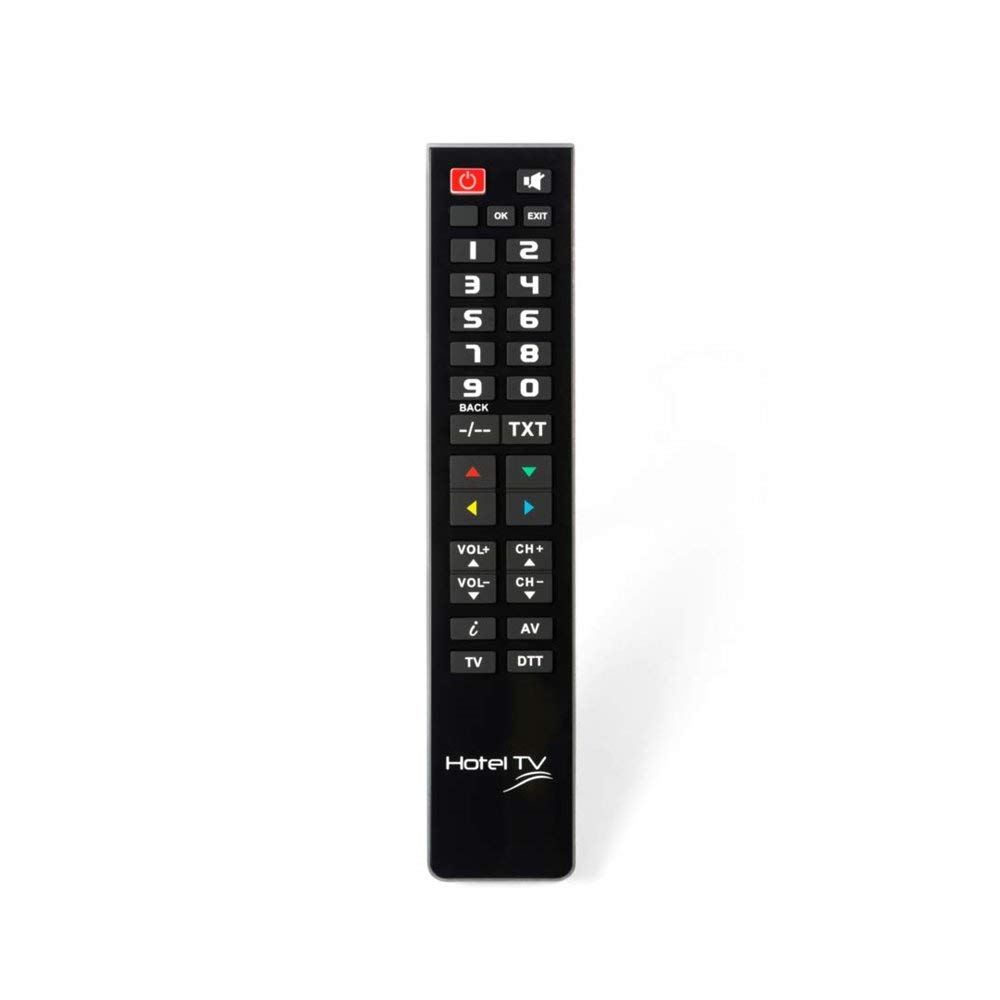
Image: Superior Hotel TV Universal Programmable Remote Control, showing its compact design and large buttons.
سيٽ اپ ڪريو
1. بيٽري لڳائڻ
- ريموٽ ڪنٽرول جي پٺيءَ تي بيٽري جي دٻي جي احاطي کي ڳولھيو.
- ڍڪ کي هيٺئين طرف سلائڊ ڪريو يا ان کي کولڻ لاءِ لچ کي دٻايو.
- Insert two AAA (LR03) batteries, ensuring the correct polarity (+ and -) as indicated inside the compartment. نوٽ: بيٽري شامل نه آهن.
- بيٽري جي ڪمپارٽمينٽ جي ڍڪ کي تبديل ڪريو جيستائين اهو محفوظ طور تي جاءِ تي نه اچي.
2. پي سي پروگرامنگ
The remote control requires programming via a personal computer to function with your specific TV model. Follow these steps:
- Visit the official programming software webسائيٽ: www.telecontrol.tv.
- Download and install the programming software onto your PC.
- Connect the remote control to your PC using a compatible USB cable (not included).
- Follow the on-screen instructions within the software to select your TV brand and model, and program the remote control.
- Once programming is complete, disconnect the remote control from your PC.
آپريٽنگ هدايتون
After successful programming, the remote control is ready for use. Its design focuses on essential functions for hotel guests.
- پاور بٽڻ: ٽي وي کي کولڻ يا بند ڪرڻ جي لاءِ دٻايو.
- چينل مٿي / هيٺ: Use these buttons to change TV channels sequentially.
- حجم مٿي / ھيٺ: Adjust the TV's audio volume.
- گونگا بٽڻ: Temporarily silence the TV audio.
- نمبر بٽڻ (0-9): Directly select TV channels.
اهم نوٽ: The menu access button is intentionally inactive on this remote control. This design prevents guests from altering TV settings, ensuring consistent operation within a hotel environment.
سار سنڀال
بيٽري مٽائڻ
When the remote control's performance degrades or it stops responding, replace the batteries. Follow the battery installation steps outlined in the "Setup" section. Always use new AAA (LR03) alkaline batteries.
صفائي
ريموٽ ڪنٽرول کي صاف ڪرڻ لاءِ، نرم، سڪل ڪپڙي سان ان جي مٿاڇري کي نرميءَ سان صاف ڪريو. ضدي مٽيءَ لاءِ، ٿورو ڊيampen the cloth with water or a mild, non-abrasive cleaner. Avoid using harsh chemicals or submerging the remote in liquid.
مشڪلاتون
- ريموٽ جواب نه ڏئي رهيو آهي:
- چيڪ ڪريو ته بيٽريون صحيح طرح سان لڳل آهن ۽ ڪافي چارج آهن. جيڪڏهن ضروري هجي ته تبديل ڪريو.
- پڪ ڪريو ته ريموٽ ڪنٽرول ۽ ٽي وي جي انفراريڊ رسيور جي وچ ۾ ڪا به رڪاوٽ نه آهي.
- Verify that the remote was programmed correctly for your TV model using the PC software.
- بٽڻ ڪم نه ڪري رهيا آهن:
- Some buttons, like the menu button, are intentionally disabled for hotel use.
- If essential buttons are not working, re-program the remote control via PC.
- ريموٽ ڪنٽرول کي صاف ڪريو ته جيئن پڪ ڪري سگهجي ته ڪو به ملبو بٽڻ دٻائڻ سان مداخلت نه ڪري.
- پروگرامنگ جا مسئلا:
- Ensure your PC meets the minimum requirements for the programming software.
- Use a reliable USB cable for connection.
- Refer to the software's help section or the telecontrol.tv website for specific programming guidance.
وضاحتون
| برانڊ | Superior Electronics |
| ماڊل نمبر | 8054242080070 |
| مطابقت رکندڙ ڊوائيسز | ٽيليويزن |
| رابطي ٽيڪنالاجي | ريڊيو فريڪوئنسي (RF) |
| خاص خصوصيت | Pre-programmed (via PC) |
| وڌ ۾ وڌ سپورٽ ٿيل ڊوائيسز | 1 |
| بٽڻ جو تعداد | 1 (referring to the main function set, not individual keys) |
| وڌ ۾ وڌ رينج | 10 ميٽر |
| بيٽري جي وضاحت | اي اي اي (ايل آر 03) |
| UPC / EAN | 08054242080070 |
وارنٽي ۽ سپورٽ
وارنٽي ڄاڻ
Specific warranty details for the Superior Hotel TV Universal Programmable Remote Control are not provided in this manual. Please refer to your purchase documentation or contact your vendor for warranty terms and conditions.
ٽيڪنيڪل سپورٽ
For technical assistance, programming software, and additional information, please visit the official webسائيٽ: