
1. تعارف
This manual provides essential information for the safe and efficient operation of your InFocus IN2126a WXGA Network Projector. Please read this manual thoroughly before using the projector and retain it for future reference. The InFocus IN2126a is designed for versatile use in various environments, offering high brightness and network capabilities.
2. حفاظت جي ڄاڻ
پروجيڪٽر کي نقصان کان بچائڻ ۽ استعمال ڪندڙ جي حفاظت کي يقيني بڻائڻ لاءِ هيٺ ڏنل حفاظتي احتياطن تي عمل ڪريو:
- وينٽيليشن جي سوراخن کي نه روڪيو. پروجيڪٽر جي چوڌاري مناسب هوا جي وهڪري کي يقيني بڻايو.
- جڏهن ايلamp روشن روشني اکين کي نقصان پهچائي سگھي ٿي.
- پروجيڪٽر کي سڌي سج جي روشني ۾، گرمي جي ذريعن جي ويجهو، يا وڌيڪ نمي يا گهڻي مٽي واري ماحول ۾ رکڻ کان پاسو ڪريو.
- صرف پروجيڪٽر سان فراهم ڪيل پاور ڪنڊ استعمال ڪريو.
- سڀني سروسنگ کي قابل سروس اهلڪارن جي حوالي ڪريو. پروجيڪٽر کي پاڻ کولڻ يا مرمت ڪرڻ جي ڪوشش نه ڪريو.
3. پراڊڪٽ ختمview
Familiarize yourself with the components and features of your InFocus IN2126a projector.
3.1 پروجيڪٽر جا جزا
شڪل 1: سامهون واري پاسي view of the InFocus IN2126a projector, showing the lens and ventilation.

شڪل 2: پاسي view of the InFocus IN2126a projector, highlighting the ventilation grilles.
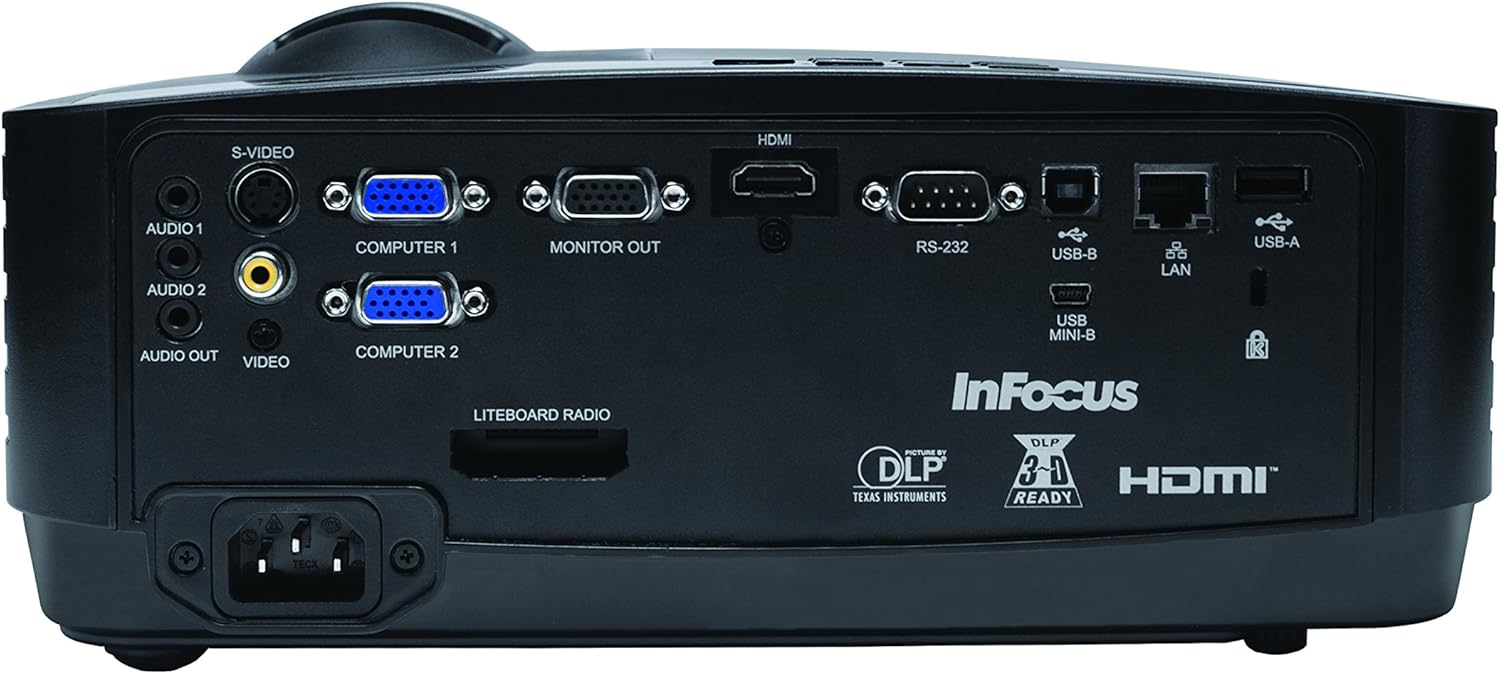
3.2 ريئر پينل ڪنيڪشن
پوئين پينل ٻاهرين ڊوائيسز کي ڳنڍڻ لاءِ مختلف ان پٽ ۽ آئوٽ پُٽ پورٽ فراهم ڪري ٿو.
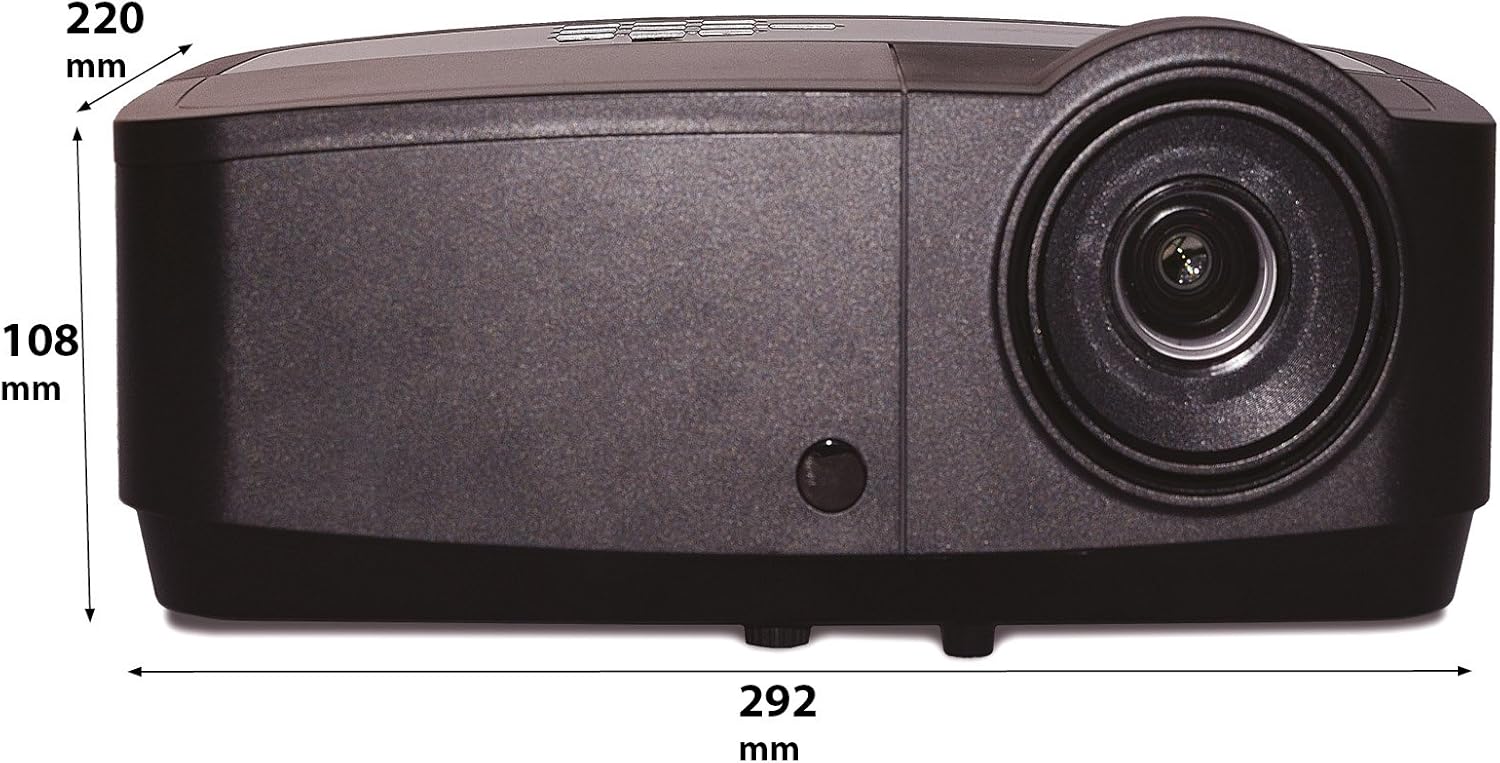
Figure 3: Rear panel of the InFocus IN2126a projector, displaying various connectivity ports including HDMI, VGA, USB, and LAN.
- HDMI: For digital video and audio input.
- COMPUTER 1 / COMPUTER 2 (VGA): ڪمپيوٽرن مان اينالاگ وڊيو ان پٽ لاءِ.
- MONITOR OUT (VGA): ٻاهرين مانيٽر کي ڳنڍڻ لاءِ.
- USB-B / USB Mini-B: For service or specific USB functions.
- USB-A: For connecting USB devices, such as a wireless adapter.
- لين (آر جي 45): نيٽ ورڪ ڪنيڪشن لاءِ.
- آر ايس 232: سيريل ڪنٽرول لاءِ.
- AUDIO 1 / AUDIO 2 (RCA): آڊيو ان پٽ لاءِ.
- آڊيو ٻاهر: ٻاهرين آڊيو سسٽم کي ڳنڍڻ لاءِ.
- VIDEO (RCA): جامع وڊيو ان پٽ لاءِ.
- س-وڊيو: For S-Video input.
- پاور داخل ٿيڻ: بجلي جي تار کي ڳنڍڻ لاءِ.
3.3 مٿيون پينل ڪنٽرول
The top panel features controls for basic projector functions and image adjustments.

Figure 4: Top panel of the InFocus IN2126a projector, showing the control buttons and focus/zoom rings.
- پاور بٽڻ: پروجيڪٽر کي آن يا آف ڪري ٿو.
- مينيو/ايگزٽ بٽڻ: Accesses or exits the on-screen display (OSD) menu.
- نيويگيشن بٽڻ (مٿي، هيٺ، کاٻي، ساڄي): مينيو آپشنز ذريعي نيويگيٽ ڪري ٿو.
- داخل ڪريو بٽڻ: مينيو ۾ چونڊن جي تصديق ڪري ٿو.
- ذريعو بٽن: ان پٽ ذريعن کي چونڊيو.
- Blank Button: Temporarily blanks the screen.
- خودڪار بٽڻ: خودڪار طريقي سان تصوير سيٽنگون ترتيب ڏئي ٿو.
- فوڪس رنگ: تصوير جي تيزيءَ کي ترتيب ڏئي ٿو.
- وڏو انگ: تصوير جي سائيز کي ترتيب ڏئي ٿو.
3.4 طول و عرض
Understanding the physical dimensions is important for installation and placement.

Figure 5: Diagram illustrating the dimensions of the InFocus IN2126a projector (292mm length, 220mm width, 108mm height).
4. سيٽ اپ
4.1 پروجيڪٽر جي جاءِ
Place the projector on a stable, flat surface or mount it securely. Ensure the projector is positioned at an appropriate distance from the screen to achieve the desired image size. Maintain sufficient space around the projector for proper ventilation.
4.2 ڳنڍڻ وارا آلات
- پاور ڪنيڪشن: پاور ڪنڊ کي پروجيڪٽر جي پاور انليٽ سان ڳنڍيو ۽ پوءِ گرائونڊ ٿيل اليڪٽريڪل آئوٽليٽ سان ڳنڍيو.
- وڊيو جو ذريعو:
- For digital sources (e.g., Blu-ray player, laptop), use an HDMI cable to connect to the HDMI port.
- For analog computer sources, use a VGA cable to connect to the COMPUTER 1 or COMPUTER 2 port.
- For other video sources, use the appropriate S-VIDEO or VIDEO (RCA) connections.
- آڊيو ذريعو: If your video source does not transmit audio via HDMI, connect audio cables to the AUDIO 1 or AUDIO 2 ports.
- نيٽ ورڪ ڪنيڪشن: For wired network access, connect an Ethernet cable to the LAN port.
- وائرلیس رابطي If using a compatible wireless adapter (sold separately), insert it into the USB-A port.
4.3 پاور آن/آف
- پاور آن ڪرڻ: Press the Power button on the projector's top panel or the remote control. The power indicator light will illuminate.
- پاور آف ڪرڻ: Press the Power button again. The projector will enter a cooling cycle before shutting down completely. Do not unplug the projector during the cooling cycle.
5. پروجيڪٽر هلائڻ
5.1 ماخذ جي چونڊ
After powering on, the projector may automatically detect an active input source. If not, or to switch sources:
- کي دٻايو ذريعو پروجيڪٽر يا ريموٽ ڪنٽرول تي بٽڻ.
- Use the navigation buttons to highlight the desired input source (e.g., HDMI, Computer 1, Video).
- دٻايو داخل ڪريو ذريعو چونڊڻ لاء.
5.2 تصويري ترتيب
- فوڪس: گھمايو فڪر ring on the projector lens until the image appears sharp and clear.
- وڏو ڪريو: گھمايو زوم ring on the projector lens to adjust the image size to fit your screen.
- ڪيسٽون جي اصلاح: جيڪڏهن تصوير trapezoidal نظر اچي ٿي، ته تصوير کي چورس ڪرڻ لاءِ OSD مينيو ۾ ڪيسٽون اصلاح جي خصوصيت استعمال ڪريو.
5.3 آن اسڪرين ڊسپلي (OSD) مينيو
The OSD menu allows you to configure various projector settings.
- کي دٻايو مينيو او ايس ڊي مينيو کولڻ لاءِ بٽڻ دٻايو.
- استعمال ڪريو مٿي / هيٺ navigation buttons to select a menu category.
- استعمال ڪريو کاٻي / ساڄي navigation buttons to adjust settings or enter sub-menus.
- دٻايو داخل ڪريو تبديلين جي تصديق ڪرڻ لاءِ.
- دٻايو نڪرڻ او ايس ڊي مينيو بند ڪرڻ لاءِ.
5.4 وائرليس ڪنيڪشن
The IN2126a is wireless-ready. To enable wireless display, a compatible InFocus wireless adapter (sold separately) must be connected to the USB-A port. Refer to the wireless adapter's specific instructions for setup and connection procedures.
5.5 3D ڪارڪردگي
پروجيڪٽر 3D مواد کي سپورٽ ڪري ٿو. view 3D content, you will need a compatible 3D source, 3D glasses, and appropriate 3D content. Refer to the projector's OSD menu for 3D settings and ensure your source device is configured for 3D output.
6. سار سنڀال
باقاعده سار سنڀال بهترين ڪارڪردگي کي يقيني بڻائي ٿي ۽ توهان جي پروجيڪٽر جي زندگي وڌائي ٿي.
6.1 ايلamp بدلائڻ
پروجيڪٽر ايلamp has a limited lifespan (approximately 4000 hours). When the lamp indicator illuminates or the image brightness significantly decreases, the lamp needs replacement. Always use an authorized InFocus replacement lamp. Refer to the full service manual for detailed lamp replacement instructions or contact customer support.
6.2 فلٽر صفائي
Dust accumulation on the air filter can impede airflow and cause overheating. Regularly clean the air filter to maintain proper ventilation. Turn off and unplug the projector before cleaning. Use a soft brush or vacuum cleaner to remove dust from the filter cover.
6.3 عام صفائي
- پروجيڪٽر سيasing: نرم، لِنٽ کان خالي ڪپڙو استعمال ڪريو ڊيampنرم، غير رگڙيندڙ ڪلينر سان سينگاريل. سخت ڪيميڪل استعمال نه ڪريو.
- لينس: Use a lens cleaning cloth and specialized lens cleaning solution. Avoid touching the lens surface with your fingers.
7. مسئلا حل ڪرڻ
جيڪڏهن توهان کي پنهنجي پروجيڪٽر سان مسئلا درپيش اچن ٿا، ته هيٺ ڏنل عام مسئلن ۽ حلن جو حوالو ڏيو:
| مسئلو | ممڪن سبب | حل |
|---|---|---|
| اسڪرين تي ڪوبه تصوير نه آهي | غلط ان پٽ سورس چونڊيو ويو آهي؛ ڪيبل ڪنيڪشن لوز آهي؛ پروجيڪٽر اسٽينڊ بائي موڊ ۾ آهي. | Verify input source; Check all cable connections; Press power button to wake from standby. |
| تصوير urري آهي | فوڪس ترتيب نه ڏنو ويو آهي؛ پروجيڪٽر اسڪرين کان تمام ويجهو/ پري آهي. | Adjust the focus ring; Reposition the projector and adjust zoom. |
| تصوير ٽراپيزائيڊل آهي. | پروجيڪٽر اسڪرين تي عمودي نه آهي. | او ايس ڊي مينيو ۾ ڪيسٽون اصلاح استعمال ڪريو. |
| نه آڊيو | Audio cables not connected; Volume too low; Muted. | Check audio cable connections; Adjust volume; Unmute projector. |
| پروجيڪٽر گرم ٿي ويندو آهي ۽ بند ٿي ويندو آهي | بند ٿيل وينٽيليشن؛ گندو ايئر فلٽر. | Ensure clear airflow around projector; Clean the air filter. |
For more detailed troubleshooting, consult the complete user manual or contact InFocus customer support.
8. وضاحتون
Key technical specifications for the InFocus IN2126a WXGA Network Projector:
- ماڊل نالو: IN2126a
- ڊسپلي جو قسم: ڊي ايل پي
- اصلي قرارداد: 1280 x 800 (ڊبليو ايڪس جي اي)
- روشني: 3500 Lumens
- مقابلي جي نسبت: 15000:1
- رنگ جي پيداوار: 1.07 Billion Colors (30-bit)
- روشني جو ذريعو آپريٽنگ زندگي: 4000 ڪلاڪ
- رابطي ٽيڪنالاجي: Wireless-ready, HDMI 1.4, VGA (x2), USB (Type-A, Mini-B, Type-B), LAN (RJ45), RS-232, Audio In (x2), Audio Out, Video (RCA), S-Video
- خاص خاصيتون: 3D-Ready, Network Projector
- فارم فيڪٽر: پورٽبل
- چڙهڻ جو قسم: ٽيبل ٽاپ جبل
- شيء جو وزن: 7.1 پائونڊ
9. وارنٽي ۽ سپورٽ
For information regarding your product's warranty, please refer to the warranty card included with your purchase or visit the official InFocus website. For technical support, service, or to purchase accessories, please contact InFocus customer service through their official channels.