
YONGNUO YN560-III-USA
YONGNUO YN560-III-USA Speedlite Flash User Manual
Model: YN560-III-USA
1. تعارف
This manual provides detailed instructions for the safe and effective use of your YONGNUO YN560-III-USA Speedlite Flash. Please read this manual thoroughly before operating the device to ensure optimal performance and to prevent damage.
2. حفاظت جي ڄاڻ
Always observe the following safety precautions to prevent injury or damage to the flash unit:
- فليش يونٽ کي ڌار نه ڪريو يا تبديل نه ڪريو.
- Keep the flash unit away from water and moisture.
- Avoid direct eye exposure to the flash light, especially at close range.
- Use only specified batteries (4 AA batteries).
- Do not operate in environments with flammable gases or liquids.
3. پيڪيج مواد
پڪ ڪريو ته سڀئي شيون توهان جي پيڪيج ۾ موجود آهن:
- YONGNUO YN560-III-USA Speedlite Flash
- Protecting Bag
- ميني اسٽينڊ
- استعمال ڪندڙ جو دستياب (ھي دستاويز)
4. مصنوعات جون خاصيتون
The YONGNUO YN560-III-USA Speedlite Flash offers advanced features for versatile lighting control:
- Integrated 2.4G Wireless Receiver: Supports ultra-long-range wireless flash with a triggering distance of up to 100 meters.
- مطابقت: Can receive signals from RF-603 and RF-602 wireless transmitters, supporting 16 channels for flexible wireless flash setups.
- ڪيترائي ٽرگر موڊ: Can be triggered via camera hot shoe, 2.4G radio, S1 (optical slave), and S2 (pre-flash cancel optical slave) modes.
- زوم فنڪشن: Flash coverage can be adjusted manually from 24mm to 105mm.
- ٻاهرين پاور پورٽ: Equipped with a charging socket for an external power pack to reduce recycle time.
- PC Sync Port: Provides a PC port for synchronous flash triggering.
- وڏي LCD اسڪرين: Features a clear and intuitive display for easy operation and setting adjustments.
- Automatic Settings Save: Automatically saves your current settings for convenience.
5. سيٽ اپ
5.1 بيٽري لڳائڻ
- Open the battery compartment cover on the back of the flash unit.
- Insert four (4) AA-size batteries according to the polarity indicators (+/-) inside the compartment.
- بيٽري جي ڪمري واري ڍڪ کي محفوظ طور تي بند ڪريو.
5.2 فليش لڳائڻ
The YN560-III-USA can be mounted on a camera's hot shoe or used off-camera with the included mini stand.

سامهون view of the YN560-III-USA Speedlite Flash on its mini stand.
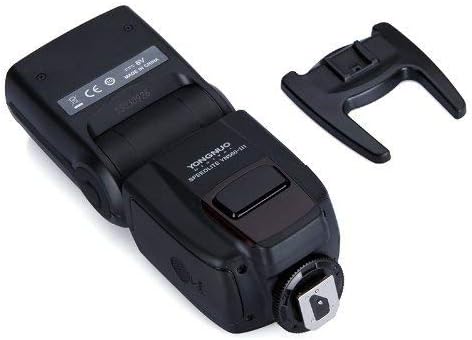
هيٺيون view showing the hot shoe mount and external ports.
On-Camera Mounting:
- فليش جي گرم جوتي کي پنهنجي ڪئميرا جي گرم جوتي جي ماؤنٽ ۾ سلائڊ ڪريو.
- Tighten the locking ring on the flash unit to secure it to the camera.
Off-Camera Mounting:
- Attach the flash unit to the included mini stand.
- Place the mini stand on a flat, stable surface or mount it onto a light stand/tripod.
5.3 Connecting External Power
For faster recycle times, an external power pack can be connected.

Close-up of the external power port (left) and PC sync port (right).
- Locate the external power port on the side of the flash unit.
- Connect the compatible external power pack cable to this port.
6. آپريٽنگ هدايتون
6.1 پاور آن/آف
کي دٻايو ۽ رکو آن/بند button for approximately 2 seconds to power the flash on or off.

Back panel with LCD screen and control buttons.
6.2 موڊ جي چونڊ
کي دٻايو موڊ موجود فليش موڊس ذريعي چڪر ڪرڻ لاءِ بٽڻ:
- ايم (مينوئل موڊ): Manually set the flash output power.
- ملٽي (اسٽروبوسڪوپڪ موڊ): Fires a series of rapid flashes.
- S1 (Optical Slave Mode): Triggers the flash when it detects another flash firing.
- S2 (Pre-flash Cancel Optical Slave Mode): Triggers the flash when it detects another flash firing, ignoring the camera's pre-flash.
6.3 پاور ايڊجسٽمينٽ
In Manual (M) mode, use the directional buttons (up/down) to adjust the flash output power from 1/1 (full power) to 1/128 in 1/3 stop increments.
6.4 Zoom Adjustment
کي دٻايو زوم button to adjust the flash head's coverage. Use the directional buttons to select a focal length from 24mm, 28mm, 35mm, 50mm, 70mm, 80mm, to 105mm.

Flash head tilted with wide-angle diffuser and bounce card extended.
6.5 Wireless Operation (2.4G)
The YN560-III-USA has an integrated 2.4G wireless receiver. To use this feature:
- Ensure the flash is in a wireless slave mode (indicated by a wireless icon on the LCD).
- Set your compatible YONGNUO 2.4G wireless transmitter (e.g., RF-603, RF-602, YN560-TX) to the same channel as the flash unit.
- The flash will trigger wirelessly when commanded by the transmitter.
6.6 PC Sync Port Usage
Connect a PC sync cable from your camera's PC sync terminal to the flash's PC sync port for wired synchronization.
7. سار سنڀال
- فليش يونٽ کي نرم، سڪل ڪپڙي سان صاف ڪريو. سالوينٽس يا رگڙيندڙ ڪلينر استعمال نه ڪريو.
- جيڪڏهن فليش ڊگهي عرصي تائين استعمال نه ٿيندي ته جيئن ليڪيج کي روڪي سگهجي، ته پوءِ بيٽريون ڪڍي ڇڏيون.
- Store the flash in a cool, dry place, away from direct sunlight and extreme temperatures.
8. مسئلا حل ڪرڻ
| مسئلو | ممڪن سبب | حل |
|---|---|---|
| Flash does not power on. | بيٽريون ختم ٿي ويون آهن يا غلط طور تي لڳايون ويون آهن. | بيٽريون تبديل ڪريو يا پولارٽي چيڪ ڪريو. |
| فليش نه ٿو هلي. | Flash is not fully charged. Incorrect mode selected. Hot shoe connection is loose. | Wait for recycle indicator. Select appropriate mode (M, S1, S2). Re-mount flash securely. |
| Wireless triggering fails. | Channels do not match. Transmitter is out of range. Interference. | Ensure flash and transmitter are on the same channel. Reduce distance. Change channels. |
| فليش آئوٽ پُٽ غير مطابقت رکندڙ آهي. | گھٽ بيٽري طاقت. | Replace batteries or connect external power pack. |
9. وضاحتون
| خاصيت | تفصيل |
|---|---|
| گائيڊ نمبر | GN58 (ISO 100, 105mm) |
| فليش موڊ | M, Multi, S1, S2 |
| زوم رينج | 24, 28, 35, 50, 70, 80, 105mm |
| عمودي گردش زاويه | -7 کان 90 درجا |
| افقي گردش زاويه | 0 کان 270 درجا |
| بجلي جي فراهمي | 4 x AA size batteries (Alkaline or Ni-MH) |
| ريسائيڪل ٽائيم | Approx. 3 seconds (with new AA alkaline batteries) |
| رنگ جي درجه حرارت | 5600K |
| فليش مدت | 1/200s - 1/20000s |
| طول و عرض | 3.25 x 3.75 x 8.25 انچ (تقريبن) |
| وزن | 1.06 پائونڊ (بيٽرين کان سواءِ) |
| هم آهنگ Mountings | Canon, Nikon, Pentax, Olympus (standard hot shoe) |
| فليش هم وقت سازي جي رفتار | 1/200 or 1/250 (depending on camera model) |
10. وارنٽي ۽ سپورٽ
This product comes with a limited warranty. Please refer to the warranty card included in your product packaging for specific terms and conditions. For technical support or service inquiries, please contact your local YONGNUO distributor or visit the official YONGNUO webرابطي جي معلومات لاء سائيٽ.
Ask a question about this manual
Ask about setup, troubleshooting, compatibility, parts, safety, or missing instructions. Manuals+ will review the question and use this page’s manual context to help answer it.