
تعارف
This manual provides instructions for the setup, operation, and maintenance of your DIRECTV Universal Remote Control, model RC65. This remote is designed to operate your DIRECTV receiver and can be programmed to control other audio/video devices such as televisions and sound systems.
Please read this manual thoroughly before using your remote control to ensure proper functionality and to maximize your viewتجربو.
پيداوار ختمview
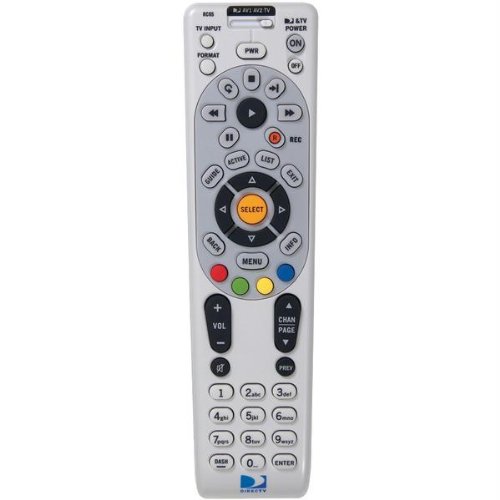
تصوير: سامهون view of the DIRECTV Universal Remote Control RC65. This image displays the remote's ergonomic design and the layout of its primary control buttons, including the directional pad, channel and volume controls, and various function keys. The remote is black with white button labels.
The DIRECTV RC65 remote control is a universal remote capable of controlling multiple devices. Its design focuses on ease of use and compatibility with a wide range of audio/video equipment.
سيٽ اپ ڪريو
1. بيٽري لڳائڻ
- ريموٽ ڪنٽرول جي پٺي تي بيٽري جي خاني کي ڳوليو.
- ٽيب تي دٻايو ۽ بيٽري جو ڍڪ بند ڪريو.
- ٻہ (2) AA بيٽريون داخل ڪريو، پڪ ڪريو ته مثبت (+) ۽ منفي (-) ٽرمينل ڪمپارٽمينٽ اندر نشانن سان برابر هجن.
- بيٽري جي ڍڪ کي واپس جاء تي سلائيڊ ڪريو جيستائين اهو محفوظ طور تي ڪلڪ ڪري.
Note: Batteries are not included with the remote control.
2. Programming for DIRECTV Receiver
The remote is typically pre-programmed to operate your DIRECTV receiver. If it does not work, or if you are setting up a new remote, follow these steps:
- ريموٽ کي پنهنجي DIRECTV رسيور ڏانهن اشارو ڪريو.
- کي دٻايو ۽ رکو خاموش ۽ چونڊيو buttons simultaneously until the green light at the top of the remote flashes twice.
- ڪوڊ داخل ڪريو 961. The green light will flash twice.
- کي دٻايو چينل اپ button. The green light will flash twice.
- کي دٻايو چونڊيو button. The green light will flash twice.
- Test the remote by changing channels or adjusting volume.
3. Programming for Other Devices (TV, Audio)
To program the remote to control your television or other audio/video devices, you will need the device's brand code. Refer to the code list provided with your DIRECTV system or search online for "DIRECTV remote codes [your device brand]".
- Turn on the device you wish to program (e.g., your TV).
- کي دٻايو ۽ رکو خاموش ۽ چونڊيو buttons simultaneously until the green light at the top of the remote flashes twice.
- Press the mode button for the device you are programming (e.g., TV for television, AV1 or AV2 for audio/video devices). The green light will flash once.
- Enter the 5-digit code for your device's brand. The green light will flash twice if the code is accepted.
- ريموٽ کي ڊوائيس ڏانهن اشارو ڪريو ۽ دٻايو پاور بٽڻ. جيڪڏهن ڊوائيس بند ٿي وڃي ته، پروگرامنگ ڪامياب ٿي وئي.
- If the device does not turn off, repeat steps 1-5 with another code for your device's brand.
Tip: If you cannot find a code, try the "Code Search" method: After step 3, instead of entering a code, press چينل اپ repeatedly until the device turns off, then press چونڊيو.
آپريٽنگ هدايتون
The DIRECTV RC65 remote control features a standard layout for easy navigation and control of your entertainment system.
- MODE Buttons (DIRECTV, TV, AV1, AV2): Select the device you want to control. Press the corresponding button before issuing commands for that device.
- طاقت: چونڊيل ڊوائيس کي آن يا آف ڪري ٿو.
- حجم مٿي/هيٺ: Adjusts the volume of the selected audio device (usually TV or AV receiver).
- CHANNEL UP/DOWN: Changes channels on the DIRECTV receiver.
- مٽي: آواز کي خاموش يا غير خاموش ڪري ٿو.
- ھدايت: Displays the DIRECTV program guide.
- مينيو Accesses the DIRECTV system menu.
- SELECT/OK: چونڊن جي تصديق ڪري ٿو يا مينيو ۾ داخل ٿئي ٿو.
- ARROW Buttons (UP, DOWN, LEFT, RIGHT): Navigate through menus and guides.
- رڪارڊ: Records the current program on your DIRECTV DVR.
- PLAY, PAUSE, STOP, REW, FF, SKIP: Control playback of recorded content or live TV (with DVR).
- ڄاڻ: موجوده پروگرام بابت معلومات ڏيکاري ٿو.
- نڪرڻ: مينيو يا گائيڊ مان نڪرندو آهي.
Note: Specific button functions may vary slightly depending on your DIRECTV receiver model and programmed devices.
سار سنڀال
ريموٽ صاف ڪرڻ
- ريموٽ ڪنٽرول جي مٿاڇري کي صاف ڪرڻ لاءِ نرم، سڪل ڪپڙو استعمال ڪريو.
- ضدي مٽيءَ لاءِ، ٿورو ڊيampڪپڙي کي پاڻي يا نرم، غير رگڙيندڙ ڪلينر سان صاف ڪريو. ريموٽ تي سڌو سنئون ڪلينر اسپري نه ڪريو.
- سخت ڪيميڪلز، سالوينٽس، يا رگڙيندڙ صفائي پيڊ استعمال ڪرڻ کان پاسو ڪريو، ڇاڪاڻ ته اهي ريموٽ جي ختم يا اندروني حصن کي نقصان پهچائي سگهن ٿا.
بيٽري مٽائڻ
Replace batteries when the remote's response becomes sluggish or if the green light at the top does not flash when a button is pressed. Refer to the "Battery Installation" section under Setup for detailed instructions.
- هميشه ٻنهي بيٽرن کي هڪ ئي وقت مٽايو.
- Use new AA alkaline batteries for optimal performance.
- مقامي ضابطن جي مطابق پراڻين بيٽرين کي ضايع ڪريو.
مشڪلاتون
ريموٽ جواب نه ڏيڻ
- بيٽري چيڪ ڪريو: پڪ ڪريو ته بيٽريون صحيح طرح سان لڳايون ويون آهن ۽ ختم نه ٿيون ٿين. جيڪڏهن ضروري هجي ته تبديل ڪريو.
- نظارو لائن: Make sure there are no obstructions between the remote and the device you are trying to control. The remote uses infrared (IR) signals, which require a clear line of sight.
- درست موڊ: Verify that the correct mode button (DIRECTV, TV, AV1, AV2) is pressed for the device you intend to control.
- ريموٽ ري سيٽ ڪريو: Remove batteries, press all buttons a few times to discharge any residual power, then reinsert batteries.
Device Not Responding After Programming
- تصديق ڪوڊ: Double-check that you entered the correct 5-digit code for your device's brand. Try other codes listed for your brand.
- ڪوڊ ڳولها: Attempt the "Code Search" method described in the "Programming for Other Devices" section.
- ڊوائيس مطابقت: While the remote has an extensive code library, some older or very new devices may not be fully compatible.
Volume/Channel Control Issues
- حجم تالا: Ensure the volume is not locked to the DIRECTV receiver if you want to control the TV volume. To unlock, press and hold خاموش ۽ چونڊيو until the green light flashes twice, then enter 993. دٻايو چونڊيو.
- چينل ڪنٽرول: Ensure the remote is in DIRECTV mode to change channels on the receiver.
وضاحتون
| خاصيت | تفصيل |
|---|---|
| برانڊ | DIRECTV |
| ماڊل جو نالو / نمبر | آر سي 65 |
| خاص خصوصيت | عالمگير |
| رنگ | ڪارو |
| مطابقت رکندڙ ڊوائيسز | Television, DIRECTV Receiver, Audio/Video Devices |
| رابطي ٽيڪنالاجي | انفراريڊ (IR) |
| ڪنٽرولر جو قسم | بٽڻ ڪنٽرول |
| بيٽري جو قسم | 2 x AA بيٽريون (شامل نه آھن) |
| شيءِ جو وزن | تقريبن 0.52 پائونڊ |
وارنٽي ڄاڻ
This DIRECTV Universal Remote Control (Model RC65) comes with a limited warranty against defects in materials and workmanship under normal use. The warranty period typically covers 90 days from the date of purchase. Please retain your proof of purchase for warranty claims.
This warranty does not cover damage caused by misuse, accident, unauthorized modification, or use with non-DIRECTV approved accessories. For specific warranty terms and conditions, please refer to the documentation included with your DIRECTV system or visit the official DIRECTV support webسائيٽ.
ڪسٽمر سپورٽ
If you require further assistance with your DIRECTV Universal Remote Control, please contact DIRECTV customer support:
- آن لائن سپورٽ: Visit the official DIRECTV support website for FAQs, troubleshooting guides, and programming code lists.
- فون سپورٽ: Refer to your DIRECTV service agreement or bill for the most current customer service phone number.
When contacting support, please have your DIRECTV account information and the remote control model number (RC65) ready.