
1. تعارف
The PowerDrive PD3000 is a 3000 Watt power inverter designed to convert 12V DC power from your vehicle's battery into 115V AC household power. This unit provides 3000 Watts of continuous AC power and has a high surge capacity of up to 6000 Watts to accommodate devices with high starting power requirements. It features integrated Bluetooth wireless technology for remote monitoring and control via a mobile application, along with a removable control panel for flexible placement. This manual provides essential information for the safe and efficient operation of your PowerDrive PD3000 inverter.
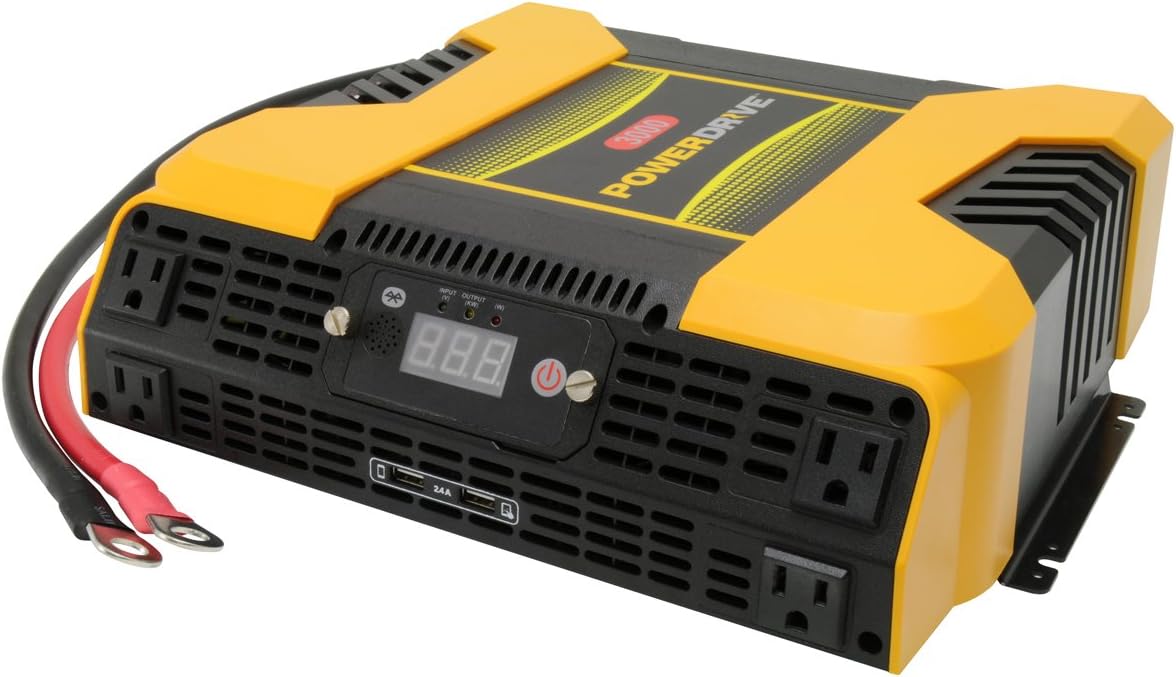
Figure 1.1: PowerDrive PD3000 3000 Watt Power Inverter, front view with outlets and display.
2. حفاظت جي ڄاڻ
Please read and understand all safety instructions before installing or operating the inverter. Failure to follow these instructions may result in electrical shock, fire, serious injury, or property damage.
- برقي جھٽڪو جو خطرو: انورٽر نه کوليو casing. اندر ڪو به استعمال ڪندڙ جي خدمت لائق پرزا نه آهن. سڀني سروسنگ کي قابل سروس اهلڪارن جي حوالي ڪريو.
- باهه جو خطرو: Do not operate the inverter near flammable materials, gases, or vapors. Ensure adequate ventilation around the inverter.
- بيٽري جي حفاظت: Connect the inverter only to a 12V DC battery system. Ensure battery terminals are clean and connections are secure. Wear eye protection and gloves when working with batteries.
- وينٽيليشن: پڪ ڪريو ته انورٽر سٺي هوادار علائقي ۾ نصب ٿيل آهي. وينٽيليشن جي سوراخن کي بلاڪ نه ڪريو.
- اوور لوڊ تحفظ: Do not exceed the inverter's continuous power rating of 3000 Watts. Overloading can damage the inverter and connected devices.
- نمي: Do not expose the inverter to rain, moisture, or spray.
3. پيڪيج مواد
پيڪنگ ڪرڻ وقت پڪ ڪريو ته سڀئي شيون موجود آهن:
- PowerDrive PD3000 Power Inverter Unit
- ھدايت وارو دستور
- بيٽري ڪيبل (ڳاڙهو ۽ ڪارو)
- Removable Control Panel with Cable
4. مصنوعات جون خاصيتون
The PowerDrive PD3000 inverter offers a range of features for versatile power conversion:
- هاء پاور آئوٽ: Delivers 3000 Watts of continuous AC power with a 6000 Watt surge capacity.
- گھڻا اي سي آئوٽليٽ: Equipped with four (4) 3-prong AC outlets to support various devices.
- USB چارجنگ پورٽ: Includes two (2) USB power ports (shared 2400mA total output) for charging mobile devices.
- بلوٽوت ڪنيڪشن: Allows remote access to features and settings via a free downloadable mobile application.
- Removable Control Panel: Detachable control panel enables remote monitoring and testing, offering installation flexibility.
- پائيدار تعمير: Features a robust ABS PVC composite housing designed to protect internal electronic components.
- حفاظت جي حفاظت: Incorporates audible alarms and automatic shut-off triggers for low battery, high battery, and overload conditions.

Figure 4.1: Front panel of the PowerDrive PD3000 showing AC outlets, USB ports, and digital display.
5. سيٽ اپ ۽ تنصيب
توهان جي انورٽر جي محفوظ ۽ ڪارآمد آپريشن لاءِ صحيح انسٽاليشن تمام ضروري آهي.
5.1 انورٽر کي چڙهڻ
- Choose a dry, well-ventilated location away from direct sunlight, heat sources, and flammable materials.
- پڪ ڪريو ته انورٽر جي چوڌاري هوا جي گردش لاءِ ڪافي جاءِ آهي، خاص طور تي کولنگ فين جي چوڌاري.
- Mount the inverter securely using appropriate hardware (not included) to prevent movement during operation.
5.2 12V DC پاور سورس سان ڳنڍڻ
اهم: Ensure the inverter is turned OFF before making any connections.
- ڳنڍيو ڳاڙهو (positive) battery cable to the ڳاڙهو (positive) terminal on the inverter. Tighten securely.
- جي ٻئي آخر سان ڳنڍيو ڳاڙهو (positive) battery cable to the هاڪاري (+) terminal of your 12V DC battery. Tighten securely.
- ڳنڍيو ڪارو (negative) battery cable to the ڪارو (negative) terminal on the inverter. Tighten securely.
- جي ٻئي آخر سان ڳنڍيو ڪارو (negative) battery cable to the ناڪاري (-) terminal of your 12V DC battery. Tighten securely.
- Verify all connections are tight and free from corrosion. Loose connections can cause overheating and damage.

Figure 5.1: PowerDrive PD3000 Inverter showing battery cable connections.

شڪل 5.2: پوئتي view of the PowerDrive PD3000 showing cooling fans and battery terminals.
5.3 Removable Control Panel Installation
The control panel can be used directly on the inverter or detached for remote operation.
- To use remotely, gently pull the control panel from the inverter.
- Connect the provided cable to the port on the back of the detached control panel and to the corresponding port on the inverter.
- Mount the control panel in a convenient location for monitoring and control.

Figure 5.3: PowerDrive PD3000 Inverter with its control panel detached for remote use.
6. آپريٽنگ هدايتون
6.1 پاور آن/آف
- After ensuring all battery connections are secure, press and hold the power button on the inverter or the remote control panel for approximately 1-2 seconds.
- The digital display will illuminate, and the inverter will begin providing AC power.
- To turn off, press and hold the power button again until the display turns off.
6.2 AC ڊوائيسز کي ڳنڍڻ
- Plug your 115V AC devices into the 3-prong AC outlets on the front of the inverter.
- مجموعي واٽ کي يقيني بڻائيtage of all connected devices does not exceed 3000 Watts.
- For devices with high starting loads (e.g., motors, compressors), ensure their surge wattage is within the inverter's 6000 Watt surge capacity.
6.3 USB چارجنگ پورٽ استعمال ڪندي
- Connect your USB-powered devices (e.g., smartphones, tablets) to the USB ports.
- The two USB ports share a total output of 2400mA (2.4A).
6.4 Understanding the Digital Display and Indicators
The digital display shows real-time information such as input voltage or output wattage. Indicator lights provide status feedback:
- ان پٽ LED: Indicates the status of the DC input power.
- آئوٽ پٽ LED: Indicates the status of the AC output power.
- غلطي LED: Illuminates to indicate an error condition (e.g., overload, low/high voltag۽.
7. بلوٽوت ڪنيڪشن
The PowerDrive PD3000 features Bluetooth wireless technology, allowing you to monitor and control the inverter using a compatible smartphone application.
7.1 Downloading the Mobile App
- ڳولھيو the official PowerDrive inverter app on your smartphone's app store (e.g., Apple App Store, Google Play Store).
- اپليڪيشن ڊائون لوڊ ۽ انسٽال ڪريو.
7.2 Pairing with Your Inverter
- پڪ ڪريو ته توهان جي اسمارٽ فون تي بلوٽوت فعال آهي.
- Turn on the PowerDrive PD3000 inverter.
- Open the PowerDrive mobile app. The app should automatically detect nearby PowerDrive inverters.
- Follow the on-screen prompts within the app to pair with your PD3000 inverter.
7.3 ايپ جون خاصيتون
Once paired, the app allows you to:
- مانيٽر ان پٽ voltage ۽ ٻاھر ڪڍوtage.
- View inverter status and fault codes.
- Remotely turn the inverter on or off.
- Adjust certain settings (refer to the app's help section for details).

Figure 7.1: Smartphone displaying the PowerDrive mobile application interface.
8. سار سنڀال
باقاعده سار سنڀال توهان جي انورٽر جي بهترين ڪارڪردگي ۽ ڊگهي عمر کي يقيني بڻائي ٿي.
- صفائي: وقت بوقت انورٽر جي ٻاهرين حصي کي سڪل، نرم ڪپڙي سان صاف ڪريو. مائع صاف ڪندڙ يا سالوينٽس استعمال نه ڪريو.
- وينٽيليشن: Ensure the cooling fans and ventilation openings are free from dust and debris. Use compressed air to clear blockages if necessary.
- ڪنيڪشن: Regularly check battery cable connections for tightness and corrosion. Clean terminals with a wire brush if corrosion is present.
- اسٽوريج: جيڪڏهن انورٽر کي گهڻي عرصي تائين ذخيرو ڪري رهيا آهيو، ته ان کي بيٽري کان ڌار ڪريو ۽ ان کي ٿڌي، سڪل جاءِ تي ذخيرو ڪريو.
9. مسئلا حل ڪرڻ
This section addresses common issues you might encounter with your PowerDrive PD3000 inverter.
9.1 عام مسئلا ۽ حل
- انورٽر آن نه ٿيڻ:
- Check battery connections for tightness and proper polarity.
- بيٽري جي مقدار کي يقيني بڻائيtage is above 10.5V DC (Low Battery Shut Down Point).
- Verify the power button is pressed and held for the required duration.
- ڪوبه اي سي آئوٽ پُٽ ناهي:
- Check if the inverter is powered on and the Output LED is illuminated.
- Ensure the connected AC device is functioning correctly.
- Check for an overload condition (Fault LED illuminated). Reduce the load.
- Audible Alarm / Fault LED On:
- گھٽ بيٽري الارم: Activates at 11 ± 0.3V DC. Recharge or replace the battery. The inverter will shut down at 10.5 ± 0.3V DC.
- High Battery Shut Down: Occurs at 15.5 ± 0.5V DC. Check the charging system of your vehicle.
- اوور لوڊ: ڪل واتtage of connected devices exceeds 3000 Watts. Disconnect some devices.
- و Temperatureيڪ گرمي پد: Inverter is overheating. Ensure proper ventilation and reduce load.
- بلوٽوٿ ڪنيڪشن جا مسئلا:
- Ensure Bluetooth is enabled on your smartphone and the inverter is powered on.
- Restart the mobile app and try pairing again.
- Ensure your smartphone is within range of the inverter.
10. وضاحتون
| تفصيل | قدر |
|---|---|
| ماڊل | پي ڊي 3000 |
| Continuous AC Power Output | 3000 واٽ |
| چوٽي سرجري پاور | 6000 واٽ |
| ڊي سي ان پٽ Voltage | 12.8V |
| AC آئوٽ وولٽtage | 115V |
| AC ٻاھر نڪرندڙ تعدد | 58Hz-62Hz |
| يو ايس بي آئوٽ | 5V / 2 (Shared 2400mA) |
| ڪارڪردگي (وڌ کان وڌ) | >88% |
| ڪارڪردگي (مڪمل لوڊ) | >84% |
| Battery Drain (No AC Load) | <0.6A |
| Low Battery Alarm Trigger | 11 ± 0.3V ڊي سي |
| Low Battery Shut Down Point | 10.5 ± 0.3V ڊي سي |
| High Battery Shut Down Point | 15.5 ± 0.5V ڊي سي |
| Recovering Voltage after Under Voltage Turn-off | 12 ± 0.3V ڊي سي |
| شيءِ جو وزن | 12.14 پائونڊ |
| پيداوار جي ماپ | 16.2 x 16.3 x 7.6 انچ |
11. وارنٽي ۽ سپورٽ
For warranty information or technical support, please refer to the documentation included with your purchase or visit the official PowerDrive webسائيٽ. ڪنهن به وارنٽي دعوائن لاءِ خريداري جو ثبوت رکو.