
تعارف
خريد ڪرڻ لاءِ مهربانيasing the DIAFIELD 1byone Ultra-Thin Wireless Keyboard. This manual provides detailed instructions on how to set up, operate, and maintain your new keyboard. Please read this manual thoroughly before use to ensure optimal performance and longevity of your device.
پيداوار ختمview
The DIAFIELD 1byone Ultra-Thin Wireless Keyboard is designed for versatility and convenience, featuring a compact design, a multi-function touchpad, and broad compatibility.

Figure 1: DIAFIELD 1byone Wireless Keyboard
اهم خاصيتون:
- Ultra Portability: Designed for use anywhere, anytime, with your smartphone, tablet, or Smart TV. Its compact design ensures easy transport and quick setup.
- انٽيگريٽيڊ ٽچ پيڊ: Features an ultra-thin touchpad that functions as a mouse, supporting various pre-set gestures for convenient navigation. The touchpad can also be disabled if not needed.
- پائيدار بيٽري جي زندگي: Equipped with a 500 mAh built-in battery, providing up to 4 months of standby time or 90 hours of continuous use on a single charge.
- Spanish QWERTY Layout: Specifically designed for Spanish speakers, including common Spanish symbols and the 'Ñ' key. Ensure your system's keyboard language is set to Spanish for proper functionality.
- بلوٽوت 3.0 ڪنيڪشن: Ensures fast and stable connections with tablets and other devices, providing synchronous input without delay. Setup is quick and easy.

Figure 2: Touchpad and Function Keys

Figure 3: Type-C Charging and Battery Life
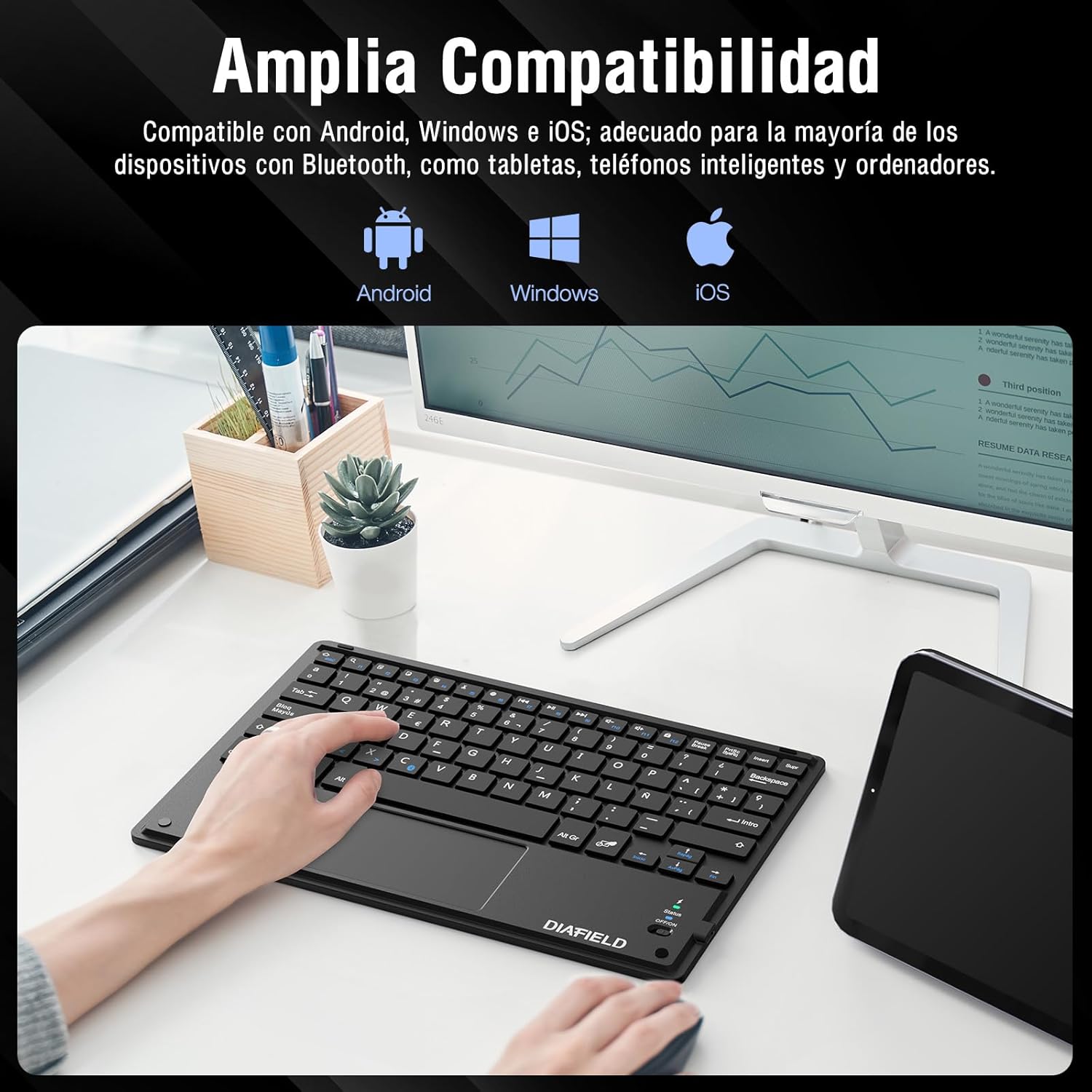
Figure 4: Broad Device Compatibility

Figure 5: Scissor-Type Key Mechanism

شڪل 6: ڪمپيڪٽ ۽ هلڪو وزن وارو ڊيزائن

Figure 7: Multi-touch Gestures

Figure 8: Keyboard in Use with Tablet
سيٽ اپ گائيڊ
1. ڪي بورڊ کي چارج ڪرڻ
Before first use, ensure the keyboard is fully charged. Connect the provided USB-C cable to the keyboard's charging port and the other end to a USB power source (e.g., computer, wall adapter). The charging indicator light will show the charging status.
- Charging time: Less than 4 hours.
- بيٽري جي گنجائش: 500 mAh.

Figure 9: Charging the Keyboard
2. بلوٽوٽ جوئر
Follow these simple steps to pair your keyboard with your device:
- Turn on the keyboard by sliding the power switch to the "ON" position. The status indicator light will illuminate.
- Activate Bluetooth on your device (tablet, smartphone, computer, Smart TV).
- On your device, search for available Bluetooth devices. The keyboard will appear as "DIAFIELD KEYBOARD" or similar.
- Select the keyboard from the list to initiate pairing. Your device may prompt you to enter a pairing code displayed on the screen. Type this code on the keyboard and press Enter.
- Once paired, the status indicator light on the keyboard will turn off or change color, indicating a successful connection.
The keyboard supports quick connection and pairing with iOS, Android, and Windows systems.

Figure 10: Bluetooth Pairing on a Smartphone
آپريٽنگ هدايتون
1. ٽچ پيڊ استعمال ڪرڻ
The integrated touchpad supports various multi-touch gestures to enhance your productivity:
- کاٻي ڪلڪ ڪريو: Single tap with one finger.
- ساڄي ڪلڪ ڪريو: Tap with two fingers.
- زوم ان / آئوٽ: ٻن آڱرين سان اندر يا ٻاهر چِٽڪيو.
- Scroll/Explore: Drag two fingers up or down, or left or right.
- Switch Windows: Swipe three fingers horizontally.
- Open Task Manager (Windows): Swipe three fingers upwards.
Figure 11: Touchpad Multi-touch Gestures
2. فنڪشن ڪنجيون
The top row of keys (F1-F12) includes multimedia and shortcut functions. To use these functions, press the Fn گهربل فنڪشن ڪي سان گڏ هڪ ئي وقت ڪي.
| ڪنيڪشن | فنڪشن |
|---|---|
| Fn + Esc | گهر |
| Fn + F1 | ڳولا |
| Fn + F2 | ڪاپي |
| Fn + F3 | ڪٽ |
| Fn + F4 | پيسٽ |
| Fn + F5 | حجم ھيٺ |
| Fn + F6 | حجم مٿي |
| Fn + F7 | اڳيون ٽريڪ |
| Fn + F8 | راند/روڪ |
| Fn + F9 | ايندڙ ٽريڪ |
| Fn + F10 | گونگا |
| Fn + F11 | سڀ چونڊيو |
| Fn + F12 | اسڪرين لاڪ |

Figure 12: Keyboard Function Keys
سار سنڀال
Proper maintenance will extend the life of your keyboard:
- صفائي: ڪيبورڊ جي مٿاڇري کي صاف ڪرڻ لاءِ نرم، سڪل، لِنٽ فري ڪپڙو استعمال ڪريو. ضدي مٽيءَ لاءِ، ٿورو ڊيampڪپڙي کي پاڻي يا نرم صفائي واري محلول سان ڌوئڻ ڏيو. گهڻي نمي کان پاسو ڪريو.
- اسٽوريج: ڪيبورڊ کي سڌي سج جي روشني ۽ انتهائي گرمي پد کان پري ٿڌي، سڪل جاءِ تي رکو.
- بيٽري جي سنڀال: To preserve battery life, avoid fully discharging the keyboard frequently. If storing for a long period, charge it to about 50% and recharge every few months.
- مائع کان بچاء: Keep the keyboard away from liquids to prevent damage to internal components.
مشڪلاتون
عام مسئلا ۽ حل:
- ڪي بورڊ بلوٽوٿ ذريعي نه ڳنڍي رهيو آهي:
- پڪ ڪريو ته ڪيبورڊ چارج ٿيل آهي ۽ آن ڪيو ويو آهي.
- پڪ ڪريو ته توهان جي ڊوائيس تي بلوٽوت فعال آهي.
- Try unpairing and re-pairing the keyboard from your device's Bluetooth settings.
- Restart both the keyboard (turn off/on) and your device.
- Characters typed do not match the keys (e.g., @ instead of "):
This often happens when the keyboard layout setting on your device does not match the physical layout of the keyboard (Spanish QWERTY). You need to change your device's keyboard input language to Spanish.
For Android devices, follow these general steps (may vary slightly by device model):
- ڏانهن وڃو سيٽنگون.
- ڏانهن وڃو عام انتظام (or System).
- چونڊيو ٻولي ۽ ان پٽ.
- Under "Physical keyboard" or "Keyboards," find your connected keyboard (e.g., "DIAFIELD KEYBOARD").
- Tap on the keyboard name and then select ڪيبورڊ لي آئوٽ سيٽ اپ ڪريو or Configure keyboard layouts.
- Ensure "Spanish (ES)" is selected or enabled. You might need to disable other languages.
- Alternatively, you can often switch layouts by pressing Ctrl + Spacebar ڪي بورڊ تي.

Figure 13: Resolving Keyboard Layout Mismatch
- Touchpad not responding:
- Ensure the touchpad is not accidentally disabled (check for a function key combination that toggles the touchpad).
- ٽچ پيڊ جي مٿاڇري کي صاف ڪريو.
- بلوٽوٿ ذريعي ڪيبورڊ کي ٻيهر ڳنڍيو.
وضاحتون
| خاصيت | تفصيل |
|---|---|
| برانڊ | 1 BY ONE |
| ٺاهيندڙ | ڊائفيلڊ |
| ماڊل نمبر | O0000-0713 |
| پيداوار جي ماپ | 25.8 x 17.2 x 0.4 سينٽي |
| وزن | 259 جي |
| رنگ | ڪارو |
| طاقت جو ذريعو | بيٽري |
| بيٽري جو قسم | انٽيگريٽيڊ ليٿيم بيٽري |
| بيٽري جلدtage | 4.2 وولٽ |
| بيٽرين جو تعداد | 1 |
| هارڊويئر پليٽ فارم | Computer, Laptop, Smartphone, Tablet, Television |
| آپريٽنگ سسٽم مطابقت | iOS، Android، ونڊوز |
| رابطي ٽيڪنالاجي | بلوٽوٿ 3.0 |
| ڪي بورڊ جي وضاحت | ملٽي ميڊيا |
| تجويز ڪيل استعمال | روزاني استعمال |
| خاص خصوصيت | ٽريڪ پيڊ |
| ڪنجي جو تعداد | 81 |
| Keyboard Backlight Color | اڪيلو رنگ |
| پهرين دستياب تاريخ | آگسٽ 24، 2015 |
وارنٽي ۽ سپورٽ
For warranty information and technical support, please refer to the contact details provided with your product packaging or visit the official 1 BY ONE webسائيٽ. ڪنهن به وارنٽي دعوائن لاءِ خريداري جي ثبوت طور پنهنجي خريداري جي رسيد رکو.
جيڪڏهن توهان کي ڪو مسئلو درپيش اچي ٿو جيڪو هن دستور ۾ شامل نه آهي، مهرباني ڪري مدد لاءِ ڪسٽمر سپورٽ سان رابطو ڪريو.