
تعارف
This manual provides detailed instructions for the setup, operation, and maintenance of your 1byone Foldable Wireless Backlit Keyboard. Please read this manual thoroughly before using the product to ensure proper function and longevity.
پيڪيج مواد
- 1 x 1byone Foldable Wireless Backlit Keyboard
- 1 x مائڪرو-USB چارجنگ ڪيبل
- 1 x استعمال ڪندڙ دستياب
پيداوار ختمview
Familiarize yourself with the keyboard's components and layout.

تصوير 1: The 1byone Foldable Wireless Backlit Keyboard shown fully unfolded, displaying the QWERTY layout with function keys and special keys for Android, Windows, and iOS.

تصوير 2: هڪ بند اپ view highlighting the Micro-USB port for charging and wired connection, along with the retractable balance supports designed to stabilize the keyboard during use.
سيٽ اپ ڪريو
1. ڪي بورڊ کي چارج ڪرڻ
Before first use, fully charge the keyboard. Connect the provided Micro-USB cable to the keyboard's charging port and the other end to a USB power source (e.g., computer USB port, USB wall adapter). The charging indicator light will show the charging status.
2. کولڻ ۽ فولڊنگ ڪرڻ
- پڌرو ڪرڻ: Gently open the keyboard. The integrated magnetic switch will automatically power on the device. Ensure the retractable supports are extended for stability.
- فولڊ: Close the keyboard. The magnetic switch will automatically power off the device, making it compact for storage and travel.
3. ڪنيڪشن جا طريقا
The keyboard supports two connection modes: Bluetooth wireless and Micro-USB wired.
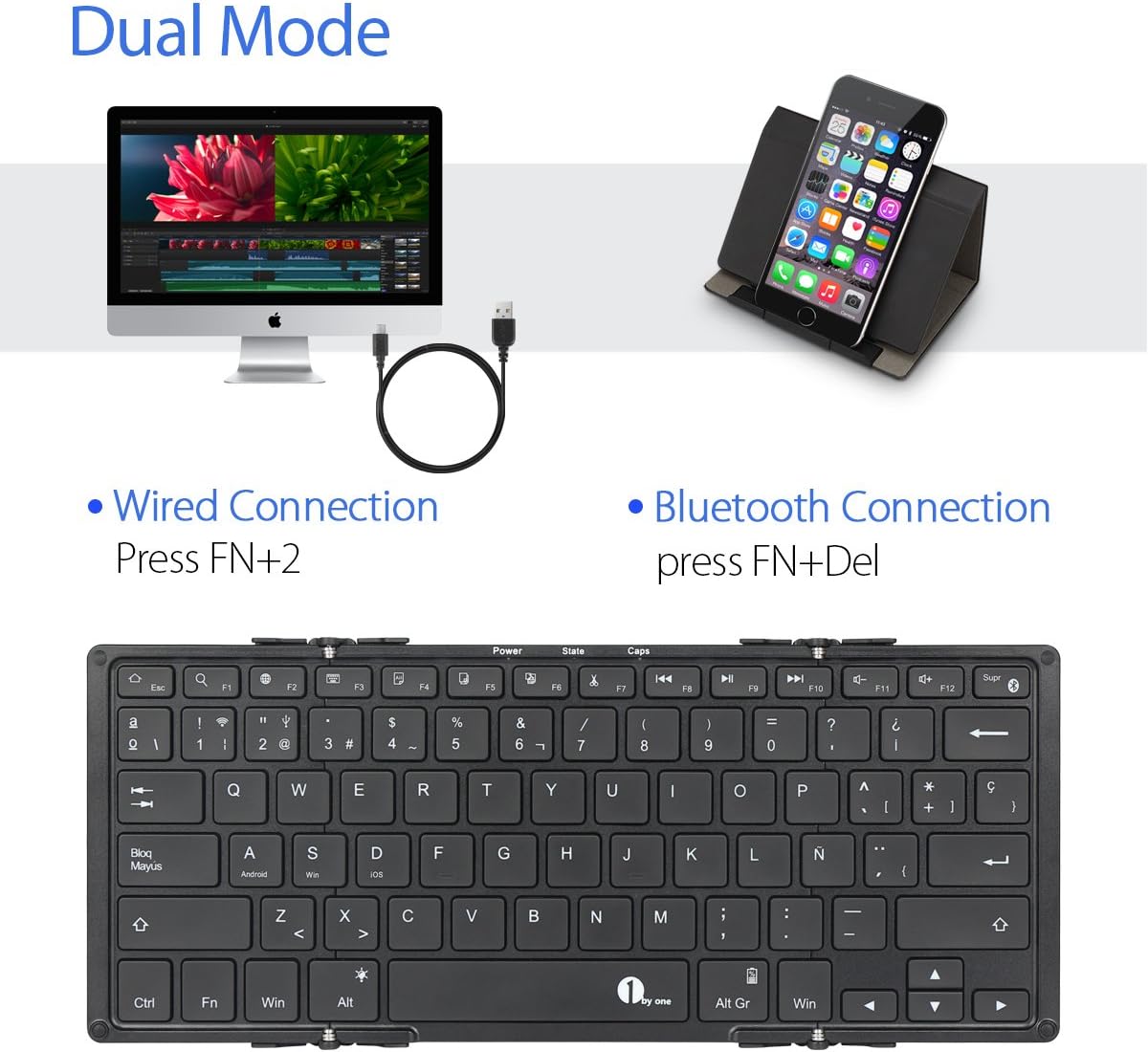
تصوير 3: Illustration of the dual connection modes: wired via USB cable and wireless via Bluetooth. Instructions for activating each mode are shown.
بلوٽوٽ ڪنيڪشن:
- ڪيبورڊ کي آن ڪرڻ لاءِ ان کي کوليو.
- دٻايو Fn + حذف ڪريو simultaneously to activate Bluetooth pairing mode. The Bluetooth indicator light will flash.
- پنهنجي ڊوائيس (اسمارٽ فون، ٽيبليٽ، ڪمپيوٽر) تي، بلوٽوٿ کي فعال ڪريو ۽ موجود ڊوائيسز جي ڳولا ڪريو.
- Select "1byone Keyboard" (or similar) from the list of devices.
- Follow any on-screen prompts to complete the pairing process. The indicator light will stop flashing once connected.
وائرڊ ڪنيڪشن:
- Connect the Micro-USB cable to the keyboard's port and the other end to your device's USB port.
- دٻايو fn+2 simultaneously to switch to wired mode. The keyboard will now function via the USB cable.
آپريٽنگ هدايتون
1. بڪ لائٽ ڪنٽرول
The keyboard features a 3-color backlight (red, blue, green) with two adjustable brightness levels for each color.
- رنگ تبديل ڪريو: دٻايو Fn + Alt simultaneously to cycle through backlight colors.
- روشني کي ترتيب ڏيو: دٻايو Fn + مٿي تير or Fn + هيٺيون تير backlight جي روشني کي ترتيب ڏيڻ لاء.
- بيڪ لائيٽ بند ڪريو: Cycle through brightness levels until the backlight turns off.
2. آپريٽنگ سسٽم مطابقت
The keyboard is compatible with a wide range of operating systems:
- iOS (e.g., iPad Air/Air 2/Mini, iPhone 4s/5/5s/5c/6/6s/6 Plus/6s Plus)
- Android (e.g., Samsung Galaxy tablets, Android smartphones)
- Windows (e.g., Windows tablets/PCs)
- Mac OS (via Bluetooth connection)
Note: Not compatible with Kindle Fire HD 10 (OS 5.6).
3. خاص فنڪشن ڪيز
The keyboard includes function keys that may vary in behavior depending on the connected operating system. Look for icons on the keys for specific functions like volume control, media playback, and home screen access.
سار سنڀال
صفائي
ڪيبورڊ صاف ڪرڻ لاءِ، نرميءَ سان مٿاڇري کي نرم، ڊي سان صاف ڪريوamp cloth. Avoid using harsh chemicals or abrasive materials. Ensure the keyboard is powered off and disconnected from any power source before cleaning.
ذخيرو
When not in use, fold the keyboard to protect the keys and make it compact for storage. Store in a dry, cool place away from direct sunlight and extreme temperatures.
مشڪلاتون
- ڪي بورڊ بلوٽوٿ ذريعي نه ڳنڍي رهيو آهي:
- پڪ ڪريو ته ڪيبورڊ چارج ٿيل آهي ۽ پاور آن آهي.
- Make sure Bluetooth is enabled on your device and the keyboard is in pairing mode (Fn + Delete).
- Delete previous pairings on your device and try pairing again.
- Ensure your device is within the 10-meter operating range.
- ڪي بورڊ وائرڊ موڊ ۾ جواب نه ڏئي رهيو آهي:
- Verify the Micro-USB cable is securely connected to both the keyboard and your device.
- Ensure you have pressed Fn + 2 to switch to wired mode.
- ڪو ٻيو USB پورٽ يا ڪيبل آزمايو.
- بيڪ لائيٽ ڪم نه ڪري رهي آهي:
- Check if the keyboard battery is sufficiently charged.
- Try adjusting the brightness using Fn + Up/Down Arrow.
- چاٻيون جواب نه ڏئي رهيون آهن:
- ڪيبورڊ ري چارج ڪريو.
- Reconnect the keyboard (either Bluetooth or wired).
- پنهنجي ڳنڍيل ڊوائيس کي ٻيهر شروع ڪريو.
وضاحتون
| آپريٽنگ رينج | 10 ميٽر (33 فوٽ) تائين |
| مطابقت | آئي او ايس، اينڊرائيڊ، ونڊوز، ميڪ او ايس |
| بيٽري جي گنجائش | 750 mAh Lithium-ion Polymer |
| اهم عمر | 3 ملين ڪلڪ |
| Operating Time (Backlight ON) | 5 ڪلاڪ تائين |
| Operating Time (Backlight OFF) | 300 ڪلاڪ تائين |
| اسٽينڊ بائي ٽائيم | 90 ڏينهن تائين |
| چارج ڪرڻ وقت | لڳ ڀڳ 3.5 ڪلاڪ |
| مواد | ABS (front), Aluminum Alloy (rear) |
| پاسا (فيل ٿيل) | 16.5 x 12 x 1.5 سينٽي (6.5 x 4.7 x 0.6 انچ) |
| طول و عرض (پڌرو) | 29.2 x 11.6 x 0.7 سينٽي (11.5 x 4.6 x 0.3 انچ) |
| رابطي | Bluetooth, Micro-USB |
وارنٽي ۽ سپورٽ
For warranty information and technical support, please refer to the official 1byone webسائيٽ تي وڃو يا انهن جي ڪسٽمر سروس سان رابطو ڪريو. وارنٽي دعوائن لاءِ پنهنجي خريداري جي رسيد رکو.
آن لائن سپورٽ: www.1byone.com/support (مثالampلي لنڪ، اصل لنڪ ڊيٽا ۾ مهيا نه ڪيو ويو آهي)