
اهم حفاظتي هدايتون
مھرباني ڪري ھن پراڊڪٽ کي استعمال ڪرڻ کان پھريان سڀ حفاظتي ھدايتون پڙھو ۽ سمجھو. مستقبل جي حوالي لاءِ ھي ھدايتون رکو.
- پاڻي يا نمي جي ويجهو هي اوزار استعمال نه ڪريو.
- صرف سڪل ڪپڙي سان صاف ڪريو.
- ڪنهن به وينٽيليشن جي سوراخن کي بند نه ڪريو. ٺاهيندڙ جي هدايتن جي مطابق انسٽال ڪريو.
- ڪنهن به گرمي جي ذريعن جي ويجهو نصب نه ڪريو جهڙوڪ ريڊيٽرز، گرمي رجسٽر، اسٽو، يا ٻيو سامان (بشمول ampلائفائرز) جيڪي گرمي پيدا ڪن ٿا.
- بجليءَ جي تار کي هلڻ يا پنچ ٿيڻ کان بچايو، خاص طور تي پلگ، سهولتن جي رسيپٽيڪل ۽ ان نقطي تي جتي اهي سامان مان نڪرندا آهن.
- صرف ٺاھيندڙ طرفان بيان ڪيل منسلڪ / لوازمات استعمال ڪريو.
- بجليءَ جي طوفانن دوران يا ڊگھي عرصي لاءِ غير استعمال ٿيڻ دوران ھن ڊوائيس کي ان پلگ ڪريو.
- سڀني خدمتن جو حوالو ڏيو قابل خدمت اهلڪارن ڏانهن. خدمت ڪرڻ جي ضرورت پوندي آهي جڏهن سامان ڪنهن به طريقي سان خراب ٿي ويو آهي، جهڙوڪ پاور سپلائي ڪنڊ يا پلگ خراب ٿي ويو آهي، مائع ڦوڪيو ويو آهي يا شيون اپريٽس ۾ گر ٿي ويا آهن، سامان مينهن يا نمي جي سامهون آيو آهي، عام طور تي ڪم نٿو ڪري. ، يا ڇڏيو ويو آهي.
پيداوار ختمview
The AUNA Roadie KIDS Boombox is a versatile audio system featuring a top-loading CD player, Bluetooth connectivity, USB playback, AUX input, and AM/FM radio. It is designed for portable use with both AC power and battery options, and includes integrated LED lights.

شڪل 1: سامهون view of the AUNA Roadie KIDS Boombox with active red LED lights.

شڪل 2: تفصيلي اڳيون view showing the display, USB port, and control panel.
ڪنٽرول ۽ اجزاء
- سي ڊي ڪمپارٽمينٽ: Top-loading tray for audio CDs.
- ڏيکاريو: LED screen showing track number, mode, and radio frequency.
- ڪنٽرول بٽڻ: Play/Pause, Stop, Skip Forward/Backward, Program, Album.
- ڳالهائيندڙ: Integrated stereo speakers with LED illumination.
- USB پورٽ: For playing MP3/WMA files هڪ USB فليش ڊرائيو مان.
- جيڪ ۾ AUX: ٻاهرين آڊيو ڊوائيسز کي ڳنڍڻ لاءِ 3.5 ايم ايم ان پٽ.
- هيڊ فون جڪ خانگي ٻڌڻ لاءِ 3.5 ايم ايم آئوٽ پُٽ.
- AM/FM Antenna: Extendable antenna for radio reception.
- حجم نوب: آڊيو آئوٽ پُٽ ليول کي ترتيب ڏئي ٿو.
- موڊ سليڪٽر سوئچ: Toggles between CD, USB, Bluetooth, AUX, AM, and FM modes.
- لائيٽ سوئچ: Turns the LED speaker lights on or off.
- اي سي ان جڪ: اي سي پاور اڊاپٽر کي ڳنڍڻ لاءِ.
- بيٽري جو خانو: Located on the bottom for C-type batteries.
- هٿ کڻڻ: آسان portability لاء.
سيٽ اپ ڪريو
بجلي جي فراهمي
The AUNA Roadie KIDS Boombox can be powered by either the included AC power adapter or by batteries.
AC پاور ڪنيڪشن
- Ensure the boombox is switched off.
- Connect the small end of the AC power adapter to the اي سي ان jack on the back of the boombox.
- Plug the other end of the AC power adapter into a standard wall outlet (110-120V ~ / 50-60 Hz).

شڪل 3: پوئتي view with AC power input and antenna.
بيٽري لڳائڻ
For portable use, the boombox requires 6 x C-type batteries (not included).
- Ensure the boombox is switched off and disconnected from AC power.
- يونٽ جي تري ۾ بيٽري جي خاني کي ڳوليو.
- بيٽري جي ڪمري واري ڍڪ کي کوليو.
- Insert 6 C-type batteries, ensuring correct polarity (+/-) as indicated inside the compartment.
- بيٽري جي ڪمري واري ڍڪ کي محفوظ طور تي بند ڪريو.
آپريٽنگ هدايتون
جنرل آپريشن
- پاور آن / آف: Use the main power switch located on the side of the unit.
- حجم ڪنٽرول: گھمايو حجم knob on the side of the unit to adjust the sound level.
- موڊ جي چونڊ: استعمال ڪريو موڊ selector switch on the side to choose between CD/USB/BT/AUX and AM/FM radio functions.

شڪل 4: پاسي view showing Volume and Mode controls.
سي ڊي پليئر آپريشن
The boombox supports Audio CD, CD-R, CD-RW, and MP3-CDs.
- تبديل ڪريو موڊ چونڊيندڙ کي CD.
- Gently press the 'OPEN' area on the CD compartment lid to open it.
- اسپنڊل تي هڪ سي ڊي رکو ۽ ليبل واري پاسي کي مٿي ڪيو.
- Close the CD compartment lid firmly until it clicks. The display will show 'CD' and then the total number of tracks.
- کي دٻايو راند/روڪ پلے بیک شروع ڪرڻ لاءِ بٽڻ.
- دٻايو راند/روڪ ٻيهر روڪڻ لاءِ، ۽ دٻايو اسٽاپ پلے بیک ختم ڪرڻ لاء.
- استعمال ڪريو ا Sتي وو (>> |) يا پوئتي ڇڏي وڃو (|<) ٽريڪ جي وچ ۾ نيويگيٽ ڪرڻ لاءِ بٽڻ.
- پروگرام ٿيل پلے بیک: اسٽاپ موڊ ۾ ، پريس ڪريو پروگرام button. The display will show '01'. Use اڳتي/پوئتي ڇڏيو ٽريڪ چونڊڻ لاءِ، پوءِ دٻايو پروگرام again to confirm. Repeat for up to 20 tracks (CD) or 99 tracks (MP3). Press راند ڪريو پروگرام ٿيل پلے بیک شروع ڪرڻ لاءِ.
- Repeat Functions: پلے بیک دوران، دٻايو ورجائي button to cycle through repeat modes (e.g., repeat one track, repeat all tracks, repeat folder for MP3 CDs).
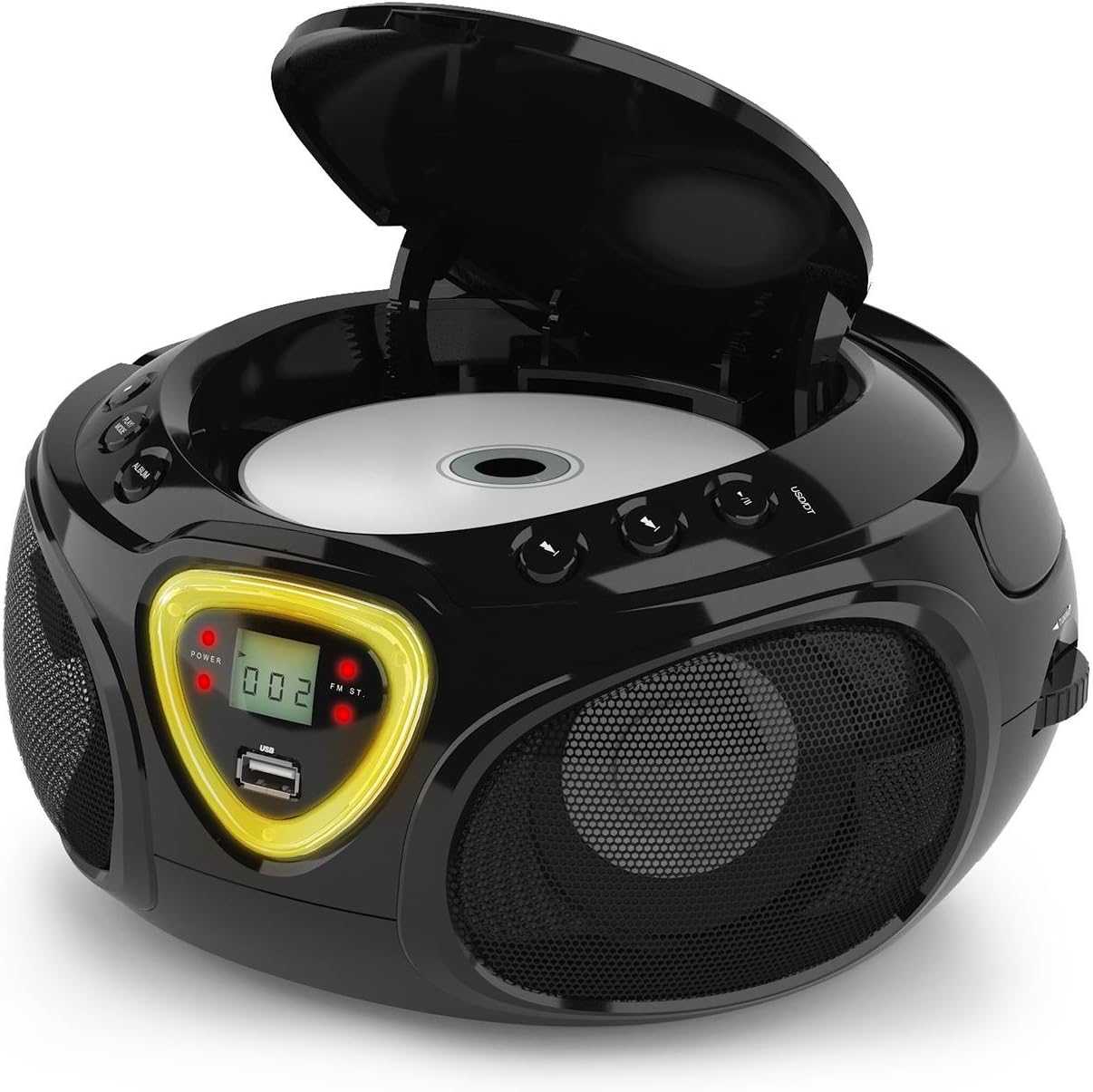
Figure 5: CD compartment open for disc insertion.
بلوٽوٽ آپريشن
- تبديل ڪريو موڊ چونڊيندڙ کي BT (Bluetooth). The display will show 'BT' and flash, indicating pairing mode.
- پنهنجي اسمارٽ فون، ٽيبليٽ، يا ٻئي بلوٽوٿ-فعال ڊوائيس تي بلوٽوٿ کي فعال ڪريو.
- ڳولھيو available devices and select 'AUNA Roadie' from the list.
- Once successfully paired, the 'BT' indicator on the boombox display will stop flashing and remain solid.
- You can now play audio from your connected device through the boombox. Use the controls on your device or the boombox's Play/Pause and Skip buttons to manage playback.
USB پلے بیک
The boombox supports MP3 and WMA file formats from USB flash drives.
- هڪ USB فليش ڊرائيو داخل ڪريو USB port on the front of the boombox.
- تبديل ڪريو موڊ چونڊيندڙ کي USB. The unit will automatically detect and begin playing compatible audio files.
- استعمال ڪريو راند/روڪ, اسٽاپ، ۽ اڳتي/پوئتي ڇڏيو پلے بیک کي ڪنٽرول ڪرڻ لاءِ بٽڻ.
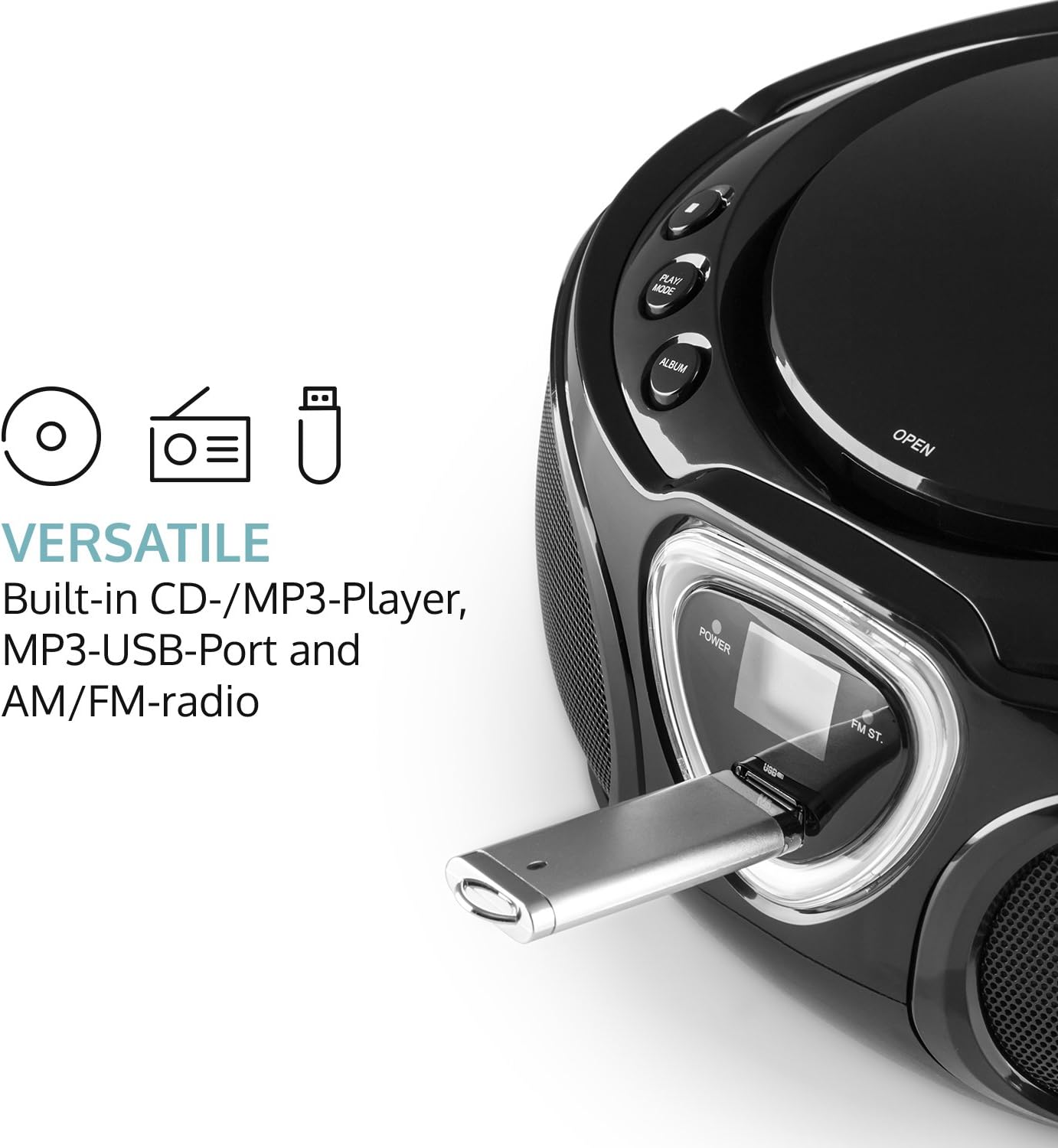
Figure 6: USB port with a flash drive inserted.
AUX ان پٽ
- 3.5 ايم ايم آڊيو ڪيبل جي هڪ پڇاڙي (شامل نه آهي) سان ڳنڍيو AUX اندر بوم باڪس تي جڪ.
- آڊيو ڪيبل جي ٻئي ڇيڙي کي پنهنجي ٻاهرين آڊيو ڊوائيس (مثال طور، MP3 پليئر، اسمارٽ فون) جي هيڊ فون جيڪ يا آڊيو آئوٽ پٽ سان ڳنڍيو.
- تبديل ڪريو موڊ چونڊيندڙ کي AUX.
- Control playback and volume directly from your external audio device.
ريڊيو آپريشن (اي ايم/ايف ايم)
- تبديل ڪريو موڊ selector to either AM or FM.
- Extend the telescopic antenna for optimal FM reception. For AM, rotate the unit for best reception.
- گھمايو ٽيوننگ dial on the side of the unit to scan for radio stations.

شڪل 7: پاسي view with Tuning dial and Light switch.
LED لائيٽ فنڪشن
The boombox features multi-color LED lights that illuminate the speakers.
- استعمال ڪريو روشني آن / بند switch on the side of the unit to turn the LED lights on or off.
- The lights will typically pulse and change color with the rhythm of the music when active.

Figure 8: Boombox with active LED lights.
هيڊ فون استعمال ڪريو
For private listening, connect any standard 3.5mm headphones (not included) to the هيڊ فون jack. The main speakers will automatically mute when headphones are connected.
سار سنڀال
يونٽ جي صفائي
- Wipe the exterior of the boombox with a soft, dry cloth.
- گھڙڻ وارا صاف ڪندڙ، موم، يا محلول استعمال نه ڪريو ڇو ته اهي ختم کي نقصان پهچائي سگهن ٿا.
- For the CD lens, use a specialized CD lens cleaning kit if necessary. Avoid touching the lens directly.
ذخيرو
- بوم باڪس کي سڌي سج جي روشني ۽ انتهائي گرمي پد کان پري ٿڌي، سڪل جاءِ تي ذخيرو ڪريو.
- If storing for an extended period, remove the batteries to prevent leakage and damage to the unit.
مشڪلاتون
If you encounter any issues with your AUNA Roadie KIDS Boombox, please refer to the following common problems and solutions:
| مسئلو | ممڪن سبب | حل |
|---|---|---|
| طاقت نه آهي | AC adapter not connected, batteries depleted or incorrectly inserted. | Check AC adapter connection. Replace or correctly insert batteries. |
| آواز ڪونهي | Volume too low, incorrect mode selected, headphones connected. | Increase volume. Select correct mode (CD, BT, USB, AUX, AM/FM). Disconnect headphones if using speakers. |
| سي ڊي نه پئي هلي. | CD inserted incorrectly, CD dirty/scratched, incompatible CD format. | Ensure CD is label-side up. Clean CD. Use compatible CD format. |
| بلوٽوٿ ڳنڍي نه ٿو | Boombox not in BT mode, device too far, already paired to another device. | Switch to BT mode. Ensure device is within 10 meters. Disconnect from other devices. |
| ناقص ريڊيو استقبال | Antenna not extended/adjusted, weak signal. | Extend and adjust FM antenna. Rotate unit for AM. Try a different location. |
وضاحتون
| خاصيت | تفصيل |
|---|---|
| برانڊ | آونا |
| رابطي ٽيڪنالاجي | معاون، بلوٽوٿ، يو ايس بي |
| رنگ | ڪارو |
| اسپيڪر جو قسم | اسٽيريو |
| شيون طول و عرض (L x W x H) | 7.9 x 9.5 x 5.2 انچ |
| طاقت جو ذريعو | AC (110-120V ~ / 50-60 Hz) or 6 x C-type batteries (9V DC) |
| مطابقت رکندڙ ڊوائيسز | ليپ ٽاپ، اسمارٽ فون، ٽيبليٽ |
| واتtage | 3 watts (2 x 1.5W speakers) |
| آڊيو آئوٽ پٽ موڊ | اسٽيريو |
| سپورٽ ٿيل آڊيو فارميٽ | CD، MP3، WMA |
| بلوٽوت ورزن | 2.1 + EDR (Profiles: A2DP, AVRCP) |
| مطابقت رکندڙ سي ڊي فارميٽ | Audio CD, CD-R, CD-RW, MP3-CDs |
| Programmable Playback | 20 tracks (CD), 99 tracks (MP3) |
| شيءِ جو وزن | 3.4 پائونڊ |
وارنٽي ۽ سپورٽ
This product comes with a manufacturer's warranty. For detailed warranty information, please refer to the documentation included with your purchase or visit the official AUNA website. If you require technical assistance, troubleshooting beyond this manual, or have questions regarding your product, please contact AUNA customer support.