
1. تعارف
This manual provides essential information for the safe and efficient operation of your InFocus IN3148HD 1080p 5000 Lumen Professional Projector. Please read these instructions thoroughly before using the projector and retain them for future reference. The InFocus IN3148HD is designed for professional environments, offering high brightness, full HD resolution, and versatile connectivity for various presentation needs.

شڪل 1: سامهون view of the InFocus IN3148HD Projector.
2. اهم خاصيتون
The InFocus IN3148HD projector offers a range of features designed for high-performance presentations:
- 1080p (1920 x 1080) Native Resolution: Delivers crisp, high-definition images.
- 5000 Lumens جي روشني: Ensures clear visibility in well-lit rooms.
- 1.5x بصري زوم: Provides flexibility in projector placement and image sizing.
- 3D سپورٽ: Compatible with Blu-ray and other 3D content sources.
- 10W اسپيڪر: Integrated audio for presentations.
- گھڻن ڪنيڪشن جا اختيار: Includes two HDMI 1.4 ports, VGA, and more.
- نيٽ ورڪ مانيٽرنگ: Allows for remote management and control.
وڊيو 1: هڪ اوورview of the InFocus IN3148HD projector's features and capabilities.
3. سيٽ اپ ۽ تنصيب
3.1 کولڻ
Carefully remove the projector and all accessories from the packaging. Verify that all components listed in the packing list are present and undamaged. Keep the original packaging for future transport or storage.
3.2 لڳائڻ
Position the projector on a stable, flat surface or mount it securely. Ensure adequate ventilation around the unit to prevent overheating. Consider the throw distance and screen size for optimal image quality. The projector supports both tabletop and ceiling mount installations.

Figure 2: Projector dimensions for installation planning.
4. ڪنيڪشن
The IN3148HD offers a variety of input and output ports for connecting to different devices.
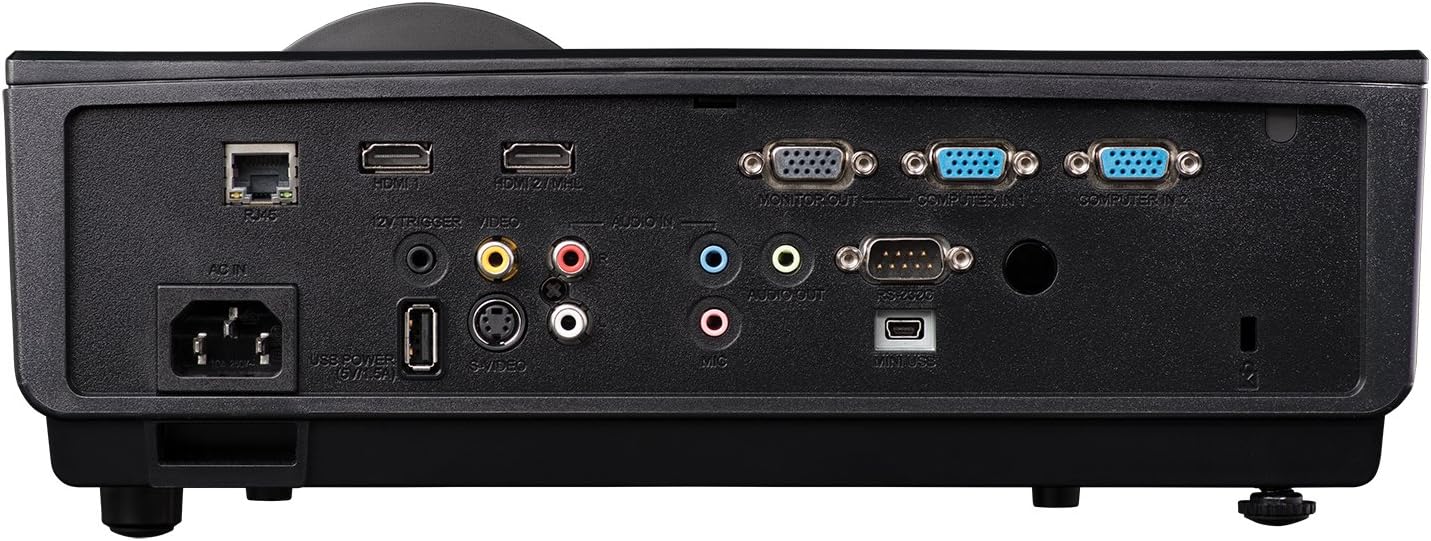
Figure 3: Rear panel showing available connection ports.
- HDMI (x2): For digital video and audio input from computers, Blu-ray players, and other HDMI-enabled devices.
- VGA (x2): ڪمپيوٽرن مان اينالاگ وڊيو ان پٽ لاءِ.
- USB: سروس يا فرم ويئر اپڊيٽ لاءِ.
- نيٽ ورڪ (RJ45): نيٽ ورڪ ڪنٽرول ۽ نگراني لاءِ.
- آڊيو اندر/آئوٽ: 3.5mm jacks for external audio sources or output to external speakers.
- وڊيو (آر سي اي): جامع وڊيو ان پٽ لاءِ.
5. آپريشن
5.1 پاور آن/آف
- پاور آن: Connect the power cord and press the power button on the projector or remote control. The power indicator light will turn blue.
- بجلي بند: پاور بٽڻ کي ٻه ڀيرا دٻايو. پروجيڪٽر مڪمل طور تي بند ٿيڻ کان اڳ ٿڌي چڪر ۾ داخل ٿيندو.
5.2 تصوير کي ترتيب ڏيڻ
- فوڪس: لينس تي فوڪس رنگ کي گھمايو جيستائين تصوير تيز نه ٿئي.
- وڏو ڪريو: تصوير جي سائيز کي تبديل ڪرڻ لاءِ لينس تي زوم رنگ کي ترتيب ڏيو.
- ڪيسٽون جي اصلاح: Use the keystone correction function in the OSD (On-Screen Display) menu to correct trapezoidal image distortion.
6. 3D ڪارڪردگي
The InFocus IN3148HD projector supports 3D content from compatible sources, such as Blu-ray players. To experience 3D, you will need active 3D glasses (sold separately) and a 3D-enabled source device.

Figure 4: Visual representation of 3D content viewing.
7. سار سنڀال
باقاعده سار سنڀال بهترين ڪارڪردگي کي يقيني بڻائي ٿي ۽ توهان جي پروجيڪٽر جي عمر وڌائي ٿي.
- Lamp متبادل: آيلamp has a limited lifespan. Refer to the OSD menu for lamp hour information. Replace the lamp when its brightness significantly decreases or when the lamp indicator light illuminates. Always use genuine InFocus replacement lamps.
- فلٽر صفائي: Clean the air filter regularly to prevent dust buildup, which can affect cooling and image quality. Refer to the full user manual for specific instructions on accessing and cleaning the filter.
- لينس جي صفائي: Use a soft, lint-free cloth and a specialized lens cleaning solution to gently clean the projector lens. Avoid abrasive materials.
8. مسئلا حل ڪرڻ
If you encounter issues with your projector, consult the table below for common problems and solutions.
| مسئلو | ممڪن سبب | حل |
|---|---|---|
| ڪابه تصوير ڏيکاريل ناهي | Power cable disconnected, input source not selected, lamp ناڪامي | Check power connection, select correct input source, replace lamp جيڪڏهن ضروري هجي. |
| تصوير urري آهي | Lens out of focus, incorrect throw distance. | Adjust focus ring, reposition projector. |
| نه آڊيو | Volume too low, audio cable disconnected, incorrect audio source. | Increase volume, check audio cable connections, select correct audio input. |
| پروجيڪٽر وڌيڪ گرم ڪري ٿو | Blocked ventilation, dirty air filter. | Ensure clear ventilation, clean air filter. |
9. وضاحتون
Detailed technical specifications for the InFocus IN3148HD projector.
| خاصيت | تفصيل |
|---|---|
| برانڊ | InFocus |
| ماڊل نالو | IN3148HD |
| ڊسپلي قرارداد | 1920 x 1080 (1080p) |
| روشني | 5000 Lumens (ANSI) |
| مقابلي جي نسبت | 1000:1 |
| ڊسپلي جو قسم | ڊي ايل پي |
| رابطي ٽيڪنالاجي | HDMI، USB، VGA |
| خاص خصوصيت | 3D اسٽريمنگ |
| Lamp واتtage | 310 واٽ |
| روشني جو ذريعو آپريٽنگ زندگي | 4500 ڪلاڪ |
| شيءِ جو وزن | 4.47 ڪلوگرام |
10. وارنٽي ۽ سپورٽ
For warranty information, technical support, or service inquiries, please refer to the warranty card included with your product or visit the official InFocus webسائيٽ. وارنٽي دعوائن لاءِ خريداري جي ثبوت طور پنهنجي خريداري جي رسيد رکو.