
1. پراڊڪٽ ختمview
The KAYSUDA USB Speakerphone SP300U is a portable audio device designed for clear communication in various settings, including conference calls, online meetings, and VoIP calls. It integrates both a speaker and a 360-degree omnidirectional microphone, featuring echo cancellation and noise reduction for optimal audio quality.
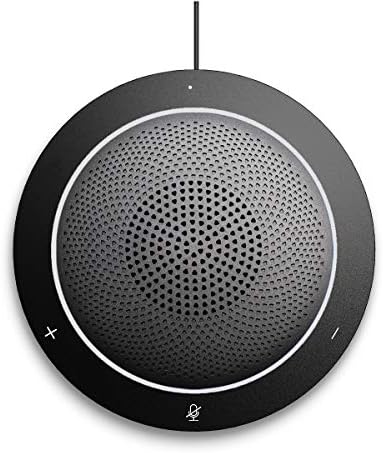
تصوير 1.1: سامهون view of the KAYSUDA USB Speakerphone SP300U, showing the speaker grille and control buttons.
اهم خاصيتون:
- 360° Omnidirectional Microphone: Captures sound from all directions, ideal for group discussions.
- Full Duplex Audio: Allows simultaneous speaking and listening without interruption.
- Echo Cancellation & Noise Reduction: Enhances clarity by minimizing background noise and acoustic echo.
- پلگ ۽ پلي ڪنيڪٽوٽي: No drivers or external power supply needed; connects via USB.
- 3.5mm Earphone Port: ذاتي ٻڌڻ لاءِ.
- وسيع مطابقت: Works with Windows, Microsoft Communicator, Microsoft Lync, and PS4.
2. سيٽ اپ جون هدايتون
The KAYSUDA USB Speakerphone SP300U is designed for simple plug-and-play operation. Follow these steps to set up your device:
- ڪمپيوٽر سان ڳنڍيو: Locate an available USB port on your computer (PC or laptop). It is recommended to use a USB 3.0 port for optimal performance.
- پلگ ان: Insert the USB connector of the speakerphone's cable into the USB port on your computer.
- خودڪار سڃاڻپ: Your operating system (Windows) should automatically detect and install the necessary drivers. No additional software installation is required.
- آڊيو ڊيوائس طور چونڊيو: In your communication software (e.g., Skype, Microsoft Teams, Zoom) or operating system sound settings, select "KAYSUDA SP300U" (or similar) as your default microphone and speaker device.

Image 2.1: The speakerphone connected to a laptop, demonstrating its use in a meeting environment.
For private listening, connect a 3.5mm earphone or headphone to the earphone port located on the side of the speakerphone.
3. آپريٽنگ هدايتون
The KAYSUDA USB Speakerphone SP300U features intuitive controls for managing your calls and audio.
ڪنٽرول:
- حجم وڌايو (+): اسپيڪر جو حجم وڌائي ٿو.
- حجم گھٽ (-): اسپيڪر جو حجم گھٽائي ٿو.
- Mute Microphone (Microphone Icon): Toggles the microphone on/off. An indicator light typically shows the microphone status.

تصوير 3.1: مٿيview of the speakerphone's features, including its 360° omnidirectional microphone and noise cancellation capabilities.
آڊيو خاصيتون:
- هر طرفي مائڪرو فون: The 360-degree microphone ensures that voices from all participants around the speakerphone are clearly captured. Position the speakerphone centrally in your meeting space for best results.
- Echo Cancellation and Noise Reduction: These features work automatically to provide clear audio by reducing ambient noise and preventing echo during calls.
- Privacy Headphone Jack: Use the 3.5mm port to connect headphones for private conversations or to avoid disturbing others.
4. سار سنڀال
To ensure the longevity and optimal performance of your KAYSUDA USB Speakerphone SP300U, follow these simple maintenance guidelines:
- صفائي: Use a soft, dry cloth to wipe the exterior of the speakerphone. Avoid using abrasive cleaners, solvents, or harsh chemicals, as these can damage the surface.
- اسٽوريج: When not in use, store the speakerphone in a cool, dry place, away from direct sunlight and extreme temperatures. The included pouch can be used for protection during transport.
- ڪيبل جي سنڀال: Avoid bending or twisting the USB cable excessively. Do not pull the cable to disconnect the device; always grasp the plug.
- ماحولياتي حالتون: Do not expose the device to water, moisture, or high humidity. Keep it away from dust and debris.

Image 4.1: The speakerphone, its USB cable, and the protective carrying pouch.
5. مسئلا حل ڪرڻ
If you encounter issues with your KAYSUDA USB Speakerphone SP300U, refer to the following common solutions:
| مسئلو | ممڪن سبب / حل |
|---|---|
| No Sound from Speakerphone |
|
| Microphone Not Picking Up Voice |
|
| Echo or Poor Audio Quality |
|
| ڊوائيس نه سڃاڻي |
|
جيڪڏهن انهن قدمن کي آزمائڻ کان پوءِ به مسئلو برقرار رهي ٿو، ته مهرباني ڪري وڌيڪ مدد لاءِ ڪسٽمر سپورٽ سان رابطو ڪريو.
6. وضاحتون
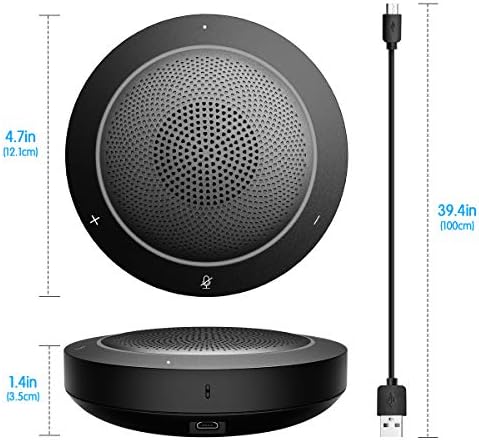
Image 6.1: Physical dimensions of the speakerphone and its integrated USB cable length.
| خاصيت | تفصيل |
|---|---|
| ماڊل | SP300U |
| برانڊ | ڪاسودا |
| رابطي ٽيڪنالاجي | USB, Auxiliary (3.5mm Jack) |
| مائڪروفون جو قسم | هر طرفي |
| هارڊويئر پليٽ فارم | PC |
| پيداوار جي ماپ (L x W x H) | 4.76 x 4.76 x 1.38 انچ (12.1 x 12.1 x 3.5 سينٽي) |
| شيءِ جو وزن | 7.1 آونس (200 گرام) |
| سگنل کان شور جي نسبت | 58 ڊي بي |
| آڊيو حساسيت | 65 ڊيسيبل |
| مواد | اڪيريلانٽنتريلي بديادي اسٽائائن |
| طاقت جو ذريعو | DC (USB Powered) |
| شامل اجزاء | Speakerphone, USB Cable |
7. وارنٽي ۽ سپورٽ
KAYSUDA products are manufactured with quality and performance in mind. For any questions, technical support, or warranty claims, please contact KAYSUDA customer service.
Please refer to the product packaging or the official KAYSUDA webتازي وارنٽي جي معلومات ۽ رابطي جي تفصيلن لاءِ سائيٽ.
When contacting support, please have your product model (SP300U) and purchase information readily available.