
تعارف
This manual provides detailed instructions for the TECWARE Phantom 87 Key RGB Mechanical Gaming Keyboard. Please read this manual thoroughly before using the product to ensure proper operation and to maximize your experience.
حفاظت جي ڄاڻ
- ڪيبورڊ کي مائعات يا گھڻي نمي کي بي نقاب نه ڪريو.
- انتهائي گرمي پد کان بچاء.
- Do not attempt to disassemble or modify the keyboard. This may void your warranty.
- ٻارن جي پهچ کان پري رکو.
- صرف مطابقت رکندڙ ڊوائيسز ۽ بجلي جي ذريعن سان استعمال ڪريو.
پيڪيج مواد
پڪ ڪريو ته سڀئي شيون توهان جي پيڪيج ۾ موجود آهن:
- TECWARE Phantom 87 Key RGB Mechanical Gaming Keyboard
- 4x Spare Mechanical Switches (Outemu Red)
- 1x سوئچ پلر
- 1x ڪي ڪيپ پلر
- 1x استعمال ڪندڙ دستياب

Figure 1: TECWARE Phantom 87 Key RGB Mechanical Gaming Keyboard with key features such as low latency, 16.8M RGB colors, gaming-oriented design, full N-key rollover, and durable fiberglass PCB.
سيٽ اپ ڪريو
1. ڪي بورڊ کي ڳنڍڻ
- Locate the USB-A cable attached to your TECWARE Phantom keyboard.
- Plug the USB-A connector into an available USB port on your computer.
- The keyboard will automatically be detected and drivers will install (Windows/macOS).
2. سافٽ ويئر انسٽاليشن (اختياري)
For advanced customization, including per-key RGB lighting, macro recording, and user profiles, download the TECWARE software from the official TECWARE webسائيٽ. انسٽاليشن لاءِ اسڪرين تي ڏنل هدايتن تي عمل ڪريو.

Figure 2: The TECWARE software allows for custom per-key RGB lighting, 18 lighting effects control, macro recording and assignment, and up to 3 user profiles, along with brightness and speed adjustments.
آپريٽنگ هدايتون
بنيادي ڪم
- ٽائپنگ: The keyboard features Outemu Red linear switches for a smooth and quiet typing experience.
- N-ڪي رول اوور: All key presses are registered simultaneously, preventing ghosting during rapid input.
- ونڊوز لاڪ: Use the dedicated Windows Lock key (often Fn + Win key) to disable the Windows key during gaming to prevent accidental interruptions.
آر جي بي لائٽنگ ڪنٽرول
The Phantom keyboard offers 16.8 million RGB colors and 18 pre-set lighting effects. These can be controlled directly on the keyboard or through the TECWARE software.
- روشني جا طريقا تبديل ڪرڻ: Use the Fn key combined with specific function keys (refer to your keyboard's keycaps for symbols) to cycle through the 18 pre-set lighting modes.
- روشني/رفتار کي ترتيب ڏيڻ: Use Fn + Arrow keys (or other designated keys) to adjust the brightness and speed of the lighting effects.
- حسب ضرورت: For per-key lighting and advanced effects, use the TECWARE software.
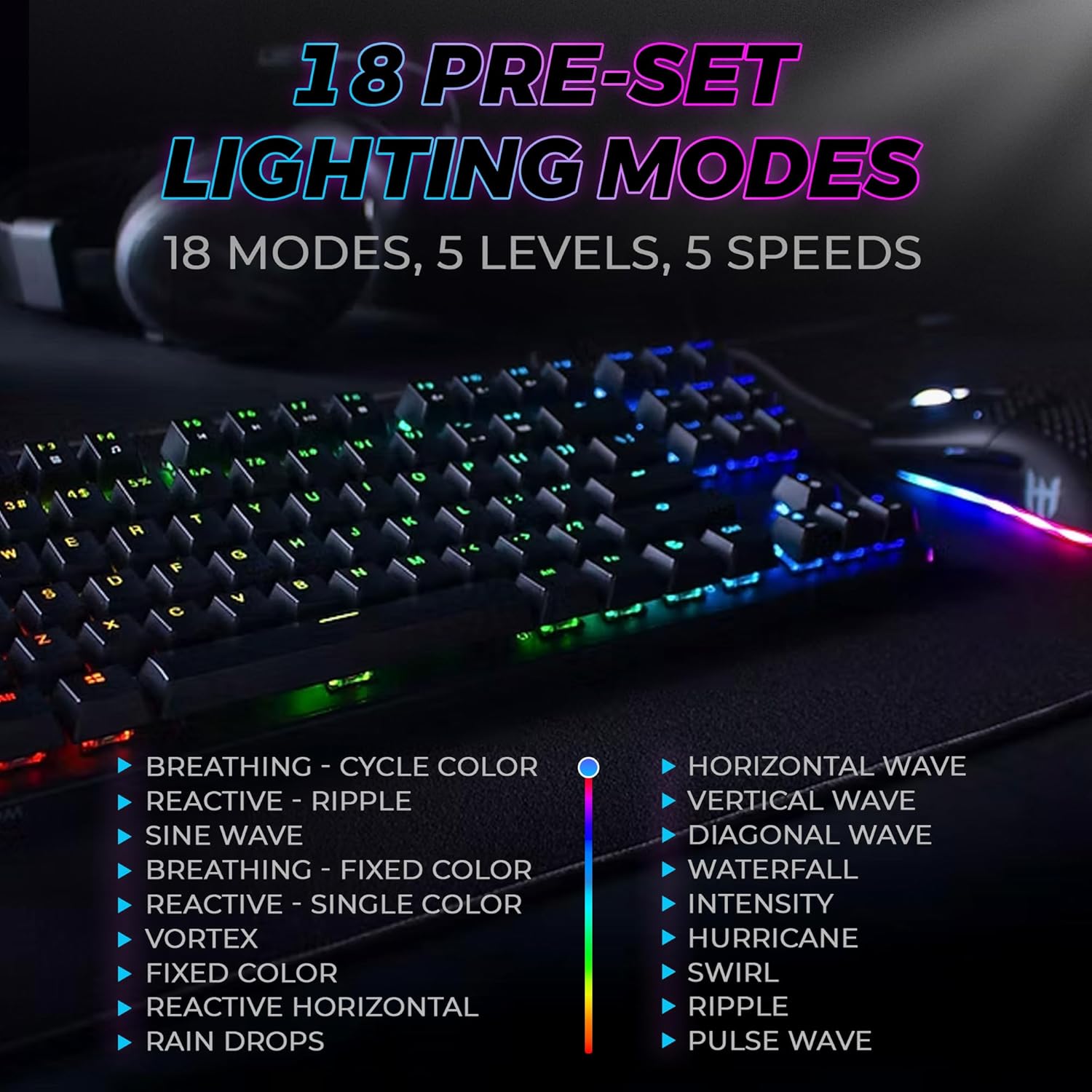
Figure 3: The keyboard features 18 pre-set lighting modes with 5 levels of brightness and 5 levels of speed, including effects like Breathing, Ripple, Sine Wave, Vortex, Waterfall, and Pulse Wave.
ملائي ميڊيا چيڪ
Access multimedia controls by pressing the Fn key in combination with the F-keys (F1-F12). The specific functions are typically indicated by icons on the keycaps.
- Exampاليزي: Fn + F7 (Play/Pause), Fn + F8 (Stop), Fn + F9 (Mute).
Video 1: Official TECWARE branded video showcasing various products, including the Phantom keyboard, highlighting its features and design philosophy.
سار سنڀال
صفائي
- صفائي ڪرڻ کان اڳ ڪيبورڊ کي ڪمپيوٽر کان ڌار ڪريو.
- ڪي ڪيپس ۽ چيسس کي صاف ڪرڻ لاءِ نرم، سڪل ڪپڙو استعمال ڪريو.
- For deeper cleaning, use the provided keycap puller to remove keycaps and compressed air to clear debris from under the keys.
مٽائي مٽائڻ
The TECWARE Phantom keyboard features hot-swappable Outemu mechanical switches, allowing for easy replacement without soldering.
- مهيا ڪيل ڪي ڪيپ پلر استعمال ڪندي، گهربل ڪي ڪيپ کي نرميءَ سان هٽايو.
- Use the provided switch puller to carefully grip the switch and pull it straight up to remove it.
- نئين سوئچ جي پنن کي پي سي بي تي سوراخن سان ترتيب ڏيو.
- نئين سوئچ کي نرميءَ سان دٻايو جيستائين اهو محفوظ طور تي ڪلڪ نه ڪري.
- ڪي ڪيپ ٻيهر ڳنڍيو.
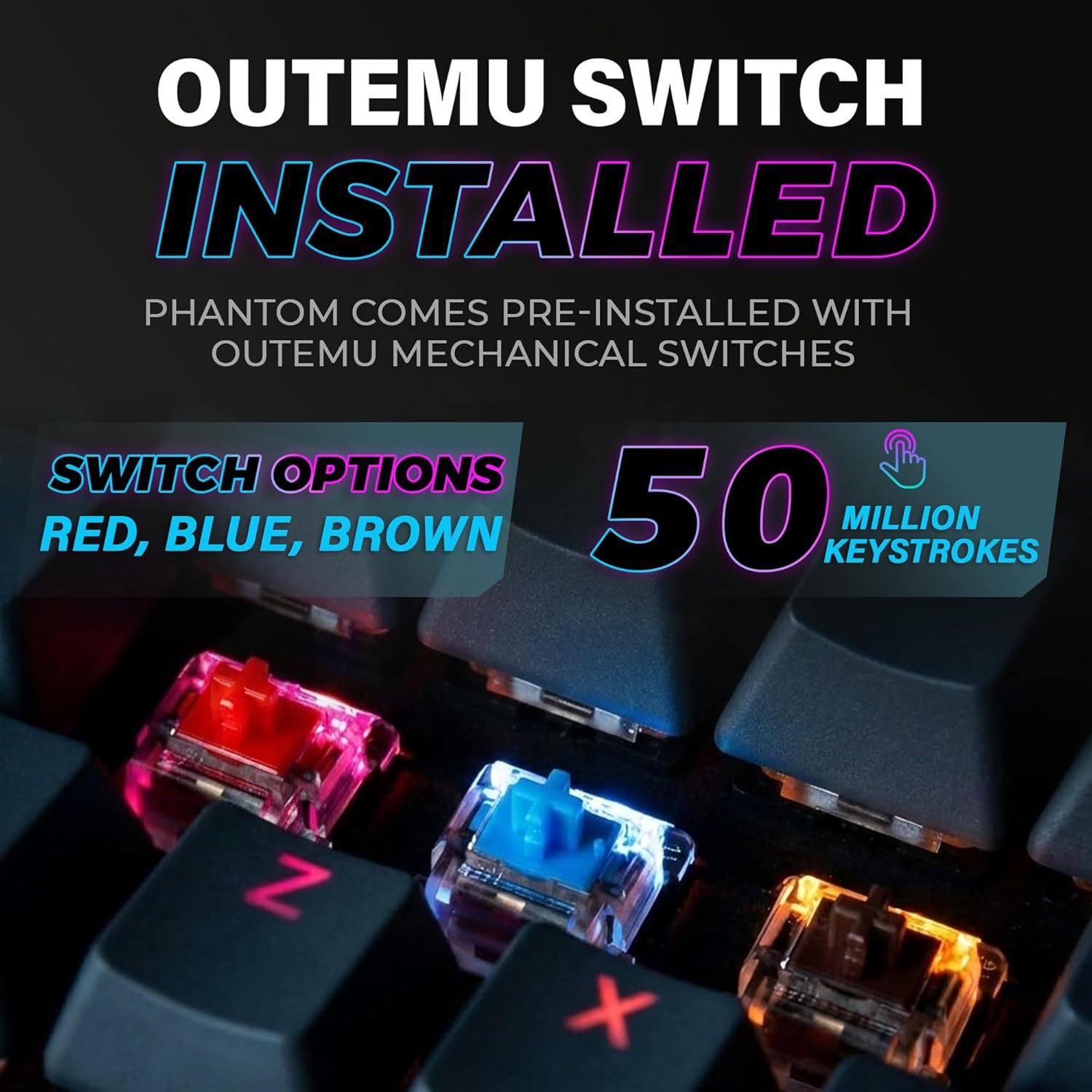
Figure 4: The keyboard comes with pre-installed Outemu switches, available in Red, Blue, and Brown options, rated for 50 million keystrokes.

Figure 5: An Outemu Red linear switch, detailing its pre-travel of 2.00mm, operating force of 45 gf/CN, and total travel of 4.00mm.
مشڪلاتون
| مسئلو | ممڪن حل |
|---|---|
| ڪي بورڊ جواب نه ڏئي رهيو آهي | Ensure the USB cable is securely connected to both the keyboard and the computer. Try a different USB port or computer. |
| آر بي جي روشني ڪم نه ڪندي | Check if the lighting is turned off or set to minimum brightness using the Fn key combinations. Reinstall the TECWARE software if using custom profiles. |
| مخصوص ڪنجيون ڪم نه ڪري رهيون آهن | If you have hot-swappable switches, try replacing the faulty switch with one of the spare switches provided. Ensure the switch is properly seated. |
| Keys feel inconsistent | Ensure keycaps are fully pressed down. Clean under the keycaps for any debris. |
Video 2: Official TECWARE Phantom video demonstrating various features and functionalities of the keyboard.
وضاحتون
| خاصيت | تفصيل |
|---|---|
| ماڊل نمبر | TWKB-P87ZORD |
| سوئچ جو قسم | Outemu Red Mechanical (Linear) |
| اهم شمار | 87 ڪنجيون |
| آر بي جي روشني | 16.8 Million Colors, 18 Pre-set Modes |
| پولنگ جي شرح | 1000Hz |
| N-ڪي رول اوور | مڪمل اين-ڪي رول اوور |
| رابطي | وائرڊ USB-A |
| پي سي بي | Dual-layer Fiberglass PCB |
| طول و عرض (L x W x H) | 14.21 x 5.24 x 1.61 انچ |
| وزن | 2.53 پائونڊ |
وارنٽي ۽ سپورٽ
TECWARE products are designed for durability and performance. For warranty information, technical support, or to download the latest software and drivers, please visit the official TECWARE webسائيٽ تي وڃو يا انهن جي ڪسٽمر سروس سان رابطو ڪريو. وارنٽي دعوائن لاءِ خريداري جي ثبوت طور پنهنجي خريداري جي رسيد رکو.
آن لائين وسيلا:
- Official TECWARE Webسائيٽ: www.tecware.co
- پراڊڪٽ سپورٽ صفحو: TECWARE Amazon Store