
تعارف
This manual provides detailed instructions for the assembly, operation, and maintenance of your FLEXISPOT E2B-B Height Adjustable Desk Frame. This electric sit-stand desk frame is designed to offer a flexible and ergonomic workspace, allowing seamless transitions between sitting and standing positions. Please read this manual thoroughly before assembly and use to ensure proper function and safety.

Image: The FLEXISPOT E2B-B Height Adjustable Desk Frame in black, shown with a black desktop and two monitors, illustrating a typical setup.
حفاظت جي ڄاڻ
محفوظ آپريشن کي يقيني بڻائڻ ۽ نقصان کي روڪڻ لاءِ، مھرباني ڪري ھيٺ ڏنل حفاظتي ھدايتن تي عمل ڪريو:
- Ensure all cables are properly connected and not pinched during movement.
- Keep hands and fingers clear of moving parts, especially during height adjustments.
- ڊيسڪ کي اوورلوڊ نه ڪريو. وڌ ۾ وڌ وزن جي گنجائش 220 پائونڊ (100 ڪلوگرام) آهي.
- ميز جي فريم تي ويهڻ يا بيهڻ نه ڪريو.
- Only use the desk frame indoors in a dry environment.
- Unplug the power cord before cleaning or performing any maintenance.
- Children should not operate the desk without adult supervision.
پيڪيج مواد
اسيمبلي شروع ڪرڻ کان اڳ، مھرباني ڪري تصديق ڪريو ته سڀئي جزا موجود آھن:
- 1 x Height Adjustable Desk Frame (Black)
- 1 x Desktop (Black, 55"x 27.5")
- اسيمبلي لاء سڀ ضروري هارڊويئر
- 1 x Digital Display Handset
سيٽ اپ ۽ اسيمبلي
Assembly of the FLEXISPOT E2B-B desk frame is required. Please follow the instructions provided in the separate assembly guide included with your package. Ensure you have adequate space and the necessary tools before starting.
Key assembly considerations:
- The frame width is adjustable from 42" to 63" to accommodate various desktop sizes.
- The desk frame supports desktops ranging from 47.25" to 70.9" in width and 23.6" to 31.5" in depth.
- Ensure all screws are tightened securely after assembly.

Image: An illustration showing various components of the desk frame, including the legs, crossbar, and feet, indicating the assembly process.
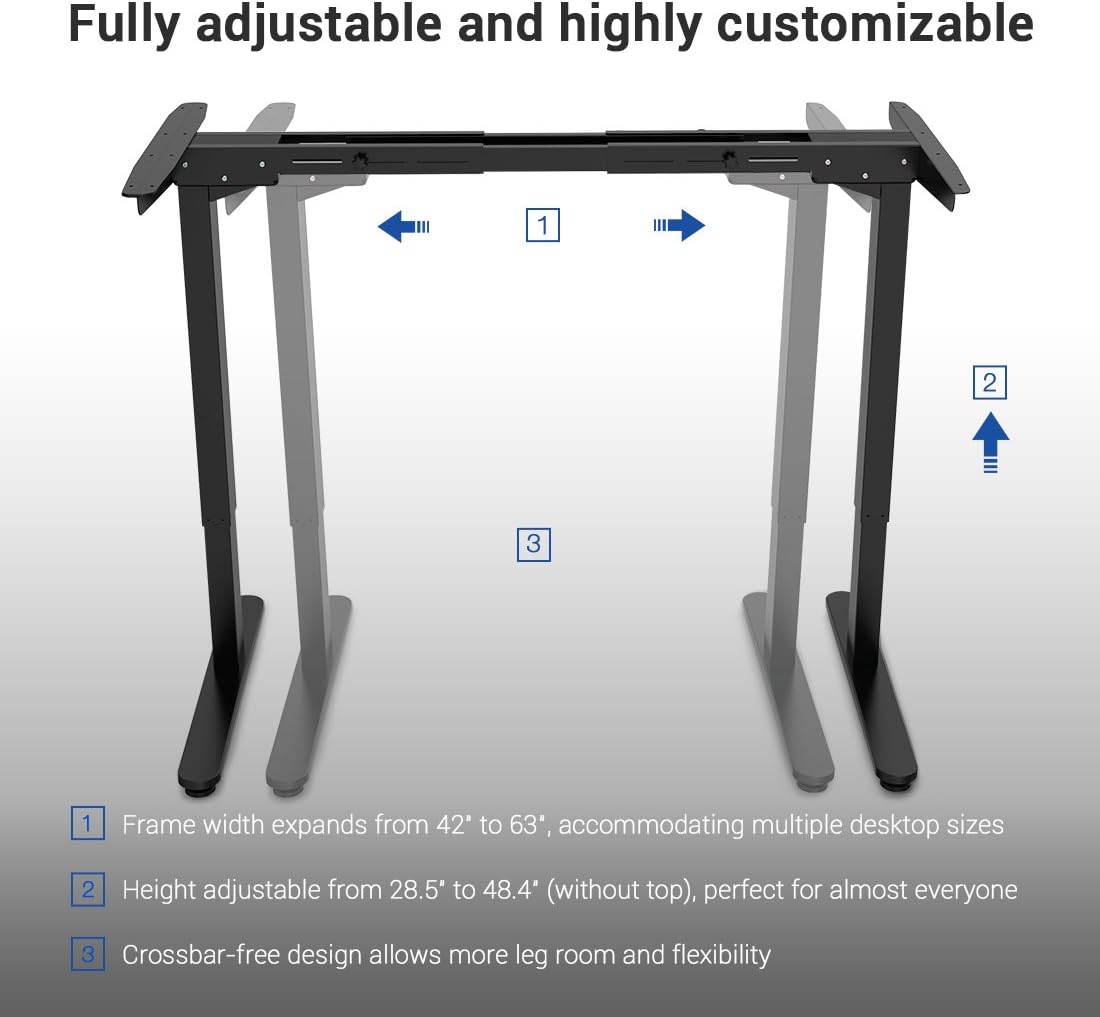
Image: A diagram illustrating the adjustable frame width (42" to 63") and height (28.5" to 48.4") of the FLEXISPOT desk frame, highlighting its customizable nature.
آپريٽنگ هدايتون
The FLEXISPOT E2B-B desk frame features a 7-button digital display handset for easy height adjustment and memory presets.
- اونچائي جي ترتيب: Use the up and down arrows on the handset to smoothly adjust the desk height. The desk moves at approximately 0.87 inches per second.
- ياداشت جي اڳڪٿي: The handset includes 3 customizable height preset options (buttons 1, 2, 3). To save a height, adjust the desk to your desired position, then press and hold one of the preset buttons until the display confirms the setting.
- Sit/Stand Reminder: A dedicated button allows you to set a reminder to switch between sitting and standing positions, promoting healthier work habits.
- ڊجيٽل ڊسپلي The display shows the current height of the desk in inches.

تصوير: هڪ ويجهو تصوير view of the FLEXISPOT digital control panel, showing the up/down arrows, memory preset buttons (1, 2, 3), and other function buttons.
سار سنڀال
Regular maintenance helps ensure the longevity and smooth operation of your desk frame.
- صفائي: Wipe the desk frame and desktop with a soft, damp ڪپڙو. گھڙڻ وارا صاف ڪندڙ يا محلولن کان پاسو ڪريو.
- ڪيبل جو انتظام: Periodically check that all cables are securely connected and not tangled or pinched.
- فاسٽنر چيڪ: Every few months, inspect all screws and bolts to ensure they remain tight. Retighten if necessary.
مشڪلاتون
جيڪڏهن توهان کي پنهنجي ڊيسڪ فريم سان مسئلا درپيش اچن ٿا، ته هيٺ ڏنل عام مسئلا حل ڪرڻ واري قدمن جو حوالو ڏيو:
| مسئلو | ممڪن سبب | حل |
|---|---|---|
| ڊيسڪ حرڪت نٿي ڪري. | بجلي ڪيبل ڪٽيل؛ اوورلوڊ؛ موٽر ۾ غلطي. | Check power connection; Reduce weight on desk; Unplug for 10 seconds and plug back in to reset. |
| Uneven movement. | Unbalanced load; Loose fasteners. | Distribute weight evenly; Check and tighten all assembly fasteners. |
| ڊسپلي تي غلطي ڪوڊ. | مخصوص سسٽم جي غلطي. | Refer to the full troubleshooting guide in your assembly manual or contact customer support. |
وضاحتون
Detailed specifications for the FLEXISPOT E2B-B Height Adjustable Desk Frame:
| خاصيت | تفصيل |
|---|---|
| برانڊ | FLEXISPOT |
| ماڊل | E2B-B |
| Height Adjustment Range (without top) | 28.5" کان 47.4" تائين |
| Frame Width Expansion | 42" کان 63" تائين |
| Compatible Desktop Sizes | 47.25" to 70.9" (width), 23.6" to 31.5" (depth) |
| وزن جي گنجائش | 220 پائونڊ تائين (100 ڪلوگرام) |
| موٽر جو قسم | Dual Motor Lift Mechanism |
| شور جي سطح | Under 50 dBs |
| ڊيسڪ ٽاپ مواد | MDF (Medium Density Fiberboard) with scratch-resistant high-pressure laminate |
| Desktop Dimensions (Included) | 55" (W) x 27.5" (D) x 1" (Thickness) |
| ڪنٽرول پينل | 7-button digital display handset with 3 memory presets and sit/stand reminder |
| اسيمبلي گهربل | ها |
| رنگ | Black Frame + Black Top |
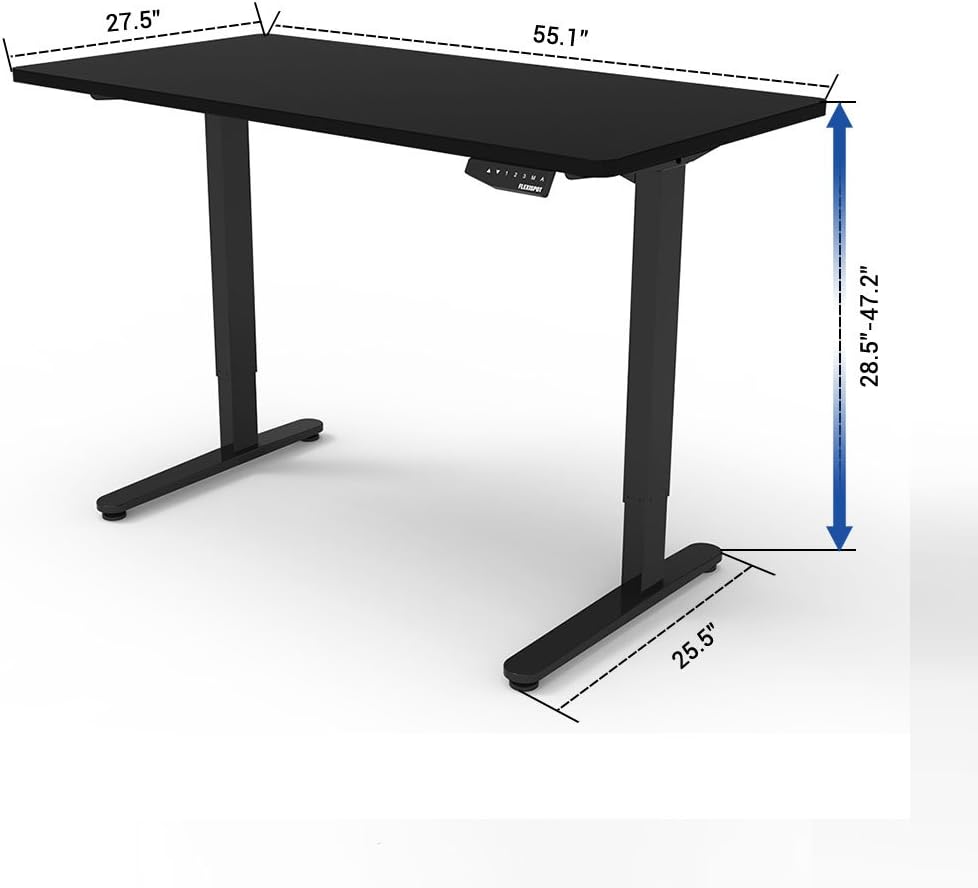
Image: A diagram illustrating the key dimensions of the FLEXISPOT desk, including desktop width (55.1"), depth (27.5"), and height adjustment range (28.5" to 47.2").
وارنٽي ۽ سپورٽ
The FLEXISPOT E2B-B Height Adjustable Desk Frame comes with a comprehensive warranty:
- Desk Frame: 5 سال وارنٽي
- موٽر: 3 سال وارنٽي
For technical support, warranty claims, or any inquiries, please contact FLEXISPOT customer service. Refer to the contact information provided on the product packaging or the official FLEXISPOT webسائيٽ.
سرٽيفڪيشن
The FLEXISPOT E2B-B desk frame meets various industry standards for quality and safety.
Image: Logos for FCC, UL, and BIFMA International certifications, indicating compliance with relevant standards for electronic devices, safety, and office furniture.