
تعارف
This manual provides instructions for the proper use and maintenance of your AW B990BL Neckband Wireless Bluetooth Earphones. Please read this manual thoroughly before using the product to ensure optimal performance and longevity.
The AW B990BL Neckband Wireless Bluetooth Earphones offer a convenient audio solution with a neckband design. Featuring Bluetooth V4.2 connectivity, these earphones provide up to 6 hours of talk or music time on a 1-hour charge. They are designed for wide compatibility with various devices, offering a reliable wireless experience.
پيڪيج مواد
- AW B990BL Neckband Wireless Bluetooth Earphones
- USB چارجنگ ڪيبل
- ڪن جا ٽوٽڪا (مختلف سائز)
- استعمال ڪندڙ دستي

Image: The AW B990BL Neckband Wireless Bluetooth Earphones, showcasing the neckband design, earbuds, and inline control panel.
سيٽ اپ ڪريو
1. ائرفون چارج ڪرڻ
- Connect the micro-USB end of the charging cable to the charging port on the earphone's control unit.
- Connect the USB-A end of the charging cable to a USB power source (e.g., computer USB port, wall adapter).
- The indicator light will illuminate during charging. Once fully charged (approximately 1 hour), the indicator light will change or turn off.
- Disconnect the charging cable once charging is complete.
نوٽ: Ensure the earphones are fully charged before first use for optimal battery performance.
2. بلوٽوٽ جوئر
- Ensure the earphones are turned off.
- Press and hold the Multi-function button (usually the center button on the control unit) for approximately 5-7 seconds until the indicator light flashes red and blue alternately. This indicates pairing mode.
- پنهنجي ڊوائيس (اسمارٽ فون، ٽيبليٽ، وغيره) تي، بلوٽوٿ کي فعال ڪريو ۽ موجود ڊوائيسز جي ڳولا ڪريو.
- Select "B990BL" from the list of found devices.
- Once successfully paired, the indicator light will flash blue slowly, and you may hear a confirmation tone.
- جيڪڏهن پاسورڊ لاءِ چيو وڃي ته، "0000" داخل ڪريو.
نوٽ: ائرفون آن ٿيڻ تي پاڻمرادو آخري جوڙيل ڊوائيس سان ٻيهر ڳنڍڻ جي ڪوشش ڪندا.
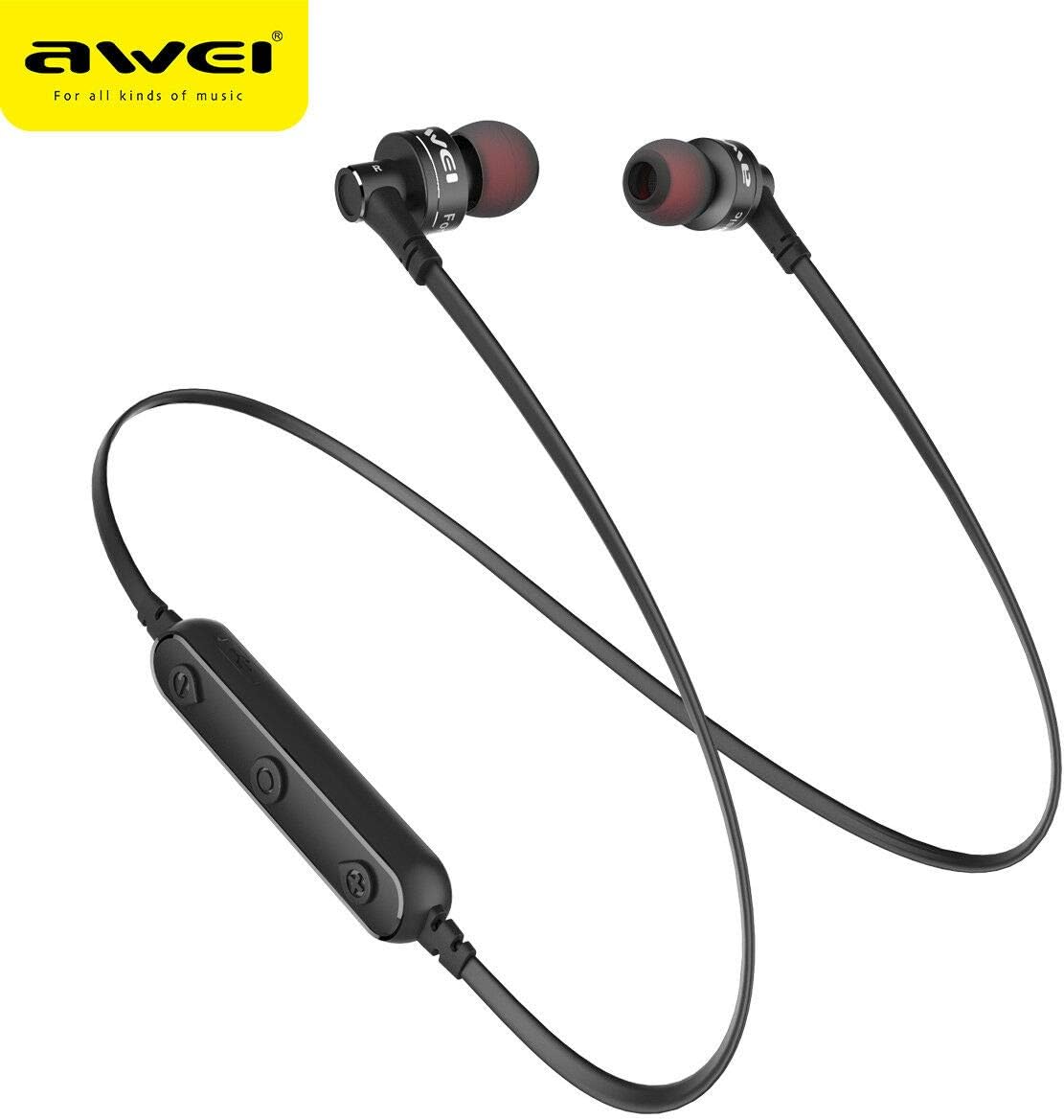
تصوير: هڪ ويجهو تصوير view of the AW B990BL earphones, highlighting the inline control panel with its buttons and charging port.
آپريٽنگ هدايتون
بنيادي ڪم
- پاور آن: 3 سيڪنڊن لاءِ ملٽي فنڪشن بٽڻ کي دٻايو ۽ رکو.
- بجلي بند: 3 سيڪنڊن لاءِ ملٽي فنڪشن بٽڻ کي دٻايو ۽ رکو.
- راند/روڪ: ملائي واري فنڪشن جي بڪ کي هڪ ڀيرو دٻايو.
- حجم مٿي "+" بٽڻ دٻايو.
- حجم ھيٺ "-" بٽڻ دٻايو.
- اڳيون ٽريڪ: "+" بٽڻ کي دٻايو ۽ رکو.
- پويون ٽريڪ: "-" بٽڻ کي دٻايو ۽ رکو.
ڪال انتظام
- جواب ڏيو ڪال: ملائي واري فنڪشن جي بڪ کي هڪ ڀيرو دٻايو.
- ڪال ختم ڪريو: ڪال دوران هڪ ڀيرو ملٽي فنڪشن بٽڻ دٻايو.
- ڪال رد ڪريو: 2 سيڪنڊن لاءِ ملٽي فنڪشن بٽڻ کي دٻايو ۽ رکو.
- ريڊل آخري نمبر: ملٽي فنڪشن بٽڻ کي Doubleه يرا دايو.
سار سنڀال
- Keep the earphones dry. Avoid exposure to extreme temperatures, humidity, or corrosive materials.
- Clean the earphones regularly with a soft, dry cloth. Do not use harsh chemicals or abrasive cleaners.
- جڏهن استعمال ۾ نه هجن ته ائرفون کي صاف ۽ سڪل جاءِ تي رکو.
- Avoid dropping or subjecting the earphones to strong impacts.
- Do not attempt to disassemble or modify the earphones, as this will void the warranty and may cause damage.
مشڪلاتون
- ڊوائيس سان جوڙو نه ٿو ٺاهي سگهجي:
- Ensure the earphones are in pairing mode (red and blue indicator light flashing alternately).
- پڪ ڪريو ته توهان جي ڊوائيس تي بلوٽوٿ فعال آهي ۽ اهو ائرفون کان 10 ميٽر جي اندر آهي.
- Turn off and restart both the earphones and your device, then attempt pairing again.
- جيڪڏهن ضروري هجي ته پنهنجي ڊوائيس تي پوئين بلوٽوٿ ڪنيڪشن صاف ڪريو.
- ڪابه آواز يا گهٽ آواز:
- ائرفون ۽ توهان جي ڳنڍيل ڊوائيس ٻنهي تي حجم جي سطح چيڪ ڪريو.
- پڪ ڪريو ته ائرفون توهان جي ڊوائيس سان صحيح طرح سان ڳنڍيل آهن.
- ميڊيا سان ڪنهن مسئلي کي رد ڪرڻ لاءِ مختلف آڊيو ذريعن کي هلائڻ جي ڪوشش ڪريو. file.
- ائرفون چارج نه ٿي رهيا آهن:
- پڪ ڪريو ته چارجنگ ڪيبل محفوظ طور تي ائرفون ۽ پاور سورس ٻنهي سان ڳنڍيل آهي.
- Try a different USB charging cable or power source.
- ڪنهن به ملبي يا نقصان لاء چارجنگ پورٽ چيڪ ڪريو.
وضاحتون
| خاصيت | تفصيل |
|---|---|
| ماڊل نالو | B990BL |
| بلوٽوت ورزن | V4.2 |
| چارج ڪرڻ وقت | 1 ڪلاڪ |
| ڳالهائڻ جو وقت | 6 ڪلاڪ |
| موسيقي جو وقت | 6 ڪلاڪ |
| رابطي ٽيڪنالاجي | وائرليس |
| حساسيت | 96 ڊي بي |
| پيداوار جي ماپ | 4 x 10 x 16.5 سينٽي |
| وزن | 4.54 جي |
| ٺاهيندڙ | اوئي |
وارنٽي ۽ سپورٽ
وارنٽي جي معلومات يا ٽيڪنيڪل سپورٽ لاءِ، مھرباني ڪري پنھنجي خريداري سان گڏ ڏنل دستاويز ڏسو يا پرچون ڪندڙ سان رابطو ڪريو جتان پراڊڪٽ حاصل ڪئي وئي ھئي. وارنٽي جي دعوائن لاءِ خريداري جو ثبوت رکو.