
1. اھم حفاظتي ھدايتون
Please read and follow these instructions carefully for safe assembly and operation of your FLEXISPOT E5W-UK electric standing desk frame. Adhere to all weight restrictions and consider using additional anchors for enhanced stability, especially if the desk is frequently moved or heavily loaded.
- اسيمبليءَ کان اڳ پڪ ڪريو ته سڀئي جزا موجود آهن ۽ انهن کي ڪو نقصان نه پهتو آهي.
- 125 kg (275 lbs) جي وڌ ۾ وڌ لوڊ گنجائش کان وڌيڪ نه ڪريو.
- آپريشن دوران ٻارن ۽ پالتو جانورن کي ڊيسڪ کان پري رکو.
- Avoid placing objects under the desk that could obstruct its movement.
- صفائي يا سار سنڀال کان اڳ بجلي بند ڪريو.
- صرف مهيا ڪيل پاور اڊاپٽر استعمال ڪريو.
2. پراڊڪٽ ختمview
The FLEXISPOT E5W-UK is a robust electric standing desk frame designed for height adjustability and stability. It features a dual-motor lifting system and a memory control panel.

تصوير: مٿانview of the FLEXISPOT EC5 height-adjustable desk frame, showcasing its robust and stable design in various color options (black, grey, white).
اهم خاصيتون:
- Electric Lifting System: Powerful dual motors with a three-stage linear motion system ensure smooth and rapid height adjustment at 38 mm/second with low noise (under 50 dB).
- Solid and Robust Construction: The heavy-duty coated steel frame provides stability and supports a load capacity of up to 125 kg (275 lbs). Telescopic crossbars extend from 110 cm to 190 cm to accommodate tabletops from 120 cm to 200 cm in width.
- Humanized Lifting Function: Height adjustment range from 62 cm to 125 cm to suit various user heights and office needs.
- ٽڪراءُ مخالف فنڪشن: Protects the desk from collisions with obstacles during height adjustment, enhancing safety.
- معيار جي ضمانت: Each Flexispot desk frame undergoes 10,000 fatigue tests, meeting international standards with CE/BIFMA/RoHS certification.

Image: Illustrates the dual motor system, highlighting specifications such as max load capacity (160kg), low energy consumption (<0.5W), speed (35mm/s), and noise level (under 50dB).

Image: Details the stability and durability features, including 3 lifting columns, height adjustment from 62-127cm, 20,000+ fatigue test validation, and removable foot caps for casters.
3. سيٽ اپ ۽ اسيمبلي
The FLEXISPOT E5W-UK desk frame requires assembly. All necessary tools are included in the package. Assembly typically takes 20-25 minutes with clear, top-notch instructions.
اسيمبلي جا قدم:
- سڀني حصن کي کوليو ۽ شامل ڪيل دستور ۾ حصن جي فهرست جي خلاف تصديق ڪريو.
- Attach the lifting columns to the foot supports.
- Connect the crossbars between the lifting columns.
- Install the control box and motor cables.
- Mount the control panel to the desired location on the desk frame.
- Secure your chosen tabletop to the assembled frame using appropriate screws (tabletop not included).
- Connect the power cable and ensure all connections are secure.

Image: Displays all components of the FLEXISPOT EC5 desk frame laid out for assembly, including legs, crossbars, control box, and tools, indicating an easy assembly process.
Adjusting Frame Width:
The frame's width is adjustable from 110 cm to 190 cm to accommodate various tabletop sizes (120-200 cm width x 60-80 cm depth). Adjust the telescopic crossbars to match your tabletop before securing it.
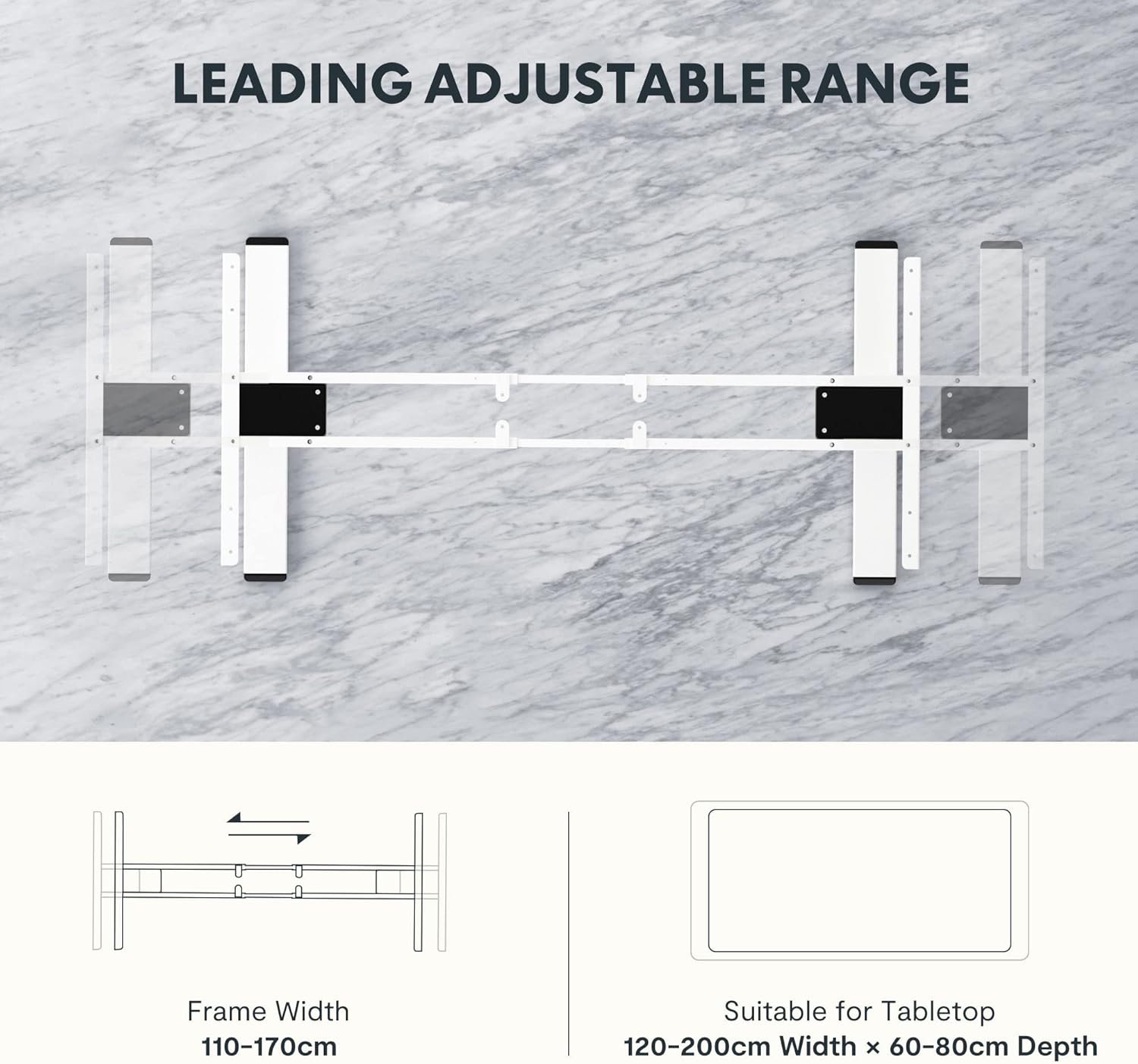
Image: Diagram illustrating the adjustable frame width from 110-170cm and suitable tabletop dimensions (120-200cm width x 60-80cm depth).
4. آپريٽنگ هدايتون
The FLEXISPOT E5W-UK desk frame is operated via an intuitive control panel with memory presets.
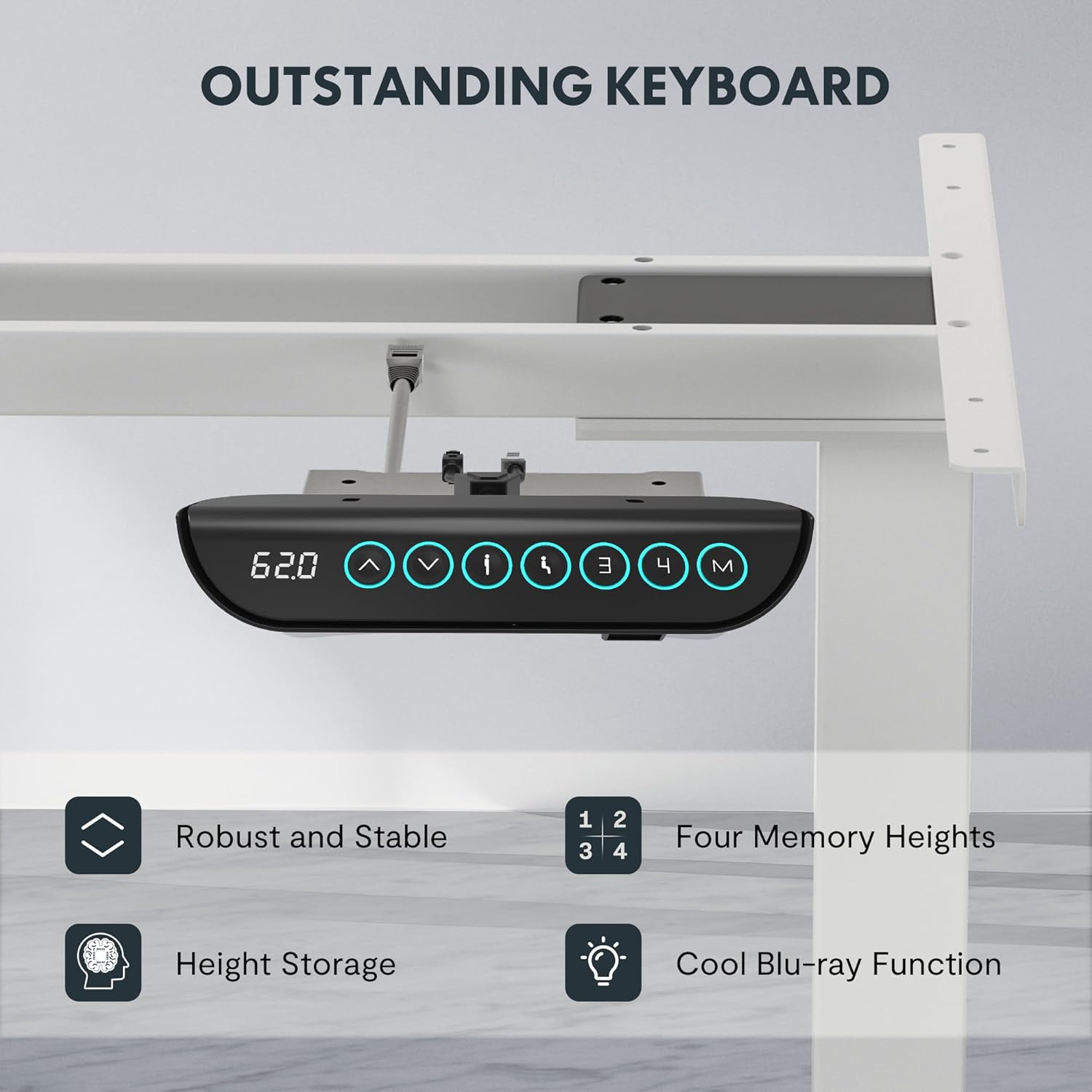
Image: Close-up of the FLEXISPOT EC5 control panel, featuring a digital height display, up/down buttons, and four memory preset buttons (1, 2, 3, 4), along with a memory set button (M).
ڪنٽرول پينل افعال:
- مٿي/هيٺ بٽڻ (▲ / ▼): Press and hold to adjust the desk height manually. Release to stop at the desired height.
- ڊجيٽل ڊسپلي ڊيسڪ جي موجوده اوچائي سينٽي ميٽرن ۾ ڏيکاري ٿو.
- ياداشت جا اڳواٽ سيٽ (1، 2، 3، 4):
- ڊيسڪ کي پنهنجي گهربل اوچائي تي ترتيب ڏيو.
- Press the "M" button. The display will show "S-".
- Press one of the number buttons (1, 2, 3, or 4) within 3 seconds to save the current height to that preset.
- محفوظ ڪيل اوچائي کي ياد ڪرڻ لاءِ، صرف لاڳاپيل نمبر بٽڻ کي دٻايو. ڊيسڪ خودڪار طريقي سان ذخيرو ٿيل پوزيشن ڏانهن منتقل ٿي ويندي.
- ٽڪراءُ مخالف نظام: The desk is equipped with an anti-collision feature. If the desk encounters an obstacle during movement, it will automatically stop and reverse slightly to prevent damage.
5. سار سنڀال
Regular maintenance ensures the longevity and optimal performance of your FLEXISPOT E5W-UK desk frame.
- صفائي: ڊيسڪ فريم کي نرم، ڊي سان صاف ڪريوamp cloth. Avoid abrasive cleaners or solvents. Ensure the power is disconnected before cleaning.
- ڪيبل جو انتظام: Periodically check all cables for wear or damage. Ensure they are neatly routed and not pinched.
- فاسٽنرز: ڪڏهن ڪڏهن سڀني اسڪرو ۽ بولٽن کي چيڪ ڪريو ته جيئن پڪ ٿئي ته اهي تنگ آهن. جيڪڏهن ضروري هجي ته ٻيهر مضبوط ڪريو.
- تحريڪ جي چڪاس: Operate the desk through its full height range periodically to ensure smooth movement.
6. مسئلا حل ڪرڻ
If you encounter issues with your FLEXISPOT E5W-UK desk frame, refer to the common solutions below.
| مسئلو | ممڪن سبب | حل |
|---|---|---|
| ڊيسڪ حرڪت نٿي ڪري. | Power cable disconnected, control box loose, overload. | Check power connection. Ensure all cables are securely plugged in. Reduce weight on the desk. |
| Uneven movement or strange noises. | Loose fasteners, obstruction, uneven weight distribution. | Check and tighten all screws. Remove any obstructions. Redistribute weight evenly on the tabletop. |
| ٽڪراءُ مخالف نظام اڪثر ڪري چالو ٿئي ٿو. | Obstacles under or above the desk, sensitivity setting. | Clear the area around the desk. Consult the full manual for adjusting anti-collision sensitivity if available. |
| ميموري پري سيٽ ڪم نه ڪري رهيا آهن. | Not saved correctly. | Re-save the memory presets following the operating instructions. |
جيڪڏهن انهن حلن جي ڪوشش ڪرڻ کان پوءِ به مسئلو برقرار رهي ٿو، ته مهرباني ڪري FLEXISPOT ڪسٽمر سپورٽ سان رابطو ڪريو.
7. وضاحتون
- ماڊل نمبر: E5W-UK
- برانڊ: FLEXISPOT
- رنگ: White (Frame 3 Levels - White)
- مواد: Alloy Steel (Frame), Metal (Raw Material)
- طول و عرض (L x W x H): 45.87 x 110 x 7.87 cm (packaged); Product dimensions: 116.5P x 32l x 20H cm (assembled, without tabletop)
- وزن: 29.72 ڪلو (پيڪيج ٿيل)
- لوڊ گنجائش: 125 ڪلو تائين (275 مب)
- اونچائي جي ترتيب جي حد: 62 سينٽي کان 125 سينٽي ميٽر
- رفتار: 38 ايم ايم / سيڪنڊ
- شور جي سطح: 50 ڊي بي کان گھٽ
- فريم ويڪر جي ترتيب: 110 سينٽي کان 190 سينٽي ميٽر
- Suitable Tabletop Dimensions: 120-200 cm (width) x 60-80 cm (depth)
- اسيمبلي جي ضرورت آهي: ها
- خاص خاصيتون: Sit-stand desk, Height-adjustable desk, Electric standing desk, Anti-collision function, Memory presets.
- سرٽيفڪيشن: CE/BIFMA/RoHS (as per product features)

Image: Displays certifications for the FLEXISPOT EC5, including an IGR Institute certificate for ergonomic product and a German Health Award for ergonomic brands.
8. وارنٽي ۽ سپورٽ
FLEXISPOT stands by the quality of its products.
- فريم وارنٽي: 5 سال
- موٽر وارنٽي: 3 سال
- ٽيڪنيڪل سپورٽ: مفت حياتياتي ٽيڪنيڪل سپورٽ
For warranty claims, technical assistance, or any questions regarding your FLEXISPOT E5W-UK desk frame, please contact FLEXISPOT customer service through their official website or the retailer where the product was purchased. Please have your model number (E5W-UK) and proof of purchase ready when contacting support.