
1. تعارف
This manual provides comprehensive instructions for the installation, operation, and maintenance of your AMASE AUDIO Android 14 Car Stereo. Please read this manual thoroughly before using the product to ensure proper function and safety. Keep this manual for future reference.
2. Application Models
This car stereo is compatible with the following Audi and SEAT models:
- Audi A4 B6 (8E/8H) (2000-2006)
- Audi A4 B7 (8E/8H) (2004-2008)
- Audi S4 B7 (8E/8H) (2005-2008)
- Audi S4 B6 (8E/8H) (2003-2005)
- Audi RS4 (2002-2008)
- Audi RS4 B7 (8E) (2006-2008)
- SEAT Exeo (2008-2012)
تبصرو: If your car's dashboard has a 1 DIN structure, this head unit is not applicable.
3. اهم خاصيتون
- آپريٽنگ سسٽم: Real Android 14.0 system with Rockchip RK3562 Quad-core ARM Cortex-A53@2.0GHz.
- ياداشت ۽ ذخيرو: 3GB RAM and 32GB ROM.
- ڏيکاريو: QLED 1024x600 pixel screen.
- رابطي: Support 4G WiFi (5GHz/2.4GHz bands) and Bluetooth 5.0.
- سمارٽ فون انٽيگريشن: Built-in Wireless/Wired CarPlay and Android Auto.
- آڊيو پروسيسنگ: Built-in DSP (Digital Sound Processor) for enhanced sound quality.
- نيويگيشن: Built-in Google Maps for GPS navigation.
- ملٽي ميڊيا: Supports 1080p movie playback.
- يوزر انٽرفيس: Split-screen functionality, multicolor LED buttons, customizable themes.
- اضافي خاصيتون: Built-in apps to support OBDII & rear camera (rear camera not included).
- سافٽ ويئر اپڊيٽ: Convenient online firmware updates for Android version and app updates.
4. دٻي ۾ ڇا آهي
The package includes all necessary parts for installation and operation:
- AMASE AUDIO Android 14 Car Stereo Unit
- Power Cable (x2, one with CANBUS, one without)
- RCA ڪيبل
- Radio Antenna Connector
- 15A فيوز
- CANBUS Decoder Box
- خارجي مائڪروفون
- USB Adapter Cables (x3)
- Disassembly Tools (x4)
- ريڊيو اينٽينا اڊاپٽر ڪيبل
- GPS اينٽيننا

Figure 4.1: All accessories included with the AMASE AUDIO car stereo. This image displays various cables, adapters, and tools such as power cables, RCA cables, radio antenna connectors, a 15A fuse, a CANBUS box, an external microphone, USB adapter cables, disassembly tools, a radio antenna adapter cable, and a GPS antenna.
5. پراڊڪٽ ختمview

شڪل 5.1: سامهون view of the AMASE AUDIO Android 14 Car Stereo, showcasing its 7-inch touchscreen display and physical control buttons.

شڪل 5.2: ختمview of the car stereo's high-standard configuration, highlighting Android 14, 4-core CPU, 3GB RAM, 32GB ROM, Wireless Carplay, DSP+, Dual-band WiFi (2.4G+5G), 4G Cellular Network, Bluetooth 5, Play Store, Navigation, Radio, and Touchscreen capabilities.
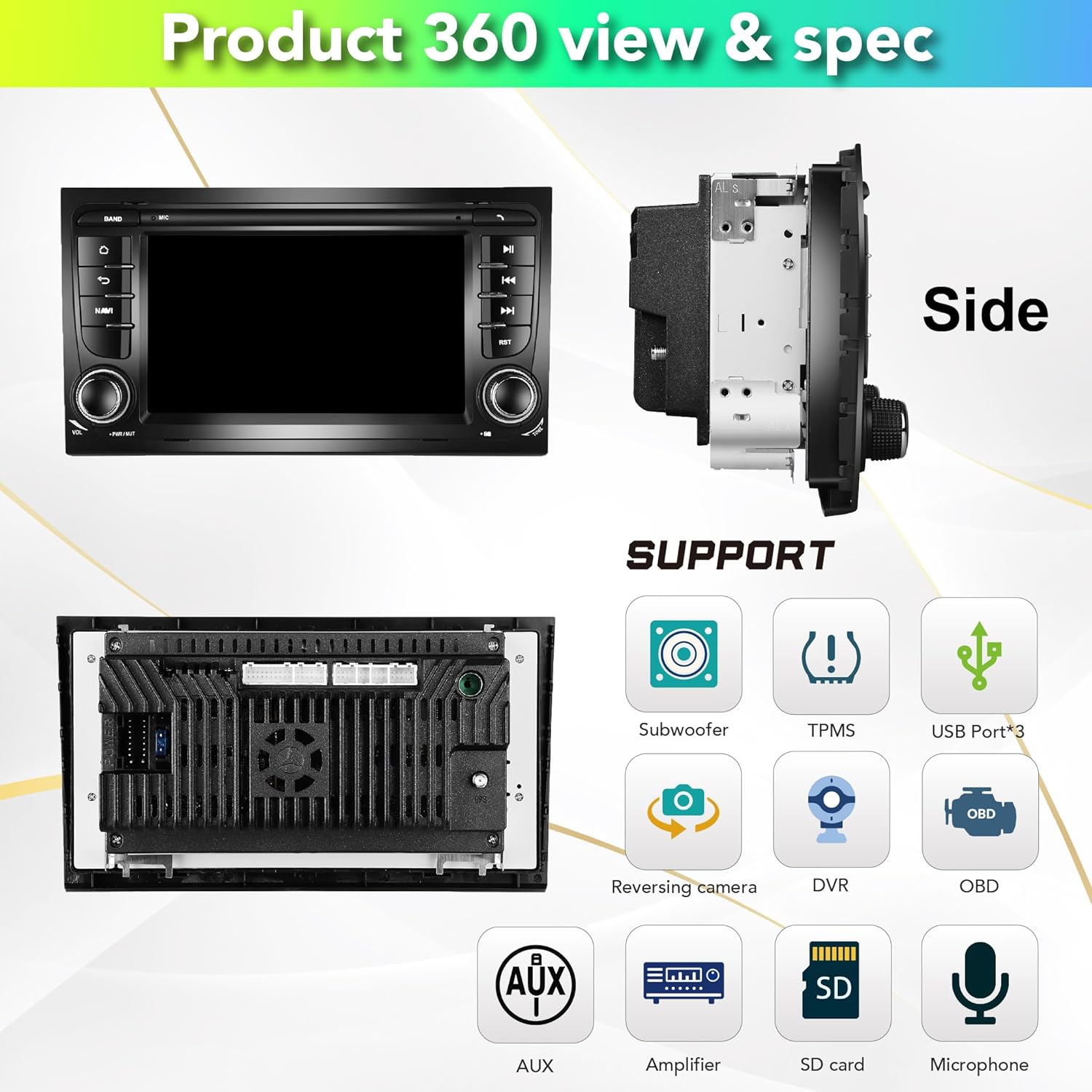
Figure 5.3: Side and rear views of the car stereo, illustrating its physical dimensions and various supported features including Subwoofer, TPMS, USB ports (x3), Reversing camera, DVR, OBD, AUX, Amplifier, SD card, and Microphone connections.
6. سيٽ اپ ۽ انسٽاليشن
Installation of the AMASE AUDIO car stereo requires careful attention to wiring and proper fitment. It is recommended to have the installation performed by a qualified professional if you are not familiar with car audio systems.
6.1. انسٽاليشن کان اڳ جي چڪاس
- پڪ ڪريو ته سيڪشن 4 ۾ درج ڪيل سڀئي جزا موجود آهن.
- Verify compatibility with your vehicle model (refer to Section 2).
- ڪو به بجلي جو ڪم شروع ڪرڻ کان اڳ گاڏي جي بيٽري کي ڊسڪنيڪٽ ڪريو.
6.2. تنصيب جا مرحلا
- Use the provided disassembly tools to carefully remove your factory radio unit from the dashboard.
- Connect the appropriate power cable harness (with or without CANBUS, depending on your vehicle's original setup) to the car stereo and the vehicle's wiring harness. Ensure all RCA cables are properly connected for sound output.
- جي پي ايس اينٽينا کي ڳنڍيو ۽ ان کي صاف آسمان واري هنڌ ڏانهن روانو ڪريو. view (e.g., dashboard, under windshield).
- Connect the external microphone and route it to a suitable location (e.g., near the instrument cluster or sun visor) for optimal voice pickup.
- Connect any optional accessories such as USB adapter cables, reversing camera, or DVR.
- Before fully securing the unit, temporarily connect the battery and test all functions (power, audio, GPS, Bluetooth, etc.) to ensure proper operation.
- Once verified, carefully slide the car stereo into the dashboard opening and secure it in place.

Figure 6.1: Visual comparison showing the factory radio unit before installation and the AMASE AUDIO car stereo installed in an Audi A4 dashboard.
7. آپريٽنگ هدايتون
Your AMASE AUDIO car stereo runs on Android 14, offering a wide range of functionalities. The user interface is intuitive and can be customized.
7.1. Basic Navigation and UI
The main screen provides quick access to frequently used applications. You can swipe left/right to access more apps. The system supports split-screen mode for multitasking.
Video 7.1: A demonstration of the Audi A4 7-inch system display, showcasing the user interface, app collection, GPS navigation, main app settings, Bluetooth phone connectivity, Bluetooth music playback, 1080p video playback, online browsing, app downloads, panel light color settings, radio functions, default themes, and built-in OBD2 features.

شڪل 7.1: مثالamples of the system's user interface screens, including the home screen, app drawer, radio interface, and settings menu, along with options for theme selection.
7.2. جي پي ايس نيويگيشن
The unit comes with built-in Google Maps for navigation. Ensure the GPS antenna is properly installed for accurate positioning.
- Tap the 'Maps' icon on the home screen to launch the navigation application.
- Enter your destination using the on-screen keyboard or voice input.
- Follow the on-screen directions and voice prompts for your route.
7.3. وائرليس ڪار پلي ۽ اينڊرائيڊ آٽو
The system supports both Wireless/Wired CarPlay for Apple devices and Android Auto for Android devices. No additional dongle or cable is required for wireless connection.
- پڪ ڪريو ته توهان جي اسمارٽ فون ۽ ڪار اسٽيريو تي بلوٽوٿ فعال آهي.
- On your phone, search for and connect to the car stereo's Bluetooth name (e.g., "AMASE").
- Once connected, launch the CarPlay or Android Auto application on the car stereo.
- سيٽ اپ کي مڪمل ڪرڻ لاءِ آن-اسڪرين اشارن تي عمل ڪريو.
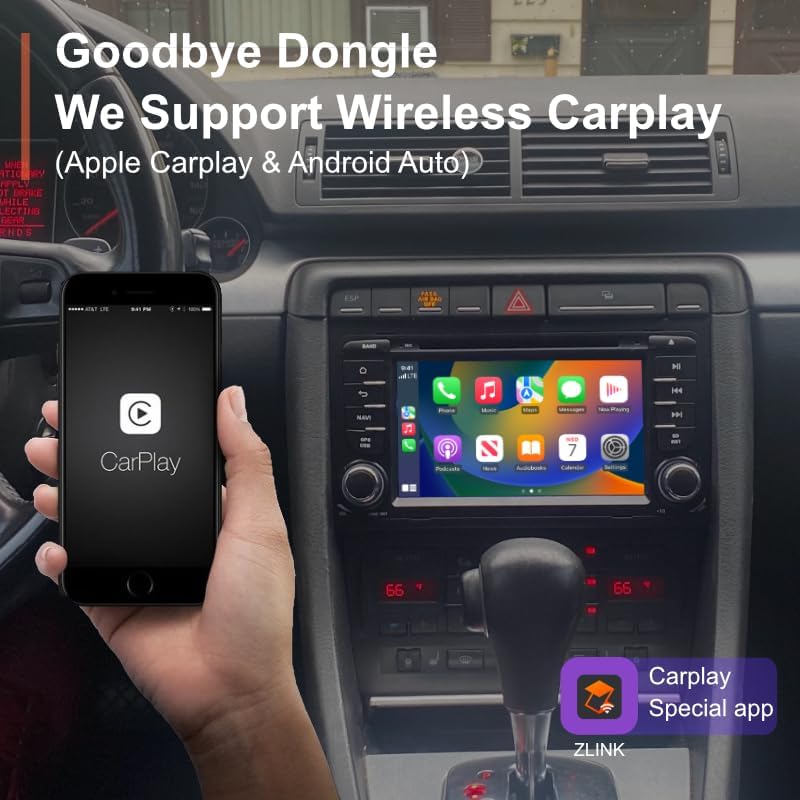
Figure 7.2: A smartphone displaying the CarPlay interface, wirelessly connected to the car stereo, demonstrating seamless integration without the need for a dongle.
7.4. بلوٽوت ڪنيڪشن
هينڊز فري ڪالنگ ۽ آڊيو اسٽريمنگ لاءِ پنهنجي اسمارٽ فون کي بلوٽوٿ ذريعي ڳنڍيو.
- Go to Settings > Bluetooth on the car stereo.
- Enable Bluetooth and ensure visibility.
- پنهنجي فون تي، ڪار اسٽيريو جو بلوٽوٿ نالو ۽ جوڙو ڳولهيو.
- هڪ ڀيرو جوڙيو ويو، توهان ڪال ڪري/ وصول ڪري سگهو ٿا ۽ وائرليس طور تي موسيقي هلائي سگهو ٿا.
7.5. ڊجيٽل سائونڊ پروسيسر (ڊي ايس پي)
The built-in DSP allows for advanced audio customization to optimize sound quality in your vehicle.
- Access the DSP settings from the app menu.
- Adjust the 15-band graphic equalizer to fine-tune frequency response.
- Utilize special sound effects like Equiloudness, Surround system enhancement, Cut Frequency, Dynamic Bass adjustment, and Subwoofer controls.
- Perform time correction to adjust sound field and time delay for optimal listening position.

Figure 7.3: The DSP interface, illustrating the 15-band graphic equalizer, options for special sound effects, and time correction settings for precise audio tuning.
7.6. سافٽ ويئر اپڊيٽ
Keep your unit up-to-date with convenient online firmware updates.
- Ensure the car stereo is connected to a stable internet connection (via WiFi hotspot).
- Navigate to Settings > System Update.
- Tap 'Check version' to see if new updates are available.
- اپڊيٽ ڊائون لوڊ ۽ انسٽال ڪرڻ لاءِ اسڪرين تي ڏنل هدايتن تي عمل ڪريو.

Figure 7.4: The system update screen, displaying the current software version and providing an option to check for new firmware updates.
8. سار سنڀال
توهان جي ڪار اسٽيريو جي ڊگهي عمر ۽ بهترين ڪارڪردگي کي يقيني بڻائڻ لاءِ، انهن سار سنڀال جي هدايتن تي عمل ڪريو:
- صفائي: اسڪرين ۽ ٻاهرين حصي کي صاف ڪرڻ لاءِ نرم، سڪل ڪپڙو استعمال ڪريو. رگڙيندڙ صاف ڪندڙ يا محلولن کان پاسو ڪريو.
- گرمي پد: يونٽ کي انتهائي گرمي پد تي ظاهر ڪرڻ کان بچاء.
- سافٽ ويئر: Regularly check for and install software updates to ensure system stability and access to new features.
- ڪنيڪشن: وقتي طور تي سڀني وائرنگ ڪنيڪشنن کي چيڪ ڪريو ته جيئن پڪ ڪري سگهجي ته اهي محفوظ ۽ سنکنرن کان پاڪ آهن.
9. مسئلا حل ڪرڻ
جيڪڏهن توهان کي پنهنجي ڪار اسٽيريو سان مسئلا درپيش اچن ٿا، ته هيٺ ڏنل عام مسئلن ۽ حلن جو حوالو ڏيو:
| مسئلو | ممڪن سبب | حل |
|---|---|---|
| يونٽ پاور نه آهي. | بجلي جو ڪنيڪشن ڍلو، فيوز ڦاٽو. | Check power cables and connections. Inspect and replace the 15A fuse if blown. |
| ڪوبه آواز ٻاھر نه. | Incorrect RCA cable connection, speaker wiring issue, DSP settings. | Ensure all RCA audio cables are correctly plugged into the unit. Check speaker wiring. Verify DSP output settings. |
| جي پي ايس ڪم نه ڪري رهيو آهي يا غلط آهي. | GPS antenna not properly connected or positioned. | پڪ ڪريو ته GPS اينٽينا محفوظ طور تي ڳنڍيل آهي ۽ صاف جڳهه تي رکيل آهي view آسمان جو. |
| بلوٽوٿ ڪنيڪشن جا مسئلا. | Incorrect pairing, Bluetooth disabled. | Ensure Bluetooth is enabled on both the unit and your phone. Re-pair the devices. Clear Bluetooth cache if necessary. |
| Screen fails in colder weather. | Temperature sensitivity. | Allow the car's interior to warm up. If the issue persists, contact customer support. |
For persistent issues not covered here, please contact AMASE AUDIO customer support.
10. وضاحتون
- پيداوار جي ماپ: 9.33 x 6.81 x 5.12 انچ
- شيء جو وزن: 2.64 پائونڊ
- آپريٽنگ سسٽم: Android 14.0
- پروسيسر: Rockchip RK3562 Quad-core ARM Cortex-A53@2.0GHz
- رام: 3 جي بي
- روم: 32 جي بي
- ڊسپلي سائيز: 7 انچ (18 سينٽي ميٽر ڊاگونل)
- ڊسپلي قرارداد: QLED 1024x600 pixels
- رابطي: Bluetooth 5.0, 4G WiFi (5GHz/2.4GHz)
- آڊيو آئوٽ موڊ: اسٽيريو
- چوڌاري آواز چينل جي جوڙجڪ: 4.0
- رنگ: ڪارو
- ٺاهيندڙ: Amaseaudio
11. وارنٽي ۽ سپورٽ
AMASE AUDIO provides a one-year warranty for this product. This warranty covers defected parts, excluding the screen (human-damaged parts are not included).
For technical support, warranty claims, or any inquiries, please contact AMASE AUDIO customer service through the platform where you purchased the product or visit the official AMASE AUDIO store online.
مھرباني ڪري وارنٽي جي مقصدن لاءِ خريداري جو ثبوت رکو.