
تعارف
This manual provides essential instructions for the safe and effective use of your Andoer Portable 1080P Digital Camera D11773S. Please read this manual thoroughly before operating the device and retain it for future reference. This digital camera is designed for capturing high-resolution photos and videos, featuring a 48MP image sensor, 1080P video recording, 8X digital zoom, and a 2.7-inch LCD screen.
حفاظت جي ڄاڻ
- ڪئميرا کي پاڻي يا نمي کي بي نقاب نه ڪريو.
- ڪئميرا ڇڏڻ يا ان کي مضبوط اثرن جي تابع ڪرڻ کان پاسو ڪريو.
- ڪئميرا کي مضبوط مقناطيسي ميدانن کان پري رکو.
- Do not attempt to disassemble or modify the camera. Repairs should only be performed by qualified personnel.
- صرف مخصوص بيٽري جو قسم ۽ چارجنگ ڪيبل استعمال ڪريو.
- جڏهن استعمال ۾ نه هجي ته ڪئميرا کي ٿڌي، سڪل جاءِ تي محفوظ ڪريو.
- ننڍن ٻارن جي پهچ کان پري رکو.
پيڪيج مواد
پڪ ڪريو ته سڀئي شيون پيڪيج ۾ موجود آهن:
- Andoer Portable Digital Camera (Model D11773S)
- Lithium Battery (3.7V 550mAh)
- ٽائپ-سي چارج ڪيبل
- کلائي پٽي
- ڪيري جو ٿيلهو
- استعمال ڪندڙ دستي

Image: Contents of the camera package, showing the camera, battery, USB-C cable, wrist strap, carry bag, and user manual.
ڪئميرا ختمview
پنهنجي ڪئميرا جي مکيه حصن سان پاڻ کي واقف ڪرايو.
سامهون View

تصوير: سامهون view of the Andoer D11773S camera. Key features visible include the digital lens, built-in flash, and the 2.7" TFT display and 48 Mega pixels indicators.
- لينس: تصويرون ۽ وڊيوز کي پڪڙيو.
- فليش: گهٽ روشني واري حالتن ۾ روشني فراهم ڪري ٿو.
- مائڪروفون: وڊيو ڪيپچر دوران آڊيو رڪارڊ ڪري ٿو.
ريڙهه View

تصوير: پوئين پاسي view of the Andoer D11773S camera, displaying the 2.7-inch LCD screen and various control buttons for navigation and settings.
- LCD Screen (2.7 Inch): لائيو ڏيکاري ٿو view, menus, and playback.
- ڪنٽرول بٽڻ: For menu navigation, mode selection, zoom, and playback.
- اسپيڪر: آڊيو پلے بیک لاءِ.
پاسي View ۽ طول و عرض

Image: Diagram illustrating the dimensions of the Andoer D11773S camera: 9.2cm length, 6.1cm width, and 1.4cm thickness.
- USB پورٽ (ٽائيپ-سي): چارج ڪرڻ ۽ ڊيٽا جي منتقلي لاء.
- ميموري ڪارڊ سلاٽ: مائڪرو ايس ڊي ڪارڊ داخل ڪرڻ لاءِ.
- بيٽري جو خانو: ريچارج لائق ليٿيم بيٽري رکي ٿو.
سيٽ اپ ڪريو
1. بيٽري کي چارج ڪرڻ
- Insert the provided lithium battery into the camera's battery compartment.
- Connect the camera to a power source (e.g., computer USB port or USB wall adapter) using the supplied Type-C charge cable.
- چارجنگ انڊيڪيٽر لائيٽ روشن ٿيندي. هڪ ڀيرو مڪمل چارج ٿيڻ کان پوءِ، روشني رنگ تبديل ڪري سگهي ٿي يا بند ٿي سگهي ٿي.
2. ميموري ڪارڊ داخل ڪرڻ
The camera requires a Class-10 external Micro SD memory card (not included) with a maximum capacity of 128GB.
- ڪئميرا جي پاسي تي ميموري ڪارڊ سلاٽ ڳوليو.
- Insert the Micro SD card with the metal contacts facing the front of the camera until it clicks into place.
- To remove, gently press the card inward until it springs out.
آپريٽنگ هدايتون
پاور آن / آف
- پاور آن ڪرڻ لاءِ، پاور بٽڻ کي دٻايو ۽ رکو.
- پاور آف ڪرڻ لاءِ، پاور بٽڻ کي ٻيهر دٻايو ۽ رکو.
تصويرون ڪڍڻ
The camera supports picture resolutions up to 48MP.
- ڪئميرا آن ڪريو.
- 2.7 انچ جي LCD اسڪرين استعمال ڪندي پنهنجي شاٽ کي فريم ڪريو.
- Press the Shutter button halfway to focus (if applicable), then fully press to capture the photo.

Image: Visual representation of the camera's capabilities, showing a 48MP photo example and a 1080P video exampلي.
رڪارڊنگ وڊيوز
The camera supports video resolution up to 1920x1080 (1080P).
- Switch the camera to video recording mode (refer to on-screen icons or mode button).
- رڪارڊ شروع ڪرڻ لاءِ رڪارڊ جو بٽڻ دٻايو.
- رڪارڊ بٽڻ کي Pressيهر د Pressايو رڪارڊنگ بند ڪرڻ لاءِ.
زوم فنڪشن
The camera features 8X digital zoom.
- Use the zoom buttons (often marked 'W' for Wide and 'T' for Telephoto) to adjust the zoom level.
فليش سيٽنگون
The built-in flash can be used in dark conditions.
- Access the flash settings through the camera's menu to select modes like Auto Flash, Fill-in Flash, Red-eye Reduction, or Flash Off.
Special Features: Anti-Shake, Face Detect, Smile Capture, Self-Timer
These features enhance your photography experience.
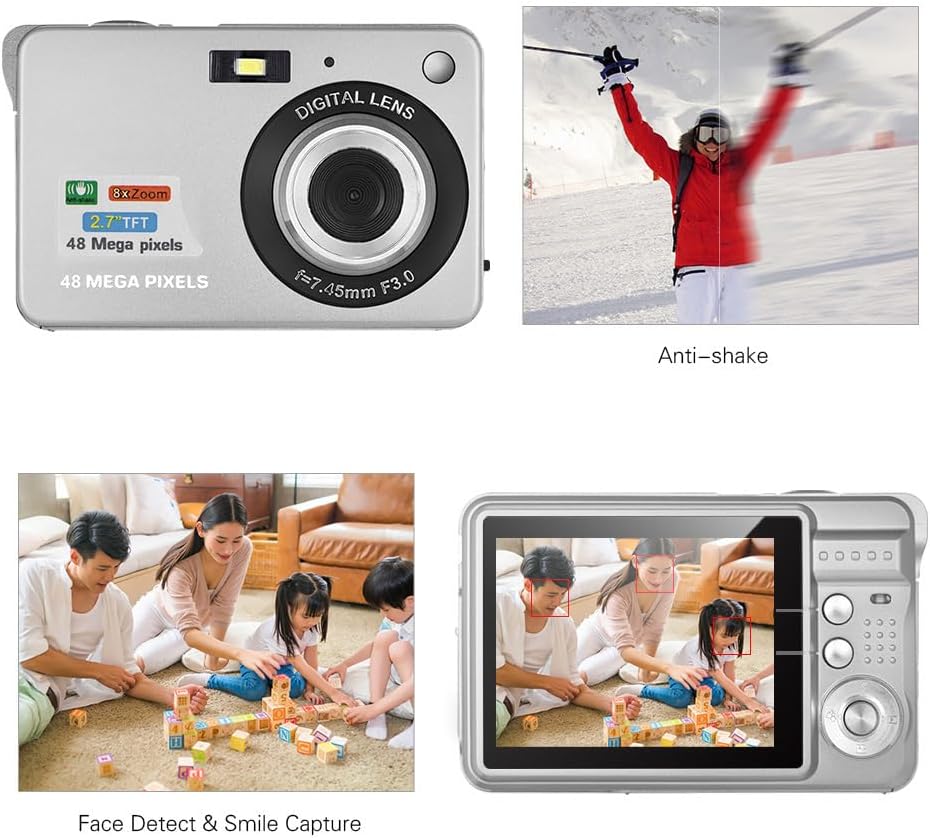
Image: Demonstrations of the camera's Anti-shake function (reducing blur from movement) and Face Detect & Smile Capture (identifying faces and automatically taking a photo when a smile is detected).
- مخالف ڇڪڻ: Helps reduce blur caused by camera movement. This feature is typically enabled by default or can be toggled in settings.
- Face Detect & Smile Capture: The camera can detect faces and automatically capture a photo when a smile is detected. Enable these options in the camera's menu.
- خود ٽائمر: Set a delay (2, 5, or 10 seconds) before the photo is taken, allowing you to be in the shot.
ميڪرو موڊ
ننڍين شين جي ويجهي فوٽوگرافي لاءِ.

Image: A close-up photograph of an ant, demonstrating the camera's Macro Mode capability for detailed shots of small subjects.
- Activate Macro Mode through the camera's menu or a dedicated button for close-up shots.
پلے بیک موڊ
- ٻيهر ڪرڻ لاءِ پلے بیک بٽڻ کي دٻايوview LCD اسڪرين تي تصويرون ۽ وڊيوز قبضو ڪيون.
- پنھنجي ميڊيا ذريعي اسڪرول ڪرڻ لاءِ نيويگيشن بٽڻ استعمال ڪريو.
ڪمپيوٽر سان ڳنڍڻ
You can transfer photos and videos to a computer using the supplied Type-C USB cable.
- پڪ ڪريو ته ڪئميرا فعال آهي.
- Connect one end of the Type-C USB cable to the camera's USB port and the other end to an available USB port on your computer.
- The camera should appear as a removable disk or media device on your computer.
- Open the camera's folder to access and transfer your files.
- ڪيبل کي ڊسڪنيڪٽ ڪرڻ کان اڳ ڊوائيس کي پنهنجي ڪمپيوٽر مان محفوظ طور تي ٻاهر ڪڍو.
سار سنڀال
- صفائي: Use a soft, dry cloth to clean the camera body. For the lens and LCD screen, use a specialized lens cleaning cloth and solution. Do not use abrasive cleaners.
- اسٽوريج: When not in use for extended periods, remove the battery and store the camera in a cool, dry place, preferably in its carry bag.
- بيٽري جي سنڀال: Recharge the battery periodically even if not in use to maintain its lifespan.
مشڪلاتون
| مسئلو | ممڪن حل |
|---|---|
| ڪئميرا آن نٿو ٿئي. | پڪ ڪريو ته بيٽري مڪمل طور تي چارج ٿيل آهي ۽ صحيح طرح سان داخل ڪئي وئي آهي. |
| تصويرون نه ٿا ڪڍجن/ وڊيوز رڪارڊ نه ٿا ڪري سگهجن. | Check if a memory card is inserted and has sufficient free space. Ensure the camera is in the correct mode. |
| تصويرون blurry آهن. | Ensure the lens is clean. Hold the camera steady during capture. Check lighting conditions and use flash if necessary. |
| ڪمپيوٽر ڪئميرا کي سڃاڻي نٿو سگهي. | Ensure the USB cable is securely connected. Try a different USB port or restart the computer. |
| بيٽري جلدي ختم ٿئي ٿي. | Reduce LCD brightness. Limit flash usage. Ensure the camera is powered off when not in use. |
وضاحتون
| خاصيت | تفصيل |
|---|---|
| تصويري سينسر | CMOS سينسر |
| ڏيکاريو | 2.7 انچ LCD |
| File فارميٽ | JPEG (Photo), AVI (Video) |
| تصويري قرارداد | 48M تائين (8000x6000) |
| وڊيو قرارداد | 1920x1080 (1080P), 1280x720 |
| ڊجيٽل زوم | 8X |
| نمائش جو معاوضو | EV-3 to EV+3 |
| خود ٽائمر | بند / 2 سيڪنڊ / 5 سيڪنڊ / 10 سيڪنڊ |
| خاص خاصيتون | Anti-Shake, Face Detect, Smile Capture |
| بجلي جي فراهمي | 1 * Lithium battery (3.7V 550mAh) |
| سپورٽ ٿيل ميموري ڪارڊ | Class-10 Micro SD, max. 128GB (not included) |
| انٽرفيس | قسم-سي USB |
| طول و عرض (L*W*H) | 9.2 * 6.1 * 1.4 cm / 3.6 * 2.4 * 0.5 inch |
| وزن | 99g / 3.5oz |
| سپورٽ سسٽم | Windows XP, VISTA, WIN7, MAC |
وارنٽي ۽ سپورٽ
This product comes with a standard manufacturer's warranty. Please refer to the warranty card included in your package for specific terms and conditions. For technical support, troubleshooting assistance, or further inquiries, please visit the official Andoer webسائيٽ تي وڃو يا انهن جي ڪسٽمر سروس ڊپارٽمينٽ سان رابطو ڪريو. وارنٽي دعوائن لاءِ خريداري جي ثبوت طور پنهنجي خريداري جي رسيد رکو.
آن لائن سپورٽ: Visit the Andoer Store on Amazon