
تعارف
The FLEXISPOT EN2 Electric Height Adjustable Standing Desk is designed to enhance your workspace by offering versatile sitting and standing options. Its expansive 55” x 28” eco-friendly whole-piece desktop provides ample space for multiple monitors, laptops, and other essentials, allowing you to confidently manage any work situation. The robust motor lift mechanism ensures smooth and quiet height adjustments, promoting a healthier and more productive work environment.

Figure 1: The FLEXISPOT EN2 Standing Desk in a typical office setup, showcasing its spacious black desktop and integrated accessories.
سيٽ اپ ۽ اسيمبلي
Your FLEXISPOT EN2 desk will be shipped in two separate packages, which may arrive on different days. Please ensure you have received both packages before beginning assembly. Some steps may require a drill, which is not included in the package. Follow the included assembly guide for detailed instructions.

Figure 2: Illustration showing the two separate packages for the desktop and desk frame.
آپريٽنگ هدايتون
The desk features an electric height adjustable system and a digital memory control panel for convenient operation.
اونچائي جي ترتيب
The motor lift mechanism allows for smooth height adjustments from 28 inches to 47.6 inches at a speed of 1 inch per second, with low noise (under 50 dB). Use the up and down arrow buttons on the control panel to manually adjust the desk height.

Figure 3: Digital memory control panel for height adjustment and presets.
Digital Memory Presets
The 6-button controller includes 4 programmable memory preset options. This allows you to save 4 desired desk heights for quick one-touch switching between sitting and standing positions throughout your day.
- مٿي/هيٺ تيرن جي استعمال سان ڊيسڪ کي پنهنجي گهربل اوچائي تي ترتيب ڏيو.
- Press the 'M' button (Memory) followed by one of the numbered preset buttons (1, 2, 3, or 4) to save the current height.
- محفوظ ڪيل اوچائي کي ياد ڪرڻ لاءِ، صرف لاڳاپيل نمبر واري پري سيٽ بٽڻ کي دٻايو.
Video 1: Demonstration of setting and using memory presets on the control keypad.
Power Strip Usage
The desk comes with a clamp power strip featuring 3 AC outlets (125V/12A) and 2 USB ports (5V/2A), with a maximum output of 1500W. This power strip can be clamped onto the desktop edge for convenient access to power for your devices.
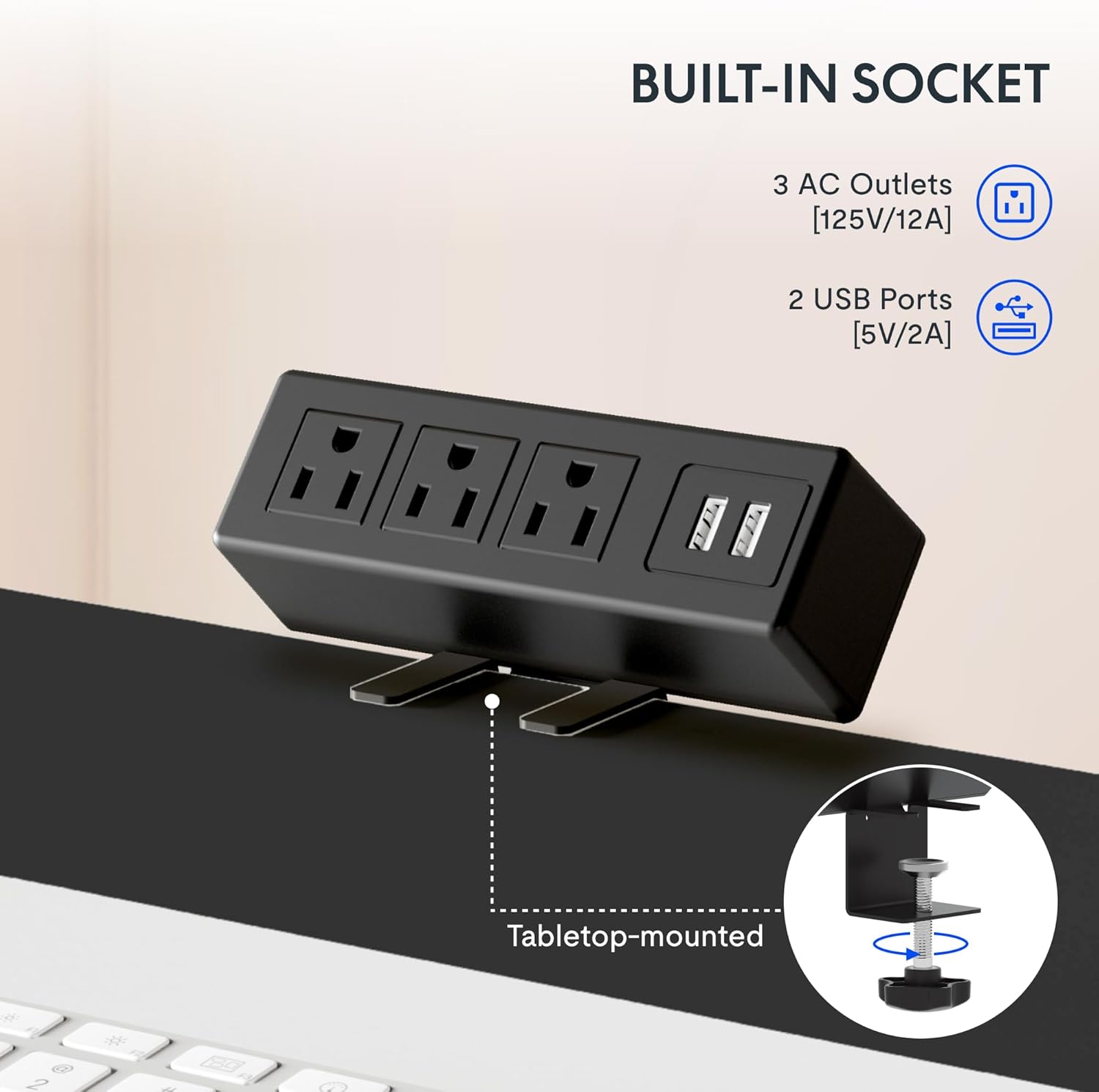
Figure 4: Built-in power strip with AC outlets and USB ports for convenient charging.
خاصيتون
- سڄو ٽڪرو ڊيسڪ ٽاپ: The expansive 55” x 28” desktop is a single, eco-friendly piece, providing a smooth and stable work surface. This design is up to 30% more stable than multi-piece desktops.

Figure 5: Comparison of single-piece vs. two-piece desktop stability.
- مضبوط تعمير: An industrial-grade steel frame combined with the solid desktop allows for a maximum weight capacity of 154 lbs. Each desk leg undergoes 20,000 lift tests to ensure durability.
- ڪيبل جو انتظام: The desk includes features to help manage cables, reducing clutter and maintaining a tidy workspace.

Figure 6: Before and after view of cable management under the desk.
- Desktop Friendly Hooks: Two hooks are included that can be installed on the side of the desk for hanging headphones, bags, or other items, keeping your desktop clear.
وڊيو 2: ختمview of FlexiSpot standing desk features, including height adjustment and cable management.
سار سنڀال
To ensure the longevity and optimal performance of your FLEXISPOT EN2 desk, regular maintenance is recommended:
- ڊيسڪ ٽاپ جي مٿاڇري کي باقاعدي طور تي نرم، ڊي سان صاف ڪريوamp cloth to remove dust and spills. Avoid abrasive cleaners.
- Check all screws and connections periodically to ensure they are secure. Tighten if necessary.
- Keep the motor and electrical components free from dust and moisture.
- Avoid placing excessive weight on the desk beyond its stated capacity of 154 lbs.
مشڪلاتون
If you encounter any issues with your FLEXISPOT EN2 desk, refer to the following common troubleshooting tips:
- ڊيسڪ نه حرڪت:
- پڪ ڪريو ته پاور ڪنڊ ڊيسڪ ۽ ڪم ڪندڙ وال آئوٽليٽ ٻنهي ۾ محفوظ طور تي لڳل آهي.
- Check if any cables are tangled or obstructing the desk's movement.
- If an error code is displayed on the control panel, consult the detailed troubleshooting section in the full manual (if available) or contact customer support.
- غير معمولي تحريڪ:
- Verify that the desk is placed on a level surface. Adjust the adjustable feet if necessary.
- Ensure the weight on the desktop is evenly distributed and within the maximum capacity.
- غير معمولي آواز:
- A slight humming sound during adjustment is normal. If you hear grinding or loud noises, discontinue use and contact customer support.
وضاحتون
| خاصيت | تفصيل |
|---|---|
| برانڊ | FLEXISPOT |
| ماڊل نمبر | E1B-R5530N |
| ڊيسڪ ٽاپ جي ماپ | 55"ڊي x 28"ڊبليو |
| اونچائي جي ترتيب جي حد | 28" کان 47.6" تائين |
| Speed of Adjustment | 1" per second |
| شور جي سطح | Under 50 dBs |
| وزن جي گنجائش | 154 پائونڊ |
| ڪنٽرول پينل | 6-button with 4 memory presets |
| پاور پٽي | 3 AC outlets (125V/12A), 2 USB ports (5V/2A), 1500W Max Output |
| بنيادي مواد | مصر جو اسٽيل |
| مٿين مواد جو قسم | مصر جو اسٽيل |
وارنٽي ۽ سپورٽ
The FLEXISPOT EN2 Standing Desk is covered by the following warranties:
- Frame, Motor, and other Mechanisms: 5 سال وارنٽي.
- ڪنٽرولر، سوئچ، ۽ اليڪٽرانڪس: 2 سال وارنٽي.
For technical support, warranty claims, or any inquiries, please visit the official FLEXISPOT webسائيٽ تي وڃو يا سڌو سنئون انهن جي ڪسٽمر سروس سان رابطو ڪريو. وارنٽي جي تصديق لاءِ پنهنجي خريداري جي رسيد رکو.
وڊيو 3: هڪ اوورview of the FlexiSpot brand and its commitment to ergonomic solutions.