تعارف
Thank you for choosing the MIFA A3 Soundbox Bluetooth Portable Speaker. This manual provides essential information for the safe and efficient use of your device. Please read it thoroughly before operating the speaker and retain it for future reference.
حفاظت جي ڄاڻ
- اسپيڪر کي انتهائي گرمي پد، سڌي سج جي روشني، يا وڌيڪ نمي جي سامهون نه رکو.
- ڊپ کان پاسو ڪريو يا اسپيڪر کي مضبوط اثرن جي تابع ڪرڻ.
- Do not disassemble or attempt to repair the speaker yourself. Contact qualified service personnel.
- Keep the speaker away from water and liquids, despite its waterproof rating, to prevent damage to charging ports or internal components.
- صرف مخصوص چارجنگ ڪيبل ۽ اڊاپٽر استعمال ڪريو.
پيڪيج مواد
مھرباني ڪري ھيٺ ڏنل شين لاءِ پيڪيج چيڪ ڪريو:
- MIFA A3 Bluetooth Portable Speaker
- USB چارجنگ ڪيبل
- AUX آڊيو ڪيبل
- استعمال ڪندڙ جو دستياب (ھي دستاويز)
پيداوار ختمview
The MIFA A3 speaker features intuitive touch controls and multiple connectivity options. Familiarize yourself with the speaker's layout:
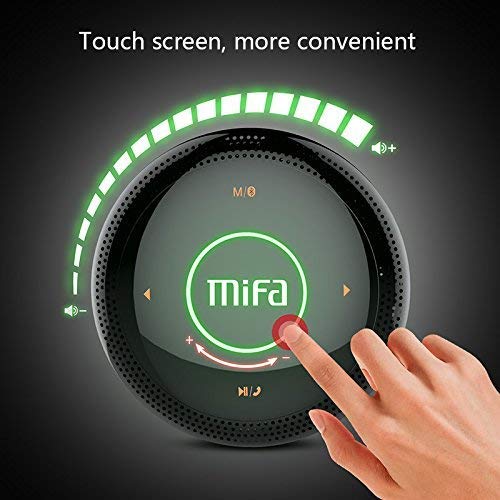
شڪل 1: مٿو view of the MIFA A3 speaker, highlighting the touch-sensitive control panel. The panel displays volume indicators, play/pause, and track navigation buttons. A central 'Mifa' logo is also visible.
- ٽچ ڪنٽرول پينل: Located on the top surface for volume adjustment, playback control, and mode selection.
- مائڪروفون: هٿ کان سواءِ ڪال ڪرڻ لاءِ.
- چارج پورٽ: چارج ڪرڻ لاءِ مائڪرو USB پورٽ.
- AUX ان پٽ: وائرڊ ڪنيڪشن لاءِ 3.5 ايم ايم آڊيو جيڪ.
- مائڪرو ايس ڊي ڪارڊ سلاٽ: ميموري ڪارڊ مان سڌو سنئون موسيقي هلائڻ لاءِ.
سيٽ اپ ڪريو
1. اسپيڪر کي چارج ڏيڻ
Before first use, fully charge the speaker. Connect the provided USB charging cable to the speaker's charging port and the other end to a USB power adapter (not included) or a computer's USB port.
- چارجنگ انڊيڪيٽر لائيٽ چارجنگ دوران روشن ٿيندي.
- The indicator will turn off or change color once fully charged.
- A full charge provides approximately 8 hours of continuous playtime.
2. پاور آن/آف
- پاور آن ڪرڻ: Press and hold the Power button (usually integrated into the touch panel or a dedicated button) for 2-3 seconds until you hear an audible prompt or see an indicator light.
- پاور آف ڪرڻ: Press and hold the Power button again for 2-3 seconds.
آپريٽنگ هدايتون
1. بلوٽوٽ جوئر
- Ensure the speaker is powered on and in Bluetooth pairing mode (indicated by a flashing blue light or audible prompt).
- پنهنجي ڊوائيس (اسمارٽ فون، ٽيبليٽ، پي سي) تي، بلوٽوٿ کي فعال ڪريو ۽ موجود ڊوائيسز جي ڳولا ڪريو.
- Select "MIFA A3" from the list of devices.
- Once paired, the speaker will provide an audible confirmation, and the indicator light will become solid blue.
- The speaker will automatically connect to the last-paired device when powered on, if that device's Bluetooth is active and within range.
2. AUX ڪنيڪشن
For devices without Bluetooth, use the provided 3.5mm AUX audio cable:
- Connect one end of the AUX cable to the speaker's AUX input port.
- ٻئي آڊيو کي توهان جي آڊيو ڊيوائس جي هيڊ فون جڪس سان ڳن Connectيو.
- اسپيڪر خودڪار طريقي سان AUX موڊ ۾ تبديل ٿي ويندو.
3. مائڪرو ايس ڊي ڪارڊ پلے بیک
Insert a Micro SD card (up to 32GB, FAT32 format) with music fileمقرر ڪيل سلاٽ ۾. اسپيڪر خودڪار طريقي سان ڪارڊ کي ڳوليندو ۽ پلے بیک شروع ڪندو.
4. Touch Control Operations
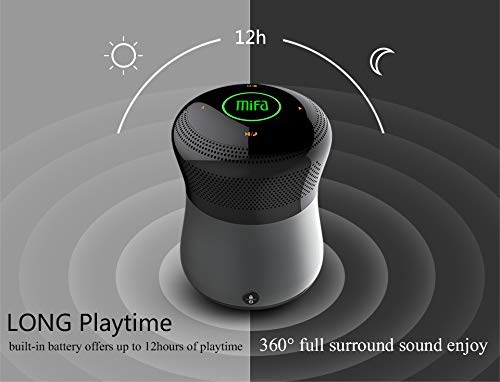
شڪل 2: The MIFA A3 speaker shown with an overlay indicating "LONG Playtime" (up to 12 hours) and "360° full surround sound enjoy." This image emphasizes the speaker's battery life and audio dispersion.
- حجم ڪنٽرول: Slide your finger clockwise on the touch panel to increase volume, counter-clockwise to decrease.
- راند/روڪ: Tap the central Play/Pause icon.
- اڳيون ٽريڪ: Tap the "Next" arrow icon.
- پويون ٽريڪ: Tap the "Previous" arrow icon.
- موڊ سوئچ: Tap the "M/O" icon to cycle between Bluetooth, AUX, and Micro SD card modes.
- لاڪ بٽڻ: Press the lock icon to prevent accidental touch inputs.
5. Call Handling (Bluetooth Mode)
- جواب ڏيو ڪال: Tap the Play/Pause icon when a call comes in.
- ڪال ختم ڪريو: Tap the Play/Pause icon again.
- ڪال رد ڪريو: Press and hold the Play/Pause icon for 2 seconds.
سار سنڀال
- اسپيڪر کي نرم، سڪل ڪپڙي سان صاف ڪريو. گھڙڻ وارا صاف ڪندڙ يا محلول استعمال نه ڪريو.
- اسپيڪر کي ٿڌي، سڪل جاءِ تي رکو جڏهن گهڻي عرصي تائين استعمال ۾ نه هجي.
- Charge the battery at least once every three months to maintain battery health.
مشڪلاتون
| مسئلو | ممڪن حل |
|---|---|
| اسپيڪر پاور آن نٿو ٿئي. | پڪ ڪريو ته بيٽري چارج ٿيل آهي. پاور سورس سان ڳنڍيو ۽ ٻيهر ڪوشش ڪريو. |
| بلوٽوٿ ذريعي جوڙي نه ٿو سگهجي. |
|
| آواز ڪونهي. |
|
| خراب آواز جو معيار. |
|
وضاحتون
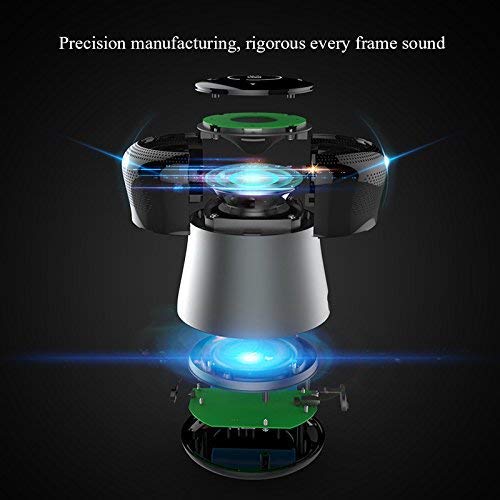
شڪل 3: An exploded diagram of the MIFA A3 speaker, illustrating its internal components and structural design, emphasizing precision manufacturing.
| ماڊل | MIFA A3 |
| ٻاھر نڪرڻ جي طاقت | 10W |
| رابطي | Bluetooth 4.2, AUX, Micro SD Card |
| بيٽري | 1800 mAh لي آئن |
| راند جو وقت | 8 ڪلاڪ تائين (60٪ حجم تي) |
| چارج ڪرڻ وقت | لڳ ڀڳ 3-4 ڪلاڪ |
| مائڪروفون | هينڊ فري ڪالن لاءِ بلٽ ان |
| پنروڪ | Yes (as per product specifications, but general caution advised for ports) |
| ڪنٽرول جو طريقو | ڇڪڻ |
| مطابقت رکندڙ ڊوائيسز | ليپ ٽاپ، پي سي، اسمارٽ فون، ٽيبليٽ |
وارنٽي ۽ سپورٽ
MIFA products are designed to provide reliable performance. For warranty information or technical support, please refer to the warranty card included with your purchase or visit the official MIFA webسائيٽ. وارنٽي دعوائن لاءِ خريداري جو ثبوت رکو.
For further assistance, you may contact MIFA customer support through their official channels.