
Alpha EK 60
الفا EK-60 61-ڪي اليڪٽرانڪ پيانو ڪي بورڊ استعمال ڪندڙ دستياب
Portable Digital Keyboard with Audio Input, Microphone Input, Headphone Output, 255 Tones, Rhythms, LED Display
1. تعارف
خريد ڪرڻ لاءِ مهربانيasing the Alpha EK-60 61-Key Electronic Piano Keyboard. This manual provides detailed instructions for the proper setup, operation, and maintenance of your new instrument. The EK-60 is designed to offer a rich musical experience with its versatile features, including a wide range of tones and rhythms, intelligent teaching functions, and various connectivity options. Please read this manual thoroughly before using the product to ensure optimal performance and longevity.
2. حفاظت جي ڄاڻ
To prevent electric shock, fire, or damage to the unit, please observe the following precautions:
- Do not expose the keyboard to rain or moisture.
- Do not place objects filled with liquids, such as vases, on the keyboard.
- ڪنهن به وائنٽيليشن جي افتتاح کي بلاڪ نه ڪريو.
- صرف مخصوص پاور اڊاپٽر استعمال ڪريو.
- يونٽ کي ڌار نه ڪريو يا تبديل نه ڪريو. سڀني سروسنگ کي قابل اهلڪارن جي حوالي ڪريو.
- ننڍن ٻارن جي پهچ کان پري رکو.
3. پيڪيج مواد
مھرباني ڪري چيڪ ڪريو ته ھيٺ ڏنل سڀ شيون توھان جي پيڪيج ۾ شامل آھن:
- 1 x Alpha 61-Key Standard Keyboard EK-60
- 1 x Adjustable Stand
- 1 x ميوزڪ شيٽ هولڊر
- 1 x پاور اڊاپٽر
- 1 x استعمال ڪندڙ دستياب (هي دستاويز)
4. پراڊڪٽ ختمview
Familiarize yourself with the components of your Alpha EK-60 keyboard.
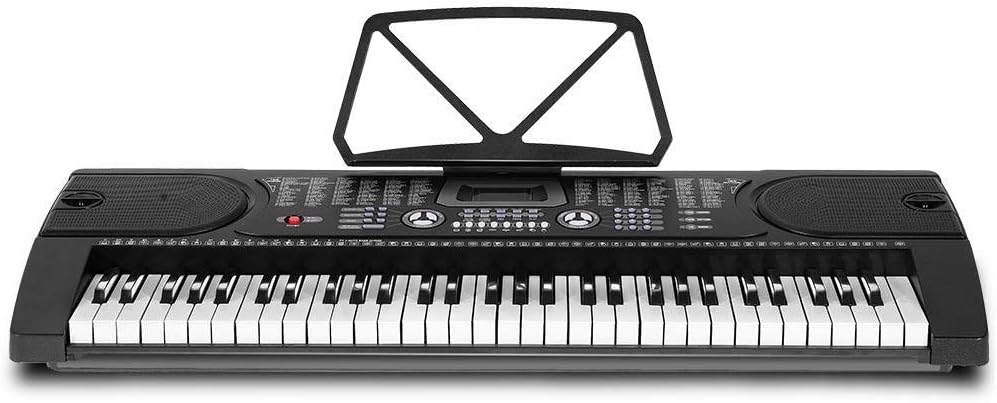
شڪل 4.1: مٿي کان هيٺ view of the Alpha EK-60 keyboard, highlighting the control panel, integrated speakers, and the 61 standard piano keys.

Figure 4.2: Detail of the LED display for convenient settings adjustment and the battery compartment for portable use.

شڪل 4.3: View of the multiple jacks including Audio Input, Microphone Input, and Headphone Output for versatile connectivity.
اهم خاصيتون:
- 61-Key Standard Piano Keyboard
- LED display for easy navigation
- 24 ڊيمو گيت
- 255 timbres (instrument sounds)
- 255 rhythms (accompaniment styles)
- 61 kinds of keyboard percussions
- 8 Panel Percussions
- Master volume, accompaniment volume, and tempo control
- Intelligent teaching function: one-key, follow and ensemble function
- تال پروگرامنگ فنڪشن
- Auto chord and chord timbre option
- رڪارڊ ۽ پلے بیک ڪارڪردگي
- Sustain and vibrato effects
- Microphone input and speaker output
- Headphone jack for silent practice
- Battery powered option (6 x AA-size batteries, not included)
5. سيٽ اپ
5.1 اسٽينڊ کي گڏ ڪرڻ
- Unpack all components of the adjustable stand.
- Connect the horizontal support bars to the vertical legs, ensuring they are securely fastened.
- Adjust the height of the stand to your preferred playing position using the adjustment knobs. The stand is adjustable from 59cm to 79cm in height.
- ڪيبورڊ کي محفوظ طور تي گڏ ٿيل اسٽينڊ جي مٿان رکو.
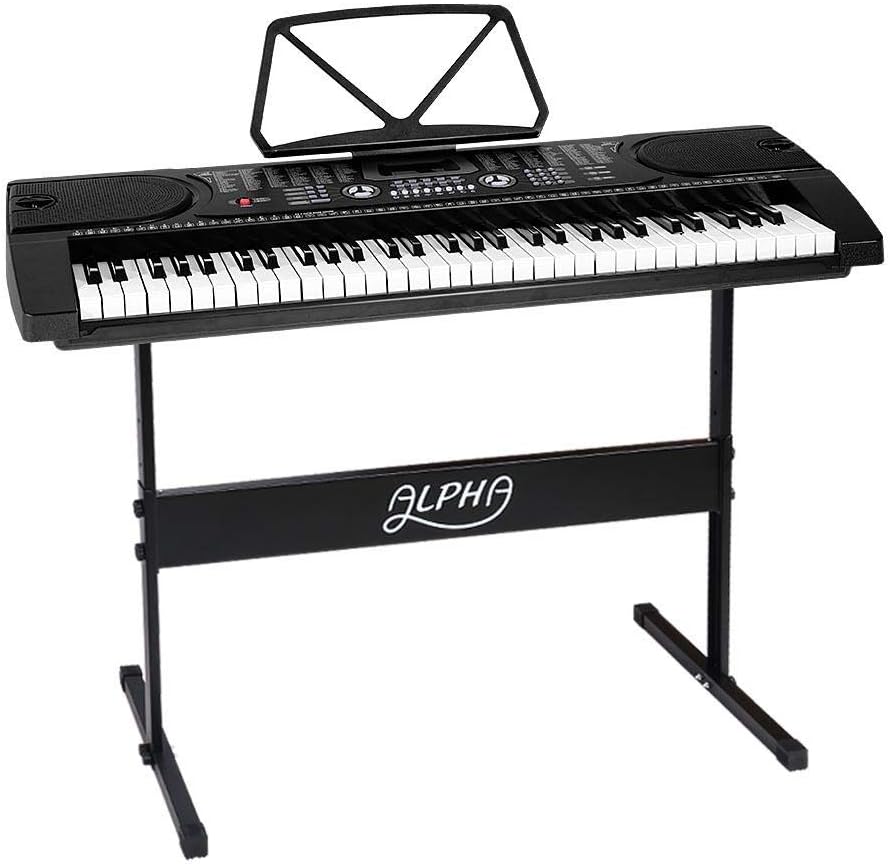
Figure 5.1: The Alpha EK-60 keyboard fully assembled on its adjustable stand, ready for use.
5.2 ڪي بورڊ کي طاقت ڏيڻ
The Alpha EK-60 can be powered by the included AC adaptor or by batteries.
اي سي ايڊاپٽر استعمال ڪندي:
- Connect the DC plug of the power adaptor to the DC 9V input jack on the rear of the keyboard.
- اي سي اڊاپٽر کي معياري وال آئوٽليٽ ۾ لڳايو.
بيٽرين جو استعمال:
- ڪيبورڊ جي هيٺئين پاسي بيٽري جي خاني کي ڳوليو.
- بيٽري جي ڪمري واري ڍڪ کي کوليو.
- Insert 6 x AA-size batteries (not included), ensuring correct polarity (+/-).
- بيٽري جي ڪمري واري ڍڪ کي محفوظ طور تي بند ڪريو.
Note: When using batteries, disconnect the AC adaptor. The keyboard will automatically switch to battery power if the adaptor is removed.
6. آپريٽنگ هدايتون
6.1 بنيادي آپريشن
- پاور آن / آف: کي دٻايو پاور ڪيبورڊ کي آن يا آف ڪرڻ لاءِ بٽڻ.
- حجم ڪنٽرول: استعمال ڪريو ماسٽر حجم مجموعي آواز جي سطح کي ترتيب ڏيڻ لاءِ نوب.
- رفتار ڪنٽرول: استعمال ڪريو ٽيمپو buttons to adjust the speed of rhythms and demo songs.
6.2 سر ۽ تال چونڊڻ
- Tones (Timbre): کي دٻايو ٽمبر button, then use the number pad or +/- buttons to select from 255 different instrument sounds. The selected timbre number will appear on the LED display.
- تال: کي دٻايو تال button, then use the number pad or +/- buttons to select from 255 accompaniment rhythms. Press START/STOP تال شروع ڪرڻ يا ختم ڪرڻ لاءِ.
6.3 Intelligent Teaching Function
The EK-60 features a 3-step intelligent teaching system to help you learn to play.
- هڪ چا Keyي: Plays the melody of a demo song by pressing any key.
- تابعداري ڪريو: Waits for you to play the correct note before proceeding with the melody.
- گڏجي Plays the accompaniment while you play the melody.
To use, select a demo song, then press the desired teaching mode button (ون-ڪي, فالو ڪريو، يا ENSEMBLE).
6.4 رڪارڊنگ ۽ پلے بیک
The keyboard allows you to record your performances.
- کي دٻايو آر اي سي button to start recording. The LED display will indicate recording mode.
- پنهنجي پسند جو راڳ وڄايو.
- کي دٻايو راند ڪريو button to stop recording and play back your recorded performance.
6.5 ڪنيڪشن
- هيڊ فون جڪ هيڊفونز سان ڳنڍيو هيڊ فون jack for silent practice.
- مائڪروفون ان پٽ: هڪ مائڪرو فون سان ڳنڍيو مائڪ داخل jack to sing along while playing.
- آڊيو ان پٽ/آئوٽ پٽ: استعمال ڪريو آڊيو انٽرويو to connect external audio devices (e.g., MP3 player) and the آڊيو نتيجو to connect to external speakers or an ampوierيڪ زنده
7. سار سنڀال
Proper care will ensure the longevity of your Alpha EK-60 keyboard.
- صفائي: ڪيبورڊ کي نرم، سڪل ڪپڙي سان صاف ڪريو. ضدي مٽيءَ لاءِ، ٿورو ڊي استعمال ڪريوamp cloth and then wipe dry immediately. Do not use abrasive cleaners, waxes, or solvents.
- اسٽوريج: When not in use for extended periods, store the keyboard in a cool, dry place away from direct sunlight and extreme temperatures. If using batteries, remove them before long-term storage to prevent leakage.
- سنڀالڻ: ڪيبورڊ ڇڏڻ يا ان کي مضبوط اثرن جي تابع ڪرڻ کان پاسو ڪريو.
8. مسئلا حل ڪرڻ
If you encounter any issues with your keyboard, refer to the following table for common problems and solutions.
| مسئلو | ممڪن سبب | حل |
|---|---|---|
| آواز ڪونهي | Volume is too low; Power is off; Headphones connected; Faulty power connection. | Increase master volume; Turn on power; Disconnect headphones; Check power adaptor or replace batteries. |
| چاٻيون جواب نه ڏئي رهيون آهن | Keyboard is in a teaching mode; Internal malfunction. | Exit teaching mode; Power cycle the keyboard. If issue persists, contact support. |
| Rhythm/Demo song not playing | Rhythm/Demo song not selected; START/STOP button not pressed. | Select a rhythm/demo song; Press START/STOP. |
| بگڙيل آواز | Volume too high; External device connected incorrectly. | Reduce volume; Check connections of external devices. |
جيڪڏهن انهن حلن جي ڪوشش ڪرڻ کان پوءِ به مسئلو برقرار رهي، مهرباني ڪري ڪسٽمر سپورٽ سان رابطو ڪريو.
9. وضاحتون
| خاصيت | وصف |
|---|---|
| ماڊل | EK-60 |
| چاٻيون | 61 Standard Piano Keys |
| Key Width | 1.9 سينٽي |
| Tones (Timbres) | 255 |
| تالون | 255 |
| ڊيمو گانا | 24 |
| وڌ ۾ وڌ پوليفوني | 8 |
| رابطي | Audio Input, Audio Output, Headphone Jack (3.5mm), Microphone Input (3.5mm) |
| بجلي جي فراهمي | AC Adaptor (DC 9V) or 6 x AA-size batteries (not included) |
| طول و عرض (ڪي بورڊ) | 86cm (L) x 32.5cm (W) |
| Dimensions (Overall with Stand) | 86cm (L) x 32.5cm (W) x 59-79cm (H) |
| وزن | 6.2 ڪلوگرام |
| رنگ | ڪارو |

Figure 9.1: Detailed dimensions of the Alpha EK-60 keyboard and its adjustable stand.
10. وارنٽي ۽ سپورٽ
10.1 وارنٽي ڄاڻ
The Alpha EK-60 keyboard comes with a 1 سال وارنٽي from the date of purchase. This warranty covers manufacturing defects and ensures the product is free from defects in material and workmanship under normal use. It does not cover damage caused by misuse, accident, unauthorized modification, or normal wear and tear.
10.2 ڪسٽمر سپورٽ
For any queries, technical assistance, or warranty claims, please contact the seller or manufacturer directly. Please have your purchase receipt and product model number (EK-60) ready when contacting support.
Ask a question about this manual
Ask about setup, troubleshooting, compatibility, parts, safety, or missing instructions. Manuals+ will review the question and use this page’s manual context to help answer it.