
تعارف
This manual provides comprehensive instructions for the Anderic RRLC16.2 Universal Replacement Remote Control. Designed specifically for Sharp Roku TVs, this remote offers immediate functionality for compatible Sharp models without requiring any initial programming. It features dedicated shortcut keys for popular streaming services and a secure battery compartment for enhanced durability and safety. For other Roku TV brands or Roku Boxes, programming may be required.
پيداوار جون خاصيتون
- Fully Universal: Compatible with all Roku TVs. Note: Not for Roku Streaming Sticks.
- Uncompromised Quality: Engineered for superior performance and durability compared to original remotes.
- بيڪار آپريشن: Works identically to the original remote for Sharp Roku TVs without complex setup. (Some shortcut keys may differ).
- Quick Access to Streaming Services: Dedicated shortcut keys for NETFLIX, AMAZON, RDIO, and MGO provide instant access to these streaming platforms.
- محفوظ بيٽري ڪمپارٽمينٽ: Includes an optional screw to secure the battery cover, preventing accidental opening.
سيٽ اپ ڪريو
1. بيٽرين کي انسٽال ڪرڻ
The Anderic RRLC16.2 remote requires two AAA batteries (not included). To install:
- ريموٽ جي پٺي تي بيٽري جي خاني کي ڳولھيو.
- کولڻ لاءِ بيٽري جي ڍڪ کي هيٺان سلائڊ ڪريو.
- ٻه AAA بيٽريون داخل ڪريو، صحيح پولارٽي (+ ۽ -) کي يقيني بڻائي.
- Replace the battery cover by sliding it upwards until it clicks into place. For added security, use the optional screw to fasten the cover.

Image: Back of the remote control, highlighting the battery compartment and optional screw.
2. Initial Use (Sharp Roku TVs)
For Sharp Roku TV models (e.g., LC-43LB371U, LC-43LB371UA, LC-43LB371UB, LC-50LB371U), the Anderic RRLC16.2 remote is pre-programmed and ready to use immediately after battery installation. No additional setup is required.
3. Programming for Other Roku TVs or Roku Boxes
If you are using the remote with other Roku TV brands (Hisense, Insignia, TCL, Hitachi) or a Roku Box, programming may be necessary. Refer to the "Programming Instructions (via Learning)" section below for detailed steps.
آپريٽنگ هدايتون

تصوير: سامهون view of the Anderic RRLC16.2 remote control.
- پاور بٽڻ (●): Located at the top, press to turn your TV on or off.
- Directional Pad (Purple Arrows) & OK Button: Use the arrow buttons to navigate menus and select options. Press the central "OK" button to confirm selections.
- پوئتي بٽڻ (←): پوئين اسڪرين يا مينيو ڏانھن واپسي.
- هوم بٽڻ (⌂): روڪو هوم اسڪرين ڏانهن واپس اچي ٿو.
- Volume & Mute Buttons: Located on the side of the remote. Use the volume up/down buttons to adjust audio levels and the mute button to silence audio.
- هلايو/روڪيو، پوئتي ڪريو، تيز اڳتي وڌو: Standard media control buttons for content playback.
- شارٽ ڪٽ ڪيز: Dedicated buttons for NETFLIX, AMAZON, RDIO, and MGO provide instant access to these streaming platforms.
مطابقت
The Anderic RRLC16.2 remote control is designed for broad compatibility with Roku TVs. Please review the compatibility details below:
- Pre-Programmed for Sharp Roku TV Models: LC-43LB371U, LC-43LB371UA, LC-43LB371UB, LC-50LB371U.
- Compatible with Other Roku TV Brands (Requires Programming): Hisense, Insignia, TCL, Hitachi.
- Compatible with Roku Box (Requires Programming).
- NOT Compatible with Roku Streaming Sticks.
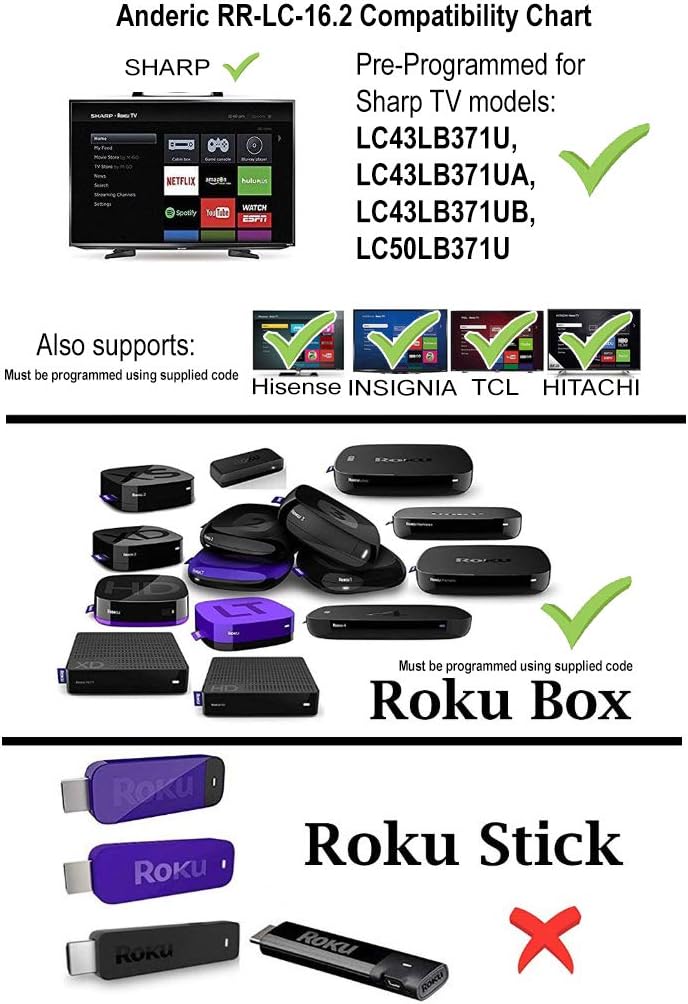
Image: Anderic RR-LC-16.2 Compatibility Chart.
Programming Instructions (via Learning)
This remote can be programmed to work with any TV via the learning method. This method does not require codes. Note: All keys on the RR-LC-16.2 may be learned. Original remote is needed.
- کي دٻايو ۽ رکو ⌂ (گهر) ۽ ← (Back) keys simultaneously for about 3 seconds. The indicator light will light up and remain on. Release the keys.
- Press and release the key to be learned. The indicator light will flash slowly.
- Point the original remote control head-to-head with the RR-LC-16.2, making sure the IR (infrared) light bulb at the top edge of the remote aligns directly with the lens on the front of the RR-LC-16.2, with a distance of about 3cm.
- Press and hold the key on the original remote that you want the RR-LC-16.2 to learn. The indicator light will flash 3 times to confirm and then remain on, waiting for the next entry.
- atيھر ڪريو قدم 2-4 learnيون چاysيون سکڻ لاءِ.
- دٻايو ⌂ (Home) to save and exit, or the remote will exit automatically after 20 seconds.
فيڪٽري ڊفالٽ اسٽيٽ تي ري سيٽ ڪريو
دٻايو ۽ رکو ⌂ (گهر) ۽ ← (Back) keys simultaneously for 3 seconds. The indicator will flash 3 times to confirm. Remote has successfully been reset to factory default status.
سڀ سکيا چاٻيون ختم ڪريو
دٻايو ۽ رکو ⌂ (گهر) ۽ ★ (Star) keys simultaneously for 3 seconds. The indicator will flash 3 times to confirm. All learned keys have been successfully deleted.

Image: Anderic RR-LC-16.2 Advanced Universal Operating Guide with programming details.
وضاحتون
| پيداوار جي ماپ | 5.75 x 1.75 x 1 انچ |
| شيءِ جو وزن | 1.76 اونس |
| شيون ماڊل نمبر | RRLC16.2 |
| بيٽريون | 2 AAA بيٽرين جي ضرورت آهي |
| برانڊ | اينڊرڪ |
| خاص خصوصيت | عالمگير |
| رنگ | ڪارو |
| سپورٽ ٿيل ڊوائيسز جو وڌ ۾ وڌ تعداد | 2 |
| مطابقت رکندڙ ڊوائيسز | Streaming Device, Television |
مشڪلاتون
- ريموٽ جواب نه ڏيڻ: پڪ ڪريو ته بيٽريون صحيح طرح سان نصب ٿيل آهن ۽ ختم نه ٿيون ٿين. جيڪڏهن ضروري هجي ته تبديل ڪريو.
- نظارو لائن: The remote operates using infrared (IR) technology. Ensure there is a clear line of sight between the remote and your TV's IR receiver.
- غلط ڪارڪردگي: If buttons are not performing as expected, verify compatibility with your specific Roku TV model. For non-Sharp Roku TVs or Roku Boxes, ensure the remote has been correctly programmed using the learning method.
- Shortcut Keys Not Working: While the remote is universal, some shortcut keys may differ from your original remote. Ensure your streaming apps are installed and updated on your Roku TV.
وارنٽي ۽ سپورٽ
Anderic products are designed for quality and reliability. For any issues or support inquiries, please refer to the manufacturer's official webسائيٽ تي وڃو يا انهن جي ڪسٽمر سروس سان رابطو ڪريو. وارنٽي دعوائن لاءِ پنهنجي خريداري جي رسيد رکو.
Anderic is a registered trademark of Dan's Electronics Etc., Inc. All Rights Reserved. We are not affiliated with Roku. Roku is a registered trademark of Roku Inc.
حمايت لاء، دورو ڪريو: www.anderic.com