
1. تعارف
This manual provides instructions for the Superior Electronics Universal Replacement Remote Control, model SUPTRB015. This remote is designed to be a direct replacement for original remote controls of LG, Samsung, and Sony televisions, including Smart TV models. It is ready to use without any programming.
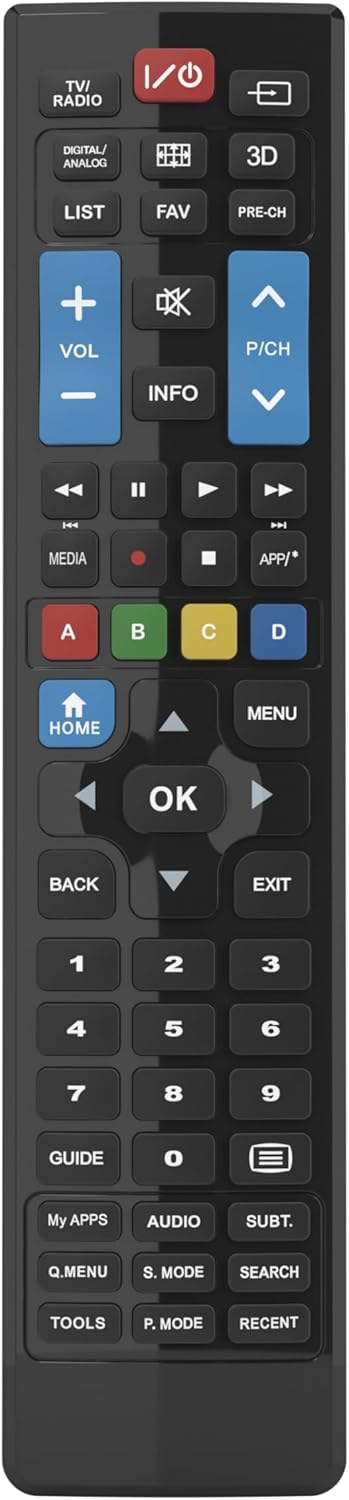
Figure 1: Superior Electronics Universal Remote Control (SUPTRB015)
2. سيٽ اپ
2.1. بيٽري لڳائڻ
ريموٽ ڪنٽرول کي ٻه AAA بيٽريون گهرجن (شامل نه آهن). انهن کي انسٽال ڪرڻ لاءِ انهن قدمن تي عمل ڪريو:
- ريموٽ ڪنٽرول جي پٺي تي بيٽري جي خاني کي ڳوليو.
- ليچ کي دٻايو ۽ بيٽري جو ڍڪ بند ڪريو.
- ٻه AAA بيٽريون داخل ڪريو، پڪ ڪريو ته مثبت (+) ۽ منفي (-) ٽرمينل ڪمپارٽمينٽ اندر ڊاگرام سان ملن ٿا.
- بيٽري جي ڍڪ کي واپس جاء تي سلائيڊ ڪريو جيستائين اهو محفوظ طور تي ڪلڪ ڪري.

Figure 2: Battery Compartment on the back of the remote.
2.2. شروعاتي استعمال (ڪوبه پروگرامنگ گهربل ناهي)
This universal remote control is designed for immediate use with LG, Samsung, and Sony televisions. Once batteries are installed, it is ready to operate your TV without any additional programming or code setup.
3. آپريٽنگ هدايتون
The remote control features an intuitive layout with dedicated buttons for common functions and Smart TV access. Refer to Figure 3 for a visual guide to the buttons.

Figure 3: Remote Control Button Layout.
3.1. بنيادي ٽي وي فنڪشن
- پاور بٽڻ (ⓘ): ٽي وي آن يا آف ڪري ٿو.
- حجم مٿي/گهٽ (VOL +/-): آواز جي مقدار کي ترتيب ڏئي ٿو.
- Channel Up/Down (P/CH +/-): ٽي وي چينلز بدلائي ٿو.
- گونگا بٽڻ (🔇): ٽي وي جي آواز کي خاموش يا غير خاموش ڪري ٿو.
- نمبر بٽڻ (0-9): سڌو سنئون ٽي وي چينل چونڊيو.
- ان پٽ/ذريعو بٽڻ (⎌): Selects the input source (HDMI, AV, etc.).
3.2. نيويگيشن ۽ مينيو فنڪشن
- Directional Pad (Up, Down, Left, Right Arrows): مينيو ۽ اختيارن ذريعي نيويگيٽ ڪري ٿو.
- OK بٽڻ: چونڊن جي تصديق ڪري ٿو.
- هوم بٽڻ: Accesses the TV's main home screen or Smart Hub.
- مينيو بٽڻ: ٽي وي جو مکيه مينيو کوليندو آهي.
- پوئتي بٽڻ: پوئين اسڪرين يا مينيو ڏانهن واپس اچي ٿو.
- EXIT بٽڻ: موجوده مينيو يا ايپليڪيشن مان نڪرندو آهي.
- INFO بٽڻ: موجوده پروگرام يا ان پٽ بابت معلومات ڏيکاري ٿو.
3.3. Smart TV and Media Functions
- Dedicated Smart TV Buttons: Access popular streaming apps directly (e.g., Netflix, YouTube, Prime Video). These buttons are typically labeled or have recognizable logos.
- ميڊيا ڪنٽرول بٽڻ (کيڏڻ، روڪيو، روڪيو، پوئتي ڪريو، تيز اڳتي): ميڊيا پلے بیک کي ڪنٽرول ڪري ٿو.
- رنگين بٽڻ (ڳاڙهو، سائو، پيلو، نيرو): These buttons often have specific functions within Smart TV apps or teletext, as indicated on your TV screen.
4. سار سنڀال
4.1. ريموٽ ڪنٽرول کي صاف ڪرڻ
ريموٽ ڪنٽرول جي ظاهر ۽ ڪارڪردگي کي برقرار رکڻ لاءِ:
- مٿاڇري کي نرم، سڪل ڪپڙي سان مسح ڪريو.
- ضدي مٽيءَ لاءِ، ٿورو ڊيampur پاڻيءَ سان ڪپڙو يا نرم، غير ابريندڙ صاف ڪندڙ.
- سخت ڪيميڪل، سالوينٽس، يا رگڙيندڙ صفائي پيڊ استعمال نه ڪريو، ڇاڪاڻ ته اهي ريموٽ جي ختم يا اندروني حصن کي نقصان پهچائي سگهن ٿا.
4.2. بيٽري مٽائڻ
Replace batteries when the remote's response becomes sluggish or it stops functioning. Always replace both batteries at the same time with new AAA batteries. Do not mix old and new batteries, or different types of batteries.
5. مسئلا حل ڪرڻ
جيڪڏهن توهان کي پنهنجي ريموٽ ڪنٽرول سان مسئلا درپيش اچن ٿا، ته هيٺ ڏنل حل آزمايو:
- ريموٽ جواب نه ڏئي رهيو آهي:
- Check if the batteries are correctly inserted with the correct polarity (+/-).
- بيٽرين کي تازو سان تبديل ڪريو.
- پڪ ڪريو ته ريموٽ ڪنٽرول ۽ ٽي وي جي انفراريڊ رسيور جي وچ ۾ ڪا به رڪاوٽ نه آهي.
- Make sure you are within the effective operating range (up to 10 meters).
- ڪجھ بٽڻ ڪم نه ڪري رهيا آهن:
- This remote is designed for LG, Samsung, and Sony TVs. Ensure your TV is one of these brands.
- Some advanced functions or very specific buttons might not be universally supported across all TV models, especially older ones.
- Clean the remote control, especially around the unresponsive buttons, to ensure no debris is preventing contact.
- Smart TV buttons not working:
- Ensure your TV is a Smart TV and is connected to the internet.
- The dedicated Smart TV buttons (e.g., Netflix, YouTube) are compatible with most LG, Samsung, and Sony Smart TV models. If they don't work, you may need to access these apps through your TV's main Smart Hub/Home menu using the navigation buttons.
6. وضاحتون
| برانڊ | Superior Electronics |
| ماڊل نالو | Superior Electronics Replacement LG/Samsung/Sony SUPTRB015 |
| خاص خصوصيت | عالمگير |
| رنگ | ڪارو |
| وڌ ۾ وڌ سپورٽ ٿيل ڊوائيسز | 3 (LG, Samsung, Sony) |
| مطابقت رکندڙ ڊوائيسز | ٽيليويزن |
| رابطي ٽيڪنالاجي | انفراريڊ |
| ڪنٽرولر جو قسم | بٽڻ ڪنٽرول |
| وڌ ۾ وڌ رينج | 10 ميٽر |
| بيٽرين جو تعداد | 2 AAA (Required) |

Figure 4: Remote Control Dimensions (approx. 20 cm length, 4.5 cm width).
7. وارنٽي ۽ سپورٽ
Superior Electronics products are manufactured to high-quality standards. For information regarding warranty coverage, please refer to the documentation provided with your purchase or visit the official Superior Electronics website. For technical support or further assistance, please contact Superior Electronics customer service through their official channels.
مھرباني ڪري مستقبل جي حوالي لاءِ ھن دستوري کي برقرار رکو.