
1. اهم حفاظتي ڄاڻ
Please read all safety instructions carefully before using your monitor. Keep this manual for future reference.
- هڪ غير مستحڪم ڪارٽ ، اسٽينڊ ، ٽيپوڊ ، بریکٹ يا ٽيبل تي مانيٽر کي رکڻ نه ڏيو.
- مانيٽر جي چوڌاري مناسب وينٽيليشن کي يقيني بڻايو. وينٽيليشن جي سوراخن کي بند نه ڪريو.
- صرف مانيٽر سان فراهم ڪيل پاور ڪنڊ ۽ اڊاپٽر استعمال ڪريو.
- Avoid exposing the monitor to rain or moisture to prevent fire or electric shock.
- مانيٽر نه کوليو casing. سڀني خدمتن کي قابل سروس اهلڪارن جي حوالي ڪريو.
- Unplug the monitor from the wall outlet during lightning storms or when unused for long periods.
2. پيڪيج مواد
پڪ ڪريو ته سڀئي شيون توهان جي پراڊڪٽ پيڪيج ۾ موجود آهن:
- Samsung LC27F396FHNXZA 27-Inch Curved Monitor
- بي بنياد
- بيٺل گردن
- Power Adapter and Power Cable (1.5 m)
- HDMI ڪيبل
- جلدي سيٽ اپ گائيٽ
- وارنٽي ڪارڊ
3. سيٽ اپ
3.1 اسٽينڊ کي گڏ ڪرڻ
- ڇڪڻ کان بچڻ لاءِ مانيٽر جو مُنهن احتياط سان نرم، صاف ڪپڙي تي رکو.
- اسٽينڊ گردن کي مانيٽر جي پوئين پاسي سان ڳنڍيو جيستائين اهو جاءِ تي ڪلڪ نه ڪري.
- Connect the stand base to the stand neck by aligning the tabs and tightening the screw at the bottom of the base.

3.2 ڳنڍيندڙ ڪيبل
Ensure the monitor and your computer are powered off before connecting any cables.
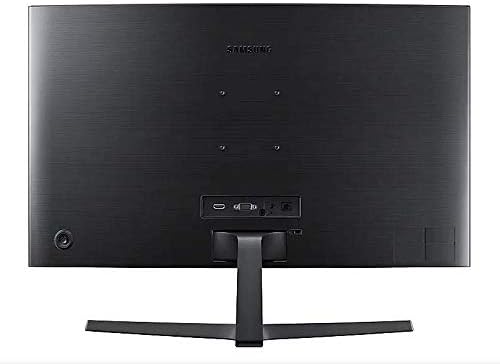
- پاور ڪيبل: Connect the power adapter to the monitor's power input, then plug the power cable into the adapter and a wall outlet.
- وڊيو ڪيبل (HDMI يا VGA): Connect one end of the HDMI or VGA cable to the corresponding port on your computer's graphics card and the other end to the HDMI or VGA input on the monitor. Ensure cables are tightened securely.
- Audio Cable (Optional): If you wish to use external speakers or headphones, connect a 3.5mm audio cable from your computer's audio output to the monitor's 3.5mm audio input.
3.3 پاور آن
سڀني ضروري ڪيبلن کي ڳنڍڻ کان پوءِ، پنهنجي ڪمپيوٽر کي پاور آن ڪريو، پوءِ مانيٽر تي پاور بٽڻ دٻايو. مانيٽر کي خودڪار طريقي سان ان پٽ سگنل کي ڳولڻ گهرجي.
4. مانيٽر کي هلائڻ
4.1 Basic Functions and OSD Menu
The monitor features a single joystick button located on the back for navigating the On-Screen Display (OSD) menu. Press the joystick to open the OSD menu, then move it up/down/left/right to select and adjust settings.
4.2 تصويري سيٽنگون
Adjust picture quality settings via the OSD menu:
- چمڪ/ برعڪس: Adjust these to your preferred viewing levels.
- قرارداد: The optimal resolution for this monitor is 1920 x 1080 (FHD 1080p).
- تناسب تناسب: Set to 16:9 for widescreen content.
- ميجڪ برائيٽ: Select from various preset modes (e.g., Standard, Cinema, Dynamic Contrast) for optimized viewماحوليات.
- Active Crystal Color: Enhances color reproduction for a more vibrant display.

4.3 AMD FreeSync and Game Mode
This monitor supports AMD FreeSync technology, which synchronizes the screen refresh rate with your graphics card's frame rate to reduce input latency and minimize image tearing and stutter during gaming. Enable FreeSync through the OSD menu for a smoother gaming experience.

4.4 Curved Display Benefits
The 1800R curvature of this monitor is designed to match the natural curve of the human eye, providing a more immersive viewing experience. This curvature helps to reduce peripheral distractions and enhances depth perception, drawing you deeper into your content.

5. سار سنڀال
5.1 مانيٽر جي صفائي
- هميشه صاف ڪرڻ کان اڳ مانيٽر کي انپلگ ڪريو.
- استعمال ڪريو نرم، lint-آزاد ڪپڙو روشنيءَ سان ڊيampپاڻي يا خاص اسڪرين ڪلينر سان صاف ڪيو وڃي.
- صاف ڪندڙ کي سڌو سنئون اسڪرين تي نه اسپري ڪريو.
- گھڙڻ وارا صاف ڪندڙ، موم، يا محلول استعمال ڪرڻ کان پاسو ڪريو.
5.2 اسٽوريج
When storing the monitor for an extended period, ensure it is kept in a cool, dry place, preferably in its original packaging to protect it from dust and physical damage.
6. مسئلا حل ڪرڻ
جيڪڏهن توهان کي پنهنجي مانيٽر سان مسئلا درپيش اچن ٿا، ته هيٺ ڏنل عام مسئلا حل ڪرڻ واري قدمن جو حوالو ڏيو:
| مسئلو | ممڪن حل |
|---|---|
| ڪابه طاقت | Ensure the power cable is securely connected to the monitor, power adapter, and wall outlet. Check if the wall outlet is functioning. |
| ڪوبه سگنل ناهي / خالي اسڪرين | Verify that the video cable (HDMI/VGA) is firmly connected to both the monitor and the computer. Try a different video input source on the monitor if available. Ensure the computer is powered on and not in sleep mode. |
| Distorted Image / Incorrect Resolution | Adjust the display resolution on your computer to 1920 x 1080. Check the video cable for damage. |
| Screen Tearing / Stuttering (during gaming) | Ensure AMD FreeSync is enabled in the monitor's OSD menu and your graphics card settings. |
| Monitor does not wake up from sleep | Try unplugging and replugging the monitor's power cable. Check your computer's power management settings. |
7. وضاحتون
| خاصيت | تفصيل |
|---|---|
| ماڊل نمبر | LC27F396FHNXZA |
| اسڪرين جي ماپ | 27 انچ |
| قرارداد | 1920 x 1080 (ايف ايڇ ڊي 1080 پي) |
| اسپيڪٽ ريشو | 16:9 |
| اسڪرين Curvature | 1800 آر |
| پينل جو قسم | VA |
| جوابي وقت | 4 ملي سيڪنڊ |
| ريفريش جي شرح | 60 هز |
| رابطي | 1x HDMI, 1x VGA, 1x 3.5mm Audio Out |
| Adaptive Sync ٽيڪنالاجي | AMD FreeSync |
| بجلي جو استعمال | 25 واٽ (عام) |
| طول و عرض (اسٽينڊ سان) | 62.28 x 24.26 x 46.61 سينٽي ميٽر (24.5" x 9.6" x 18.4") |
| وزن (اسٽينڊ سان) | 4.1 ڪلوگرام (9.04 پائونڊ) |
| چڙهڻ جو قسم | ڀت لڳڻ جي قابل |
8. وارنٽي ۽ سپورٽ
8.1 ٺاهيندڙ جي وارنٽي
This Samsung monitor is covered by a 1 سال جي ٺاهيندڙ جي وارنٽي خريداري جي تاريخ کان. مھرباني ڪري وارنٽي جي دعوائن لاءِ خريداري جو ثبوت رکو. وارنٽي عام استعمال هيٺ مواد ۽ ڪاريگري ۾ خرابين کي ڍڪيندي آهي.
8.2 ڪسٽمر سپورٽ
For technical assistance, troubleshooting, or warranty service, please contact Samsung Customer Support. You can find contact information on the official Samsung webتوهان جي علائقي لاء سائيٽ.
ٺاهيندڙ رابطي جي ڄاڻ: Mississauga, ON L5M 9Z9, CA
وڌيڪ معلومات لاء، دورو ڪريو سرڪاري Samsung Canada Support webسائيٽ.


