
1. تعارف
This manual provides detailed instructions for the operation and maintenance of your Trexonic TRX-68B-AMZ 3-Speed Turntable System. Please read this manual thoroughly before using the product to ensure proper function and to prevent damage.
2. حفاظتي هدايتون
- يونٽ کي مينهن يا نمي کي ظاهر نه ڪريو.
- ڪنهن به وائنٽيليشن جي افتتاح کي بلاڪ نه ڪريو.
- پڪ ڪريو ته بجلي جي تار کي پنچ نه ڪيو ويو آهي يا هلندي آهي.
- بجليءَ جي طوفانن دوران يا ڊگھي عرصي لاءِ غير استعمال ٿيڻ دوران يونٽ کي انپلگ ڪريو.
- سڀني خدمتن جو حوالو ڏيو قابل خدمت اهلڪارن ڏانهن.
3. پيڪيج مواد
پڪ ڪريو ته سڀئي شيون پيڪنگ ۾ موجود آهن:
- Trexonic TRX-68B-AMZ Main Unit
- Wired Shelf Speakers (2)
- ريموٽ ڪنٽرول
- استعمال ڪندڙ جو دستياب (ھي دستاويز)
- پاور اڊاپٽر

Figure 3.1: Trexonic TRX-68B-AMZ Turntable System with included wired shelf speakers.
4. پراڊڪٽ ختمview: Controls and Features
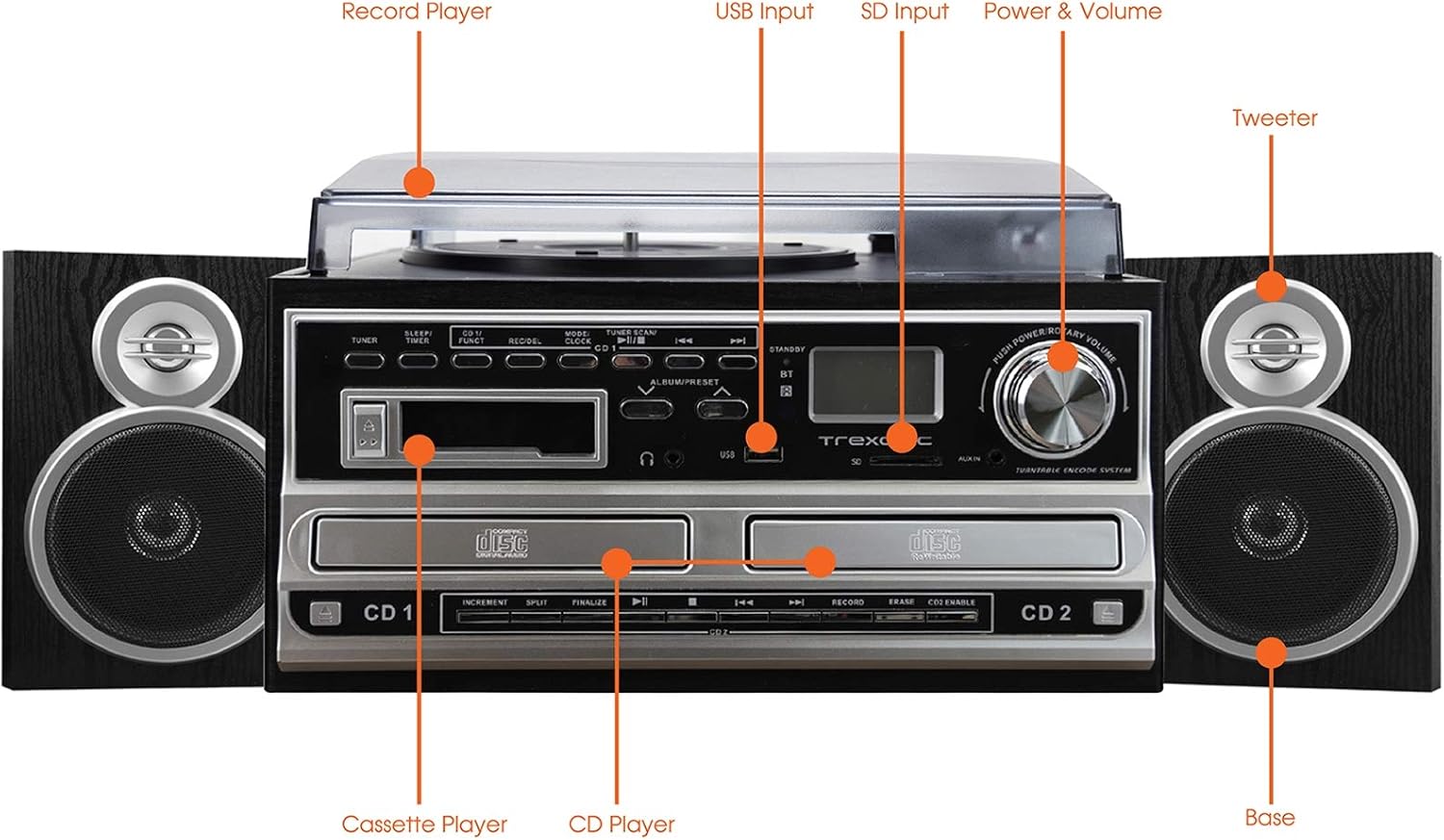
Figure 4.1: Front panel and top view of the Trexonic TRX-68B-AMZ with key components labeled.
- رڪارڊ پليئر: وينائل رڪارڊ کيڏڻ لاءِ.
- USB ان پٽ Connect USB drives for playback or recording.
- SD ان پٽ: Insert SD cards for playback or recording.
- Power & Volume Knob: Controls power on/off and audio volume.
- ٽائيٽل: High-frequency speaker component.
- Base (Woofer): Low-frequency speaker component.
- سي ڊي پليئر: For playing audio CDs and CD recording.
- Cassette Player: ڪيسٽ ٽيپ کي هلائڻ ۽ رڪارڊ ڪرڻ لاءِ.
5. سيٽ اپ
5.1 کولڻ
پيڪنگ مان سڀني حصن کي احتياط سان هٽايو. پيڪنگ مواد کي مستقبل جي ٽرانسپورٽ يا اسٽوريج لاءِ رکو.
5.2 اسپيڪر ڪنيڪشن
Connect the wired shelf speakers to the speaker output terminals on the rear of the main unit. Ensure correct polarity (positive to positive, negative to negative) for optimal sound quality.
5.3 پاور ڪنيڪشن
Plug the power adapter into the DC IN jack on the back of the unit, then plug the other end into a standard wall outlet (AC 100-240V, 50/60Hz).
6. آپريٽنگ هدايتون
6.1 عام ڪنٽرول
- طاقت / حجم نوب: Rotate to turn the unit on/off and adjust volume.
- Mode/Function Button: Press to cycle through different modes (Turntable, CD, Cassette, FM, USB, SD, AUX, Bluetooth).
6.2 Turntable Operation

شڪل 6.1: بند اپ view of the turntable platter and tonearm.
- مٽي جي ڍڪ کي مٿي ڪريو.
- پليٽ تي رڪارڊ رکو.
- اسپيڊ چونڊيندڙ سوئچ استعمال ڪندي مناسب رفتار (33، 45، يا 78 RPM) چونڊيو.
- Move the tonearm to the desired position on the record. The platter will begin to spin automatically.
- Lower the tonearm gently onto the record.
- To stop playback, lift the tonearm and return it to its rest.
6.3 سي ڊي پليئر آپريشن
- Press the Mode/Function button to select CD mode.
- سي ڊي ٽري کولڻ لاءِ OPEN/CLOSE بٽڻ کي دٻايو.
- هڪ سي ڊي رکو جنهن جي ليبل واري پاسي کي مٿي ڪيو وڃي.
- Press the OPEN/CLOSE button to close the tray. The CD will begin playing automatically.
- Use the PLAY/PAUSE, STOP, SKIP FORWARD, and SKIP BACKWARD buttons for control.
6.4 ڪيسٽ پليئر آپريشن

شڪل 6.2: بند اپ view of the cassette player slot.
- Press the Mode/Function button to select Cassette mode.
- Insert a cassette tape into the cassette slot.
- Use the PLAY, PAUSE, FAST FORWARD, REWIND, and STOP buttons for control.
6.5 ايف ايم ريڊيو آپريشن
- Press the Mode/Function button to select FM Radio mode.
- Use the TUNER knob or SEEK buttons to find radio stations.
- Press the PRESET button to save or recall favorite stations.
6.6 USB/SD پلے بیک
- Insert a USB drive into the USB port or an SD card into the SD slot.
- Press the Mode/Function button to select USB or SD mode.
- يونٽ خودڪار طريقي سان مطابقت رکندڙ آڊيو کي ڳوليندو ۽ هلائيندو. files.
- Use the PLAY/PAUSE, STOP, SKIP FORWARD, and SKIP BACKWARD buttons for control.
6.7 Recording Functions
The Trexonic TRX-68B-AMZ allows recording from various sources to USB or SD card.
- Recording from Vinyl, CD, Cassette, or AUX to USB/SD:
- Insert a USB drive or SD card into the respective slot.
- Select the desired source mode (Turntable, CD, Cassette, or AUX).
- ماخذ مواد جو پلے بیک شروع ڪريو.
- Press the RECORD button. The recording indicator will illuminate.
- Press the STOP button to end the recording.
7. سار سنڀال
7.1 يونٽ جي صفائي
Wipe the unit with a soft, dry cloth. Do not use abrasive cleaners or solvents. For the dust cover, use a soft cloth and a mild detergent solution if necessary, then wipe dry.
7.2 Stylus Care and Replacement
The turntable stylus (needle) is a delicate component. Clean it periodically with a soft brush, brushing from back to front. A worn stylus can damage records and degrade sound quality. Replace the stylus approximately every 300-500 hours of playback, or if you notice a decrease in sound quality or increased record wear.
8. مسئلا حل ڪرڻ
| مسئلو | ممڪن سبب | حل |
|---|---|---|
| طاقت نه آهي | بجلي جي تار ڳنڍيل نه آهي؛ بجلي جو آئوٽليٽ خراب آهي. | پڪ ڪريو ته پاور ڪنڊ محفوظ طور تي ڳنڍيل آهي؛ هڪ مختلف آئوٽ ليٽ آزمايو. |
| آواز ڪونهي | Volume too low; Speakers not connected; Incorrect mode selected | Increase volume; Check speaker connections; Select correct input mode. |
| گھمڻ وارو نه گھمڻ وارو | Unit not powered on; Tonearm not moved over platter | Turn on unit; Move tonearm over the record to activate platter. |
| سي ڊي نه پئي هلي. | CD inserted incorrectly; CD scratched/dirty; Incorrect mode | Reinsert CD correctly; Clean or replace CD; Select CD mode. |
| رڪارڊنگ جا مسئلا | USB/SD full or incompatible; Source not playing | Check USB/SD capacity and format; Ensure source is playing during recording. |
9. وضاحتون
| خاصيت | تفصيل |
|---|---|
| برانڊ | ٽرڪسونڪ |
| ماڊل نمبر | TRX-68B-AMZ |
| ٽرنٽيبل اسپيڊ | 33/45/78 RPM |
| رڪارڊنگ فارميٽ | MP3 (to USB/SD) |
| پلے بیک ميڊيا | Vinyl, CD, Cassette, FM Radio, USB, SD, AUX, Bluetooth |
| شامل اجزاء | Remote Control, Wired Shelf Speakers |
| طاقت جو ذريعو | تار ٿيل برقي |
| طول و عرض (پيڪيج) | 56.64 x 35.56 x 26.67 سينٽي |
| وزن (پيڪيج) | 6.89 ڪلو |
10. وارنٽي ڄاڻ
Trexonic products are designed and manufactured to the highest quality standards. For specific warranty details, please refer to the warranty card included with your product or contact Trexonic customer support. Keep your purchase receipt as proof of purchase.
11. ڪسٽمر سپورٽ
If you encounter any issues not covered in this manual or require further assistance, please contact Trexonic customer support. Contact information can typically be found on the manufacturer's official webسائيٽ تي يا پراڊڪٽ پيڪنگنگ تي.