
تعارف
This manual provides comprehensive instructions for the proper use and maintenance of your ELECTROPRIME 8GB Rechargeable USB LCD Digital Voice Recorder, Model ASH20BEBUBEB26998. Please read this manual thoroughly before operating the device to ensure optimal performance and longevity. Keep this manual for future reference.
پيداوار ختمview
The ELECTROPRIME Digital Voice Recorder is a compact and versatile device designed for high-quality audio recording and MP3 playback. It features an LCD screen for easy navigation, 8GB of internal storage, and a rechargeable battery.
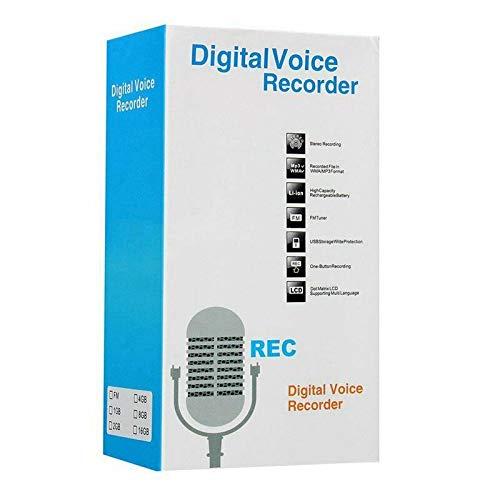
Figure 1: ELECTROPRIME Digital Voice Recorder with included accessories, including earphones, USB cable, and telephone adapter.
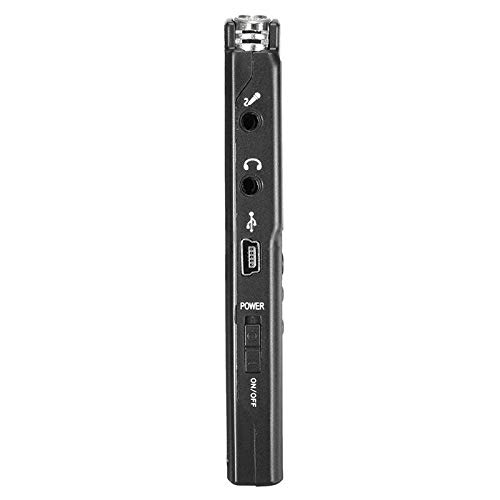
شڪل 2: پاسي view of the recorder, highlighting the USB port, headphone jack, microphone input, and power switch.
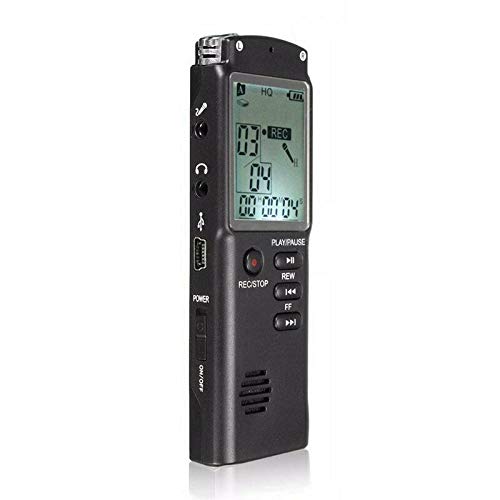
شڪل 3: سامهون view of the recorder, displaying the LCD screen with recording information and control buttons.
سيٽ اپ ڪريو
- ڊوائيس چارج ڪرڻ: Connect the recorder to a computer's USB port or a USB wall adapter using the provided USB cable. The LCD screen will indicate charging status. A full charge typically takes 2-3 hours.
- پاور آن / آف: Locate the ON/OFF switch on the side of the device. Slide it to the "ON" position to power on and to the "OFF" position to power off.
- شروعاتي سيٽ اپ: Upon first power-on, you may need to set the date and time. Use the navigation buttons (REW, FF) and Play/Pause button to adjust and confirm settings.
آپريٽنگ هدايتون
رڪارڊنگ آڊيو
- رڪارڊنگ شروع ڪريو: With the device powered on, press the REC/STOP button once. The LCD will display "REC" and a timer, indicating that recording has started.
- رڪارڊنگ کي روڪيو: رڪارڊنگ دوران، دٻايو راند/روڪ button to pause. Press it again to resume.
- رڪارڊنگ بند ڪريو: کي دٻايو REC/STOP button again to stop recording. The recording will be saved automatically.
واپس رڪارڊنگ کيڏڻ
- رسائي رڪارڊنگ: In standby mode, use the REW or FF buttons to navigate through your saved recordings.
- راند/روڪ: کي دٻايو راند/روڪ button to start playback of the selected recording. Press again to pause.
- حجم کي ترتيب ڏيو: Use the volume control buttons (if present, typically on the side or via menu) to adjust playback volume.
منتقلي Fileڪمپيوٽر ڏانهن
- ڳنڍڻ: Connect the recorder to your computer using the USB cable.
- Access Device: رڪارڊر توهان جي ڪمپيوٽر تي هڪ هٽائڻ واري ڊسڪ ڊرائيو جي طور تي ظاهر ٿيندو.
- منتقلي Open the drive, locate your audio files (usually in a folder like "RECORD" or "VOICE"), and copy them to your computer.
Using as an MP3 Player
The device supports MP3 audio playback. Transfer MP3 files to the device's internal storage via USB connection. Use the REW ۽ FF buttons to select tracks and راند/روڪ پلے بیک کي ڪنٽرول ڪرڻ لاءِ.
سار سنڀال
- صفائي: ڊوائيس جي ٻاهرين حصي کي صاف ڪرڻ لاءِ نرم، سڪل ڪپڙو استعمال ڪريو. مائع صاف ڪندڙ يا محلول استعمال نه ڪريو.
- بيٽري جي سنڀال: بيٽري جي زندگي کي وڌائڻ لاءِ، ڊوائيس کي بار بار مڪمل طور تي چارج ڪرڻ کان پاسو ڪريو. ڊوائيس کي باقاعدي طور تي چارج ڪريو، جيتوڻيڪ ڊگهي عرصي تائين استعمال ۾ نه هجي.
- اسٽوريج: ڊوائيس کي سڌي سج جي روشني، انتهائي گرمي پد ۽ تيز نمي کان پري ٿڌي، سڪل جاءِ تي رکو.
- اثر کان بچڻ: ڊوائيس کي ڦڙن ۽ اثرن کان بچايو، جيڪي اندروني حصن کي نقصان پهچائي سگهن ٿا.
مشڪلاتون
| مسئلو | ممڪن حل |
|---|---|
| ڊوائيس تي طاقت نه آهي. | Ensure the battery is charged. Connect to a USB power source and try again. Check the ON/OFF switch position. |
| Cannot record audio. | Check if the device has sufficient memory. Delete old files if necessary. Ensure the microphone is not obstructed. |
| ڪمپيوٽر ڊوائيس کي سڃاڻي نه سگهيو آهي. | هڪ مختلف USB پورٽ يا ڪيبل آزمايو. پڪ ڪريو ته ڊوائيس ڳنڍيل هجڻ تي آن آهي. پنهنجو ڪمپيوٽر ٻيهر شروع ڪريو. |
| غريب آڊيو معيار. | Ensure the recording environment is quiet. Keep the device close to the audio source. Check recording settings (if adjustable). |
وضاحتون
- برانڊ: Electroprime
- ماڊل نمبر: ASH20BEBUBEB26998
- ياداشت رکڻ جي گنجائش: 8 جي بي
- آڊيو فارميٽ: ايم پي 3
- هارڊويئر انٽرفيس: USB
- مطابقت رکندڙ ڊوائيسز: MP3 پليئر
- طاقت جو ذريعو: ريچارج لائق بيٽري (USB چارجنگ)
وارنٽي ۽ سپورٽ
Specific warranty information for this product is not provided in the available documentation. For warranty claims or technical support, please contact your retailer or the manufacturer, ELECTROPRIME, directly. Retain your proof of purchase for any warranty-related inquiries.
For further assistance, please refer to the official ELECTROPRIME webسائيٽ يا انهن جي ڪسٽمر سروس کاتي سان رابطو ڪريو.