
تعارف
Welcome to your new MageGee GK710 Pink Gaming Keyboard and Mouse Combo. This manual provides detailed instructions for setup, operation, and maintenance to ensure optimal performance and a satisfying user experience. Please read this manual thoroughly before using the product.
پيڪيج مواد
- MageGee GK710 Pink Gaming Keyboard
- MageGee Pink Gaming Mouse
- Integrated USB Cables
سيٽ اپ جون هدايتون
ڪيبورڊ ۽ ماؤس کي ڳنڍڻ
The MageGee GK710 keyboard and mouse combo utilizes standard USB connections for both devices. No additional drivers are required for basic functionality, making it a plug-and-play solution.
- پنهنجي ڪمپيوٽر تي موجود USB 2.0 پورٽ ڳوليو.
- Plug the USB connector from the keyboard into the USB port.
- Plug the USB connector from the mouse into another available USB port.
- توهان جو آپريٽنگ سسٽم خودڪار طريقي سان ضروري ڊرائيورن کي ڳولي ۽ انسٽال ڪندو.
- ڊوائيسز هاڻي استعمال لاءِ تيار آهن.

Image: Close-up of the pink gaming mouse, highlighting its USB connection and plug-and-play capability. The mouse features a geometric pattern and illuminated scroll wheel.
آپريٽنگ هدايتون
ڪي بورڊ افعال
The GK710 keyboard features a standard 104-key layout with several enhanced functions designed for gaming and productivity.
مخالف گھوسٽنگ ڪنجيون
The keyboard supports 19 anti-ghosting keys, allowing simultaneous key presses without conflict. These keys include Q, A, Z, W, S, X, E, D, C, B, Space, Up, Down, Left, Right, Tab, Alt, Ctrl, and Shift.
ملٽي ميڊيا فنڪشن ڪيز
Access multimedia controls by pressing the Fn key in combination with the designated function keys (F1-F10).

Image: The MageGee GK710 keyboard displaying the 10 dedicated multimedia function keys located above the F-keys, labeled for quick access to common applications and media controls.
- Fn + F1: Web برائوزر
- Fn + F2: منهنجو ڪمپيوٽر
- Fn + F3: اي ميل
- Fn + F4: Music Player
- Fn + F5: حساب ڪندڙ
- Fn + F6: حجم گھٽ
- Fn + F7: حجم وايو
- Fn + F8: پويون ٽريڪ
- Fn + F9: راند/روڪ
- Fn + F10: ايندڙ ٽريڪ
پٺڀرائي جي ترتيب
The keyboard features 7 single-color lighting modes. To adjust the backlight:
- دٻايو Fn + ESC repeatedly to cycle through brightness levels (Dim, Bright, Breathing, Off).
- The backlight will automatically turn off after 10 minutes of inactivity to conserve energy.
Gaming Mode Features
- Disable WIN Key: پريس Fn + WIN to disable the Windows key during gameplay, preventing accidental interruptions. Press again to re-enable.
- WASD Key Swap: پريس Fn + W to swap the functionality of the WASD keys with the arrow keys. Press again to revert to standard layout.
ماؤس جا ڪم ڪار
The gaming mouse offers adjustable DPI settings and an aesthetic breathing backlight.
ڊي پي آءِ ايڊجسٽمينٽ
The mouse supports four adjustable DPI levels. Press the DPI button located on top of the mouse to cycle through the settings. An indicator light will change color to show the current DPI:
- ڳاڙهو: 800 DPI (suitable for web browsing and general tasks)
- سائو: 1600 DPI (ideal for daily use)
- نيرو: 2400 DPI (recommended for gaming)
- واڱڻائي: 3200 DPI (for professional gaming requiring high precision)
سانس جي روشني
The mouse features an automatic 7-color breathing backlight that cycles through various colors when connected.
اهم خاصيتون
- پائيدار ڊيزائن: Features suspension keycaps and a waterproof, dust-resistant membrane switch for enhanced longevity and easy cleaning.
- ٽائيٽل راءِ: The crater structure of the keycaps provides a comfortable and responsive typing experience, crucial for both gaming and extended typing sessions.
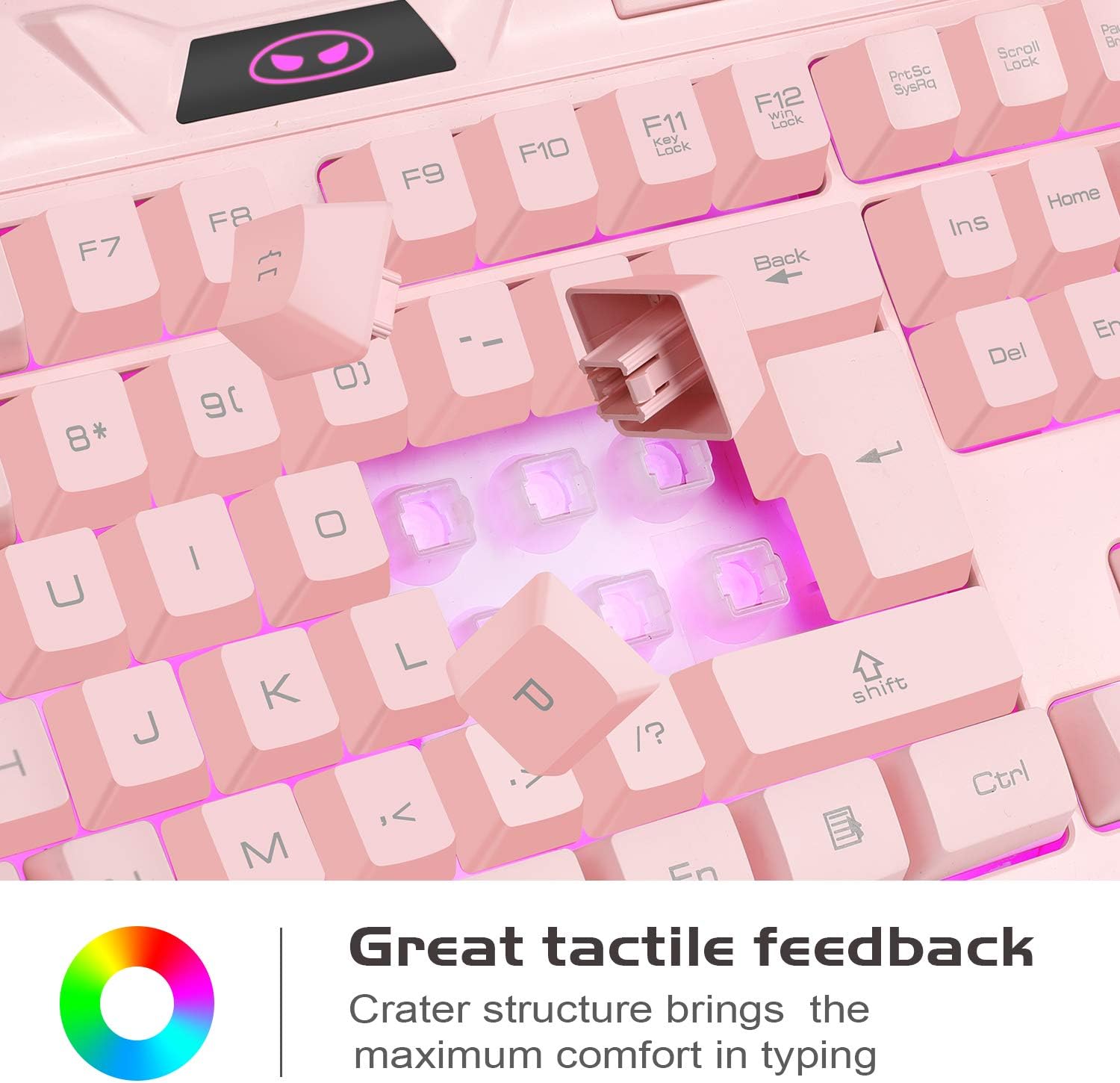
تصوير: هڪ ويجهو تصوير view of the keyboard's keycaps, illustrating the crater structure designed to provide enhanced tactile feedback during typing.
- Ergonomic Mouse Design: The mouse is contoured for a comfortable grip, reducing fatigue during prolonged use.
- وسيع مطابقت: Compatible with a broad range of operating systems including Windows 98/2000/ME/XP/Vista/Win7/Win8 and Linux.
سار سنڀال
ڪي بورڊ جي صفائي
Due to its waterproof and dust-resistant design, the keyboard is easy to clean and maintain.
- صفائي ڪرڻ کان اڳ ڪيبورڊ کي ڪمپيوٽر کان ڌار ڪريو.
- ھڪڙو نرم استعمال ڪريو، ٿورڙو ڊيamp cloth to wipe down the keycaps and surface.
- For stubborn dirt, a small amount of mild soap can be used, ensuring no liquid enters the USB connector.
- Allow the keyboard to dry completely before reconnecting it to your computer.
مائوس جي صفائي
- پنهنجي ڪمپيوٽر کان مائوس کي ڌار ڪريو.
- ھڪڙو نرم استعمال ڪريو، ٿورڙو ڊيamp cloth to gently wipe the surface of the mouse.
- سخت ڪيميڪلز يا رگڙيندڙ مواد استعمال ڪرڻ کان پاسو ڪريو، ڇاڪاڻ ته اهي ختم کي نقصان پهچائي سگهن ٿا.
- Ensure the mouse is completely dry before reconnecting.
مشڪلاتون
ڪي بورڊ يا مائوس جواب نه ڏئي رهيو آهي
- Ensure the USB cables are securely plugged into the computer's USB ports.
- پنهنجي ڪمپيوٽر تي ڊوائيسز کي مختلف USB پورٽن ۾ لڳائڻ جي ڪوشش ڪريو.
- Restart your computer to refresh the USB connections.
- Test the keyboard and mouse on another computer to determine if the issue is with the devices or your system.
Backlight ڪم نه ڪري رهيو آهي
- For the keyboard, ensure the backlight is not set to 'Off' mode by pressing Fn + ESC to cycle through modes.
- For the mouse, the backlight is automatic and should be on when connected. If not, try reconnecting the mouse.
Keys Not Registering Correctly
- Ensure the WASD keys are not swapped with arrow keys (press Fn + W to toggle this function).
- Clean around the affected keys to remove any debris that might be obstructing key presses.
وضاحتون
| خاصيت | تفصيل |
|---|---|
| ماڊل | جي جي 710 |
| ڪي بورڊ جو قسم | جھلي |
| ڪنجي جو تعداد | 104 |
| مخالف گھوسٽنگ | 19 keys (Q, A, Z, W, S, X, E, D, C, B, Space, Up, Down, Left, Right, Tab, Alt, Ctrl, Shift) |
| ملائي ميڊيا چيڪ | 10 (Fn combinations) |
| ڪي بورڊ Backlight | 7 single-color modes, adjustable brightness (Fn+ESC) |
| ماؤس DPI سيٽنگون | 800 / 1200 / 2400 / 3200 ڊي پي آئي |
| مائوس Backlight | 7 رنگن جي سانس جي روشني |
| رابطي | وائرڊ USB 2.0 |
| ڪيبل ڊگھائي | 180 سينٽي ميٽر (تقريبن 5.9 فوٽ) |
| آپريٽنگ جلدtage | 5V |
| آپريٽنگ موجوده | 10 mAh |
| مطابقت | Linux, Win XP, Win 2000, Win Vista, Win7, Win8 |
| ڪي بورڊ جو طول و عرض | لڳ ڀڳ. 460mm x 188.5mm x 28.5mm |
| مائوس جي ماپ | لڳ ڀڳ. 120mm x 70mm x 41mm |
| وزن | 1.02 kg (combined package weight) |

Image: Technical diagram illustrating the precise dimensions of both the MageGee GK710 pink gaming keyboard and its accompanying mouse.
وارنٽي ۽ سپورٽ
For any issues or questions regarding your MageGee GK710 Pink Gaming Keyboard and Mouse Combo, please contact our customer service team. We value your feedback and are committed to providing assistance.
مھرباني ڪري پنھنجي خريداري جي دستاويزن يا پرچون ڪندڙ جي حوالي ڪريو webمخصوص وارنٽي شرطن ۽ رابطي جي معلومات لاءِ سائيٽ.