
1. تعارف
Thank you for choosing the AUNA Pro Amp-Pro1 BT PA Ampجاندار. هي amplifier is designed to deliver professional-level sound for various events, including karaoke nights, parties, and general audio amplification. It features a robust 2 x 50W RMS output, Bluetooth connectivity, multiple microphone inputs, USB/SD media playback, and a 7-band equalizer for precise sound control. This manual provides essential information for safe operation, setup, and maintenance of your device.
2. حفاظتي هدايتون
Please read these safety instructions carefully before operating the device and keep them for future reference. Failure to follow these instructions may result in electric shock, fire, or other hazards.
- بجلي جي فراهمي: Connect the device only to a 230 V, 50 Hz AC power outlet. Ensure the power cord is not damaged or pinched.
- وينٽيليشن: Do not block any ventilation openings. Ensure adequate airflow around the unit to prevent overheating. Do not place the ampنرم مٿاڇري تي لائفائر جيڪو وينٽن کي بلاڪ ڪري سگهي ٿو.
- پاڻي ۽ نمي: Do not expose the device to rain or moisture. Do not place objects filled with liquids, such as vases, on or near the ampوierيڪ زنده
- گرمي جا ذريعا: رکي amplifier away from heat sources such as radiators, heat registers, stoves, or other heat-producing appliances.
- صفائي: Unplug the device from the power outlet before cleaning. Use a dry, soft cloth. Do not use liquid cleaners or aerosol cleaners.
- خدمت ڪرڻ: Do not attempt to service this product yourself. Refer all servicing to qualified service personnel. Opening the unit may expose you to dangerous voltages يا ٻيا خطرا.
- مقصد ۽ مائع جو داخلا: ڪڏهن به ڪنهن به قسم جي شين کي هن پراڊڪٽ ۾ کولڻ ذريعي نه ڌڪيو ڇو ته اهي خطرناڪ حجم کي ڇڪي سگهن ٿيونtagاي پوائنٽس يا شارٽ آئوٽ حصا جيڪي باھ يا برقي جھٽڪو جي نتيجي ۾ ٿي سگھن ٿا.
- لڳائڻ: Place the unit on a stable, level surface. Avoid placing it in direct sunlight or in areas with high humidity or dust.
3. پراڊڪٽ ختمview
The AUNA Pro Amp-Pro1 BT is a versatile PA amplifier designed for powerful audio output and flexible connectivity. It can be used as a standalone unit or installed in a 19-inch Hi-Fi rack.
اهم خاصيتون:
- طاقتور پيداوار: 2 x 50 W RMS power at 4 ohms.
- بلوٽوٿ فنڪشن: For wireless audio streaming from smartphones, tablets, or laptops.
- گھڻا مائڪروفون ان پٽ: Three fully adjustable 6.3 mm jack microphone inputs for karaoke and vocal performances.
- ميڊيا پلے بیک USB port and SD/MMC card slot for direct playback of digital audio files.
- 7-بينڊ برابر ڪرڻ وارو: Two-channel, 7-band equalizer for precise adjustment of treble, bass, and mid-range frequencies.
- وسيع ڪنيڪشن: 2 x stereo RCA inputs, 1 x antenna input, 1 x 3.5 mm AUX input, and 2 x stereo speaker outputs.
- ريڪ لڳائڻ جي قابل: Suitable for installation in a 19-inch Hi-Fi rack.
فرنٽ پينل ڪنٽرول ۽ ڪنيڪشن:
The front panel provides access to power, microphone inputs, media playback controls, and sound adjustments.

ريئر پينل ڪنيڪشن:
The rear panel houses the main audio inputs and speaker outputs.

4. سيٽ اپ ۽ ڪنيڪشن
Follow these steps to set up your AUNA Pro Amp-Pro1 BT ampوierيڪ زنده
4.1 ڳنڍڻ وارا اسپيڪر
- کي يقيني بڻايو ampلائفائر بند ڪيو ويو آهي ۽ پاور آئوٽليٽ مان ان پلگ ڪيو ويو آهي.
- Connect your passive speakers to the stereo speaker outputs on the rear panel. Use appropriate speaker cables.
- For a single set of speakers, ensure their impedance is between 4 and 16 ohms.
- If connecting two sets of speakers simultaneously, ensure their combined impedance is between 8 and 16 ohms.
4.2 آڊيو ذريعن کي ڳنڍڻ
جي ampلائفائر مختلف ان پٽ آپشن پيش ڪري ٿو:
- آر سي اي انپٽس: Connect external audio devices like CD players, DVD players, or mixers to the 2 x stereo RCA inputs on the rear panel.
- AUX ان پٽ: For portable devices, use the 3.5 mm AUX input on the front panel.
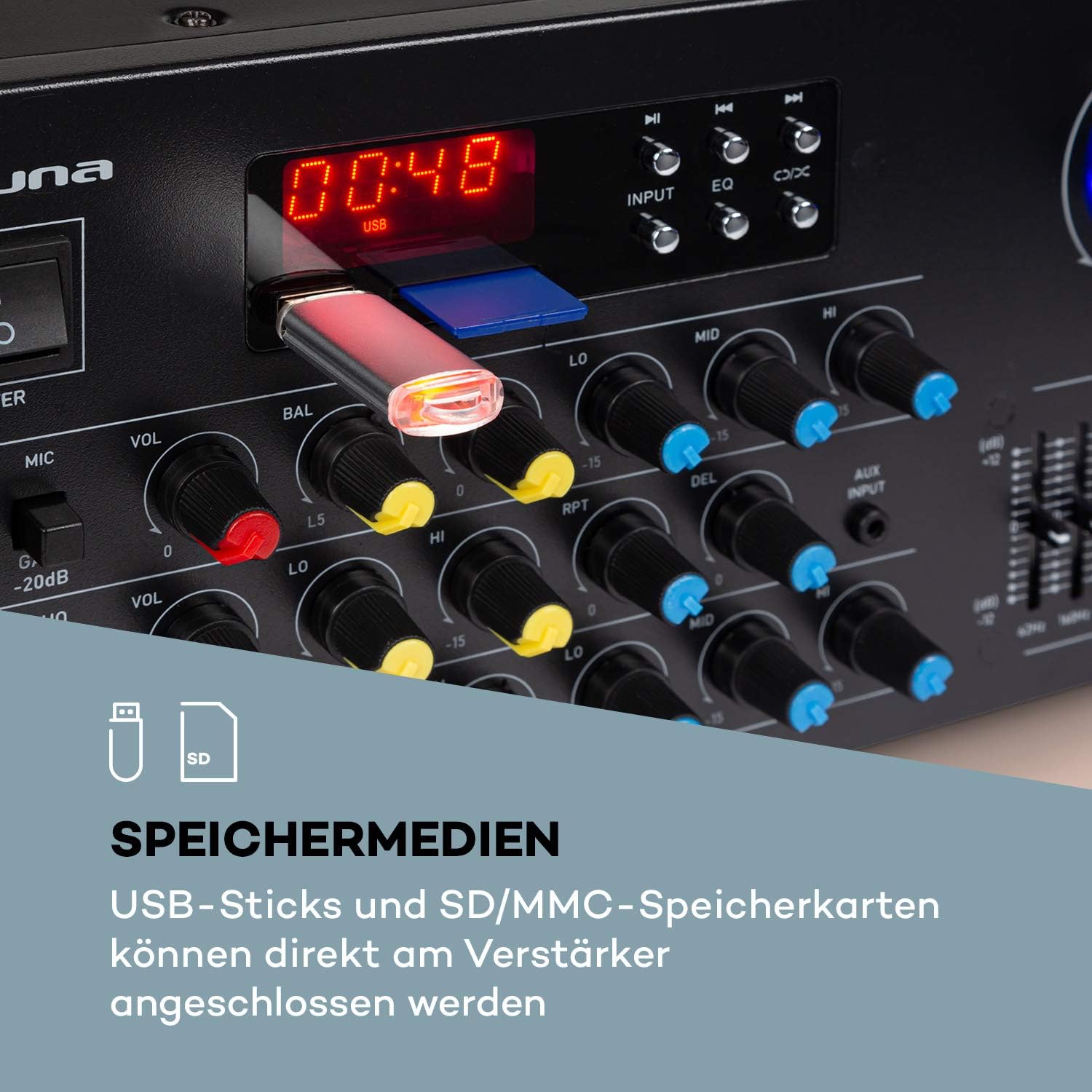
- USB/SD: Insert a USB stick or SD/MMC card into the respective slots on the front panel for direct media playback.
- بلوٽوٿ: مطابقت رکندڙ ڊوائيسز مان وائرليس آڊيو اسٽريمنگ لاءِ.
4.3 ڳنڍڻ مائڪروفون
Connect up to three 6.3 mm jack microphones to the dedicated inputs on the front panel.

4.4 پاور ڪنيڪشن
Once all audio and speaker connections are made, plug the amplifier's power cord into a suitable 230 V, 50 Hz AC power outlet.
5. آپريٽنگ هدايتون
5.1 پاور آن/آف
کي دٻايو پاور اڳيان پينل تي بٽڻ کي ڦيرائڻ لاءِ ampلائفائر آن يا آف. يونٽ جي پاور آن ٿيڻ تي ڊسپلي روشن ٿيندي.
5.2 ماخذ جي چونڊ
استعمال ڪريو INPUT selector button on the front panel to cycle through available audio sources: Bluetooth, USB, SD, AUX, and RCA inputs.
5.3 بلوٽوت آپريشن
- Select the Bluetooth input source using the INPUT button. The display will show 'BLUE' or a similar indicator.
- پنهنجي اسمارٽ فون، ٽيبليٽ، يا ليپ ٽاپ تي بلوٽوٿ کي فعال ڪريو.
- ڳولھيو available devices and select 'AUNA Amp-Pro1 BT' (or similar) from the list.
- هڪ دفعو جوڙيو ويو، توهان آڊيو کي وائرليس طور تي اسٽريم ڪري سگهو ٿا ampوierيڪ زنده

5.4 USB/SD پلے بیک
- Insert a USB stick or SD/MMC card into the corresponding slot on the front panel.
- Select the USB or SD input source using the INPUT بٽڻ جي ampلائفائر خودڪار طريقي سان مطابقت رکندڙ آڊيو کي ڳوليندو ۽ هلائڻ شروع ڪندو. files.
- Use the playback controls (Play/Pause, Next, Previous) on the front panel to manage your music.
5.5 مائڪروفون ڪنٽرول
Each microphone input has individual volume, 3-band equalizer (treble, mid, bass), balance, and echo effect controls. The echo effect also has 2-band equalizer, repeat, delay, and volume controls.
- ترتيب ڏيو مائڪ وول knob for the overall microphone volume.
- فرد استعمال ڪريو وول knobs for each microphone input.
- ترتيب ڏيو LO, MID, HI knobs for microphone equalization.
- Control the echo effect using the ايڪو, آر پي ٽي (Repeat), and ڊي ايل (Delay) knobs.
5.6 برابري واري ترتيب
جي amplifier features a 2-channel, 7-band equalizer to fine-tune your audio output. Adjust the sliders for each frequency band (62Hz, 160Hz, 400Hz, 1KHz, 3KHz, 8KHz, 16KHz) to shape your sound.

5.7 ماسٽر حجم ڪنٽرول
Adjust the large ماسٽر حجم knob to control the overall output level of the ampوierيڪ زنده
6. سار سنڀال
6.1 صفائي
هميشه unplug amplifier before cleaning. Use a soft, dry cloth to wipe the exterior surfaces. Do not use abrasive cleaners, waxes, or solvents, as they may damage the finish.
6.2 اسٽوريج
جيڪڏهن جي amplifier will not be used for an extended period, unplug it from the power outlet and store it in a cool, dry place, away from direct sunlight and extreme temperatures.
6.3 فيوز مٽائڻ
جي amplifier is equipped with a 2A fuse. If the unit fails to power on, the fuse may need replacement. This should only be performed by qualified service personnel to ensure safety and proper operation.
7. مسئلا حل ڪرڻ
جيڪڏهن توهان پنهنجي سان مسئلا محسوس ڪندا آهيو ampلائفائر، هيٺ ڏنل عام مسئلن ۽ حلن جو حوالو ڏيو:
| مسئلو | ممڪن سبب | حل |
|---|---|---|
| طاقت نه آهي | Power cord unplugged; Power outlet faulty; Fuse blown | پاور ڪنڊ ڪنيڪشن چيڪ ڪريو؛ هڪ مختلف آئوٽ ليٽ آزمايو؛ فيوز جي متبادل لاءِ سروس سان رابطو ڪريو. |
| ڪوبه آواز ٻاھر نه | Incorrect input selected; Volume too low; Speakers not connected or faulty; Mute function active | Select correct input source; Increase Master Volume; Check speaker connections; Ensure no mute is active. |
| بلوٽوٿ ڳنڍي نه ٿو | Amplifier not in Bluetooth mode; Device not discoverable; Interference | Select Bluetooth input; Ensure Bluetooth is enabled on your device and in pairing mode; Move devices closer; Restart both devices. |
| مائڪرو فون ڪم نه ڪري رهيو آهي | Microphone not connected; Microphone volume too low; Microphone faulty | Check microphone connection; Increase individual MIC VOL; Test with another microphone. |
| بگڙيل آواز | Volume too high; Input signal too strong; Speaker impedance mismatch | Reduce Master Volume or input source volume; Check speaker impedance. |
جيڪڏهن انهن حلن جي ڪوشش ڪرڻ کان پوءِ به مسئلو برقرار رهي، مهرباني ڪري ڪسٽمر سپورٽ سان رابطو ڪريو.
8. ٽيڪنيڪل وضاحتون
Below are the technical specifications for the AUNA Pro Amp-Pro1 BT PA Ampزنده:
| خاصيت | تفصيل |
|---|---|
| ٻاھر نڪرڻ جي طاقت | 2 x 50 W RMS at 4 ohms |
| تعدد جواب | 20 هرٽز - 20 ڪلو هرٽز |
| سگنل کان شور جي نسبت | > 76 ڊي بي |
| Speaker Impedance (1 set) | 4 - 16 اوهم |
| Speaker Impedance (2 sets synchronized) | 8 - 16 اوهم |
| مائڪروفون انپٽس | 3 x 6.3 mm jack (front) |
| آڊيو انپٽ | 2 x stereo RCA, 1 x 3.5 mm AUX, USB, SD/MMC |
| انٽنا داخل ڪرڻ | 1 x antenna input |
| اسپيڪر آئوٽ پُٽ | 2 x stereo (screw terminals/banana connector) |
| بجلي جي فراهمي | 230 وي ، 50 هز |
| فيوز | 2 اي |
| طول و عرض (W x H x D) | لڳ ڀڳ. 43 X 16.3 x 32.5 سينٽ |
| وزن | لڳ ڀڳ. 3.0 ڪلو |
| رابطي ٽيڪنالاجي | آڪس، بلوٽوٿ، يو ايس بي |
| مطابقت رکندڙ ڊوائيسز | ليپ ٽاپ، اسمارٽ فون |

9. نيڪال جي ڄاڻ
Do not dispose of this product with normal household waste. This product should be handed over to an applicable collection point for the recycling of electrical and electronic equipment. By ensuring this product is disposed of correctly, you will help prevent potential negative consequences for the environment and human health, which could otherwise be caused by inappropriate waste handling of this product. For more detailed information about recycling of this product, please contact your local city office, your household waste disposal service or the shop where you purchased the product.
10. وارنٽي ۽ سپورٽ
For warranty information, technical support, or service inquiries, please refer to the documentation provided with your purchase or contact your retailer. You can also visit the official AUNA webوڌيڪ مدد لاء سائيٽ.