
تعارف
This instruction manual provides detailed information on the setup, operation, and maintenance of your SabineTek SmartMike+ wireless Bluetooth microphone. Please read this manual thoroughly before using the device to ensure optimal performance and longevity.
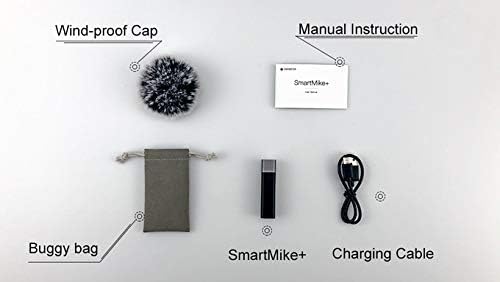
دٻي ۾ ڇا آهي
- SabineTek SmartMike+ Microphone(s)
- چارج ڪيبل
- Wind-proof Cap (Windscreen)
- Buggy Bag (Carrying Pouch)
- استعمال ڪندڙ جو دستياب (ھي دستاويز)
پيداوار ختمview
The SabineTek SmartMike+ is a compact and lightweight wireless microphone designed for high-quality audio recording with smartphones, cameras, and other compatible devices. It features advanced noise cancellation and real-time auto-sync technology for professional-grade sound.

اهم خاصيتون:
- پيشيور آڊيو معيار: Full-band audio 44.1~48kHz stereo CD-quality.
- Real-Time Auto-Sync Technology: Reduces post-editing time.
- Advanced Multi-Level Noise Cancellation: Embedded algorithm controlled by the SmartMike+ APP to block outer surrounding noise.
- حقيقي وقت جي نگراني: Allows listening to audio during recording via headphones.
- بلوٽوت 5.0 ڪنيڪشن: Provides faster, easier, and more stable connection.
- پورٽيبل ۽ پائيدار: Lightweight (14g), compact design with 5 hours of battery life.

سيٽ اپ ڪريو
1. Charging the SmartMike+
Before first use, fully charge the SmartMike+ using the provided charging cable. The device is equipped with a 110mAh high-quality lithium battery, providing approximately 5 hours of battery life on a full charge.
2. Connecting to Smartphone (Bluetooth)
- ڊائون لوڊ ڪريو SmartMike+ APP from your device's app store (available for iPhone/Android).
- پڪ ڪريو ته توهان جي اسمارٽ فون تي بلوٽوت فعال آهي.
- Power on the SmartMike+ microphone.
- Open the SmartMike+ APP and follow the on-screen instructions to pair your microphone via Bluetooth.
3. Connecting to Camera/Other Devices (3.5mm Jack)
The SmartMike+ can also be used with cameras or other devices that support a 3.5mm audio input. Use the appropriate cable (not always included, may require separate purchase) to connect the microphone to your device's audio input jack.

آپريٽنگ هدايتون
پاور آن / آف
- پاور آن ڪرڻ لاءِ، پاور بٽڻ کي دٻايو ۽ رکو جيستائين اشاري جي روشني روشن نه ٿئي.
- To power off, press and hold the power button until the indicator light turns off.
Recording Audio/Video
Once connected to your smartphone via the SmartMike+ APP, you can initiate audio or video recording directly within the application. The app provides controls for recording, playback, and managing your audio files.
شور جي منسوخي
The SmartMike+ utilizes a multi-level noise cancellation algorithm. This feature is primarily controlled and optimized through the SmartMike+ APP, allowing the microphone to block ambient noise and capture clear, authentic sound even in noisy environments.
حقيقي وقت جي نگراني
For real-time audio monitoring during recording, connect headphones to the SmartMike+ or your phone. This allows you to hear the audio being captured, ensuring sound quality and proper levels.

سار سنڀال
صفائي
Use a soft, dry cloth to clean the exterior of the SmartMike+. Do not use liquid cleaners or aerosols, as they may damage the device.
بيٽري جي سنڀال
- بيٽري کي بار بار مڪمل طور تي چارج ڪرڻ کان پاسو ڪريو.
- بيٽري جي صحت کي برقرار رکڻ لاءِ، ڊوائيس کي باقاعدي چارج ڪريو، جيتوڻيڪ استعمال ۾ نه هجي.
- هڪ ٿڌي، سڪل جڳهه ۾ ذخيرو ڪريو جڏهن وڌايل عرصي تائين استعمال ۾ نه هجي.
ذخيرو
When not in use, store the SmartMike+ in its provided buggy bag to protect it from dust and physical damage.
مشڪلاتون
| مسئلو | ممڪن سبب | حل |
|---|---|---|
| ڊوائيس تي طاقت نه آهي | گھٽ بيٽري | Charge the SmartMike+ fully. |
| بلوٽوٿ ذريعي جوڙو نه ٿو ٺاهي سگهجي | Bluetooth not enabled; device out of range; interference | Ensure Bluetooth is on, bring devices closer, restart both devices. |
| Poor audio quality (muffled, distorted, dropouts) | Environmental noise; improper microphone placement; firmware issues; app settings | Ensure wind-proof cap is used in windy conditions. Adjust microphone proximity to source. Check for firmware updates via the app. Experiment with app settings, especially noise reduction levels. Ensure strong Bluetooth connection. |
| Voice gets lost in background noise | High ambient low-frequency noise (e.g., traffic) | While the SmartMike+ has noise cancellation, very loud or persistent low-frequency sounds can still impact voice clarity. Try to record in quieter environments or use external audio editing software for post-production cleanup. |
وضاحتون
| خاصيت | تفصيل |
|---|---|
| ماڊل نمبر | S610 |
| شيءِ جو وزن | 11.8 آونس (تقريبن 0.74 پائونڊ) |
| پيداوار جي ماپ | 2.28 x 0.39 x 0.59 انچ |
| مائڪروفون فارم فيڪٽر | مائڪروفون سسٽم |
| طاقت جو ذريعو | Rechargeable, Battery Powered, Lithium Battery |
| مواد | ڌاتو |
| سگنل کان شور جي نسبت | 70 ڊي بي |
| هارڊويئر پليٽ فارم | اسمارٽ فون |
| چينلن جو تعداد | 2 |
| آڊيو حساسيت | 120 ڊي بي |
| پولر نمونو | هر طرفي |
| رابطي ٽيڪنالاجي | بلوٽوٿ |
| ڪنيڪٽر جو قسم | 3.5 مليڪ جيڪ |
| خاص خصوصيت | ڪلپ |
| مطابقت رکندڙ ڊوائيسز | Camera, Personal Computer, Smartphone, Speaker |
| رنگ | ڪارو |
وارنٽي ۽ سپورٽ
For warranty information and customer support, please refer to the documentation included with your purchase or visit the official SabineTek webسائيٽ. وارنٽي دعوائن لاءِ خريداري جو ثبوت رکو.


