
Andoer HDV-201LM
Andoer HDV-201LM 1080p Digital Video Camera User Manual
Model: HDV-201LM
1. تعارف
This manual provides detailed instructions for the safe and effective use of your Andoer HDV-201LM Digital Video Camera. Please read this manual thoroughly before operating the device and retain it for future reference.
The Andoer HDV-201LM is a 1080p Full HD digital video camera featuring a 5-megapixel CMOS sensor, capable of capturing video at 1920x1080p at 30 frames per second and still images up to 24 megapixels (interpolated). It includes a 16X digital zoom, a 3.0-inch TFT-LCD screen with 270-degree rotation, and supports external accessories via a hot shoe mount.
2. پيڪيج مواد
تصديق ڪريو ته هيٺ ڏنل سڀئي شيون توهان جي پيڪيج ۾ شامل آهن. جيڪڏهن ڪا به شيءِ غائب يا خراب آهي، مهرباني ڪري پنهنجي پرچون ڪندڙ سان رابطو ڪريو.
- 1 x Andoer HDV-201LM Digital Video Camera
- 1 x Camera Bag
- 2 x Rechargeable 3.7V 800mAh Batteries (one pre-installed)
- 1 x USB ڪيبل
- 1 x اي وي ڪيبل
- 1 x ريموٽ ڪنٽرول
- 1 x Camera User Manual (English)
- 1 x 0.39X Wide-Angle Lens
- 1 x خارجي مائڪروفون
- 1 x Microphone Connection Cable
- 1 x Microphone User Manual (Chinese)
Note: A memory card is not included. A Class 10 or higher SD card (up to 32GB) is strongly recommended for optimal performance.
3. حصن جي ساڻپ
Familiarize yourself with the various components of your digital video camera.

شڪل 3.1: سامهون view of the Andoer HDV-201LM camera with attached wide-angle lens and external microphone.

شڪل 3.2: تفصيلي views highlighting the hot shoe mount, control buttons, battery compartment, and 1/4-inch tripod thread.
- لينس: تصويرون ۽ وڊيوز ڪيپچر ڪرڻ لاءِ مکيه آپٽيڪل جزو.
- LCD اسڪرين: 3.0-inch TFT-LCD display for viewing and menu navigation. Rotates 270 degrees.
- پاور بٽڻ: ڪئميرا کي آن يا آف ڪري ٿو.
- Record/Stop Button: وڊيو رڪارڊنگ شروع ڪري ٿو يا بند ڪري ٿو.
- ڦوٽو بٽڻ: Captures still images.
- زوم ليور (W/T): Adjusts digital zoom (Wide/Telephoto).
- مينيو بٽڻ: ڪئميرا سيٽنگن تائين رسائي حاصل ڪري ٿو.
- نيويگيشن بٽڻ: مينيو نيويگيشن ۽ چونڊ لاءِ استعمال ٿيندو آهي.
- گرم جوتن جو جبل: For attaching external accessories like microphones or LED lights.
- ٽراپڊ موضوع: 1/4-inch thread for mounting the camera on a tripod.
- بيٽري جو خانو: ريچارجبل بيٽري رکي ٿو.
- SD ڪارڊ سلاٽ: For inserting a memory card.
- USB پورٽ: For connecting to a computer or charging.
- اي وي آئوٽ ٽيليويزن سان ڳنڍڻ لاءِ.
- ايل اي ڊي فل لائيٽ: گهٽ روشني واري حالتن ۾ اضافي روشني فراهم ڪري ٿي.
4. سيٽ اپ
4.1. بيٽري کي چارج ڪرڻ
- بيٽري جي ڪمري واري ڍڪ کي کوليو.
- Insert the provided 3.7V 800mAh battery, ensuring correct polarity. If an insulator tab is present, remove it before insertion.
- بيٽري جي ڪمري واري ڍڪ کي بند ڪريو.
- Connect the camera to a power source using the USB cable. The charging indicator will illuminate.
- هڪ ڀيرو مڪمل چارج ٿيڻ کان پوءِ، اشاري جي روشني تبديل ٿي ويندي يا بند ٿي ويندي.
4.2. ميموري ڪارڊ داخل ڪرڻ
- پڪ ڪريو ته ڪئميرا بند ٿيل آهي.
- ايس ڊي ڪارڊ سلاٽ ڳوليو.
- Insert a Class 10 or higher SD card (up to 32GB) into the slot until it clicks into place.
- ڪڍڻ لاءِ، ڪارڊ کي نرميءَ سان دٻايو جيستائين اهو ٻاهر نه اچي.
4.3. Attaching the Wide-Angle Lens
- Remove the protective cap from the camera lens.
- Carefully screw the 0.39X wide-angle lens onto the camera's main lens thread until secure.

Figure 4.1: The camera with the 0.39X super wide-angle lens attached, demonstrating its expanded field of view.
4.4. ٻاهرين مائڪروفون کي ڳنڍڻ
- Slide the external microphone into the hot shoe mount on top of the camera.
- Connect the microphone cable to the camera's external microphone input port.
5. ڪئميرا کي هلائڻ
5.1. پاور آن/آف
- To power on, open the LCD screen or press the طاقت بٽڻ
- To power off, close the LCD screen or press and hold the طاقت بٽڻ
5.2. رڪارڊنگ وڊيوز
- Ensure the camera is in video mode (indicated on the LCD screen). If not, press the موڊ سوئچ ڪرڻ لاءِ بٽڻ.
- کي دٻايو رڪارڊ / اسٽاپ button to start recording. A red indicator will typically flash.
- کي دٻايو رڪارڊ / اسٽاپ رڪارڊنگ کي روڪڻ لاءِ ٻيهر بٽڻ.
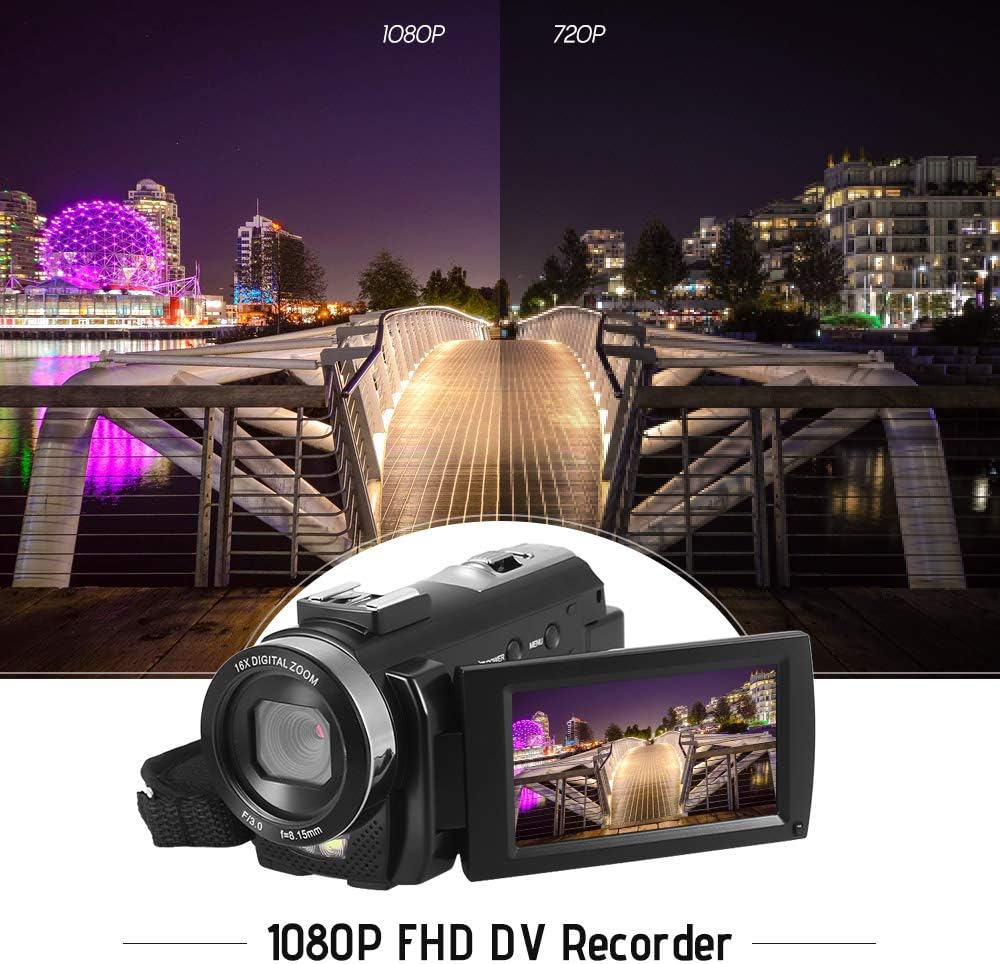
Figure 5.1: The camera is capable of recording in 1080p Full HD and 720p HD resolutions.
5.3. فوٽو ڪڍڻ
- Ensure the camera is in photo mode. If not, press the موڊ سوئچ ڪرڻ لاءِ بٽڻ.
- LCD اسڪرين استعمال ڪندي پنهنجي شاٽ کي فريم ڪريو.
- کي دٻايو ڦوٽو button to capture an image.
5.4. ڊجيٽل زوم استعمال ڪندي
- استعمال ڪريو W (Wide) ۽ T (Telephoto) lever to adjust the 16X digital zoom.

Figure 5.2: The camera's 16X digital zoom allows for closer views of subjects.
5.5. مينيو سيٽنگون
- کي دٻايو مينيو button to access settings.
- Use the navigation buttons to scroll through options such as:
- سفيد توازن: Auto, Daylight, Cloudy, Fluorescent, Tungsten.
- منظر موڊ: Auto, Night, Portrait, Landscape, Backlight, Sport, Party, Beach, High Sensitivity.
- شوٽنگ موڊ: Single, Continuous.
- پڌرائي: Adjust ±3.0EV.
- خود ٽائمر: Off, 2s, 5s, 10s.
- خودڪار پاور بند: Off, 1min, 3min, 5min.
- ٻولي: English, German, French, Spanish, Italian, Turkish, Russian, Portuguese, Dutch, Simplified Chinese, Traditional Chinese, Japanese, Polish.
- ٻيا افعال: Face Detection, Smile Capture, Beauty Face, Anti-Shake.
- کي دٻايو OK or رڪارڊ / اسٽاپ چونڊ جي تصديق ڪرڻ لاءِ بٽڻ.
- کي دٻايو مينيو ٻاهر نڪرڻ لاءِ ٻيهر بٽڻ.
5.6. ٽي وي سان ڳنڍڻ
- Use the provided AV cable to connect the camera's AV output to your television's AV input.
- Select the correct AV input channel on your TV to view camera content.
6. سار سنڀال
6.1. ڪئميرا صاف ڪرڻ
- ڪئميرا جي باڊي کي صاف ڪرڻ لاءِ نرم، سڪل ڪپڙو استعمال ڪريو.
- For the lens and LCD screen, use a specialized lens cleaning cloth and solution. Avoid harsh chemicals.
6.2. اسٽوريج
- ڪئميرا کي سڌي سج جي روشني ۽ انتهائي گرمي پد کان پري ٿڌي، سڪل جاءِ تي رکو.
- بيٽري کي هٽايو جيڪڏهن ڪئميرا وڌايل مدت تائين استعمال نه ڪيو ويندو.
7. مسئلا حل ڪرڻ
| مسئلو | ممڪن سبب | حل |
|---|---|---|
| ڪئميرا آن نٿو ٿئي. | بيٽري ختم ٿي وئي آهي يا صحيح طرح سان نه لڳائي وئي آهي. | Charge the battery fully. Ensure the battery is inserted with correct polarity and the insulator tab is removed. |
| Cannot record video or take photos. | ميموري ڪارڊ ڀريل آهي، داخل نه ڪيو ويو آهي، يا خراب ٿيل آهي. | ميموري ڪارڊ داخل ڪريو. غير ضروري ختم ڪريو files or format the card (this will erase all data). Replace the card if corrupted. |
| خراب وڊيو/تصوير جي معيار. | Insufficient lighting, dirty lens, or incorrect settings. | Ensure adequate lighting. Use the LED fill light if necessary. Clean the lens. Adjust white balance and scene mode settings. |
| ڪئميرا منجمد ٿي وڃي ٿو يا غير جوابده ٿي وڃي ٿو. | سافٽ ويئر جي خرابي يا گهٽ بيٽري. | Remove and reinsert the battery to reset the camera. Ensure the battery is charged. |
8. وضاحتون
| خاصيت | تفصيل |
|---|---|
| برانڊ | اينڊر |
| ماڊل | HDV-201LM |
| تصويري سينسر | 5 ميگا پڪسل CMOS سينسر |
| وڊيو قرارداد | 1920x1080P (FHD 30fps), 1280x720 (HD 30fps), 640x480 (VGA 30fps), 320x240 (VGA 30fps) |
| وڊيو فارميٽ | AVI |
| تصويري قرارداد | 24MP (Interpolated), 20MP (Interpolated), 16MP (Interpolated), 12MP (Interpolated), 10MP (Interpolated), 7M Wide (Interpolated), 5MP, 3MP, 2M Wide, VGA |
| تصويري شڪل | جي پي جي |
| ڊجيٽل زوم | 16X |
| لينس | ff (F/3.0 f=8.15mm) |
| وڌ ۾ وڌ | 8.15 ايف |
| LCD اسڪرين | 3.0-inch TFT-LCD (16:9), 270-degree rotation |
| ذخيرو | SD Card (up to 32GB, Class 10 recommended) |
| رابطي | USB 2.0, AV Output (NTSC/PAL) |
| بجلي جي فراهمي | 1 x 3.7V 800mAh ريچارجبل بيٽري |
| ريموٽ ڪنٽرول بيٽري | 1 x 3V CR2025 Battery |
| آپريٽنگ سسٽم جي حمايت | ونڊوز XP/Vista/7/8/10 |
| خاص خاصيتون | Anti-shake, Face Detection, Smile Capture, Beauty Face, Self-Timer, LED Fill Light, Hot Shoe Mount |
| طول و عرض | 13.5 X 5.5 x 6.5 سينٽ (5.3 X 2.2 x 2.6 انچ) |
| وزن | 273g (9.6oz) with battery |
| رنگ | ڪارو |
9. وارنٽي ۽ سپورٽ
وارنٽي جي معلومات ۽ ٽيڪنيڪل سپورٽ لاءِ، مھرباني ڪري پنھنجي خريداري سان گڏ ڏنل دستاويز ڏسو يا پنھنجي پرچون ڪندڙ سان رابطو ڪريو. ڪنھن به وارنٽي دعوائن لاءِ خريداري جو ثبوت رکو.
Ask a question about this manual
Ask about setup, troubleshooting, compatibility, parts, safety, or missing instructions. Manuals+ will review the question and use this page’s manual context to help answer it.