
Tonies 01-0193
Tonies Pettersson and Findus Character Instruction Manual
برانڊ: Tonies | ماڊل: 01-0193
1. About Your Tonie Character
The Tonies Pettersson and Findus Character is a specially designed listening figure that brings stories to life when used with a Toniebox (sold separately). This character is part of an interactive audio system that makes listening tangible and engaging for children.
This particular Tonie features beloved stories and songs from the Pettersson and Findus series. The audio content is in German.
- 01 - This is fun
- 02 - Home for Findus
- 03 - Lonely
- 04 - Visit
- 05 - A nice evening
- 06 - Alarm system
- 07 - Findus learns the clock
- 08 - Song "Findus" Findus "Findus" Findus
Each Tonie character is lovingly designed and hand-painted, ensuring a unique and durable toy that can withstand active play. It magnetically attaches to the Toniebox, making it easy for small hands to place and remove.
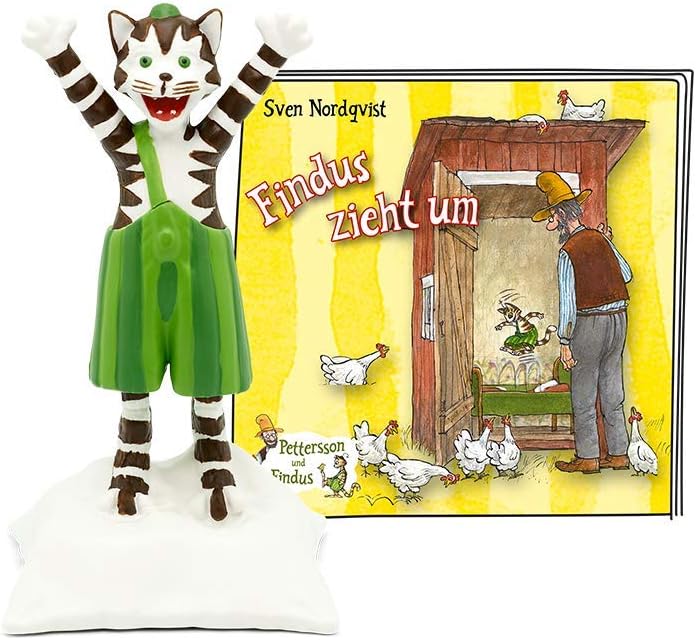
Image: The Pettersson and Findus Tonie character, a brown and white striped cat with green overalls, standing next to the illustrated book cover of "Findus zieht um" (Findus Moves Out).
2. سيٽ اپ
To begin using your Tonie character, you will need a Toniebox and an active internet connection for the initial setup.
- Charge Your Toniebox: Ensure your Toniebox is fully charged or connected to its power supply.
- وائي فائي سان ڳنڍيو: Make sure your Toniebox is connected to a Wi-Fi network. This is necessary for the first-time download of content.
- Place the Tonie: Gently place the Pettersson and Findus Tonie character on top of your Toniebox. The Toniebox will automatically detect the character.
- Content Download: The Toniebox will then connect to the Toniecloud and begin downloading the corresponding audio content. This process may take a few moments depending on your internet speed. A blue LED on the Toniebox indicates active download.
- کيڏڻ لاءِ تيار: Once the download is complete (the LED will turn green), the Toniebox will start playing the content automatically. The content is now stored on your Toniebox and can be played anywhere, even without Wi-Fi.

Image: The Pettersson and Findus Tonie character standing on a red Toniebox, demonstrating how the character interacts with the device.
3. آپريٽنگ هدايتون
Using your Tonie character with the Toniebox is intuitive and designed for children.
- پلے بیک شروع ڪريو: Place the Pettersson and Findus Tonie character on the Toniebox to start playing its stories.
- روڪيو/ٻيهر شروع ڪريو: Remove the Tonie character from the Toniebox to pause playback. Place it back on to resume from where you left off.
- Skip Chapters: Tap the side of the Toniebox to skip forward or backward between chapters. Tap the right side to go to the next chapter, and the left side to go to the previous chapter.
- فاسٽ فارورڊ/وائنڊ: Tilt the Toniebox to the right to fast forward, and to the left to rewind.
- حجم کي ترتيب ڏيو: Squeeze the large ear of the Toniebox to increase volume, and the small ear to decrease volume.

Image: A young child holding two Tonie characters, demonstrating the interactive nature of the product with the Toniebox.
4. سار سنڀال
To ensure the longevity of your Tonie character, follow these simple maintenance guidelines:
- صفائي: Wipe the character with a soft, dry cloth. Do not use abrasive cleaners or immerse in water.
- اسٽوريج: Store the Tonie character in a cool, dry place away from direct sunlight and extreme temperatures.
- سنڀالڻ: While durable, avoid dropping the character from significant heights or applying excessive force, as this may cause damage to the hand-painted finish or internal components.
5. مسئلا حل ڪرڻ
If you encounter issues with your Pettersson and Findus Tonie character, try the following solutions:
- Tonie not playing:
- Ensure the Toniebox is turned on and charged.
- Verify that the Toniebox is connected to Wi-Fi for the initial content download.
- Make sure the Tonie character is placed correctly on the Toniebox.
- Check the Toniebox app or website to ensure the Tonie is assigned to your Toniebox account.
- آواز جا مسئلا (ڪو به آواز يا بگڙيل آواز):
- Adjust the volume using the Toniebox ears.
- Ensure the Toniebox is not muted.
- Restart the Toniebox by holding both ears for about 10 seconds until you hear a sound.
- Toniebox not recognizing Tonie:
- Remove and re-place the Tonie character.
- Ensure the Toniebox surface is clean and free of debris.
- If the issue persists, try another Tonie character to determine if the problem is with the Toniebox or the specific character.
For further assistance, please refer to the official Tonies support resources.
6. وضاحتون
| خاصيت | تفصيل |
|---|---|
| برانڊ | ٽوني |
| ماڊل نمبر | 01-0193 |
| آپريٽنگ موڊ | دستوري |
| ٺاهيندڙ | Boxine GmbH |
| پيداوار جي ماپ (L x W x H) | 2 x 3.5 x 11.5 سينٽي (0.79 x 1.38 x 4.53 انچ) |
| شيءِ جو وزن | 20 گرام (0.71 اونس) |
| ٺاهيندڙ سفارش ٿيل عمر | 4 سال ۽ مٿي |
| Language of Content | جرمني |
| مواد جو قسم | پلاسٽڪ |
| رنگ | گهڻ رنگ |
| بيٽرين جي ضرورت آهي | نه |
| اسيمبلي گهربل | نه |
| تعليمي مقصد | Focus, Communication, Language, Play Instinct |
7. وارنٽي ۽ سپورٽ
Specific warranty information for the Tonies Pettersson and Findus Character is not available in the provided product data. For detailed warranty terms, product registration, or direct customer support, please visit the official Tonies webسائيٽ يا انهن جي ڪسٽمر سروس کاتي سان رابطو ڪريو.
You can often find helpful FAQs, troubleshooting guides, and contact information on the manufacturer's official support pages.
Ask a question about this manual
Ask about setup, troubleshooting, compatibility, parts, safety, or missing instructions. Manuals+ will review the question and use this page’s manual context to help answer it.