
1. تعارف
Welcome to the user manual for your Energizer E241S+ 4G Feature Phone. This guide provides essential information on how to set up, operate, and maintain your device. The E241S+ combines the simplicity of a classic feature phone with the capabilities of a smartphone, powered by the KaiOS operating system. Enjoy 4G connectivity, Wi-Fi, and access to various applications.
2. پيڪيج مواد
مھرباني ڪري ھيٺ ڏنل شين لاءِ دٻي کي چيڪ ڪريو:
- Energizer E241S+ Feature Phone
- بيٽري (1900 mAh)
- موبائل چارجر
- ائرفون
- استعمال ڪندڙ جو دستياب (ھي دستاويز)
3. ڊوائيس اوورview
Familiarize yourself with the physical components of your Energizer E241S+ phone.

تصوير 3.1: اڳيان ۽ پوئتي view of the Energizer E241S+ phone. The front features the display and keypad, while the back shows the rear camera and speaker grille.
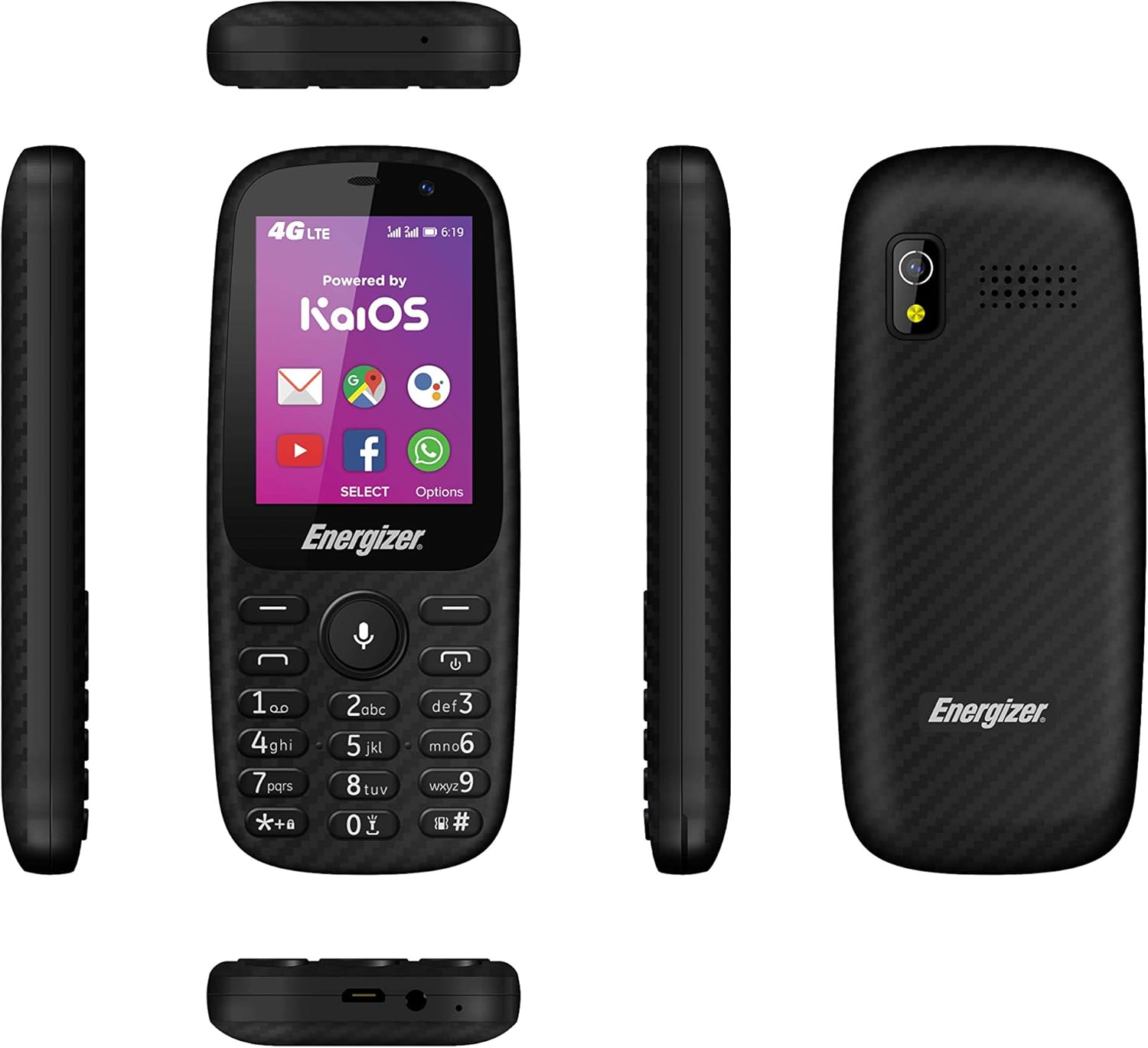
تصوير 3.2: مختلف پاسا views of the Energizer E241S+ phone, illustrating the slim profile, top-mounted ports, and bottom-mounted ports.
4. سيٽ اپ
4.1. Installing the SIM Card(s) and MicroSD Card
- فون جي پوئين ڪَوَر کي احتياط سان هٽايو.
- Insert your Mini SIM card(s) into the designated SIM slots. The E241S+ supports dual SIM functionality.
- If desired, insert a MicroSD card (up to 128GB) into the memory card slot for expanded storage.
- Ensure all cards are seated correctly.
4.2. بيٽري کي انسٽال ڪرڻ
- Align the battery contacts with the terminals inside the phone's battery compartment.
- بيٽري کي نرميءَ سان جاءِ تي دٻايو.
- پوئين ڍڪ کي تبديل ڪريو، پڪ ڪريو ته اهو محفوظ طور تي ڪلڪ ڪري.
4.3. فون چارج ڪرڻ
- Connect the Micro USB end of the charger cable to the phone's charging port.
- Plug the other end of the charger into a power outlet.
- شروعاتي استعمال کان اڳ فون کي مڪمل چارج ٿيڻ ڏيو. اسڪرين تي بيٽري جو اشارو چارجنگ اسٽيٽس ڏيکاريندو.
5. آپريٽنگ هدايتون
5.1. پاور آن/آف
- پاور آن ڪرڻ لاءِ: پاور بٽڻ کي دٻايو ۽ رکو جيستائين اسڪرين روشن نه ٿئي.
- To power off: Press and hold the Power button, then select 'Power Off' from the options on the screen.
5.2. ڪال ڪرڻ
- From the home screen, use the keypad to dial the desired phone number.
- ڪال شروع ڪرڻ لاءِ ڪال بٽڻ (عام طور تي سائو) دٻايو.
- ڪال ختم ڪرڻ لاءِ، ڪال ختم ڪريو بٽڻ دٻايو (عام طور تي ڳاڙهو).
5.3. پيغام موڪلڻ
- مين مينيو مان 'پيغام' ايپليڪيشن تي وڃو.
- 'نئون پيغام' يا 'پيغام ٺاهيو' چونڊيو.
- وصول ڪندڙ جو فون نمبر داخل ڪريو يا پنهنجن رابطن مان چونڊيو.
- ڪي پيڊ استعمال ڪندي پنھنجو پيغام ٽائپ ڪريو.
- 'موڪليو' کي دٻايو.
5.4. Internet and Applications (KaiOS)
Your E241S+ runs on KaiOS, providing access to essential smartphone features:
- 4G ڪنيڪشن: Access high-speed internet for browsing and app usage.
- وائي فائي: انٽرنيٽ تائين رسائي لاءِ موجود وائي فائي نيٽ ورڪن سان ڳنڍيو.
- ڪيو اسٽور Download and install various applications, including popular social media and communication tools.
- جي پي ايس: Utilize the built-in GPS for navigation and location services.
5.5. ڪئميرا جا ڪم
The phone is equipped with both front and rear cameras, each with a flash, allowing you to capture photos and videos.
- Navigate to the 'Camera' application.
- Use the navigation keys to switch between front and rear cameras.
- Press the center key to capture a photo or start/stop video recording.
6. سار سنڀال
- ڊوائيس کي سڪل رکو. نمي اليڪٽرانڪ سرڪٽ کي نقصان پهچائي سگھي ٿي.
- انتهائي گرمي پد کان پاسو ڪريو. تيز گرمي پد اليڪٽرانڪ ڊوائيسز جي زندگي کي گهٽائي سگهي ٿو ۽ ڪجهه پلاسٽڪ کي موڙي يا ڳاري سگهي ٿو.
- Do not use harsh chemicals, cleaning solvents, or strong detergents to clean the phone. Wipe it with a soft, dry cloth.
- Handle the phone with care. Dropping, knocking, or shaking the device can damage internal circuit boards.
- The phone is water-resistant; however, avoid prolonged submersion or exposure to high-pressure water.
7. مسئلا حل ڪرڻ
| مسئلو | ممڪن حل |
|---|---|
| فون آن نٿو ٿئي | پڪ ڪريو ته بيٽري صحيح طرح سان نصب ۽ چارج ٿيل آهي. چارجر کي ڳنڍيو ۽ ٻيهر ڪوشش ڪريو. |
| ڪالون نه ٿو ڪري سگھجي ۽ نه ئي وصول ڪري سگھجي ٿو | چيڪ ڪريو ته سم ڪارڊ صحيح طرح سان داخل ۽ چالو ٿيل آهي. نيٽ ورڪ سگنل جي طاقت جي تصديق ڪريو. |
| غريب بيٽري جي زندگي | Reduce screen brightness, close unused applications, or disable Wi-Fi/Bluetooth when not in use. |
| فون منجمد ٿئي ٿو يا جواب نه ڏئي رهيو آهي | Remove and reinsert the battery to perform a soft reset. If the issue persists, consider a factory reset (backup data first). |
| انٽرنيٽ سان ڳنڍي نٿو سگهي | Check 4G/Wi-Fi settings. Ensure data plan is active or Wi-Fi password is correct. |
8. وضاحتون
| خاصيت | تفصيل |
|---|---|
| برانڊ | توانائي ڏيندڙ |
| ماڊل نالو | E241S |
| آپريٽنگ سسٽم | KaiOS |
| رام | 512 ايم بي |
| اندروني اسٽوريج | 1 جي بي |
| وسعت وارو اسٽوريج | 128 GB تائين (MicroSD) |
| اسڪرين جي ماپ | 2.4 انچ |
| ڊسپلي قرارداد | 320 x 240 (LCD) |
| سيلولر ٽيڪنالاجي | 4 جي LTE |
| رابطي | USB، بلوٽوٿ، وائي فائي |
| سم ڪارڊ سلاٽ | Dual SIM (Mini SIM) |
| بيٽري جي گنجائش | 1900 mAh (ليتيم آئن) |
| ڳالهائڻ جو وقت | 28 ڪلاڪ تائين |
| هيڊ فون جيڪ | 3.5 ملي ميٽر |
| ڪيمرا | Front and Rear with Flash |
| جي پي ايس | ها |
| پاڻي جي مزاحمت | ها |
| طول و عرض | 14 x 50 x 116 ملي ميٽر |
9. وارنٽي ۽ سپورٽ
For warranty information, customer service, and additional resources, please visit the official Energizer webسائيٽ يا پنهنجي پرچون ڪندڙ سان رابطو ڪريو.
You can also find information regarding free applications and services at: energizeyourdevice.com/customer-services/free-apps/