
تعارف
خريد ڪرڻ لاءِ مهربانيasing the Boytone BT-424FN 2.1 Multimedia Bluetooth Speaker System. This powerful shelf stereo system is designed to deliver high-quality audio with versatile connectivity options, including Bluetooth, FM radio, USB, SD card, and auxiliary input. This manual provides detailed instructions for setting up, operating, and maintaining your speaker system to ensure optimal performance and longevity.
پيڪيج مواد
مھرباني ڪري پيڪيج کي احتياط سان چيڪ ڪريو ته جيئن پڪ ڪري سگھجي ته سڀئي شيون موجود آھن ۽ سٺي حالت ۾ آھن:
- Boytone BT-424FN Main Unit (Subwoofer with built-in ampو lifيڪ)
- Two Satellite Speakers (3" x 2" Full range)
- وائرليس ريموٽ ڪنٽرول
- AUX ڪيبل
- USB ڪيبل
- SD Card (if included with specific models)
- 2 AAA بيٽريون (ريموٽ ڪنٽرول لاءِ)

Image: The Boytone BT-424FN 2.1 Multimedia Bluetooth Speaker System, showcasing the main subwoofer unit, two satellite speakers, and the included remote control.
حفاظت جي ڄاڻ
To prevent fire or shock hazards, do not expose this appliance to rain or moisture. Do not open the cabinet. Refer servicing to qualified personnel only.
- طاقت جو ذريعو: Ensure the power source matches the requirements (AC 110/220V).
- وينٽيليشن: ڪنهن به وينٽيليشن جي سوراخن کي نه روڪيو. مناسب هوا جي وهڪري لاءِ يونٽ جي چوڌاري مناسب جاءِ کي يقيني بڻايو.
- پاڻي ۽ نمي: Do not expose the unit to dripping or splashing. Do not place objects filled with liquids, such as vases, on the apparatus.
- گرمي: يونٽ کي گرمي جي ذريعن جهڙوڪ ريڊيئيٽر، گرمي رجسٽر، اسٽو، يا ٻين سامان کان پري رکو (بشمول ampلائفائرز) جيڪي گرمي پيدا ڪن ٿا.
- صفائي: صفائي ڪرڻ کان اڳ يونٽ کي ڀت جي آئوٽليٽ مان ڪڍو. صفائي لاءِ سڪل ڪپڙو استعمال ڪريو.
- لڳائڻ: يونٽ کي هڪ مستحڪم، فليٽ مٿاڇري تي رکو ته جيئن ان کي ڪري نه پوي.
پيداوار ختمview ۽ خاصيتون
The Boytone BT-424FN is a versatile 2.1 multimedia speaker system designed for a rich audio experience. It combines powerful sound output with multiple connectivity options and user-friendly controls.
اهم خاصيتون:
- طاقتور آڊيو آئوٽ پُٽ: 40 Watts (20W subwoofer + 2x10W satellite speakers) for a wide audio spectrum.
- بلوٽوت ڪنيڪشن: Easy wireless connection with a range of up to 33 feet, compatible with all Bluetooth-enabled devices.
- گھڻن پلے بیک جا اختيار: USB port and SD card slot for MP3 file playback, FM tuner for radio, and a 3.5mm auxiliary jack for non-Bluetooth devices.
- Digital Display & Controls: Digital LED display for mode and track information, with digital bass control.
- آر بي جي روشني: Integrated RGB lighting for enhanced visual appeal.
- ريموٽ ڪنٽرول: Full-function wireless remote for convenient operation.
- ڪمپيڪٽ ڊيزائن: Tabletop mount design with a black wood finish.

Image: Diagram highlighting key features of the Boytone BT-424FN, including USB/SD port for MP3, wireless sound capability, all-in-one stereo system, and 40 Watts with RGB light.
اجزاء جي سڃاڻپ:
Familiarize yourself with the various ports and controls on your speaker system.

تصوير: پوئين ۽ پاسي view of the Boytone BT-424FN main unit, showing the USB port, SD slot, auxiliary jack, and DVD jack for various input connections.

Image: Close-up of the Boytone BT-424FN's front panel, displaying the LED screen, volume knob, and control buttons for source selection, tone, and tuning.
سيٽ اپ ڪريو
Follow these steps to set up your Boytone BT-424FN speaker system.
1. Speaker Connection:
- Connect the two satellite speakers to the corresponding audio output jacks on the rear of the main subwoofer unit. Ensure a secure connection.
2. پاور ڪنيڪشن:
- Plug the AC power cord from the main unit into a standard AC 110/220V wall outlet.
3. ريموٽ ڪنٽرول سيٽ اپ:
- Insert the two AAA batteries into the remote control, observing the correct polarity (+/-).
4. شروعاتي پاور آن:
- Press the power button on the main unit or the remote control to turn on the system. The LED display will light up.
آپريٽنگ هدايتون
Learn how to use the various functions of your Boytone BT-424FN speaker system.
1. بنيادي آپريشن:
- پاور آن / آف: Press the 'ST-BY/M' button on the main unit or the power button on the remote.
- حجم ڪنٽرول: Rotate the 'VOLUME' knob on the front panel or use the 'VOL+' and 'VOL-' buttons on the remote control.
- ذريعو چونڊ: Press the 'SOURCE' button on the main unit or the remote to cycle through input modes: Bluetooth, FM, USB, SD, AUX.
- ٽون ڪنٽرول: Use the 'TONE' button on the main unit or remote to adjust bass and treble settings (if available).
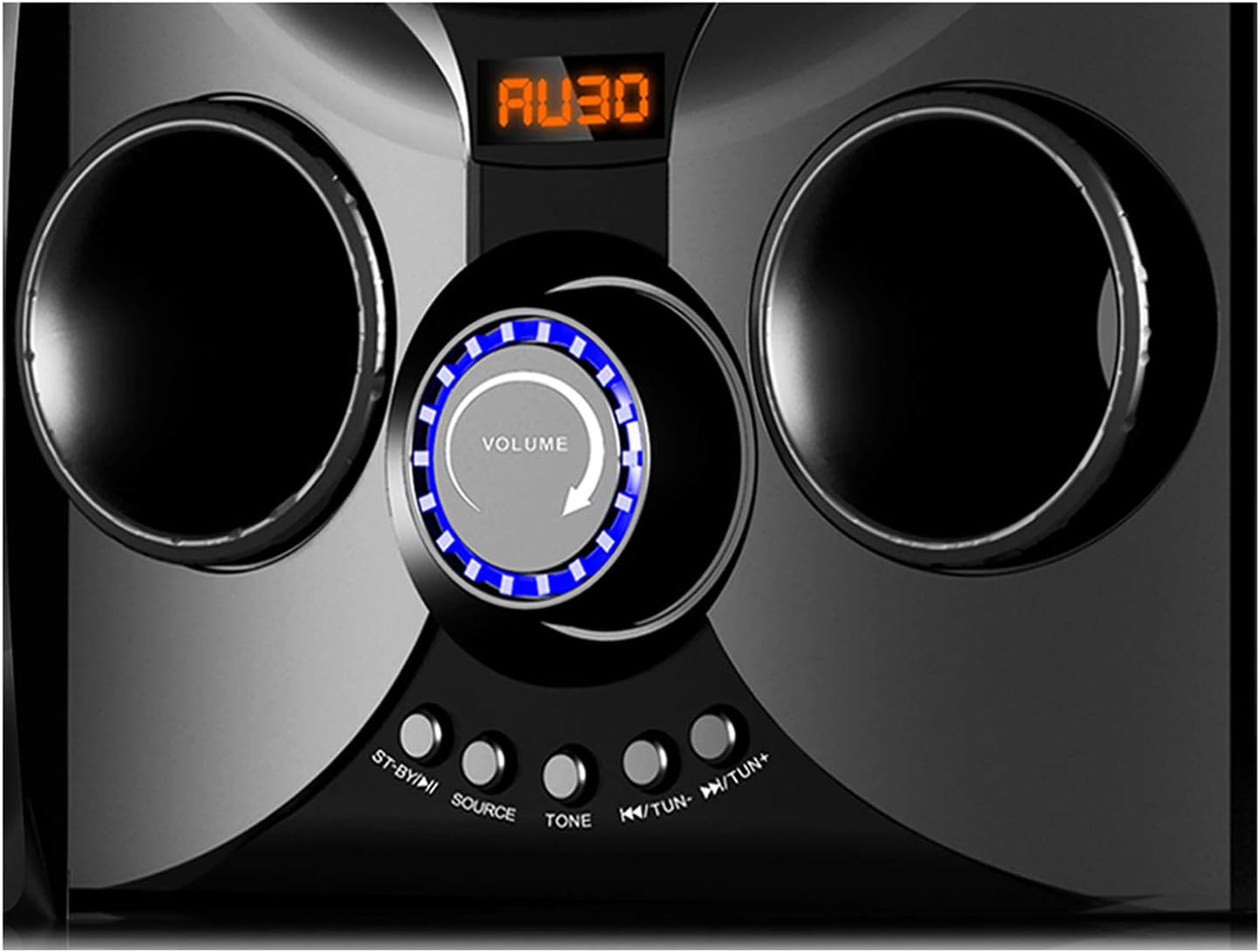
Image: Close-up of the Boytone BT-424FN's central control area, highlighting the illuminated volume knob and the function buttons below it.
2. بلوٽوٿ موڊ:
- Select 'Bluetooth' mode using the 'SOURCE' button. The LED display will show 'BT' or a similar indicator.
- پنهنجي بلوٽوٿ-فعال ڊوائيس (اسمارٽ فون، ٽيبليٽ، وغيره) تي، بلوٽوٿ کي فعال ڪريو ۽ دستياب ڊوائيسز جي ڳولا ڪريو.
- Select 'BT-424FN' or 'Boytone' from the list of devices.
- Once paired, you can play audio from your device through the speaker system.
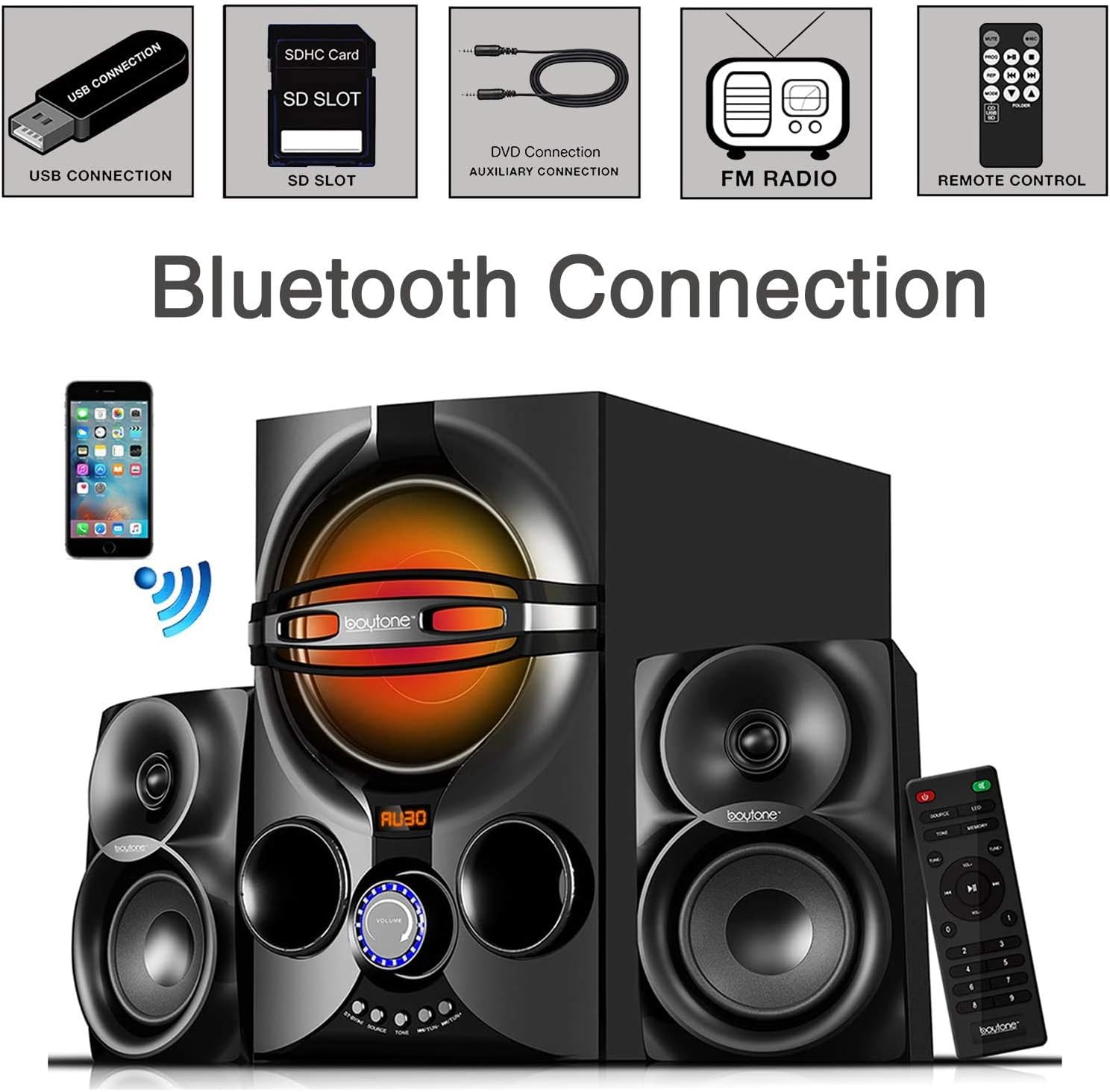
Image: A diagram illustrating the process of connecting a smartphone to the Boytone BT-424FN via Bluetooth, alongside icons representing other connectivity options like USB, SD, AUX, FM radio, and remote control.
3. ايف ايم ريڊيو موڊ:
- Select 'FM' mode using the 'SOURCE' button.
- Use the 'TUN+/-' buttons on the main unit or the remote to manually tune to a desired radio station.
- To auto-scan and save stations, press and hold the 'PLAY/PAUSE' button (often doubles as auto-scan in FM mode) on the remote or main unit.
4. USB/SD Card Mode:
- هڪ USB فليش ڊرائيو يا SD ڪارڊ داخل ڪريو جنهن ۾ MP3 آڊيو هجي. fileلاڳاپيل پورٽ ۾ داخل ٿيو.
- Select 'USB' or 'SD' mode using the 'SOURCE' button. The system will automatically begin playing the first compatible audio file.
- Use the 'PREV/NEXT' buttons on the main unit or remote to skip tracks. Use 'PLAY/PAUSE' to control playback.
5. AUX موڊ:
- Connect your external audio device (e.g., MP3 player, TV, computer) to the 'AUX' input jack on the main unit using the provided 3.5mm audio cable.
- Select 'AUX' mode using the 'SOURCE' button.
- پنهنجي ڳنڍيل ٻاهرين ڊوائيس تان سڌو سنئون پلے بیک ۽ حجم کي ڪنٽرول ڪريو.
سار سنڀال
Proper care and maintenance will ensure the longevity of your speaker system.
- صفائي: يونٽ جي ٻاهرين سطحن کي صاف ڪرڻ لاءِ نرم، سڪل ڪپڙو استعمال ڪريو. رگڙيندڙ صاف ڪندڙ، موم، يا محلول استعمال نه ڪريو.
- مٽي: Regularly dust the speaker grilles and vents to prevent accumulation that could affect sound quality and ventilation.
- اسٽوريج: جيڪڏهن يونٽ کي گهڻي عرصي تائين ذخيرو ڪري رهيا آهيو، ته ان کي پاور آئوٽليٽ مان ڪڍي ڇڏيو ۽ ان کي ٿڌي، سڪل جاءِ تي ذخيرو ڪريو.
- مائع کان بچاء: Keep liquids away from the unit to prevent damage to internal components.
مشڪلاتون
If you encounter any issues with your Boytone BT-424FN, refer to the following common problems and solutions.
| مسئلو | ممڪن سبب | حل |
|---|---|---|
| طاقت نه آهي | بجلي جي تار ڳنڍيل نه آهي؛ بجلي جو آئوٽليٽ فعال نه آهي. | Ensure power cord is securely plugged in; Try a different power outlet |
| آواز ڪونهي | Volume too low; Incorrect source selected; Speakers not connected | Increase volume; Press 'SOURCE' to select correct input; Check speaker connections |
| بلوٽوٿ جوڙڻ ناڪام ٿيو | Device too far; Bluetooth not enabled on device; Speaker not in pairing mode | Move device closer; Enable Bluetooth on your device; Ensure speaker is in Bluetooth mode and discoverable |
| ايف ايم ريڊيو جامد | Weak signal; Antenna not extended | Adjust antenna position; Try auto-scanning for stronger stations |
| USB/SD نه هلي رهيو آهي | اڻ سڌريل file فارميٽ؛ خراب ٿيل files; Incorrect mode selected | يقين ڏياريو files are MP3 format; Try a different USB/SD card; Select 'USB' or 'SD' mode |
| ريموٽ ڪنٽرول ڪم نه ڪري رهيو آهي | Batteries drained or incorrectly inserted; Obstruction between remote and unit | Replace batteries and check polarity; Remove any obstructions; Point remote directly at the unit's sensor |
وضاحتون
Detailed technical specifications for the Boytone BT-424FN speaker system.
| خاصيت | تفصيل |
|---|---|
| ماڊل نالو | BT-424FN |
| اسپيڪر جو قسم | 2.1 Channel Subwoofer System |
| اسپيڪر وڌ ۾ وڌ آئوٽ پاور | 40 Watts (20W Subwoofer + 2x10W Satellites) |
| Subwoofer قطر | 5 انچ |
| Satellite Speaker Size | 3" x 2" Full Range |
| رابطي ٽيڪنالاجي | Bluetooth, USB, SD, AUX, FM Radio |
| وائرليس ڪميونيڪيشن ٽيڪنالاجي | بلوٽوٿ |
| بلوٽوٿ رينج | 33 فوٽن تائين |
| طاقت جو ذريعو | Corded Electric (AC 110/220V) |
| ڪنٽرول جو طريقو | ريموٽ ڪنٽرول، آن يونٽ بٽڻ |
| مواد | ڪاٺ |
| رنگ | ڪارو |
| پيداوار جا طول و عرض (مکيه يونٽ) | 8.5"ڊي x 16.5"ڊي x 13"ايڇ |
| شيءِ جو وزن | 9.5 پائونڊ |
| شامل اجزاء | AUX cable, USB cable, SD card, Remote control |
| ريموٽ لاءِ بيٽرين | 2 AAA بيٽريون (شامل) |
| اندروني / ٻاهران استعمال | اندريون |
| يو پي سي | 643307992373 |

تصوير: پوئين پاسي view of the Boytone BT-424FN main unit and one satellite speaker, with dimensions indicated: 10.50 inches (height), 15 inches (depth), and 11 inches (width).
وارنٽي ۽ سپورٽ
The Boytone BT-424FN Multimedia Bluetooth Speaker System comes with a Limited Warranty. Please refer to the warranty card included in your package for specific terms and conditions, including coverage duration and claim procedures.
For technical support or service inquiries, please contact Boytone customer service through their official website or the contact information provided with your product documentation. Ensure you have your model number (BT-424FN) and proof of purchase ready when contacting support.


