
1. کانview
The Ambient Weather WH31LA Leak Detector is designed to provide early warning of water leaks in your home or property. This sensor integrates seamlessly with Ambient Weather WS-2000 and WS-5000 weather stations, transmitting leak detection data wirelessly. Upon detecting water, the unit emits a loud 90 dB alarm and sends a signal to your compatible weather station, allowing for timely intervention to prevent water damage.

Image: The Ambient Weather WH31LA Leak Detector, a compact white device designed to detect water presence.
2. ڇا شامل آهي
- 1 x Ambient Weather WH31LA Leak Detector
- Note: 2 x AA batteries are required and not included.
3. سيٽ اپ
3.1 بيٽري لڳائڻ
- Locate the battery compartment on the back of the WH31LA Leak Detector.
- بيٽري جي ڪمري واري ڍڪ کي کوليو.
- Insert two (2) AA batteries, ensuring correct polarity (+/-). Alkaline or Lithium batteries are recommended for optimal performance and longevity.
- بيٽري جي ڪمري واري ڍڪ کي محفوظ طور تي بند ڪريو.

تصوير: ويجهو تصوير view of the WH31LA Leak Detector, showing the sensor contacts and battery compartment area.
3.2 Pairing with Weather Station
The WH31LA Leak Detector automatically attempts to pair with compatible Ambient Weather stations (WS-1965, WS-2000, WS-5000) once batteries are installed. Ensure your weather station console is powered on and within range (up to 330 feet, or 100 feet in most conditions). The sensor transmits data at 915 MHz with a 60-second refresh rate. Refer to your specific weather station manual for instructions on adding new sensors or checking sensor status.
3.3 لڳائڻ
Place the leak detector on a flat surface in areas prone to water leaks, such as:
- ٻوٽن جي هيٺان
- پاڻي جي هيٽرن جي ويجهو
- ٽوائليٽ جي پويان
- بيسمنٽ يا يوٽيلٽي رومز ۾
- واشنگ مشينن يا ڊش واشرن جي ويجهو
Ensure the sensor contacts on the bottom of the unit are in direct contact with the surface where water might accumulate. The device is designed for floor mounting.

Image: The WH31LA Leak Detector positioned on the floor under a sink, ready to detect leaks.
4. آپريٽنگ هدايتون
4.1 ليڪ جي چڪاس
The WH31LA Leak Detector continuously monitors for water presence every 3 seconds. When water bridges the sensor contacts, the device will immediately trigger an alarm.
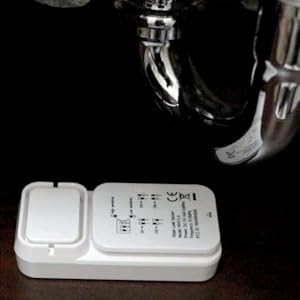
Image: A visual representation of a leak detector sensing standing water.
4.2 الارم فنڪشن
Upon detecting water, the leak detector emits a loud audible alarm at 90 dB to alert you to the presence of water. Simultaneously, it sends a wireless signal to your compatible Ambient Weather station console.
4.3 Remote Monitoring and Alerts (via Weather Station)
When connected to a compatible Ambient Weather station (WS-2000, WS-5000), you can monitor the leak detector's status remotely via the Ambient Weather Network app or website. Configure custom alerts to receive notifications (email, text, push notifications) on your smartphone or computer when a leak is detected, even when you are away from home.

تصوير: Examples of remote monitoring and alert settings available through the Ambient Weather Network, showing email, text, and push notification options.
5. سار سنڀال
5.1 بيٽري مٽائڻ
When the batteries are low, your weather station console will typically display a low battery indicator for the leak detector. Replace the two (2) AA batteries as described in the "Battery Installation" section (3.1). It is recommended to use fresh alkaline or lithium batteries for reliable operation.
5.2 صفائي
Periodically inspect the sensor contacts on the bottom of the unit for dirt or debris. Clean with a soft, damp cloth if necessary. Ensure the contacts are dry before placing the sensor back in position. Do not use abrasive cleaners or immerse the unit in water.
6. مسئلا حل ڪرڻ
| مسئلو | ممڪن سبب | حل |
|---|---|---|
| No Leak Detection / No Alarm |
|
|
| No Data on Weather Station Console |
|
|
| غلط الارم |
|
|
7. وضاحتون
| خاصيت | تفصيل |
|---|---|
| ماڊل نمبر | WH31LA |
| طاقت جو ذريعو | 2 x AA بيٽريون (شامل نه آھن) |
| بيٽري جو قسم تجويز ڪيل | Alkaline or Lithium |
| سينسر جي ماپ (L x W x H) | 3.5" x 1.5" x 1" (8.9 سينٽي ميٽر x 3.8 سينٽي ميٽر x 2.5 سينٽي ميٽر) |
| وائرليس فريڪوئنسي | 915 MHz |
| وائرلیس رينج | Up to 330 feet (100 meters) line of sight; 100 feet (30 meters) in most conditions |
| ريفريش جي شرح | 60 سيڪنڊ |
| ٻڌڻ وارو الارم | 90 ڊي بي |
| چڪاس جي وقفي | هر 3 سيڪنڊ |
| چڙهڻ جو قسم | فرش جو جبل |
| مطابقت رکندڙ ڊوائيسز | Ambient Weather WS-1965, WS-2000, WS-5000 Weather Stations |
8. وارنٽي ۽ سپورٽ
8.1 وارنٽي ڄاڻ
Ambient Weather products typically come with a limited warranty. Please refer to the warranty card included with your product or visit the official Ambient Weather webتفصيلي وارنٽي شرطن ۽ ضابطن لاءِ سائيٽ. وارنٽي دعوائن لاءِ خريداري جي ثبوت طور پنهنجي خريداري جي رسيد رکو.
8.2 ڪسٽمر سپورٽ
For technical assistance, troubleshooting, or product inquiries, please contact Ambient Weather customer support. You can usually find contact information on the Ambient Weather website or in the documentation provided with your weather station console.
Webسائيٽ: www.ambientweather.com