
سيڪوٽڪ 4254
CECOTEC Surface Precision ECOPOWER 10200 Smart Healthy White Digital Bathroom Scale User Manual
ماڊل: 4254
برانڊ: Cecotec
1. تعارف
Thank you for choosing the CECOTEC Surface Precision ECOPOWER 10200 Smart Healthy White Digital Bathroom Scale. This advanced scale is designed to provide accurate weight measurements and bio-impedance analysis for comprehensive body development tracking. Featuring an innovative EcoPower push button for battery-free operation, Bluetooth connectivity, and a sleek tempered glass design, this scale offers convenience and precision for your health monitoring needs. Please read this manual thoroughly before use to ensure proper operation and maintenance.

Image: The CECOTEC Surface Precision ECOPOWER 10200 Smart Healthy White Digital Bathroom Scale, showcasing its sleek design and the accompanying smartphone app interface.
2. حفاظت جي ڄاڻ
Please observe the following safety precautions to ensure safe and optimal use of your scale:
- جيڪڏهن توهان وٽ پيس ميڪر يا ٻيو اندروني طبي اوزار آهي ته هن اسڪيل کي استعمال نه ڪريو.
- Do not use this scale if you are pregnant.
- Always place the scale on a hard, flat surface. Using it on soft surfaces like carpet may affect accuracy.
- The scale surface is made of tempered glass. It can be slippery when wet. Ensure the surface is dry before stepping on it.
- Do not jump on the scale or drop heavy objects on it, as this may damage the glass or internal components.
- Keep the scale away from water and high humidity.
- This scale is intended for household use only and not for medical or commercial purposes.
- ٻارن جي پهچ کان پري رکو.
- پاڻ اسڪيل کي ڌار ڪرڻ يا مرمت ڪرڻ جي ڪوشش نه ڪريو. مدد لاءِ قابل سروس اهلڪارن سان رابطو ڪريو.
3. دٻي ۾ ڇا آهي
Upon unpacking, please ensure all the following items are present and in good condition:
- CECOTEC Surface Precision ECOPOWER 10200 Digital Bathroom Scale
- استعمال ڪندڙ جو دستياب (ھي دستاويز)
- Note: The product description mentions "cable or connector." For this EcoPower model, no charging cable is typically required for operation. If a cable is included, it may be for specific data transfer or a different product variant.
4. پراڊڪٽ ختمview
Familiarize yourself with the main components of your CECOTEC Surface Precision ECOPOWER 10200 scale.
- Tempeded Glass پليٽ فارم: The main weighing surface.
- LCD ڊسپلي: Shows weight measurements and other indicators.
- EcoPower Push Button: Generates power for the scale's operation.
- Electrodes (Metal Strips): Used for bio-impedance analysis. Ensure bare feet are in contact with these for full body composition data.
- Sensors (Underneath): High-precision sensors for accurate measurements.
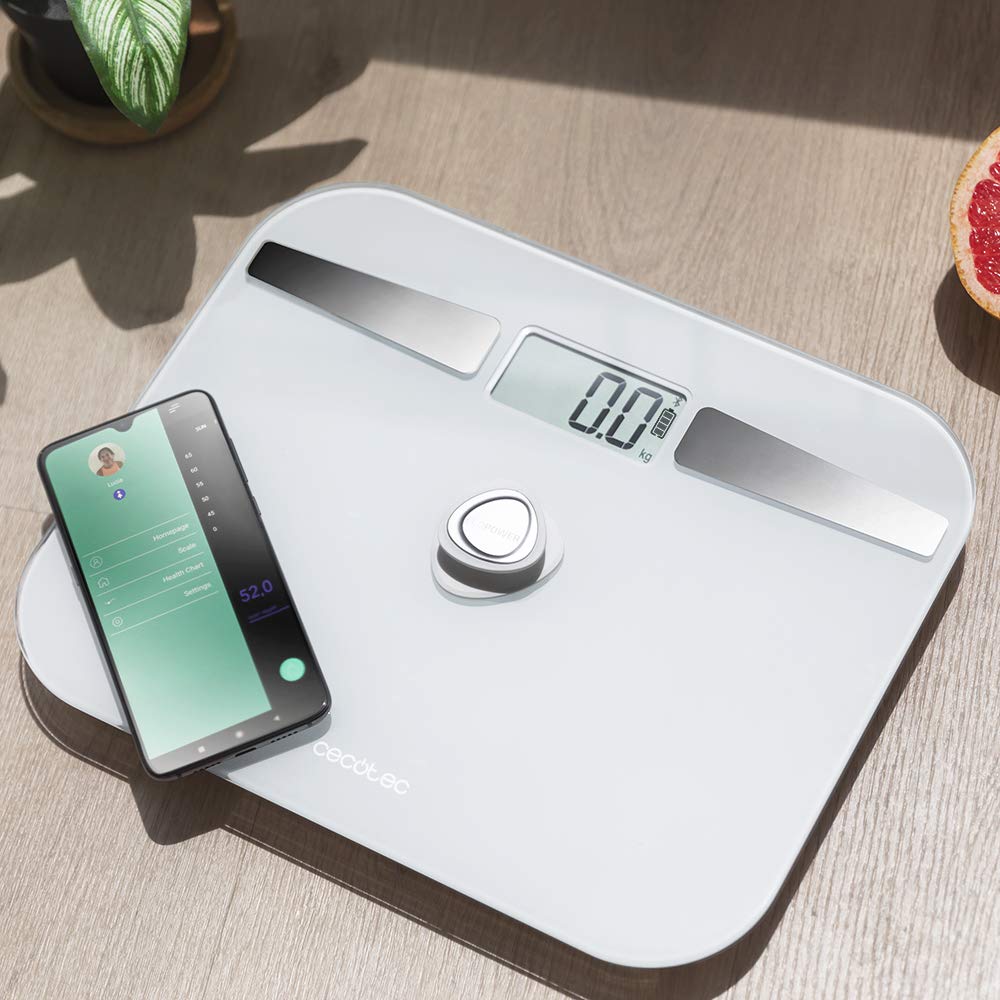
تصوير: هڪ مٿي view of the scale, highlighting its display, EcoPower button, and the metal electrodes, with a smartphone showing the connected app.
5. سيٽ اپ
5.1 شروعاتي جڳهه
Place the scale on a hard, flat, and stable surface. Avoid carpets, rugs, or uneven flooring, as this can affect measurement accuracy.

Image: The scale positioned on a hard floor surface, demonstrating ideal placement for accurate readings.
5.2 Powering On (EcoPower)
The CECOTEC Surface Precision ECOPOWER 10200 scale utilizes an innovative EcoPower system, eliminating the need for traditional batteries. To power on the scale:
- Locate the EcoPower push button, typically in the center of the scale.
- Press the EcoPower button firmly with your foot or hand. This action generates the necessary power for the scale to operate.
- The LCD display will light up, indicating the scale is ready for use.
Note: While the product specifications mention "1 AA batteries required," the primary power mechanism for this specific model, as indicated by its name and description, is the EcoPower push button. No external battery installation is typically needed for its core function.
5.3 Connecting to the App (Bluetooth)
To utilize the smart features and bio-impedance analysis, download the official CECOTEC health app on your smartphone and connect via Bluetooth.
- ايپ ڊائون لوڊ ڪريو: ڳولھيو the official "Cecotec" or "Cecotec Healthy" app in your smartphone's app store (Google Play Store for Android, Apple App Store for iOS).
- بلوٽوت کي فعال ڪريو: پڪ ڪريو ته توهان جي اسمارٽ فون تي بلوٽوت فعال آهي.
- ايپ کوليو: Launch the downloaded app and follow the on-screen instructions to create a user profile.
- Pair the Scale:
- Press the EcoPower button on the scale to activate it.
- Within the app, navigate to the "Device Management" or "Add Device" section.
- The app should detect the "CECOTEC ECOPOWER 10200" scale. Select it to pair.
- Once paired, the app will confirm the connection.
- استعمال ڪندڙ جي رجسٽريشن: The scale supports 4 user registrations. Set up individual profiles within the app for each user to track their data separately.
6. پيماني کي هلائڻ
6.1 وزن جي ماپ وٺڻ
- پڪ ڪريو ته پيمانو سخت، هموار مٿاڇري تي آهي.
- Press the EcoPower button to activate the scale. Wait for the display to show "0.0 kg" or "0.0 lb".
- Step onto the scale with bare feet, ensuring your feet are centered and in contact with the metal electrodes for bio-impedance analysis. Stand still.
- Your weight will be displayed on the LCD screen. If connected to the app, the data will automatically sync to your profile.
- Step off the scale. The scale will automatically shut down after a few seconds of inactivity.

Image: A user stepping onto the scale, demonstrating the correct posture for measurement.
6.2 Bio-impedance Measurement and App Usage
For detailed body composition analysis (body fat, muscle mass, water percentage, etc.), ensure you are connected to the app and step on the scale with bare feet.
- Open the Cecotec health app on your smartphone.
- Activate the scale by pressing the EcoPower button.
- Step onto the scale with bare feet, ensuring good contact with the metal electrodes.
- The scale will measure your weight, and the app will simultaneously collect bio-impedance data.
- View your comprehensive body composition data, historical trends, and progress reports directly within the app.

Image: A close-up of the smartphone app interface, showing various body composition metrics like weight, body fat, muscle mass, and water percentage.
7. سار سنڀال
7.1 صفائي
- نرم، ڊي سان اسڪيل جي مٿاڇري کي صاف ڪريوamp ڪپڙو.
- Do not use abrasive cleaners or chemical solvents, as these may damage the glass or electronic components.
- اسٽوريج يا ايندڙ استعمال کان اڳ پڪ ڪريو ته اسڪيل مڪمل طور تي سڪي ويو آهي.
7.2 اسٽوريج
- اسڪيل کي ٿڌي، سڪل جڳهه ۾ ذخيرو ڪريو.
- Avoid storing it vertically or placing heavy objects on top of it.
8. مسئلا حل ڪرڻ
| مسئلو | ممڪن سبب | حل |
|---|---|---|
| اسڪيل نه ٿو ڦري. | EcoPower button not pressed firmly enough. | Press the EcoPower button firmly and completely. |
| غلط پڙھڻ. | Scale on uneven or soft surface; user not standing still; scale not calibrated. | Place scale on a hard, flat surface. Stand still and centered. Step off and on again to re-calibrate to "0.0". |
| بلوٽوٿ ڪنيڪشن ناڪام ٿيو. | Bluetooth not enabled on phone; app not open; scale not active; interference. | Ensure phone Bluetooth is on. Open the app. Press EcoPower button to activate scale. Move closer to the scale. Restart phone/app. |
| No body composition data in app. | Not standing with bare feet on electrodes; poor contact; app not connected. | Ensure bare feet are making full contact with the metal electrodes. Check app connection. Ensure user profile is set up correctly. |
| "Lo" or "Err" displayed. | Low power (for models with backup battery, if applicable); overload. | Press EcoPower button again. If "Err" for overload, ensure weight is within specified range (max 180 kg). |
9. وضاحتون
| خاصيت | تفصيل |
|---|---|
| ماڊل نمبر | 4254 |
| برانڊ | Cecotec |
| ماپ جي حد | 8 kg to 180 kg (100 g grade) |
| طاقت جو ذريعو | EcoPower push button (self-generating) |
| رابطي | بلوٽوٿ |
| سينسر | 4 اعلي سڌائي سينسر |
| استعمال ڪندڙ جي رجسٽريشن | 4 صارفين تائين |
| ڊيزائن | Extra flat, 5mm thick high-security tempered glass |
| ڊسپلي جو قسم | ايل سي ڊي |
| طول و عرض | 10.31 x 12.6 x 0.79 انچ |
| وزن | 3.31 پائونڊ |
| خاص خاصيتون | Automatic shutdown, instant on, overcharge indicator, auto reset |
| سفارش ٿيل استعمال | بالغن |
10. وارنٽي ۽ سپورٽ
10.1 وارنٽي ڄاڻ
This CECOTEC product comes with a ٽن سالن جي وارنٽي against manufacturing defects. Please retain your proof of purchase for warranty claims. The warranty does not cover damage caused by misuse, accidents, unauthorized modifications, or normal wear and tear.
10.2 ڪسٽمر سپورٽ
For technical assistance, troubleshooting, or warranty inquiries, please contact Cecotec customer support.
- Webسائيٽ: سرڪاري سيڪوٽيڪ جو دورو ڪريو webسپورٽ وسيلن، اڪثر پڇيا ويندڙ سوالن، ۽ رابطي جي معلومات لاءِ سائيٽ.
- اي ميل/فون: Refer to the Cecotec website or product packaging for specific contact details in your region.
سپورٽ سان رابطو ڪرڻ وقت، مھرباني ڪري پنھنجو پراڊڪٽ ماڊل نمبر (4254) ۽ خريداري جو ثبوت تيار رکو.
Ask a question about this manual
Ask about setup, troubleshooting, compatibility, parts, safety, or missing instructions. Manuals+ will review the question and use this page’s manual context to help answer it.