
SabineTek S610
SabineTek SmartMike+ S610 Wireless Bluetooth Microphone User Manual
ماڊل: S610
1. تعارف
This manual provides instructions for the proper use and maintenance of your SabineTek SmartMike+ S610 wireless Bluetooth microphone. Please read this manual thoroughly before operating the device to ensure optimal performance and longevity.
2. پيڪيج مواد
پڪ ڪريو ته سڀئي شيون توهان جي پيڪيج ۾ موجود آهن:
- SabineTek SmartMike+ S610 Wireless Bluetooth Microphone
- چارج ڪيبل
3. پراڊڪٽ ختمview
The SabineTek SmartMike+ S610 is an ultra-compact, lightweight (approximately 15.6g) wireless lavalier microphone designed for audio and video recording. It features Bluetooth 5.0 connectivity and multi-level noise cancellation.
3.1. ڊوائيس جا حصا

شڪل 1: ڌماڪو ٿيو view of the SmartMike+ S610, showing the Qualcomm 5.0 chip, Apple MFi certification, power button, charging port, 3.5mm jack, and both unidirectional and non-directional microphone elements.
- مائڪروفون عنصر: Captures audio. The device includes both unidirectional and non-directional microphone options.
- پاور بٽڻ: Used to turn the device on/off and initiate pairing.
- چارج پورٽ: چارجنگ ڪيبل کي ڳنڍڻ لاءِ.
- 3.5mm جيڪ: For connecting an external lavalier microphone or headphones for monitoring.
- ڪلپ: Allows easy attachment to clothing.
3.2. اهم خاصيتون
- وائرلیس رابطي Bluetooth 5.0 for stable connection up to 50 feet.
- شور جي گھٽتائي: Advanced multi-level noise cancellation algorithm to reduce environmental sounds.
- پورٽيبلٽي: Ultra-compact and lightweight design (15.6g) for easy clipping and transport.
- بيٽري جي زندگي: Integrated 110mAh lithium battery provides over 6 hours of operation on a full charge.
- ائپ انٽيگريشن: Designed to work with the SmartMike+ app for enhanced functionality.

شڪل 2: Visual representation of algorithmic noise reduction, showing sound wave changes before and after processing.
4. سيٽ اپ
4.1. مائڪروفون چارج ڪرڻ
- Connect the provided charging cable to the charging port on the SmartMike+ S610.
- ڪيبل جي ٻئي پڇاڙي کي USB پاور ماخذ سان ڳنڍيو (مثال طور، ڪمپيوٽر، وال اڊاپٽر).
- The indicator light will show charging status. A full charge typically takes approximately 1 hour.
4.2. Downloading the SmartMike+ App
The SmartMike+ S610 is designed to function optimally with the dedicated SmartMike+ application. ڳولھيو "SmartMike+" in your device's app store (Apple App Store for iOS, Google Play Store for Android). نوٽ: App availability and functionality may vary by region and operating system version. It is recommended to verify app availability before purchase.
4.3. توهان جي اسمارٽ فون سان جوڙڻ
- Ensure the SmartMike+ S610 is charged.
- Press and hold the power button on the microphone until the indicator light flashes, indicating pairing mode.
- پنهنجي اسمارٽ فون تي بلوٽوت کي فعال ڪريو.
- Open the SmartMike+ app. The app should detect the microphone and guide you through the pairing process.
- توهان جي اسمارٽ فون تي جوڙي جي درخواست جي تصديق ڪريو.
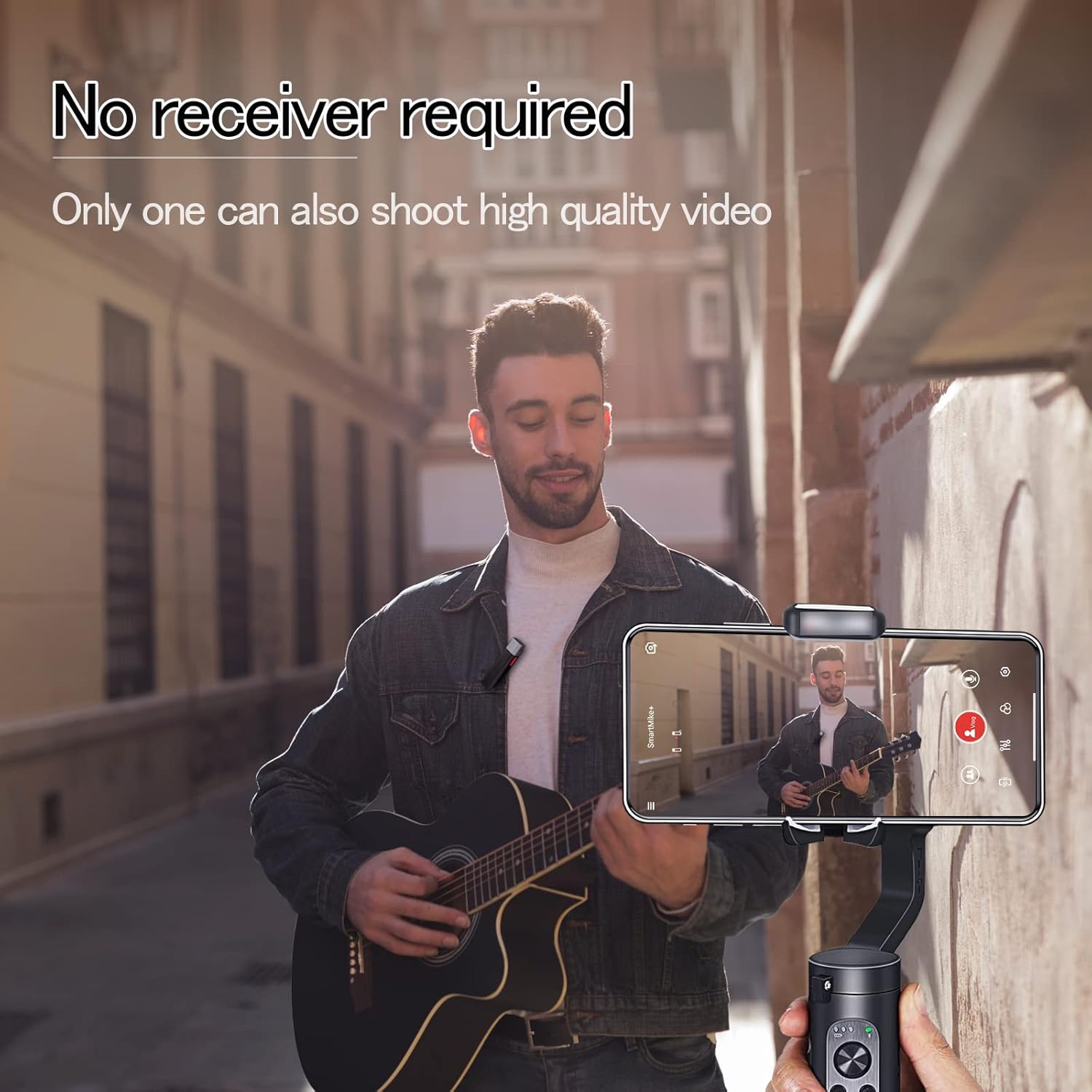
شڪل 3: The SmartMike+ S610 clipped to clothing, recording audio directly to a smartphone without a separate receiver.
5. آپريشن
5.1. Basic Audio Recording
- Once paired, open the SmartMike+ app.
- Select the desired recording mode (audio or video).
- Ensure the microphone is properly clipped to your collar or clothing, positioned for optimal sound capture.
- Press the record button within the app to begin recording.
- رڪارڊنگ کي روڪڻ لاءِ ٻيهر رڪارڊ بٽڻ کي دٻايو.
5.2. Using App Features
The SmartMike+ app provides several features to enhance your recording experience:
- شور جي گھٽتائي: Adjust the multi-level noise cancellation settings within the app to minimize background noise.
- Teleprompter: The app includes a teleprompter function where text can be auto-scrolled, and speed, color, and size are adjustable.
- Audio Filters: Apply various audio filters to customize your sound.
- نگراني: Use the 3.5mm jack to connect headphones for real-time audio monitoring during recording.
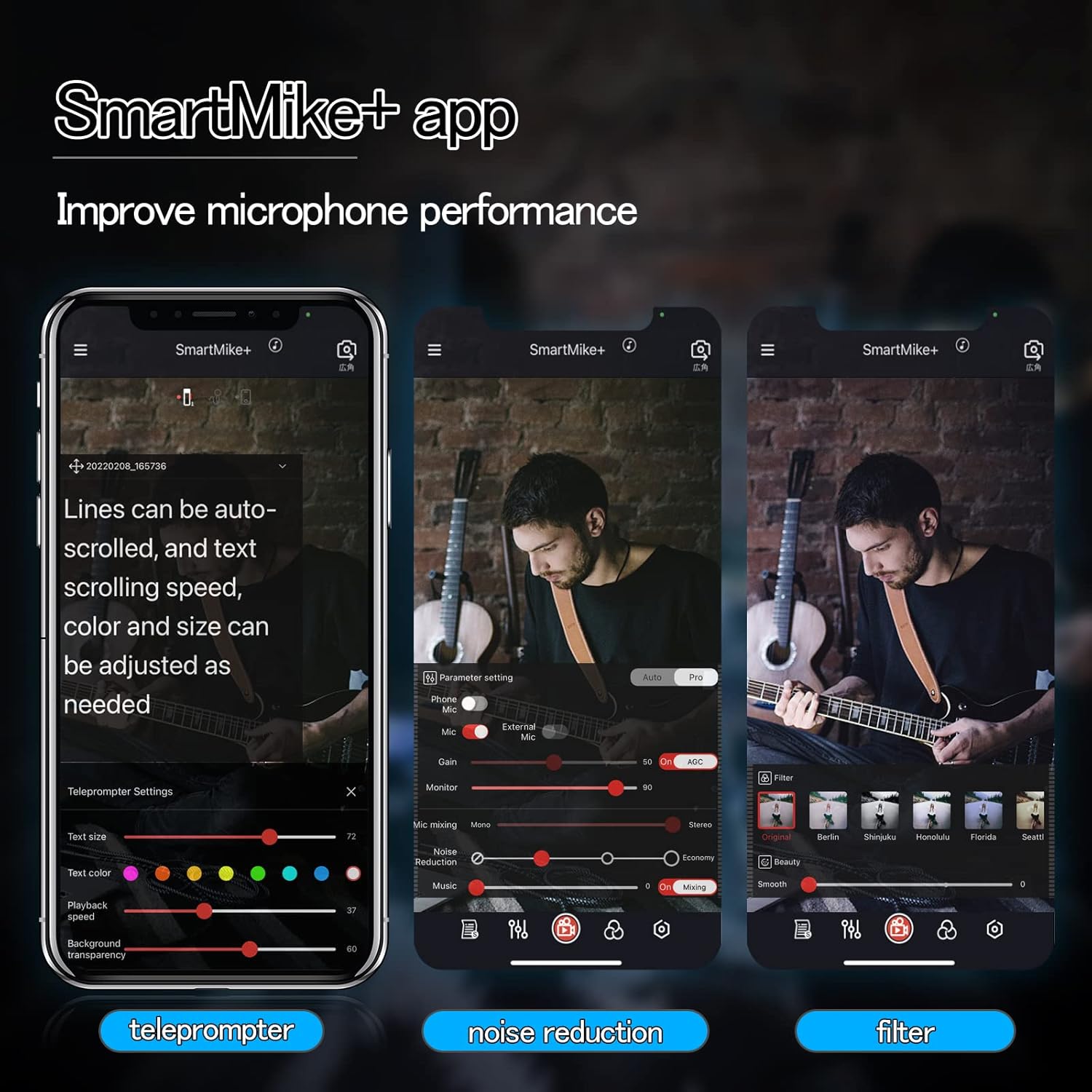
شڪل 4: SmartMike+ app interface displaying teleprompter, noise reduction, and audio filter settings.
5.3. Using with Other Devices
While primarily designed for smartphone use with the SmartMike+ app, some users have reported success in pairing two SmartMike+ units to enable broader compatibility with other recording devices such as DSLRs or GoPros that accept a microphone input. This advanced setup may require specific configurations not detailed in this manual.
6. سار سنڀال
- صفائي: Use a soft, dry cloth to clean the exterior of the microphone. Do not use liquid cleaners or solvents.
- اسٽوريج: مائڪروفون کي سڌي سج جي روشني ۽ انتهائي گرمي پد کان پري ٿڌي، سڪل جاءِ تي رکو.
- بيٽري جي سنڀال: بيٽري جي زندگي کي وڌائڻ لاءِ، ڊوائيس کي بار بار مڪمل طور تي چارج ڪرڻ کان پاسو ڪريو. ان کي باقاعدي طور تي چارج ڪريو، جيتوڻيڪ ڊگهي عرصي تائين استعمال ۾ نه هجي.
- نمي کان بچڻ: مائڪروفون کي پاڻي يا تيز نمي جي سامهون نه رکو.
7. مسئلا حل ڪرڻ
7.1. Microphone Not Pairing
- Ensure the microphone is charged and powered on.
- تصديق ڪريو ته توهان جي اسمارٽ فون تي بلوٽوت فعال آهي.
- Restart both the microphone and your smartphone.
- Try resetting the microphone (if a reset option is available, refer to manufacturer's webمخصوص هدايتن لاءِ سائيٽ).
7.2. خراب آڊيو معيار
- Check microphone placement; ensure it is not obstructed and is close enough to the sound source.
- Adjust noise reduction settings in the SmartMike+ app.
- پڪ ڪريو ته ويجهو ڪو به مضبوط برقي مقناطيسي مداخلت نه آهي.
- Confirm the microphone is fully charged. Low battery can affect performance.
7.3. SmartMike+ App Issues
- App Not Found/Working: Some users have reported issues with the SmartMike+ app availability or functionality on certain app stores (e.g., Apple App Store, Google Play Store) or with specific operating system versions. Verify the app's current status and compatibility with your device's operating system.
- ايپ جو ڪريش ٿيڻ/جمي ٿيڻ: Try restarting the app or reinstalling it. Ensure your smartphone's operating system is up to date.
- Microphone Not Recognized by App: Ensure the microphone is paired via Bluetooth before opening the app.
8. وضاحتون
| خاصيت | تفصيل |
|---|---|
| ماڊل نالو | S610 |
| برانڊ | سبين ٽيڪ |
| رابطي ٽيڪنالاجي | بلوٽوٿ 5.0 |
| مائڪروفون فارم فيڪٽر | لاوليئر |
| پولر نمونو | هر طرفي |
| آڊيو حساسيت | 110 ڊيسيبل |
| سگنل کان شور جي نسبت | 70 ڊي بي |
| شيءِ جو وزن | 0.52 آونس (تقريبن 14.7 گرام) |
| پيداوار جي ماپ (L x W x H) | 2.36 x 0.39 x 0.39 انچ |
| طاقت جو ذريعو | Battery Powered, Lithium Battery |
| بيٽري جو قسم | 1 ليتيم پوليمر بيٽري (شامل) |
| مطابقت رکندڙ ڊوائيسز | Smartphone, Camera, Tablet |
| مواد | ڌاتو |
| رنگ | اڇو |
| تجويز ڪيل استعمال | اسٽريمنگ ميڊيا |
9. وارنٽي ۽ سپورٽ
For warranty information and technical support, please refer to the official SabineTek webسائيٽ تي وڃو يا سڌو سنئون انهن جي ڪسٽمر سروس سان رابطو ڪريو. وارنٽي دعوائن لاءِ خريداري جي ثبوت طور پنهنجي خريداري جي رسيد رکو.
وڌيڪ مدد لاءِ، دورو ڪريو: SabineTek Official Store
Ask a question about this manual
Ask about setup, troubleshooting, compatibility, parts, safety, or missing instructions. Manuals+ will review the question and use this page’s manual context to help answer it.