
تعارف
Thank you for choosing the Braun Digital Alarm Clock, Model BC21B. This device combines a clear VA LCD display with a convenient 10W Qi wireless fast charging pad, automatic backlight adjustment, and an ascending beep alarm. Please read this manual carefully to ensure proper use and optimal performance.

Image: The Braun BC21B Digital Alarm Clock in black, featuring a large VA LCD display and an integrated wireless charging pad with a smartphone placed on it.
سيٽ اپ ڪريو
- پاور ڪنيڪشن: Connect the provided power supply to the alarm clock and plug it into a standard 230V AC outlet.
- بيڪ اپ بيٽري: Install the included backup battery (if not pre-installed) to maintain time settings during power outages.
- شروعاتي وقت جي سيٽنگ: The clock features a quick-set function. Refer to the 'Operating Instructions' section for detailed time and alarm setting procedures.
آپريٽنگ هدايتون
مقرر وقت ۽ تاريخ
Use the designated buttons (usually labeled 'Set' or with a gear icon) to enter time setting mode. Adjust hours, minutes, and date using the '+' and '-' buttons. Confirm each setting to proceed.
الارم کي ترتيب ڏيڻ
Press the 'Alarm Set' button to enter alarm setting mode. Adjust the desired alarm time using the '+' and '-' buttons. Activate or deactivate the alarm using the 'Alarm On/Off' switch, typically located on the top or side of the unit.

Image: The alarm clock display showing the current time and an active alarm. The green 'alarm on/off' button is clearly visible, along with icons for ascending beep alarm and snooze (5 minutes).
اسنوز فنڪشن
When the alarm sounds, press the 'Snooze' button (often a large button on top) to temporarily silence the alarm. The snooze interval is five minutes. The alarm will sound again after this period. To turn off the alarm completely, use the 'Alarm On/Off' switch.
وائرليس چارجنگ
The Braun BC21B features a 10W Qi wireless fast charging pad. This pad is Qi-certified to ensure safe and reliable charging for compatible mobile phones.
- لڳائڻ: Place your Qi-compatible smartphone directly onto the non-slip silicone charging pad. Ensure the phone is centered on the pad for optimal charging.
- چارجنگ اشارو: The clock display may show a charging icon or indicator when a device is successfully charging.
- مطابقت: Compatible with various Qi-enabled devices, including iPhone 11, 11 Pro/Pro Max, XS, XS X, XR, 8, 8+, and Samsung Galaxy S20, S20+, S20 Ultra, S10, S10+, S10e, S9, S9+, Note9.

Image: A close-up of a smartphone charging on the integrated 10W Qi wireless fast charging pad of the alarm clock, illustrating fast and convenient charging.

تصوير: هڪ تفصيلي view of the non-slip silicone charging pad, designed to keep your device securely in place during charging.

Image: The alarm clock with a phone charging, emphasizing its Qi certification for safe and reliable wireless power transfer.
ڊسپلي سيٽنگون
The clock features a VA LCD display with options for 12-hour or 24-hour time format. It also includes automatic display adjustment with four brightness levels that adapt to ambient light conditions.
- وقت جي شڪل: Toggle between 12-hour and 24-hour display modes using the dedicated button (refer to the quick-set guide for exact button location).
- خودڪار Backlight: The display automatically adjusts its brightness based on the surrounding light, ensuring readability without being overly bright in dark environments. There are four brightness levels.
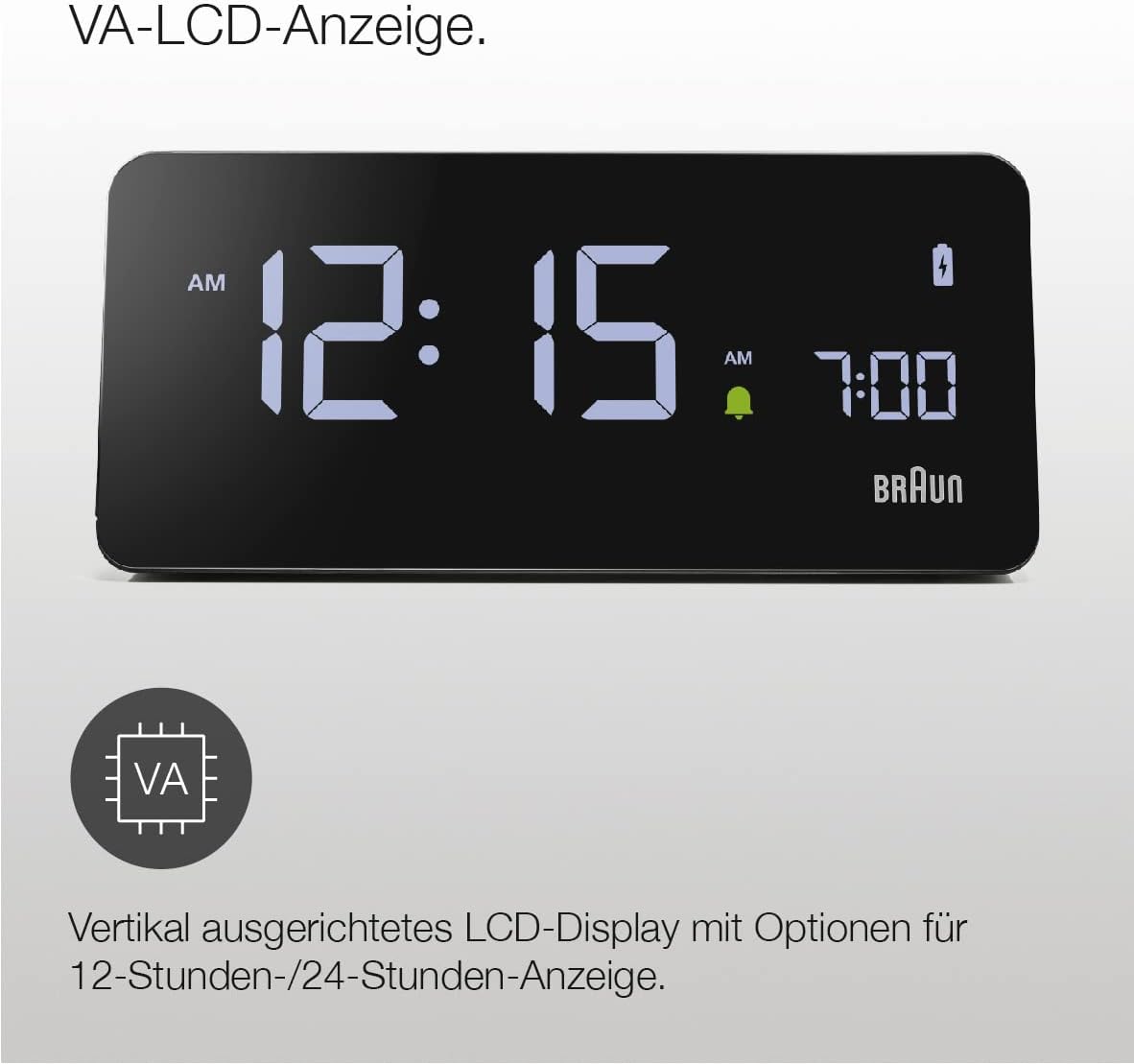
تصوير: هڪ صاف view of the VA LCD display, highlighting its vertical alignment and support for both 12-hour and 24-hour time formats.

Image: The display demonstrating its automatic brightness adjustment feature, which adapts through four levels based on ambient light for optimal visibility day and night.
سار سنڀال
To maintain your Braun Digital Alarm Clock, follow these simple guidelines:
- ڊوائيس کي نرم، سڪل ڪپڙي سان صاف ڪريو. رگڙيندڙ صاف ڪندڙ يا محلول استعمال نه ڪريو.
- Keep the device away from direct sunlight, extreme temperatures, and moisture.
- Ensure the charging pad is free of dust and debris for efficient wireless charging.
مشڪلاتون
| مسئلو | ممڪن سبب | حل |
|---|---|---|
| گھڙي چالو نه ٿي رهي آهي | Power adapter not connected securely or faulty outlet. | Check power connections. Try a different outlet. Ensure the USB-C cable is firmly inserted into the clock. |
| وائرليس چارج ڪم نه ڪري رهيو آهي | Phone not aligned correctly, phone case too thick, or phone not Qi-compatible. | Reposition phone on the center of the pad. Remove phone case. Verify phone supports Qi wireless charging. |
| ڊسپلي تمام گهڻو روشن/گهٽ آهي | Ambient light sensor obstructed or specific brightness level desired. | Ensure the light sensor is clear. The display adjusts automatically; manual adjustment options may be available via specific buttons (refer to quick-set guide). |
| الارم نه ٿو لڳي | الارم چالو نه ٿيو آهي يا غلط سيٽ ڪيو ويو آهي. | Check the 'Alarm On/Off' switch. Re-set the alarm time. |
وضاحتون
- برانڊ: برائون
- ماڊل نمبر: BC21BEU (BC21B)
- ڊسپلي جو قسم: VA LCD
- وائرليس چارجنگ معيار: Qi
- وائرليس چارجنگ آئوٽ: 10W
- انٽ واليمtage: 230V AC
- Output Current (USB): 2 Ampاڳ
- اوٽ وولٽtage (USB): 5V ڊي سي
- خاص خاصيتون: Automatic Backlight Adjustment, Ascending Beep Alarm, Snooze Function
- شامل اجزاء: 1 Power Supply, 1 Backup Battery
- طول و عرض: Refer to the image below for detailed measurements.
- وزن: 365 گرام

Image: Detailed dimensions of the Braun BC21B alarm clock, measured in centimeters.
وارنٽي ۽ سپورٽ
This Braun product comes with a standard manufacturer's warranty. For detailed warranty information, please refer to the warranty card included in the packaging or visit the official Braun website. For technical support or service inquiries, please contact Braun customer service.