
1. تعارف
This manual provides essential information for the safe and efficient operation of your Cecotec Ready Warm 800 Thermal Connected 600W Digital Heater. Please read these instructions carefully before using the appliance and retain them for future reference. This heater is designed to provide supplementary heating for indoor spaces and features Wi-Fi connectivity for remote control.
2. حفاظتي هدايتون
خبردار: انهن حفاظتي هدايتن تي عمل ڪرڻ ۾ ناڪامي باهه، بجلي جو جھٽڪو، يا زخمي ٿي سگهي ٿي.
- حجم کي يقيني بڻايو وڃيtagريٽنگ ليبل تي ظاهر ڪيل اي توهان جي مکيه جلد سان ملندو آهيtage اوزار ڳنڍڻ کان اڳ.
- هيٽر کي نه ڍڪيو. جيڪڏهن هيٽر ڍڪيل هجي يا بند هجي ته اوور هيٽنگ ٿي سگهي ٿي.
- Keep flammable materials such as furniture, curtains, and bedding at least 1 meter (3 feet) away from the heater.
- Do not operate the heater with a damaged cord or plug, or after the appliance malfunctions or has been dropped or damaged in any manner.
- هي اوزار استعمال ڪرڻ جو ارادو نه ڪيو ويو آهي ماڻهن (بشمول ٻارن سميت) گھٽ جسماني، حسي يا ذهني صلاحيتن سان، يا تجربو ۽ ڄاڻ جي کوٽ، جيستائين انهن جي حفاظت لاء ذميوار شخص طرفان اوزار جي استعمال بابت نگراني يا هدايت نه ڏني وئي آهي.
- ٻارن کي نگراني ڪرڻ گهرجي انهي کي يقيني بڻائڻ ته اهي اوزار سان راند نه ڪن.
- حمام، شاور يا سوئمنگ پول جي فوري ماحول ۾ هيٽر استعمال نه ڪريو.
- جڏهن استعمال ۾ نه هجي يا صفائي ڪرڻ کان اڳ هميشه هيٽر کي ان پلگ ڪريو.
- Do not insert any objects into the ventilation or exhaust openings as this may cause electric shock, fire, or damage to the heater.
3. پراڊڪٽ ختمview
Familiarize yourself with the components of your Cecotec Ready Warm 800 Digital Heater.

This image shows the Cecotec Ready Warm 800 Digital Heater from a side angle, highlighting its slim profile and the integrated control panel on the right side. The heater is white with black vents at the top and stands on two white feet.

The heater is shown in a home environment, positioned on a wooden floor next to a person seated on a black armchair, illustrating its compact size and how it fits into a living space.
ڪنٽرول پينل ۽ ڊسپلي
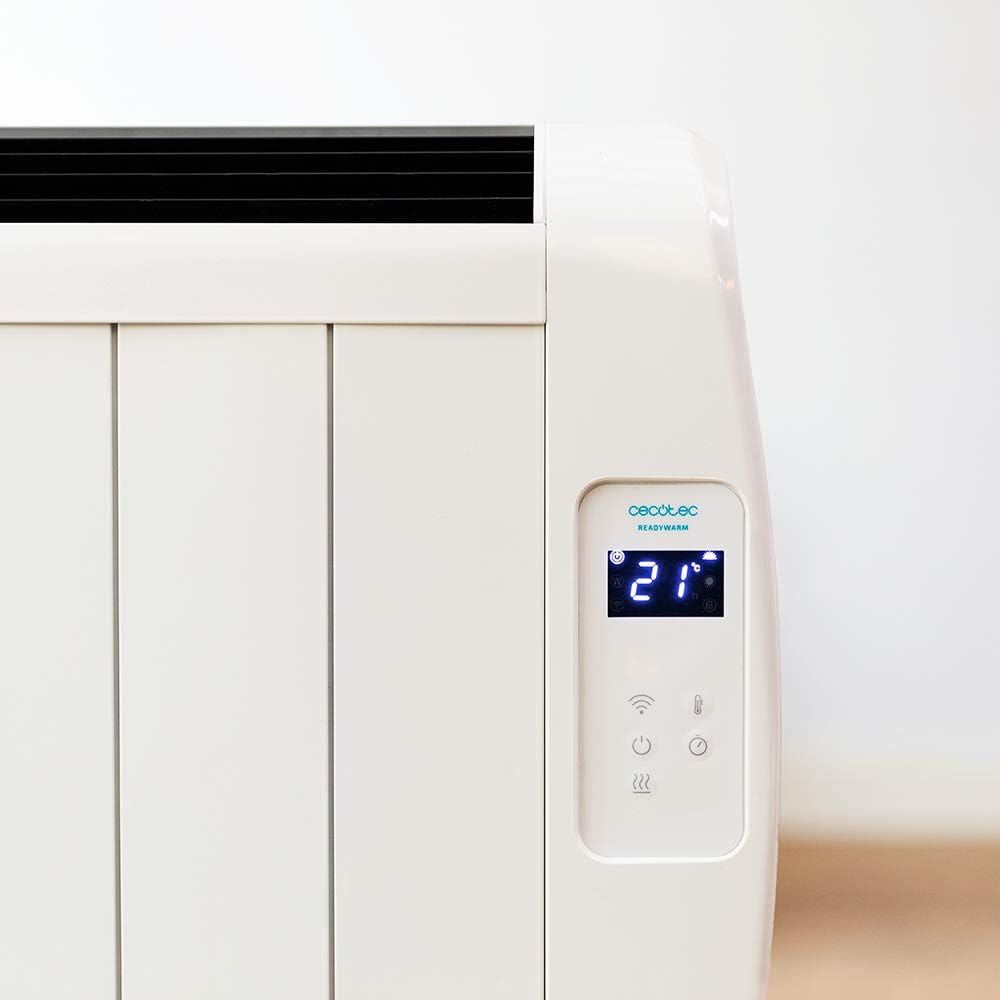
هڪ تفصيلي view of the heater's digital control panel, featuring a clear LCD screen showing '21' degrees Celsius, indicating the current temperature setting. Below the screen are touch-sensitive buttons for power, Wi-Fi, mode selection, and temperature adjustment.

This image focuses on the digital control panel, showing the LCD screen set to a timer function, displaying '04' hours. This indicates the heater is programmed to operate for a specific duration.
The digital display shows the current temperature, timer settings, and Wi-Fi status. The touch-sensitive buttons allow for easy control of the heater's functions.
پاور سوئچ

A close-up shot of the heater's base, revealing the physical on/off power switch. This switch provides a direct way to cut power to the unit.
A physical power switch is located at the base of the unit for complete power disconnection.
4. سيٽ اپ
- پيڪنگ کولڻ: هيٽر کي احتياط سان ان جي پيڪنگ مان هٽايو. اسٽوريج يا ٽرانسپورٽ لاءِ پيڪنگ کي رکو.
- لڳائڻ: Place the heater on a firm, level surface. Ensure there is at least 1 meter (3 feet) of clear space around the heater from walls, furniture, and other objects. Do not place it directly under a power outlet.
- پاور ڪنيڪشن: Plug the power cord into a suitable 230V AC power outlet. Ensure the main power switch at the base of the unit is in the 'OFF' position before plugging in.
- شروعاتي پاور آن: Flip the main power switch at the base of the unit to the 'ON' position. The digital display on the control panel should illuminate.
Dimensions for Placement

This image provides a clear diagram of the heater's physical dimensions: 63 cm in width, 10.5 cm in depth, and 53.5 cm in height, useful for planning placement.
5. آپريٽنگ هدايتون
بنيادي آپريشن
- پاور آن / آف: پاور بٽڻ دٻايو (U) هيٽر کي آن يا آف ڪرڻ لاءِ ڪنٽرول پينل تي.
- درجه حرارت جي ترتيب: Use the temperature up (+) ۽ ھي ((-) buttons to set your desired room temperature. The display will show the set temperature.
- موڊ جي چونڊ: Press the mode button to cycle through available heating modes (e.g., Low, Medium, High, or Eco, depending on the model's specific programming).
- ٽائمر فنڪشن: Press the timer button to set an operating duration. Use the temperature adjustment buttons to set the desired hours (e.g., 0-24 hours). The heater will automatically turn off after the set time.
وائي فائي ڪنيڪٽوٽي ۽ ايپ ڪنٽرول
The Cecotec Ready Warm 800 features Wi-Fi connectivity, allowing you to control the heater remotely via a smartphone application.

A hand holding a smartphone with the Cecotec Ready Warm mobile application open. The app interface shows a large dial indicating '33°C' and various control options, demonstrating remote control capabilities.
- ايپ ڊائون لوڊ ڪريو: ڳولھيو the 'Cecotec Ready Warm' app in your smartphone's app store (iOS or Android).
- رجسٽر/لاگ ان: هڪ اڪائونٽ ٺاهيو يا لاگ ان ڪريو جيڪڏهن توهان وٽ پهريان ئي آهي.
- ڊوائيس شامل ڪريو: Follow the in-app instructions to add your Ready Warm 800 heater. This typically involves putting the heater into pairing mode (often by pressing and holding the Wi-Fi button on the control panel) and connecting it to your home Wi-Fi network.
- ريموٽ ڪنٽرول: Once connected, you can control the heater's power, temperature, modes, and timer functions from your smartphone.
6. سار سنڀال
باقاعده سار سنڀال توهان جي هيٽر جي بهترين ڪارڪردگي ۽ ڊگهي عمر کي يقيني بڻائي ٿي.
- صفائي: صاف ڪرڻ کان اڳ هميشه هيٽر کي ان پلگ ڪريو ۽ ان کي مڪمل طور تي ٿڌو ٿيڻ ڏيو. نرم، ڊي استعمال ڪريوamp ٻاهرين سطحن کي صاف ڪرڻ لاءِ ڪپڙو. رگڙيندڙ صاف ڪندڙ يا محلول استعمال نه ڪريو.
- مٽي هٽائڻ: Periodically use a vacuum cleaner with a brush attachment to remove dust from the air intake and exhaust vents.
- اسٽوريج: جيڪڏهن هيٽر کي گهڻي عرصي تائين ذخيرو ڪري رهيا آهيو، ته ان کي ان پلگ ڪريو، ان کي چڱي طرح صاف ڪريو، ۽ ان کي ٿڌي، سڪل جاءِ تي ذخيرو ڪريو، ترجيحي طور تي ان جي اصل پيڪنگنگ ۾.
- ڪوبه استعمال ڪندڙ-خدمت وارو حصو: پاڻ هيٽر کولڻ يا مرمت ڪرڻ جي ڪوشش نه ڪريو. سڀني سروسنگ کي قابل اهلڪارن جي حوالي ڪريو.
7. مسئلا حل ڪرڻ
جيڪڏهن توهان کي پنهنجي هيٽر سان مسئلا درپيش اچن ٿا، ته عام مسئلن ۽ حلن لاءِ هيٺ ڏنل جدول جو حوالو ڏيو.
| مسئلو | ممڪن سبب | حل |
|---|---|---|
| هيٽر آن نٿو ٿئي. | No power supply. Main power switch off. | Check if the power cord is securely plugged in. Ensure the main power switch at the base is ON. Check the wall outlet. |
| ڪابه گرمي جي پيداوار نه آهي. | Temperature setting too low. Overheat protection activated. | Increase the desired temperature setting. Unplug the heater, let it cool for 30 minutes, then plug it back in. Ensure vents are not blocked. |
| وائي فائي ڪنيڪشن ناڪام ٿيو. | Incorrect Wi-Fi password. Heater too far from router. App issues. | Verify Wi-Fi password. Move heater closer to the router. Restart the app and heater. Ensure your router is 2.4GHz compatible. |
| هيٽر اوچتو بند ٿي ويندو آهي. | Timer function activated. Overheat protection. | Check if the timer is set. If not, unplug the heater, let it cool, and check for obstructions. |
8. وضاحتون
| خاصيت | تفصيل |
|---|---|
| برانڊ | Cecotec |
| ماڊل نمبر | 05372 |
| پاور / واٽtage | 600W |
| جلدtage | 230 وولٽ |
| پيداوار جي ماپ | 63 x 10.5 x 53.5 سينٽي |
| وزن | 3.4 ڪلو |
| خاص خاصيتون | Portable, Wireless (Wi-Fi Control), LCD Screen |
| گرمائش جو طريقو | چمڪندڙ |
| اندروني / ٻاهران استعمال | اندريون |
| چڙهڻ جو قسم | Wall Mount (optional, accessories not included) / Freestanding |
9. وارنٽي ۽ سپورٽ
Your Cecotec Ready Warm 800 Digital Heater is covered by a manufacturer's warranty. Please refer to the warranty card included with your purchase for specific terms and conditions, including the warranty period and coverage details.
For technical support, troubleshooting assistance beyond this manual, or warranty claims, please contact Cecotec customer service. Contact information can typically be found on the Cecotec official webسائيٽ تي يا توهان جي پراڊڪٽ پيڪنگنگ تي.
سپورٽ سان رابطو ڪرڻ وقت، مھرباني ڪري پنھنجو پراڊڪٽ ماڊل نمبر (05372) ۽ خريداري جو ثبوت آساني سان موجود رکو.