
فليڪس اسپاٽ اين 2
FLEXISPOT EN2 اليڪٽرڪ اوچائي ترتيب ڏيڻ واري اسٽينڊنگ ڊيسڪ هدايت نامو
ماڊل: EN2 | برانڊ: FLEXISPOT
تعارف
This manual provides comprehensive instructions for the assembly, operation, and maintenance of your FLEXISPOT EN2 Electric Height Adjustable Standing Desk. Please read this manual thoroughly before use to ensure proper function and longevity of your product.
The FLEXISPOT EN2 features a whole-piece bamboo desktop, a removable power outlet with USB ports, a 6-button digital controller with 4 memory presets, and a durable steel frame designed for a stable and productive workspace.
حفاظت جي ڄاڻ
- وڌ ۾ وڌ وزن جي گنجائش: 176 پائونڊ (80 ڪلوگرام). هن حد کان وڌيڪ نه ڪريو.
- Assembly requires an electric drill (not included). Exercise caution during assembly.
- ڊيسڪ هلائڻ کان اڳ پڪ ڪريو ته سڀئي ڪنيڪشن محفوظ آهن.
- آپريشن دوران ٻارن ۽ پالتو جانورن کي ڊيسڪ کان پري رکو.
- Avoid contact with water or abrasive materials during cleaning.
سيٽ اپ ۽ اسيمبلي
Your FLEXISPOT EN2 desk will arrive in two separate packages, which may be shipped separately. Assembly is required and is recommended for two people to facilitate handling of components. An electric drill is necessary for proper setup, but is not included.
اجزاء ختمview

شڪل 1: ختمview of FLEXISPOT EN2 desk components. This image displays the various parts included for assembly, such as the desktop, leg frames, and hardware.
ڪيبل انتظام
The desk includes a cable management device to help organize cords, contributing to a tidy workspace. Fasteners and Velcro straps are provided to secure cables neatly under the desktop.

Figure 2: Illustration of effective cable management. The "Before" section shows disorganized cables, while the "After" section demonstrates how the integrated cable management system tidies them.
اسيمبلي وڊيو
Video 1: Flexispot Standing Desk - Embrace a Healthier Lifestyle. This official video demonstrates the desk's features and includes brief segments on assembly and operation.
آپريٽنگ هدايتون
Multifunctional ڪنٽرولر
The desk is equipped with a 6-button digital controller for easy height adjustment and memory preset functions. The controller features an LED display showing the current height.

شڪل 3: تفصيلي view of the multifunctional controller. It shows the LED display, up/down arrows, and four programmable height setting buttons.
اونچائي جي ترتيب
- استعمال ڪريو مٿي (^) ۽ هيٺ (v) arrows to manually adjust the desk height.
- The motorized system adjusts smoothly from 28.1 inches (71.4 cm) to 45.7 inches (116.1 cm).
- The motor operates quietly at less than 50 dB.
ياداشت جي اڳڪٿي
The controller allows you to save up to 4 preferred height settings for quick transitions between sitting and standing positions.
- مٿي/هيٺ تيرن جي استعمال سان ڊيسڪ کي پنهنجي گهربل اوچائي تي ترتيب ڏيو.
- کي دٻايو "م" بٽڻ. LED ڊسپلي چمڪي ويندي.
- Press one of the numbered preset buttons (1، 2، 3، يا 4) while the display is flashing to save the current height to that preset.
- محفوظ ڪيل اوچائي کي ياد ڪرڻ لاءِ، صرف لاڳاپيل نمبر واري پري سيٽ بٽڻ کي دٻايو.
Removable Desktop Power Outlet
The desktop includes a removable power outlet with 3 AC outlets and 2 USB charging ports (5V/2A). This can be clipped to the back or side of your desk for convenient access.

Figure 4: The removable desktop power outlet, featuring 3 AC outlets (125V/12A) and 2 USB ports (5V/2A) for charging devices.
Anti-Collision System
The desk is equipped with a smart anti-collision system. If the desk encounters an obstruction during height adjustment, it will stop and reverse slightly to prevent damage.
سار سنڀال
- Dust regularly with a dry cloth to keep the desktop clean.
- Avoid contact with water or abrasive cleaning materials to prevent damage to the bamboo surface.
- وقتي طور تي سڀني پيچرن ۽ ڪنيڪشنن کي چيڪ ڪريو ته جيئن اهي تنگ ۽ محفوظ رهن.
مشڪلاتون
If you encounter any issues with your FLEXISPOT EN2 desk, please refer to the following general advice:
- ڊيسڪ نه هلي رهيو آهي: Check all power connections and ensure the power outlet is functioning. Verify that the control panel is properly connected.
- غير برابر حرڪت: Ensure the desk is placed on a level surface. Check that all leg components are securely fastened.
- ڊسپلي تي غلطي ڪوڊ: Consult the full troubleshooting guide available on the FLEXISPOT website or contact customer support for specific error code interpretations.
For further assistance, please contact FLEXISPOT customer support.
وضاحتون
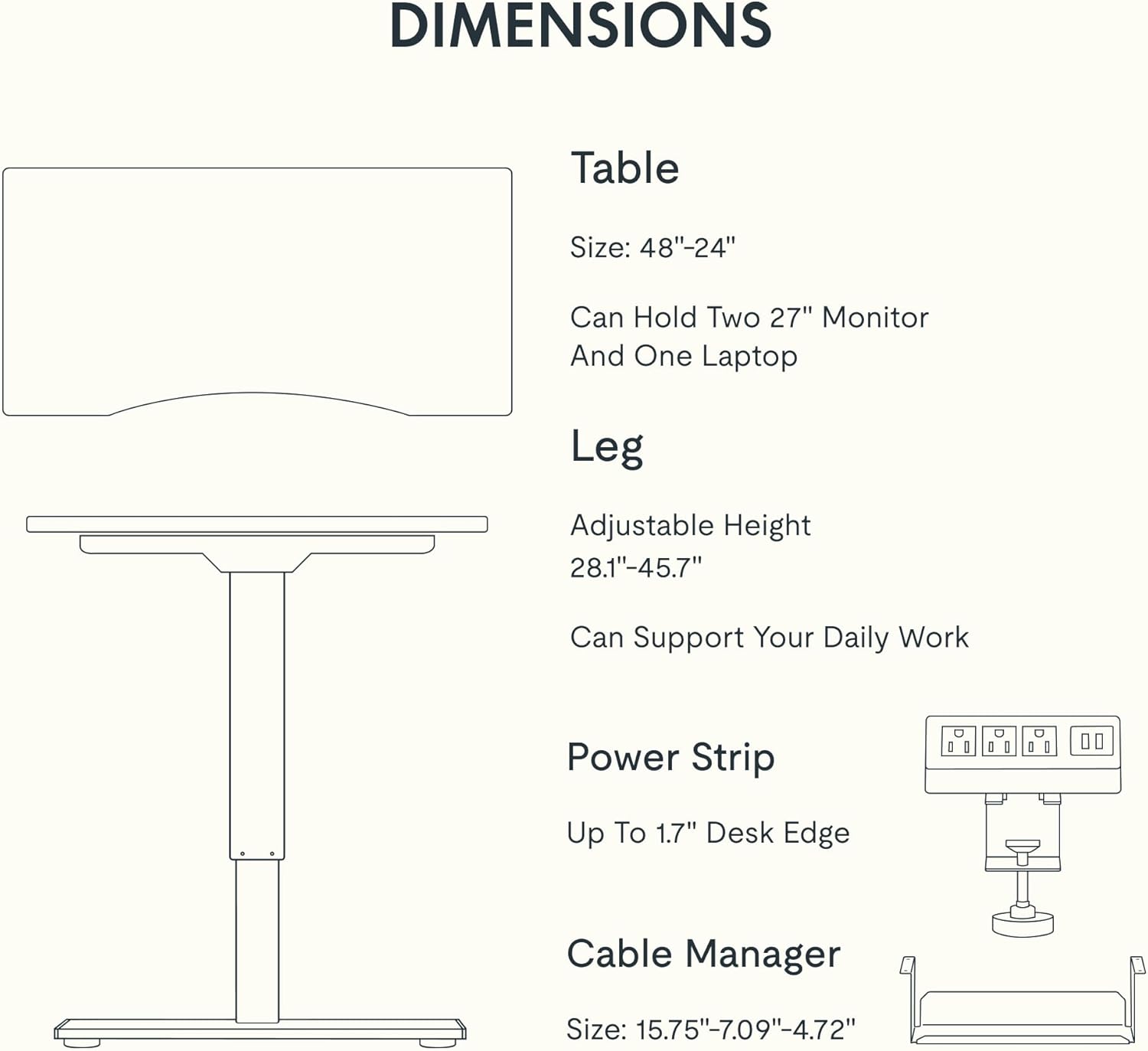
Figure 5: Dimensional specifications of the FLEXISPOT EN2 desk. This diagram illustrates the table size, adjustable height range, and dimensions of the power strip and cable manager.
| خاصيت | تفصيل |
|---|---|
| برانڊ | FLEXISPOT |
| ماڊل نمبر | EN2 |
| ڊيسڪ ٽاپ مواد | Whole-Piece Bamboo |
| فريم مواد | مصر جو اسٽيل |
| پيداوار جا طول و عرض (ڊي x ڊبليو x ايڇ) | 24"D x 48"W x 28"H (61cmD x 122cmW x 71cmH) |
| Adjustable اوچائي رينج | 28.1" - 45.7" (71.4 سينٽي ميٽر - 116.1 سينٽي ميٽر) |
| وڌ ۾ وڌ وزن جي گنجائش | 176 پائونڊ (80 ڪلوگرام) |
| موٽر شور جي سطح | 50 ڊي بي کان گھٽ |
| پاور ليٽليٽ | 3 AC آئوٽليٽس (125V/12A)، 2 USB چارجنگ پورٽ (5V/2A) |
| اسيمبلي گهربل | Yes (Recommended 2 people, electric drill not included) |
وارنٽي ۽ سپورٽ
FLEXISPOT provides the following warranty for your EN2 standing desk:
- 5 سال وارنٽي: فريم، موٽر، ۽ ٻين مشيني ڊوائيسز کي ڍڪي ٿو.
- 2 سال وارنٽي: ڪنٽرولرز، سوئچز، ۽ اليڪٽرانڪس کي ڍڪي ٿو.
For customer support, warranty claims, or additional product information, please visit the official FLEXISPOT webسائيٽ تي وڃو يا انهن جي ڪسٽمر سروس ڊپارٽمينٽ سان رابطو ڪريو. توهان پڻ دورو ڪري سگهو ٿا Amazon تي FLEXISPOT اسٽور.
Ask a question about this manual
Ask about setup, troubleshooting, compatibility, parts, safety, or missing instructions. Manuals+ will review the question and use this page’s manual context to help answer it.