
1. تعارف
This manual provides comprehensive instructions for the One For All URC4912 Sony TV Replacement Remote Control. Designed to function identically to your original Sony TV remote, the URC4912 offers immediate compatibility with all Sony TV models (LCD, LED, Plasma) without requiring any setup. It also includes a learning feature for personalized customization of functions.
2. سيٽ اپ
2.1 بيٽرين کي لڳائڻ
URC4912 ريموٽ ڪنٽرول کي ٻه AA بيٽريون گهربل آهن (شامل نه آهن). انهن کي انسٽال ڪرڻ لاءِ انهن قدمن تي عمل ڪريو:
- ريموٽ ڪنٽرول جي پٺيءَ تي بيٽري جي دٻي جي احاطي کي ڳولھيو.
- ڍڪ کي هيٺئين طرف سلائڊ ڪريو يا ان کي کولڻ لاءِ لچ کي دٻايو.
- ٻہ AA بيٽريون داخل ڪريو، پڪ ڪريو ته مثبت (+) ۽ منفي (-) ٽرمينل صحيح طرح سان ڪمري اندر نشانن سان ترتيب ڏين.
- بيٽري جي ڪمپارٽمينٽ جي ڍڪ کي واپس جاءِ تي سلائڊ ڪندي تبديل ڪريو جيستائين اهو محفوظ طور تي ڪلڪ نه ڪري.
Note: Always use new batteries and dispose of old batteries responsibly.
2.2 Initial Setup (No Configuration Required)
The One For All URC4912 remote control is pre-programmed for all Sony televisions. No setup or programming is required. Simply insert the batteries, and the remote is ready for immediate use with your Sony TV.
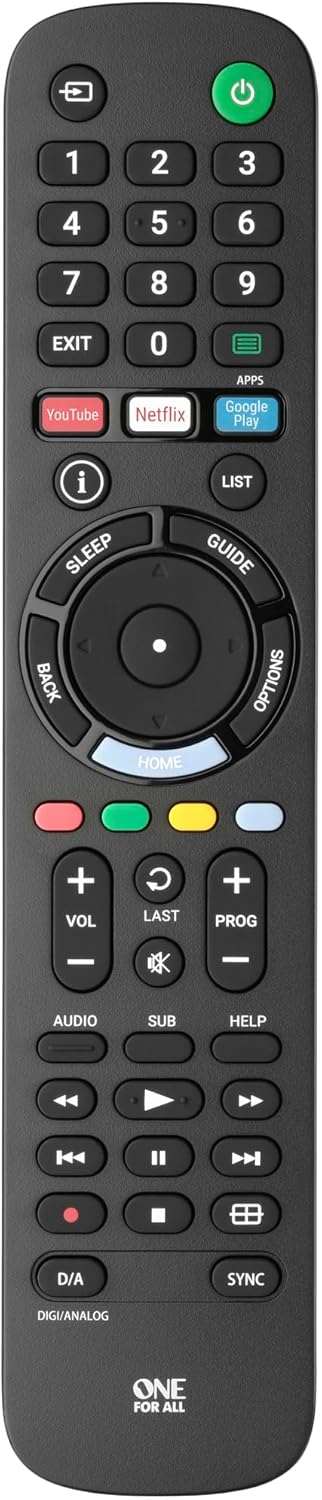
تصوير 1: سامهون view of the One For All URC4912 remote control. This image displays the remote's layout, including number buttons, navigation pad, volume and channel controls, and dedicated app buttons for services like YouTube and Netflix.
3. ريموٽ ڪنٽرول کي هلائڻ
3.1 بنيادي ڪم
The URC4912 remote provides all standard functions found on an original Sony TV remote:
- پاور بٽڻ: ٽي وي کي آن يا بند ڪري ٿو.
- نمبر بٽڻ (0-9): سڌي چينل جي چونڊ لاءِ.
- حجم مٿي/گهٽ (+/-): ٽي وي جي مقدار کي ترتيب ڏئي ٿو.
- Channel Up/Down (PROG +/-): ٽي وي چينلز بدلائي ٿو.
- گونگا بٽڻ: ٽي وي آڊيو کي خاموش ڪري ٿو.
- نيويگيشن پيڊ (مٿي، هيٺ، کاٻي، ساڄي، ٺيڪ): مينيو نيويگيشن ۽ چونڊ لاءِ.
- پوئتي بٽڻ: پوئين اسڪرين يا مينيو ڏانھن واپسي.
- هوم بٽڻ: ٽي وي جي مکيه هوم اسڪرين يا سمارٽ ٽي وي انٽرفيس تائين رسائي حاصل ڪري ٿو.
3.2 Specific Sony Functions
This remote supports common Sony-specific functions, including:
- ٿيٽر: Activates or deactivates Theatre mode.
- i-Manual: Accesses the TV's electronic instruction manual.
- اختيارن: موجوده اسڪرين لاءِ حوالي سان حساس آپشن ڏيکاري ٿو.
3.3 Learning Feature
The URC4912 remote includes a learning feature, allowing you to copy functions directly from your original remote control. This is useful for any specific functions not pre-programmed or for personalizing button assignments.
- Place the URC4912 remote and your original remote on a flat surface, facing each other, with their IR emitters approximately 1-2 inches apart.
- On the URC4912, press and hold the سيٽ اپ ڪريو button (if available, or refer to the full manual for specific button combination to enter learning mode) until the LED indicator blinks twice and then stays lit.
- Press the button on the URC4912 that you wish to program. The LED will blink rapidly.
- On your original remote, press and hold the corresponding function button until the URC4912's LED blinks twice to confirm successful learning.
- Repeat steps 3 and 4 for any other buttons you wish to program.
- سکيا واري موڊ مان نڪرڻ لاءِ، دٻايو سيٽ اپ ڪريو ٻيهر بٽڻ. ايل ايڇ بند ٿي ويندي.
Note: If the LED shows a long blink, the learning was unsuccessful. Try again, ensuring both remotes are stable and the original remote's batteries are fresh.

تصوير 2: زاويه view of the One For All URC4912 remote control, highlighting its ergonomic design and button placement for easy access to various functions.
4. سار سنڀال
توهان جي ريموٽ ڪنٽرول جي ڊگهي عمر ۽ بهترين ڪارڪردگي کي يقيني بڻائڻ لاءِ:
- صفائي: Wipe the remote with a soft, dry cloth. Do not use abrasive cleaners or liquids.
- بيٽري مٽائڻ: Replace batteries when the remote's response becomes sluggish or the LED indicator (if present) signals low power. Always replace both batteries simultaneously.
- اسٽوريج: ريموٽ کي سڪي جاءِ تي رکو، سڌي سج جي روشني ۽ انتهائي گرمي پد کان پري.
5. مسئلا حل ڪرڻ
| مسئلو | حل |
|---|---|
| ريموٽ جواب نٿو ڏئي. |
|
| ڪجھ بٽڻ ڪم نه ڪندا آھن. |
|
| Learning feature fails. |
|
6. وضاحتون
| برانڊ | سڀني لاءِ هڪ |
| ماڊل | يو آر سي 4912 |
| مطابقت رکندڙ ڊوائيسز | Television (All Sony TV types: LCD, LED, Plasma) |
| خاص خاصيتون | Infrared, Learning Function |
| شين جو تعداد | 1 |
| بيٽري جو قسم | 2 x AA بيٽريون (شامل نه آھن) |
| پيداوار جي ماپ | 19.5 x 4.4 x 2.5 سينٽي |
| شيءِ جو وزن | 100 جي |
7. وارنٽي ڄاڻ
For detailed warranty information regarding your One For All URC4912 remote control, please refer to the official One For All webسائيٽ يا توهان جي خريداري سان شامل وارنٽي ڪارڊ. وارنٽي جون شرطون ۽ ضابطا علائقي جي لحاظ کان مختلف ٿي سگهن ٿا.
8. سپورٽ
Should you require further assistance, technical support, or have questions not covered in this manual, please visit the official One For All support website or contact their customer service. You can often find FAQs, additional guides, and contact information on their brand page: