1. تعارف
Thank you for choosing the OSSURET Quad-Core Android 10 GPS Navigation System. This manual provides essential information for the proper installation, operation, and maintenance of your new car multimedia system. Please read this manual thoroughly before using the product to ensure optimal performance and safety. This unit is designed for Mitsubishi Lancer models manufactured between 2007 and 2017.
2. حفاظت جي ڄاڻ
- هميشه ڊوائيس کي ذميواري سان ۽ مقامي ٽرئفڪ قانونن جي مطابق هلايو. ڌيان نه ڇڪائيندڙ ڊرائيونگ حادثن جو سبب بڻجي سگهي ٿي.
- Do not attempt to install or repair the unit yourself if you are not qualified. Improper installation can cause damage to the vehicle's electrical system or the unit itself. Professional installation is recommended.
- Ensure all wiring connections are secure to prevent short circuits or electrical fires.
- صاف نظر کي برقرار رکڻ لاءِ اسڪرين کي صاف ۽ رڪاوٽن کان پاڪ رکو.
- يونٽ کي انتهائي گرمي پد، ڊگهي عرصي تائين سڌي سج جي روشني، يا گهڻي نمي جي سامهون رکڻ کان پاسو ڪريو.
3. پراڊڪٽ ختمview
3.1 اهم خاصيتون
- آپريٽنگ سسٽم: Android 10
- پروسيسر: Quad-Core ARM A7 4*1.2GHz
- ياداشت: 1GB ريم، 16GB فليش اسٽوريج
- ڏيکاريو: 10.1-inch Capacitive Touchscreen, 1024x600 Resolution
- نيويگيشن: Built-in GPS, supports offline maps, Google Maps, Waze, and other Android navigation apps.
- رابطي: Integrated WiFi, Bluetooth (Hands-free calling, A2DP music streaming), USB.
- ملٽي ميڊيا: Supports 1080P video decoding, various audio and video formats (MP4, AVI, MP3, WMA, JPEG, etc.).
- ترقي يافته افعال: Split Screen, Steering Wheel Control, Mirror Link (AirPlay for iOS, Easy-Connect for Android), Rearview Camera Input support, Android Market access.
3.2 Package Contents (Accessories)
The package includes the main head unit and various cables and adapters necessary for installation and functionality. Please verify all components are present upon unboxing.

تصوير: Various wiring harnesses, USB cables, and adapters included with the OSSURET car multimedia system.
4. سيٽ اپ ۽ تنصيب
4.1 گاڏين جي مطابقت
This unit is specifically designed for Mitsubishi Lancer models from 2007 to 2017. It is intended for left-hand drive vehicles. Always confirm the center console of your vehicle matches the product's design before installation.

تصوير: This image shows the dashboard of a Mitsubishi Lancer before and after the installation of the OSSURET Android head unit, demonstrating the integrated fit.
4.2 تنصيب جا مرحلا (پيشه ورانه تنصيب جي سفارش ڪئي وئي آهي)
- تياري: Disconnect the vehicle's battery to prevent electrical damage.
- اصل يونٽ هٽايو: Carefully remove the existing car stereo and trim panels.
- وائرنگ ڳنڍڻ: Connect the provided wiring harnesses to the vehicle's existing connectors. Ensure all connections are secure.
- جي پي ايس انٽنا: GPS اينٽينا کي صاف جڳهه تي نصب ڪريو view آسمان جو، عام طور تي ڊيش بورڊ تي يا ونڊ شيلڊ هيٺ.
- USB ڪيبل: Route the USB cables to an accessible location, such as the glove compartment.
- ٽيسٽ ڪارڪردگي: Before fully reassembling the dashboard, reconnect the battery and power on the unit to test basic functions (power, audio, touchscreen, GPS signal).
- محفوظ يونٽ: Mount the new head unit securely into the dashboard opening.
- ٻيهر گڏ ڪرڻ: Reinstall all trim panels and ensure a neat finish.
4.3 شروعاتي پاور آن ۽ سيٽ اپ
After installation, power on the unit. The system will boot into the Android 10 interface. Follow any on-screen prompts for initial setup, such as language selection and time zone. Connect to a Wi-Fi network to enable online features and app downloads.
5. آپريٽنگ هدايتون
5.1 بنيادي نيويگيشن
- ٽچ اسڪرين: The unit features a responsive touchscreen for all interactions. Tap to select, swipe to scroll, and pinch to zoom.
- گھر جي اسڪرين: The main interface provides access to frequently used applications and widgets.
- ايپ ڊراور: Swipe up from the bottom of the screen or tap the app icon to access all installed applications.
5.2 GPS نيويگيشن
The system comes with pre-loaded offline map data. It also supports online navigation applications like Google Maps and Waze when connected to the internet.
- Starting Navigation: Tap the 'Navigation' or 'Maps' icon on the home screen or app drawer.
- Entering Destination: Use the on-screen keyboard to enter your destination address or select from saved locations.
- آواز جي رهنمائي: The system provides voice-guided turn-by-turn directions.
- 2D/3D Map Views: Switch between 2D and 3D map views as preferred.
- ڊبل زون فنڪشن: Navigate while listening to music or other audio sources simultaneously.
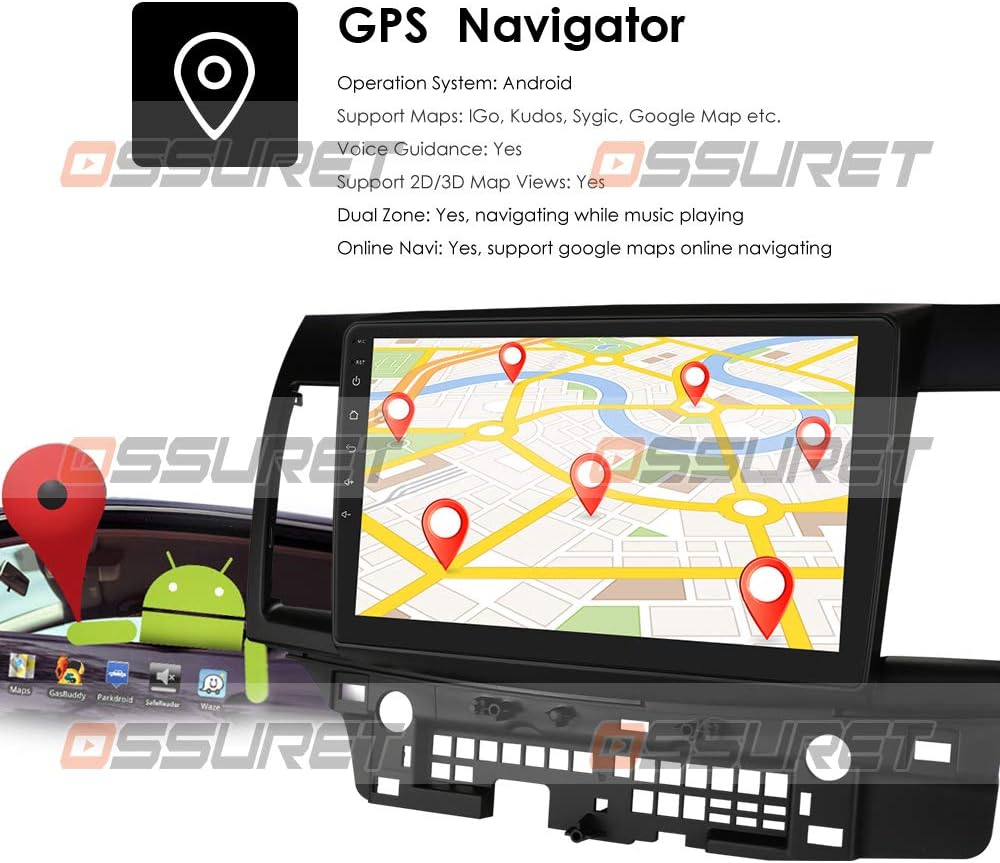
تصوير: A visual representation of the GPS navigation interface, showing a map with route markers and an Android robot icon, indicating Android OS functionality.
5.3 Radio (FM/DAB+)
- ايف ايم ريڊيو: Access the FM radio application to scan for stations, save presets, and adjust settings. The FM frequency range is 87.5-108MHz.
- DAB/DAB+ (Optional): If a DAB+ box is connected (sold separately), you can enjoy digital audio broadcasting with higher sound quality and more channels. Connect the DAB+ box via a USB port.

تصوير: This image illustrates the connection of an optional DAB+ box via USB and provides a table comparing the advantages of DAB+ over traditional FM radio, such as CD-like quality and robust signal reception.
5.4 بلوٽوٿ فنڪشن
هينڊز فري ڪالنگ ۽ آڊيو اسٽريمنگ لاءِ پنهنجي اسمارٽ فون کي بلوٽوٿ ذريعي ڳنڍيو.
- جوڙڻ: Go to Bluetooth settings on the unit and your phone, search for available devices, and pair with the OSSURET unit.
- هينڊ فري ڪالون: Make and receive calls directly from the unit's screen. The built-in microphone allows for clear communication.
- Bluetooth Music (A2DP): Stream audio from your phone to the car speakers. Control playback (play/pause, next/previous) from the unit.
- فون بڪ: Download your phone's contacts to the unit for easy access and searching.
- ڪال لاگ: View dialed, received, and missed calls.

تصوير: This image displays the Bluetooth interface for phone calls, showing a dial pad on the car stereo screen and a smartphone displaying a similar interface, highlighting hands-free calling capability.
5.5 ملٽي ميڊيا پلے بیک
The unit supports various media formats for music, video, and images.
- ميوزڪ پليئر Supports MP3, WMA, AAC, RM, FLAC, etc.
- وڊيو پليئر: Supports MPEG-1/2/4, H264, H263, VC1, RV, RMVB, DivX, VP8, AVS Stream, etc., with 1080P video decoding.
- تصوير Viewer: Supports JPS, BMP, PNG, GIF formats.
5.6 اسپلٽ اسڪرين فنڪشن
Perform two tasks simultaneously by running two applications side-by-side on the screen. For example, navigate with Google Maps while listening to music or browsing a web صفحو.
5.7 اسٽيئرنگ ويل ڪنٽرول
The unit supports your vehicle's original steering wheel controls, allowing you to manage music playback and volume without taking your hands off the wheel, enhancing driving safety.
5.8 آئيني لنڪ
Mirror your smartphone's screen onto the head unit's display.
- For Apple iPhones (AirPin PRO): Connect your iPhone via Wi-Fi. The unit can create a Wi-Fi hotspot. ڳولھيو this hotspot on your iPhone and connect. You can then mirror your iPhone's display, including the main menu, photos, videos, and online navigation maps.
- For Android Phones (Easy-Connect): Connect your Android phone using a USB charging cable. You can mirror the connected Android smartphone display, including the main menu, photos, videos, and online navigation maps.

تصوير: This image demonstrates the Mirror Link feature, showing an iPhone connected wirelessly via Wi-Fi (AirPlay) and an Android phone connected via USB (Easy-Connect), both mirroring their screens to the car stereo.
5.9 پوئتيview ڪئميرا ان پٽ
سسٽم پوئتي کي سپورٽ ڪري ٿوview camera input (camera sold separately). When the vehicle is in reverse, the display automatically switches to the camera feed, providing a clear view of the area behind the car and assisting with parking and avoiding obstacles.

تصوير: This image illustrates the rearview camera input feature, showing a car backing up with a visual overlay of parking guidelines on the screen, indicating support for a backup camera system.
5.10 Android Market and App Installation
Access the Android Market (Google Play Store) to download and install a wide variety of applications, games, and utilities. The unit supports Android Package (APK) installer for manual app installation.

تصوير: This image depicts the Android Market feature, showing various app icons floating around a tablet-like device, symbolizing access to a wide range of applications. It also highlights the 16GB ROM and support for APK installation.
6. سار سنڀال
- اسڪرين جي صفائي: ٽچ اسڪرين کي صاف ڪرڻ لاءِ نرم، لِنٽ فري ڪپڙو استعمال ڪريو. ضدي داغن لاءِ، هلڪو ڊيampڪپڙي کي پاڻي يا اسڪرين محفوظ ڪلينر سان ڌوئڻ ڏيو. سخت ڪيميڪلز کان پاسو ڪريو.
- سافٽ ويئر اپڊيٽ: Periodically check for system software updates to ensure optimal performance and access to new features. Updates can usually be found in the system settings menu.
- ڊيٽا بيڪ اپ: جيڪڏهن لاڳو هجي ته اهم ڊيٽا يا سيٽنگن جو باقاعدي بيڪ اپ وٺو.
7. مسئلا حل ڪرڻ
| مسئلو | ممڪن سبب | حل |
|---|---|---|
| يونٽ پاور نه آهي | بجلي جو ڪنيڪشن ڍلو، فيوز ڦاٽل، گاڏي جي بيٽري جو مسئلو. | بجلي جي ڪيبل ۽ فيوز چيڪ ڪريو. پڪ ڪريو ته گاڏي جي بيٽري چارج ٿيل آهي. ضرورت هجي ته ڪنهن ماهر سان صلاح ڪريو. |
| آواز ڪونهي | Volume too low, mute activated, speaker wiring issue. | Increase volume, check mute status. Verify speaker connections. |
| GPS سگنل گم ٿي ويو يا غلط | GPS antenna obstructed, poor satellite reception. | پڪ ڪريو ته GPS اينٽينا صاف آهي view آسمان جو. کليل علائقي ڏانهن وڃو. |
| بلوٽوٿ ڳنڍي نه ٿو | Bluetooth off on unit or phone, device not in pairing mode. | Ensure Bluetooth is enabled on both devices. Put phone in pairing mode. Restart both devices. |
| ٽچ اسڪرين غير جوابي | سسٽم منجمد، عارضي سافٽ ويئر جي خرابي. | Restart the unit. If issue persists, perform a factory reset (refer to system settings). |
8. وضاحتون
| خاصيت | تفصيل |
|---|---|
| آپريٽنگ سسٽم | Android 10 |
| سي پي يو | Quad-Core ARM A7 4*1.2GHz |
| رام | 1 جي بي |
| فليش ياداشت | 16 جي بي |
| اسڪرين جي ماپ | 10.1 انچ |
| قرارداد | 1024 x 600 |
| وڊيو ڊيڪوڊنگ | 1080P HD H.265 2160p, Multi-format FHD video decoding |
| FM فريکوئنسي رينج | 87.5-108MHz (EU/US) |
| وائي فائي | تعمير ٿيل |
| بلوٽوٿ | Hands-free calls, A2DP music, Phonebook download |
| جي پي ايس | Offline maps pre-loaded, supports Google Maps/Waze |
| رابطي | USB |
| آڊيو آئوٽ پٽ موڊ | اسٽيريو |
| انسٽاليشن جو قسم | ڊيش بورڊ ماؤنٽ يا ونڊشيلڊ ماؤنٽ |
| پيداوار جي ماپ | 17.78 x 10.16 x 3.05 سينٽي |
| ٺاهيندڙ ريفرنس | T1MTLC101001B |
9. وارنٽي ۽ سپورٽ
OSSURET provides a هڪ سال وارنٽي and technical support for this car stereo system. If you have any questions regarding installation or the product itself, please contact us via message. We aim to respond within 24 hours to assist you.